 AI CEO Lab
Viktor isn't a chatbot. ChatGPT is a smart assistant you have to ask for everything, every time, then copy the answer somewhere and do the next step yourself.
Viktor is an AI coworker that lives inside your Slack. It already knows your business, remembers what you told it last week, logs into your tools, writes real scripts, and gets the work done: the kind you'd otherwise hand to a team member or do yourself at 11pm.
Get $150 in free credits
The $150 in Viktor credits only applies when you sign up through my affiliate link. Signing up any other way doesn't include it.
ref.viktor.com/emeka-ajufo →What makes it different from every other AI tool I've used:
- It connects to your real tools. Viktor lists thousands of integrations. It reads your Slack and your CRM, Google Sheets, ClickUp, Calendly or whatever you run, so it acts with context instead of answering in a vacuum.
- It remembers. Your preferences, playbooks and SOPs live in Skill files, so it gets better at your business every time it works.
- It runs on its own schedule. Daily reports, weekly digests and monitoring run in the background with no prompt.
- It writes and runs code. Web apps, dashboards, PDFs, spreadsheets, scraped sites, API calls. Most AI tools stop at text.
- It lives where your team already is. No new platform to learn and nothing else to check. You message it like a teammate and the output comes back in Slack.
Slack is the control center, not a chat window
Once it's set up, you stop opening Slack to ask Viktor things. Briefings, client health alerts, DM grades, ad performance and content drops land in the right channel on their own. You're not chatting with an AI. You're reading reports from your team.
The catch
Viktor bills in credits your whole workspace shares, so vague asks and schedules nobody checks get expensive. It also only knows what you connect and what it reads in the channels it joins, so give it clear jobs and rules for what it must ask you first. How to keep the bill predictable.
Words you'll see on this page
| Term | What it means |
|---|---|
| Workspace | Your Slack or Microsoft Teams account. Everyone in it shares one Viktor credit pool. |
| Channel | A room in Slack or Teams. Give Viktor one per job or per client. |
| Integration | A tool Viktor can sign in to, like Google Ads, HubSpot or Notion. |
| Skill | Saved instructions for a job Viktor repeats, so it does it the same way next time. |
| Scheduled task | A job Viktor runs on a timer without being asked. |
| Credits | What Viktor bills in. They track the AI model costs of the work. |
Viktor AI at a Glance
| Question | Answer |
|---|---|
| What it is | An AI employee that joins your Slack or Microsoft Teams workspace and does the work in your connected tools: reports, research, client updates, automations. |
| Best for | Agencies and lean teams that already run their work in Slack or Teams, especially with one channel per client. |
| Price | From $50 a month for 20,000 credits the whole workspace shares. No per-seat fee. Free trial with $100 in credits, or $150 through my link. Full pricing breakdown. |
| Setup | About 30 minutes to install and brief it, then a week before scheduling anything. First-week walkthrough. |
| Security | Viktor says it is SOC 2 Type 1 certified with Type 2 in progress, encrypts data in transit and at rest, and asks before sensitive actions (Viktor). |
| Watch out for | Credit burn while you learn. Vague asks and unchecked schedules are what make bills run past the plan price. |
| My verdict | The closest thing to an actual team member of any agent I've run, as long as you give it clear jobs, one channel each, and rules for what it must ask first. |
Viktor Runs In Three Modes
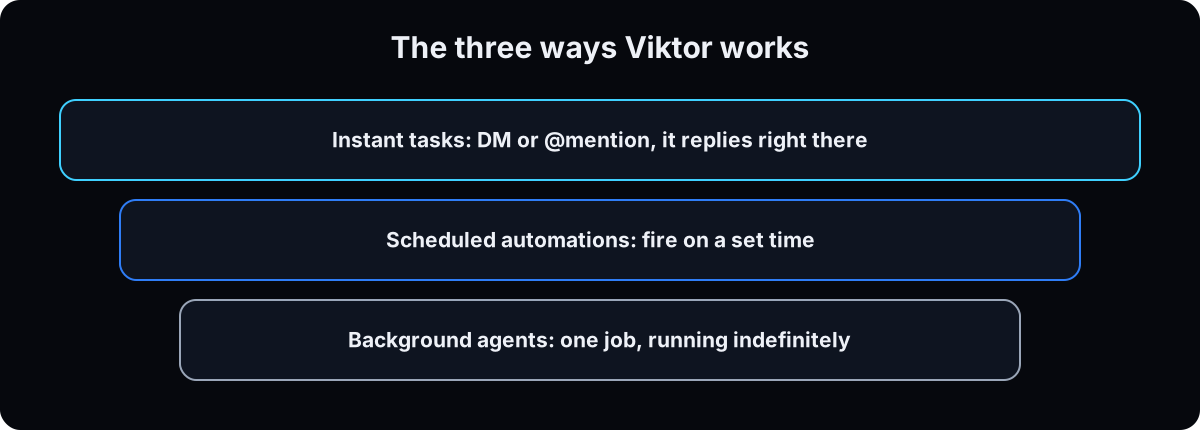
Viktor clicked for me once I understood these three modes. That's when I stopped thinking of it as a tool and started thinking of it as staff.
| Mode | How it works | When I use it |
|---|---|---|
| Instant Tasks | DM it or @mention it in any channel. Drop in a voice note, screenshot, doc link or CSV and it replies right there. | One-off asks and quick turnarounds I'd normally do myself |
| Scheduled Automations | Set it up once and it fires on its own: daily reports, weekly digests, monthly reminders, recurring pulls, posted to the channel and time you pick. | Anything I was doing by hand on repeat |
| Background Agents | A dedicated agent for one job, like a client-facing agent, a sales monitor or a billing tracker. It runs indefinitely and improves over time. | A job important enough to deserve its own "employee" |
You don't need to format anything before you send it. Voice notes, screenshots, PDFs, Word, Excel and PowerPoint files, Google Drive links, Loom and YouTube links, any URL, CSV exports and raw brain dumps all work.
Meet My Agent Roster
This is the part most people skip. I don't open Viktor and ask it things. I run six named agents on a schedule, each with its own role, Slack channel and job description, the same way I'd set up a real employee.
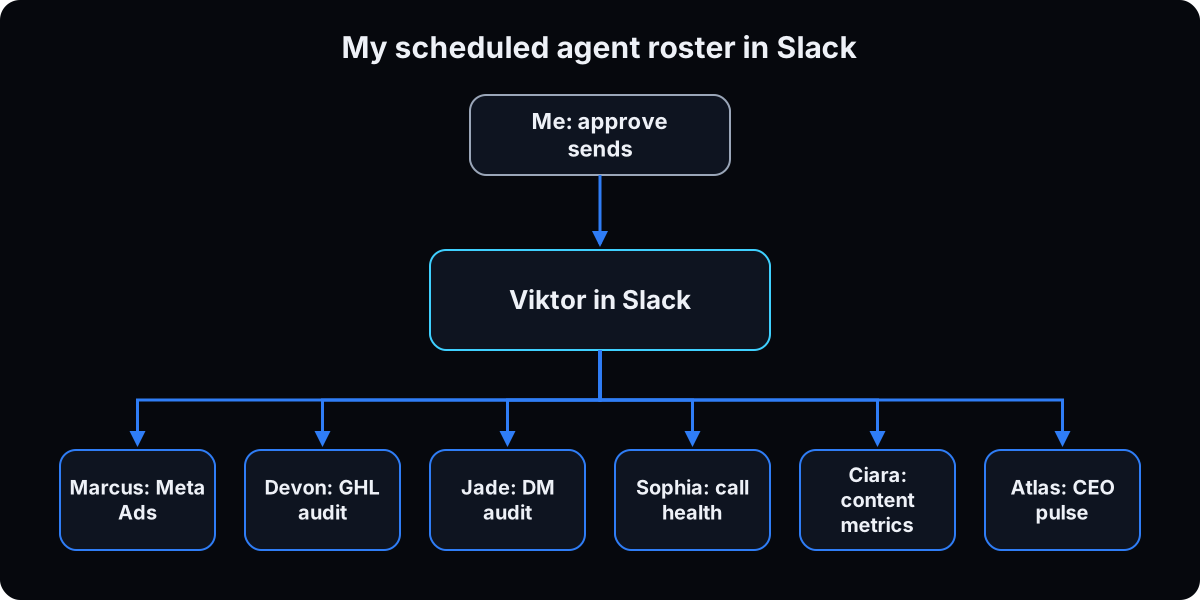
🟣 Marcus
Monday, 7AM. Meta Ads review: what to kill, what to scale, and what's fatiguing.
🟠 Devon
Tuesday. GHL workflow audit: finds broken automations before a client hits one.
🟡 Jade
Daily, 10AM. DM audit for the team: grades every lead and drafts the reply.
🟢 Sophia
Daily, 9AM. Scans every Fathom call for client health scores and at-risk flags.
🔵 Ciara
Wednesday. IG and YouTube metrics, plus 3 competitor content ideas.
⚪ Atlas
Friday. CEO pulse: MRR vs. target and pipeline health, sent straight to me.
Give Viktor a name, a role, a schedule and a channel, and it stops being a tool you check. It becomes a coworker who reports to you.
The one rule I never break
Every one of these agents drafts. None of them sends anything on my behalf until I've seen it. Viktor does the work, and I decide what goes out. That's not a limitation to work around. It's the right way to set this up. Viktor's own security page says money moves, code pushes and customer emails wait for your approval in Slack. For the full set of limits, see how to set up an agent that can't hurt you.
How It Remembers Your Business
Viktor stores what it learns in Skills (the same idea as Claude skills): structured memory files for your SOPs, preferences, team structure, client details and naming conventions. Here's what's in mine right now:
- My brand system. Colors, fonts and voice, so nothing it writes needs a redo.
- My client ICP (ideal client profile). 50+ reviews, LegitScript certified, high-ticket only. It filters against this without me repeating it.
- Where every integration lives. GHL location IDs and Notion IDs, so it gets the data instead of asking me. Keys stay in Viktor's own secure connections, never pasted into a Skill.
- Every preference I've stated. Once I correct something, it's stored. I don't correct the same thing twice.
The honest part
This only works if you feed it context up front. Skip that and it behaves like a generic assistant. Do it and it starts sounding like you.
What It's Good For
Here's what it handles, grouped by the kind of work it replaces.
Reporting on autopilot
Pulls from your CRM, calendar or spreadsheets every morning and posts a formatted report to Slack. Show rates, new-client leaderboards, cash collected. Nobody chases numbers.
Call recaps that write themselves
Every Fathom call gets pulled, action items go straight to GHL and Notion, and the recap is posted and pinned before you open your laptop. I don't write recaps by hand anymore.
Data deep-dives on demand
"Give me everyone who closed via Facebook this month, with names, amounts and cash collected." In my setup it comes back formatted in under 2 minutes.
Project management build-outs
Describe what you need in a voice note and it builds the workspace to your spec: boards, fields and pre-loaded tasks.
Billing and ops reminders
Reads your calendar or payment log every morning and posts reminders sorted into overdue, upcoming and offboarded.
Content in your voice
Copy rewrites, captions, ad scripts trained on your frameworks, video transcripts, email sequences and weekly SEO digests, without a blank page.
GHL workflows without the builder
I describe the workflow, with its triggers, steps and nurture sequences (the shape in how I build GoHighLevel workflows), and Viktor builds it in GHL. I don't click through the builder myself.
Client deliverables
Client maps and playbooks sent to Airtable, branded onboarding packets, full offer sequences with GHL build specs. For me, work that used to eat a day now takes one ask.
It also covers the smaller jobs: CRM cleanup and source-attribution fixes, SOPs written from brain dumps, morning briefings, competitor research, and performance reviews backed by real data. If you run client work, Viktor can build a dedicated agent per client for onboarding, call scoring, retention outreach, SEO digests or even a personalized landing page, running on its own schedule.
How I'd Get You Started
Sign up and install it in Slack
Sign up at my referral link, ref.viktor.com/emeka-ajufo, to get the $150 in credits, which only apply through that link (standard plans are on Viktor's pricing page). Once your account exists, it walks you through installing it in your Slack workspace (Slack explains how apps work in Slack).
Send it your business context
This first message is what separates "Viktor gets it" from another generic AI tool. Fill in the blanks and send it as your first DM:
Copy this as your first DM
Here's my business, so you have context going forward:

- What we do: ___
- My team: ___ (names + what each person owns)
- Tools we run on: ___ (CRM, calendar, project management, etc.)
- Our SOPs / how we do things: ___ (paste links, docs, or talk it out)
- Active clients / projects right now: ___
- The 3 things eating the most of my time: ___
Pick 3 things to hand off first
Take the last line of that message and don't overthink it. Good first picks:
- Daily or weekly reporting from your CRM or spreadsheet
- Content rewrites or copy tasks you do on repeat
- A digest or summary you're doing by hand
Connect your tools
The more you connect, the less you copy and paste. Google Sheets, ClickUp, Monday, your CRM, Calendly, Gmail, Airtable, Fathom, Vercel. If a tool isn't on the list, it can often work without an API (see how Viktor handles that) or code the integration itself.
Set up your first automation
Tell it: "Every Monday at 9am, I want you to [task] and post it to [channel]." It builds the schedule and runs without you touching it again.
What I'd Tell You Straight Up
- Running an agency? Set it up one client channel at a time. AI for marketing agencies. Weighing Claude instead? Viktor vs Claude.
- Keep the bill predictable. Credits are shared across the workspace, so clear briefs and checked schedules matter. How Viktor pricing works.
- Talk to it like a smart new hire. Don't over-engineer prompts. Send a voice note, a screenshot or a link and explain it the way you would to a person.
- Show it what good looks like. Want it to write something? Give it examples. Want a report? Give it the data source.
- Teach it your voice on purpose. Drop in your SOPs, existing copy and brand guidelines. It also reads your Slack history, so the longer you use it, the more it sounds like you.
- Build the automations early. The scheduled work is the real payoff. Every report you pull by hand is one it should be running.
- Correct the draft instead of starting over. Say "make this shorter" or "this doesn't sound like me." It fixes it and remembers next time.
- Stack agents by department. Run a sales agent, a content agent and an ops agent at the same time. Each one gets sharper at its own job. If you run Grok instead, the same pattern is in my Grok agents setup.
Viktor AI Questions
What is Viktor AI?
Viktor is an AI employee that lives in Slack and Microsoft Teams. You message it like a teammate, and it connects to your tools to pull reports, run research, draft client updates and run scheduled tasks.
Is Viktor AI worth it?
For a team that already works in Slack or Teams and has repeat work like reporting and client updates, yes, once each job has a clear brief. For one-off questions, a regular chat assistant is cheaper.
How much does Viktor cost?
Plans start at $50 a month for 20,000 credits shared by the whole workspace, with larger plans above that. There is a free trial with $100 in credits, or $150 through my link.
Is Viktor AI safe?
Viktor says it is SOC 2 Type 1 certified, encrypts data, doesn't train external models on customer data, and asks for approval before sensitive actions. Connect only the tools each job needs and write your own approval rules.
Does Viktor work in Microsoft Teams?
Yes. Viktor supports both Slack and Teams on every plan.
Is it Viktor or Victor AI?
The product is spelled Viktor, at viktor.com. Many people search for it as Victor AI.
Want this installed instead of explained?
This guide is the free version. If you'd rather have it built into your business, apply for the AI Leverage Audit. We map your whole business on one page and show you what to hand to AI first. Free for accepted applicants.
Apply for the AI Leverage Audit →Or start on your own with Viktor: ref.viktor.com/emeka-ajufo
Want more of this? Join the community: skool.com/aiceolab