 AI CEO Lab
Claude Skills: What They Are and How to Create Your First One
A Claude skill is a saved how-to that Claude opens when a job comes up. Learn how skills differ from Projects, connectors and MCP, then build one in claude.ai with no code and copy 3 business skills.
You explain your report format to Claude every Monday. You paste the same client details again. You fix the same tone problems in every draft.
A Claude skill fixes that. You teach Claude a job once, save it, and Claude opens those instructions by itself whenever the job comes up. This guide explains what skills are, how they differ from Projects, connectors and MCP, and walks you through building your first one in claude.ai with no code. You also get 3 business skills to copy and a safety check for skills you download.
I'm a doctor who runs an agency, not an engineer. I have 244 skills on my machine, and the power-user numbers near the end were measured on it.
New to skills? Start with the next section. Already made one that won't fire? Skip to step 6.
What you have by the end
Not concepts. Things that exist on your machine when you close the tab.
- A plain-English picture of what a skill is and when to use a Project, a connector or a skill instead
- Code execution and skills turned on in your Claude account
- A safety check you run before enabling any skill you didn't write
- Your first custom skill, built from a job you did by hand, saved and switched on
- A description that makes the skill fire without you naming it
- 3 business skills ready to adapt: a weekly ad report, a client update and content in your voice
- For Claude Code users: where skill files live, what they cost in context and how to find the ones that never fire
Start here: what Claude skills are
If you've only typed prompts into Claude, 4 ideas make the rest of this guide click.
What a skill is
Anthropic's help center defines skills as folders of instructions, scripts and resources that Claude loads when they're relevant to a task. In practice, most skills are one text file called SKILL.md. The top of the file holds a name and a short description. Below that are the steps for one job, written the way you'd brief a new hire.
Anthropic introduced Agent Skills on 16 October 2025. They work in claude.ai, the Claude desktop app, Cowork, Claude Code and the API. Anthropic ships ready-made skills for Excel, Word, PowerPoint and PDF files, and Claude uses those without you asking.
How a skill fires
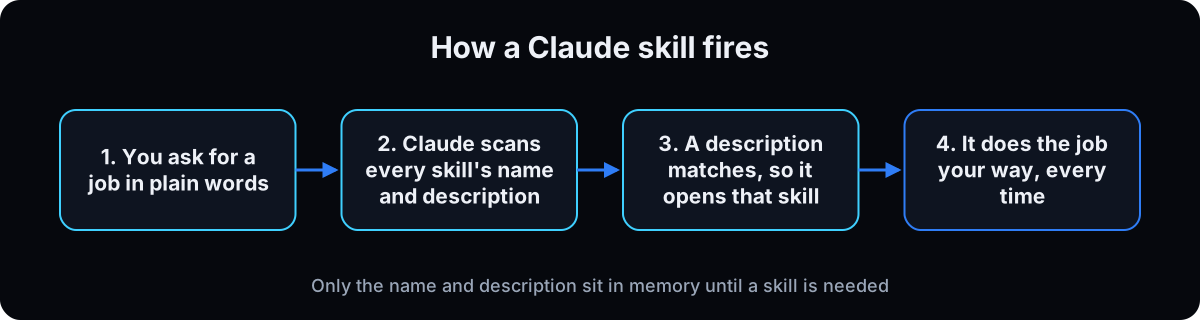 Claude doesn't read every skill in full. Per Anthropic's Agent Skills overview, only each skill's name and description are loaded up front, at about 100 tokens per skill. The full instructions load when your request matches the description. Extra files inside the skill load only when Claude opens them.
So the description decides everything. If it doesn't match the words you use, the skill never opens.
Skills vs Projects vs connectors vs MCP vs plugins
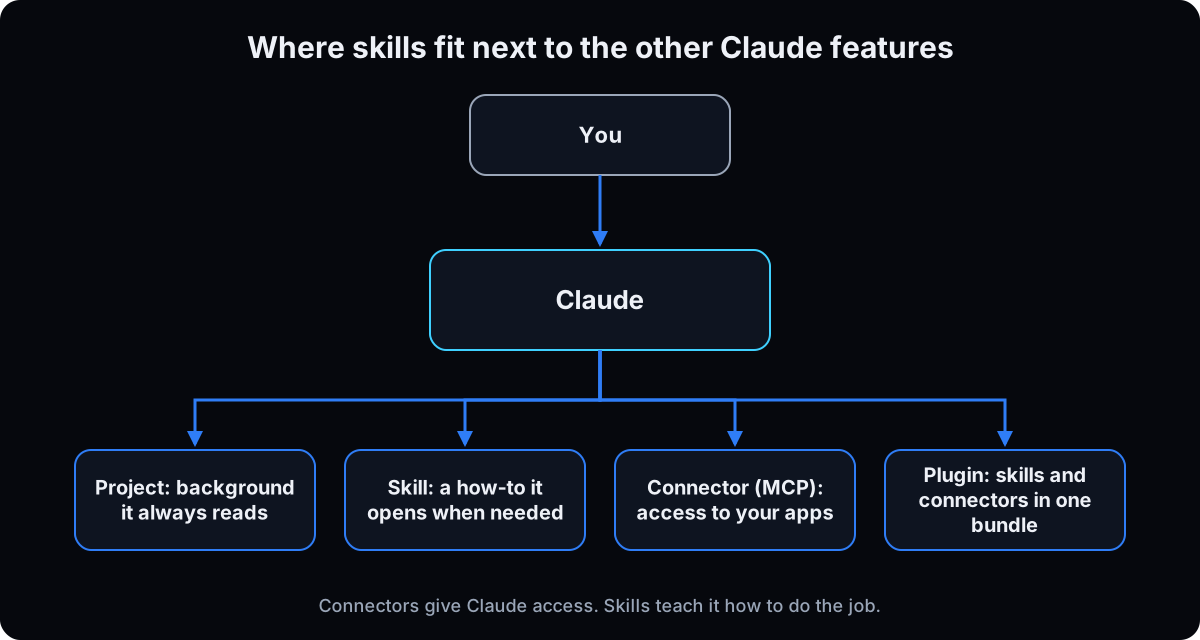 These get mixed up more than anything else about Claude. The short version: a Project is background Claude always reads inside that Project. A skill is a procedure it opens only when the job comes up, in any chat. A connector, built on MCP (Model Context Protocol), lets Claude reach an app like Gmail or your CRM. A plugin bundles skills, connectors and sub-agents into one install.
Anthropic puts the split between connectors and skills in one line: MCP connects Claude to services, while skills give it procedural knowledge about how to do the work. You'll often use both. The connector pulls your ad numbers. The skill says what to do with them.
If you use Claude Code, one more file matters: CLAUDE.md. It loads in every session, so it suits short facts about a project. A long procedure belongs in a skill, which costs almost nothing until it runs, per the Claude Code skills docs.
The catch
Three things trip up beginners.
The description is the trigger. A vague one like "helps with ads" never matches, so the skill sits unused. Step 6 fixes this.
Skills don't sync between apps. Anthropic's overview says custom skills do not sync across surfaces. A skill you upload to claude.ai isn't in the API, and a skill file in Claude Code on your laptop isn't in claude.ai or Cowork until you add it there too.
A skill can run code. That's what makes skills useful, and also why a skill from a stranger is a risk. Step 2 covers what to check.
| Feature | What it gives Claude | When it loads | Use it for |
|---|---|---|---|
| Skill | Steps for one job | Only when the job comes up | A report, email or process you repeat |
| Project | Background files and instructions | Every chat inside that Project | One client or one area of work |
| Connector (MCP) | Access to an app and its data | When Claude needs that app | Reading Gmail, Drive, your CRM or ad account |
| Plugin | Skills, connectors and sub-agents in one bundle | Once installed | A ready-made setup for a role |
| CLAUDE.md (Claude Code) | Standing facts and rules | Every session in that folder | Short project rules, not long procedures |
| Term | What it means |
|---|---|
| Skill | A saved set of instructions for one job that Claude opens when the job comes up |
| SKILL.md | The main text file inside a skill folder, holding its name, description and steps |
| Frontmatter | The settings block between two lines of three dashes at the top of SKILL.md |
| Description | The short text Claude matches your request against to decide whether to open a skill |
| Code execution | The Claude setting that lets it run code and create files, which skills need |
| Project | A workspace in Claude whose files and instructions load in every chat inside it |
| Connector | A link that lets Claude use an app, like Gmail or a CRM, with your permissions |
| MCP | Model Context Protocol, the open standard most connectors are built on |
| Plugin | A bundle of skills, connectors and sub-agents installed together |
| Cowork | Claude's desktop mode that works through longer tasks on your computer |
| Claude Code | Anthropic's coding agent, used in a terminal or the desktop app, where skills are plain folders |
| CLAUDE.md | A file Claude Code loads at the start of every session in a folder |
| Token | A small chunk of text; everything Claude reads counts against its memory in tokens |
| Context window | How much text Claude can hold in mind at once |
Isn't a skill a saved prompt?
I already keep my best prompts in a doc. Why would I bother turning them into skills?
A saved prompt waits for you to find it and paste it. A skill doesn't.
- Claude opens the skill by itself when your request matches the description, so you stop hunting for the doc.
- It's available in every chat, not only inside one Project.
- It can carry files with it: a template, a price list, a few good examples.
- When the output is wrong, you fix the file once and every future run gets the fix.
Keep the prompt doc for one-off jobs. Anything you paste more than twice a month is a skill.
Build your first Claude skill, step by step
1. Check your plan and turn on code execution
Skills are on the Free, Pro, Max, Team and Enterprise plans, and they need code execution switched on, per Anthropic's Using skills in Claude article (checked 15 September 2026).
On Free, Pro or Max: open Settings, then Capabilities, and turn on Code execution and file creation. Then open Customize in the left sidebar and choose Skills.
On Team or Enterprise: an owner turns on code execution and skills in Organization settings first. Then each member uses Customize, then Skills.
Menu names move between app versions. Some older Anthropic tutorials still say Settings, then Capabilities, then Skills. If a label doesn't match, search the help center for "using skills".
Why: skills run inside Claude's code environment. With code execution off, there's nothing for a skill to run in.
2. Set your safety rule before you add any skill
Anthropic's security guidance says to use skills only from trusted sources: ones you wrote or got from Anthropic. A malicious skill can direct Claude to use tools or run code in ways that don't match what it claims to do, and could leak data. Anthropic says to treat it like installing software.
Write your rule down now: I only enable skills I wrote, Anthropic's, or ones I've read line by line. For anything from GitHub, a marketplace or a friend, run the check below first. It's free, and Claude does the reading. Keep in mind that a skill with access to your connectors can reach what you can reach. Set agent guardrails before any skill touches client data.
Why: the setup mistakes you can undo. A skill that quietly sends your client list somewhere, you can't.
I downloaded this skill and haven't enabled it. Read every file in it, including scripts.
Tell me in plain English:
1. What it says it does, and what its steps tell you to do.
2. Any web address it contacts, any file it reads or writes outside its own folder, and any command it runs.
3. Anything that doesn't match its stated purpose.
4. A verdict: safe to enable, enable after I remove lines X to Y, or don't enable.
Don't run anything while you check.
3. Watch a built-in skill work first
Before building your own, see what a skill feels like. Anthropic's ready-made skills handle Excel, Word, PowerPoint and PDF files, and Claude uses them automatically when relevant. Paste the prompt below with your own numbers.
Why: you'll notice you didn't name any skill. Claude spotted a spreadsheet job and opened the right instructions. Your own skills should work the same way.
Make me a spreadsheet of these [4] weeks of leads by source, with a total row and a simple chart:
[paste your numbers here]
4. Do one job by hand in a normal chat
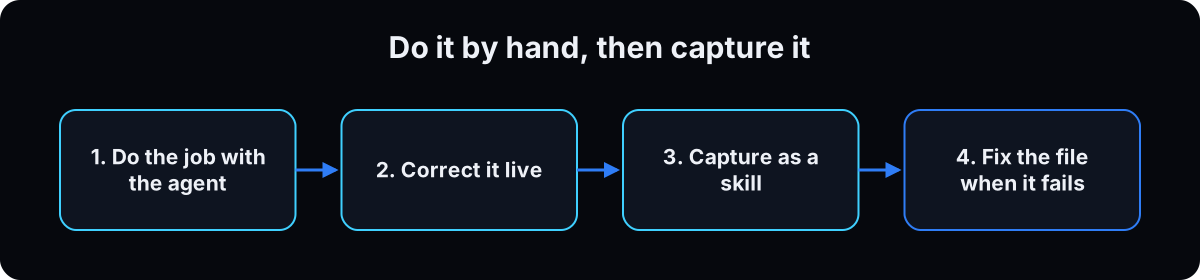 Pick a job you repeat weekly and do it with Claude in a regular chat. Use the template below. Correct it until the output is what you'd send. Every correction is a rule the skill needs.
The most common mistake is writing the skill first. You end up guessing at rules you've never said out loud. Do one clean run, then save it. If your prompts need work, better AI prompts covers the basics.
Why: Claude already knows general skills like writing and math. What it can't know is your format, your numbers and your taste, and those only come out when you correct a real draft.
Job: [one sentence: what gets made, like "the weekly client update email"]
Input: [what I'll give you each time: notes, a spreadsheet, a transcript]
Format: [sections, length, where the numbers go]
Rules: [what to never do, words to avoid, what needs my approval]
Good example: [paste one past version you liked]

Do the job with this week's input: [paste it]. Then ask me what you got wrong.
5. Save the job as a skill by asking Claude
In the same chat, once the output is right, paste the prompt below. Claude uses Anthropic's skill-creator skill to write the SKILL.md file, organize any files you shared and package it, per the help center's create a skill through conversation guide. If Claude says it can't create skills, check that skill-creator is switched on under Customize, then Skills.
Save the skill Claude makes, then find it under Customize, then Skills, and turn it on. To change it later, use the Edit with Claude option described in How to create custom skills.
On a Mac with Cowork? On Pro, Max and Team, Customize, then Skills, also offers Record your screen. You do the task for about 10 minutes and Claude builds the skill from what it saw, per the same article.
Why: saving from the chat where you did the job keeps every correction you made. Starting a skill from a blank page loses them.
That output is right. Turn what we did in this chat into a skill.
- Name: lowercase words joined by hyphens, like weekly-client-update.
- Description: under 200 characters. Say what it does, then when to use it, using the words I typed in this chat.
- Steps: numbered, including every correction I gave you.
- Put the good example and any template in separate files inside the skill, and say when to open them.
- Where I made a judgment call without explaining it, ask me instead of guessing.
6. Write the description as a trigger
The description is the only part Claude sees before deciding to open a skill. Anthropic's skill authoring best practices give 3 rules. Write it in third person. Say what the skill does, then when to use it. Use the words you'd type.
Anthropic's own skill-creator skill adds a fourth: Claude tends to undertrigger skills, so make the description a little pushy.
Watch the length. Uploading to claude.ai caps the description at 200 characters and the name at 64, per How to create custom skills (checked 15 September 2026). Claude Code allows much more, as step 10 shows. So if you want a skill everywhere, write it to 200.
Names: Anthropic's field rules allow lowercase letters, numbers and hyphens, and reserve the words claude and anthropic. Skip names like helper or tools.
Why: a skill with a good body and a weak description is a skill that never runs.
# Won't fire: vague, no situations
description: Helps with client stuff

# Fires: what it does, then when, in words you type (161 characters)
description: Writes the weekly client update email from rough notes: wins, numbers,
  next steps and what is needed from the client. Use when the user asks for a client update.
7. Copy one of these 3 business skills
Here are 3 skills built for the jobs owners repeat most. Each description fits the 200-character claude.ai limit. Fill in the brackets with your own numbers and rules, since I can't know your targets.
Weekly ad report. It reads numbers you paste or a connector pulls, and it never invents a missing number. The judgment calls behind keep, fix or pause are the ones in a Meta ads audit.
Client update. It turns your rough notes into the same clear email every week.
Content in your voice. It works from real examples of your writing, which beats describing your tone in adjectives.
To use one in claude.ai, paste it into a chat and say "make this into a skill I can save", then turn it on. In Claude Code, save each as SKILL.md in its own folder, as step 10 shows.
Why: starting from a working structure is faster than a blank page. Still run each once by hand before you trust it.
---
name: weekly-ad-report
description: Turns last week's Meta ads numbers into a one-page report with a keep, fix or pause call per campaign. Use when the user asks for the weekly ad report or pastes ad numbers.
---
1. Use only the numbers provided or pulled from the ad account. If one is missing, write "missing" and never estimate it.
2. For each campaign: spend, leads, cost per lead, and the change from the week before.
3. Keep if cost per lead is under [your target]. Fix if it's over target for 1 week. Pause if over target for [2] weeks with under [X] leads.
4. Never change the ad account. Recommendations only.
5. Output: one line on top saying whether I need to act, then a table, then 3 suggested next steps.

---
name: weekly-client-update
description: Writes the weekly client update email from rough notes: wins, numbers, next steps and what is needed from the client. Use when the user asks for a client update.
---
1. Sections in this order: Wins, Numbers, What we're doing next, What we need from you.
2. Under 200 words. Plain language, no jargon.
3. Only numbers from my notes. Flag anything that looks wrong instead of fixing it.
4. Match the tone of example-update.md in this skill folder.
5. End with one clear question for the client. Draft only; I send it.

---
name: content-in-my-voice
description: Writes posts, captions and emails in the owner's voice using saved examples and a banned-word list. Use when the user asks for a post, caption, hook or newsletter.
---
1. Before writing, read voice-examples.md in this skill folder. Copy the sentence length and openings, not the topics.
2. Never use these words: [your banned list].
3. Short sentences. One idea per paragraph. No dashes.
4. Never invent a story, result or number about me or a client. Ask for one.
5. Give 2 versions and say which one you'd post.
8. Test it cold, then fix the file
Open a new chat. Describe the situation without naming the skill, like "here are last week's ad numbers, what should I do?" If the right skill opens, the description works.
If it doesn't open, name the skill in your request. If it works when named, the file is fine and the description is the problem, so go back to step 6. If it still gets the job wrong, the steps are the problem.
When the output is wrong later: ask Claude why, fix it, then say "update the skill with that fix". Correct the file, not the chat.
Why: you'll use skills in fresh chats, so test them there. A correction you only give in chat is gone next week.
9. Pick your next skills, one a week
List the 5 jobs you paste instructions for most often. Turn one into a skill each week, in order of time saved. Anthropic's tutorials suggest starting points like a weekly team update, sales call prep and customer feedback analysis.
Then turn off skills you stopped using under Customize, then Skills. On Team and Enterprise plans you can share a skill with people or your whole organization, and recipients can use it but not edit it.
A skill that runs on a schedule and reports somewhere you already read starts to look like a business operating system. Get the single skill reliable first.
Why: 5 skills that fire every week are worth more than 50 that never do.
10. Power users: skills in Claude Code (terminal)
This step and the next two are for Claude Code users. If you only use claude.ai or Cowork, skip to the troubleshooting table.
In Claude Code a skill is a folder on your computer, not an upload. Per the Claude Code skills docs (checked 15 September 2026), a personal skill lives at ~/.claude/skills/<name>/SKILL.md and works in all your projects. A project skill at .claude/skills/<name>/SKILL.md inside a repo reaches everyone who uses that repo. You can run any skill by typing / and its folder name.
You make a skill by creating the folder and writing the file by hand, as the docs show. The description plus the optional when_to_use field can run to 1,536 characters combined before Claude Code cuts it off. Keep the body under 500 lines and move detail into files you link to.
The surface trap: skills in ~/.claude/skills/ don't load in Cowork, cloud sessions or routines. Those load the skills enabled on your claude.ai account instead.
My own folder shows what goes wrong when nobody checks. My median description is 526 characters, fine for Claude Code and far over the 200-character upload limit. My median SKILL.md is 299 lines, and 69 of my 244 skills run over 500. 54 carry a triggers: field that isn't in the supported field list, so it does nothing. Running claude plugin validate on the folder found one skill with no frontmatter at all.
Why: Claude Code gives you more room and more control, and more ways to break a skill without noticing.
# 1. make the folder
mkdir -p ~/.claude/skills/weekly-client-update

# 2. write SKILL.md inside it (name, description, steps)

# 3. check the whole folder for broken frontmatter
claude plugin validate ~/.claude/skills

# 4. test it
/weekly-client-update
11. Power users: what 244 skills cost in context
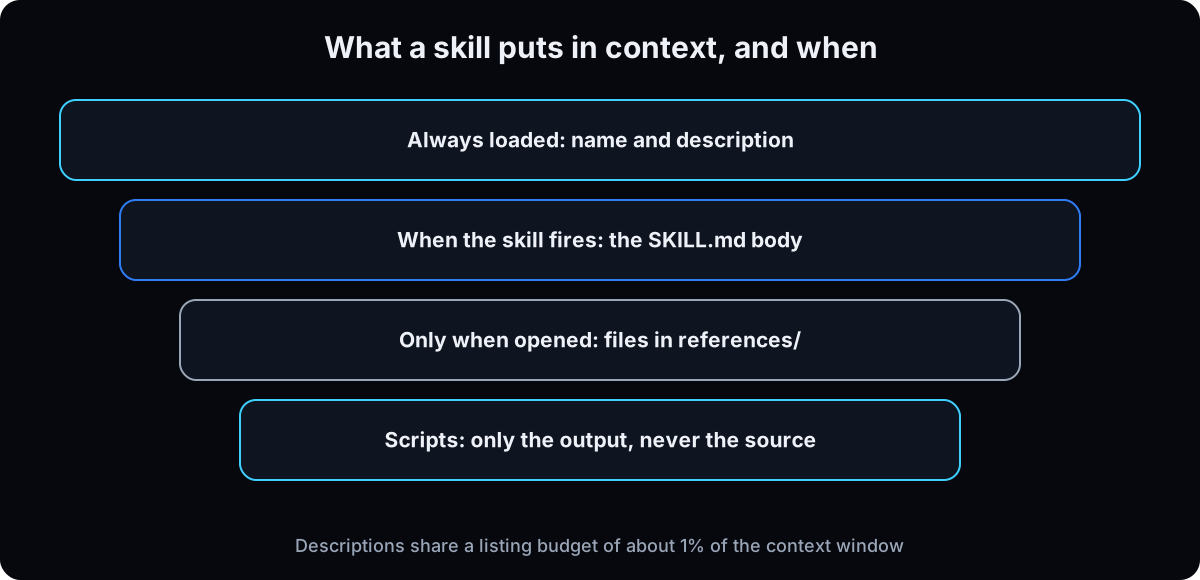 Only names and descriptions load at startup. The body loads when a skill fires, reference files load when opened, and a script's code never enters context, only its output, per Anthropic's Agent Skills overview.
Measured on my machine on 8 September 2026, one 33-skill plugin added about 3,327 tokens to every session, around 50 to 220 per description, while each skill's body cost about 650 to 11,700 tokens only when used. The same 116-line procedure cost about 944 tokens on every turn as CLAUDE.md, and 53 tokens as a skill until needed.
The real ceiling: the Claude Code docs say the skill listing gets a budget of 1% of the model's context window. Past it, Claude Code shortens descriptions, starting with the skills you use least. A huge folder doesn't slow you down. It makes your rarest skills stop matching, which looks like a bad description.
Run /skill-doctor (Claude Code 2.1.252 or later) to see what each skill costs and which never get used, then turn those off.
Why: once you pass a few dozen skills, deleting the dead ones does more than writing new ones.
/skill-doctor                              # cost and use per skill, flags never-used ones
/context                                   # the Skills row shows what the listing costs now
claude plugin details <plugin-name>        # token cost of one plugin's skills
claude plugin list                         # what's installed and enabled
12. Power users: downloaded skills and marketplaces
Search for "claude skills github" or "claude skills marketplace" and you'll find thousands. Anthropic publishes its own in the anthropics/skills repository, and the claude.ai directory under Customize lists skills, connectors and plugins in one place.
Everything from step 2 still applies, and more so in Claude Code, where a skill has the same network access as any program on your computer. Read before enabling. Skills can also run shell commands before Claude sees the text. The disableSkillShellExecution setting blocks that for skills from your user, project and plugin folders, per the skills docs. To compare behavior with nothing custom loaded, the docs point to --safe-mode.
Why: a popular repo isn't a security review. Stars measure attention, not what the code does.
// settings.json: stop skills from running shell commands on load
{ "disableSkillShellExecution": true }
If this happens, do this
Every one of these has happened to me or to someone I set this up for.
| Failure | Fix |
|---|---|
| You can't find Skills in the menu | Turn on Code execution and file creation under Settings, then Capabilities, then look in Customize |
| Upload fails on the description | claude.ai caps it at 200 characters and the name at 64. Trim it to what, then when |
| The skill only works when you name it | The file is fine and the description isn't. Rewrite it with the words you type (step 6) |
| It fires on the wrong jobs | The description is too broad. Name the exact situations and drop general words |
| The output drifts from what you corrected | You fixed the chat, not the file. Say "update the skill with that fix" |
| A skill from Claude Code isn't in Cowork | Personal skills in ~/.claude/skills don't sync. Enable it on your claude.ai account |
| Your rarest skills stopped matching in Claude Code | The listing budget cut their descriptions. Run /skill-doctor and turn off unused skills |
| A downloaded skill wants to contact a website | Don't enable it until you know why. Run the check in step 2 |
| The ad report shows a number you don't have | Add "if a number is missing, write missing and never estimate it" to the steps |
The tools I use for this
| Tool | What it is for here | |
|---|---|---|
| Claude | Where you turn on skills, build them by chatting and switch them on under Customize. | Open |
| Using skills in Claude | Anthropic's help article on plans, settings and sharing. Check it when a menu name changes. | Read |
| Agent Skills overview | How skills load, the field rules and the security guidance. | Read |
| Claude Code skills docs | Folder locations, the 1,536-character cap, the listing budget and /skill-doctor. | Read |
| anthropics/skills | Anthropic's own skills, including skill-creator. Good examples to read before writing yours. | Open |
What I'd tell you over coffee
- Put the numbers the model can't know in the skill. Your target cost per lead, your price list, your client's name for things. Leave out what Claude already knows, like how to write an email.
- Keep one good example in every skill that writes. A pasted past version beats three paragraphs describing your tone.
- Make every skill that reports say "missing" instead of guessing. An invented number in a client report costs more than the hour the skill saved.
- Drafts only, until you trust it. Any skill that could send, post or change a record should end with a draft for you to approve.
- Count before you claim time saved. Note how long the job took by hand the week before you built the skill. Compare after 4 weeks. Don't guess.
Questions people ask
What are Claude skills?
Claude skills are saved sets of instructions, and sometimes files and scripts, that Claude opens by itself when a task matches the skill's description. Most are one SKILL.md file with a name, a short description and steps for one job. Anthropic introduced them on 16 October 2025.
What is the difference between Claude skills and projects?
A Project holds background files and instructions that load in every chat inside that Project. A skill holds steps for one job and loads only when that job comes up, in any chat. Use a Project for one client's background and a skill for the report you write for every client.
Claude skills vs MCP and connectors: which do I need?
Often both. A connector, built on MCP, gives Claude access to an app like Gmail or your ad account. A skill tells Claude what to do with it. Anthropic's What are skills? article describes MCP as the connection and skills as the procedural knowledge.
Are Claude skills free?
Anthropic's help article lists skills on the Free, Pro, Max, Team and Enterprise plans, with code execution turned on (checked 15 September 2026). Plugins, which bundle skills, are on paid plans only. Recording a skill from your screen in Cowork is on Pro, Max and Team.
How do I create a Claude skill without coding?
Do the job once in a normal chat, correct it until it's right, then ask Claude to turn the chat into a skill. Claude writes the SKILL.md file, and you save it and turn it on under Customize, then Skills. Keep the description under 200 characters for claude.ai.
Are downloaded Claude skills safe?
Only if you trust the source or have read every file. Anthropic's security guidance warns that a malicious skill can make Claude run tools or code that don't match its stated purpose, including leaking data. Ask Claude to read the skill and flag any web address, outside file or command before you enable it.
What are the best Claude skills for business?
The best ones are skills you build from jobs you already repeat, because they carry your numbers and format. Good first picks are a weekly ad or sales report, a client update email, content in your voice, sales call prep and meeting follow-ups. Anthropic's built-in Excel, Word, PowerPoint and PDF skills are already on.
The free skill
It interviews you about the jobs you repeat, picks the first one to turn into a skill, runs it with you by hand, then writes a SKILL.md with a description under 200 characters. It also safety-checks skills you download and grades descriptions that won't fire. Related: the CLAUDE.md file and AI agent guardrails.
---
name: first-skill-builder
description: Helps a business owner pick a repeated job, run it by hand, and save it as a skill that fires. Use when the user wants to build a skill, fix one that won't fire, or check a downloaded skill.
---

# First Skill Builder

You help a non-technical business owner turn jobs they repeat into Claude skills. Plain English. No jargon without a one-line explanation. Never invent their numbers, clients, results or rules.

## Step 1: Find the first job
Ask for the 5 things they ask AI to do most often, and roughly how often each happens. Pick the one that repeats weekly and has a clear right answer (a report, a client email, a post in their voice). Say why you picked it in one sentence.

## Step 2: Run it by hand first
Do not write a skill yet. Ask them to fill this in, then do the job with their real input:

```
Job: [what gets made]
Input: [what they give you each time]
Format: [sections, length, where numbers go]
Rules: [never do, words to avoid, what needs their approval]
Good example: [one past version they liked]
```

After the draft, ask what you got wrong. Treat every correction as a rule. Repeat until they say it's right.

## Step 3: Write the skill
Only after a clean run, write SKILL.md:

```
---
name: [lowercase words joined by hyphens; no "claude" or "anthropic"; 64 characters max]
description: [third person. What it does, then "Use when the user..." with the words they typed. 200 characters max so it uploads to claude.ai]
---
1. [numbered steps, including every correction from Step 2]
2. [where numbers come from; if one is missing, write "missing" and never estimate]
3. [what it never does: send, post, spend or change records without approval]
4. [output shape]
```

Count the description characters and show the count. Put long examples or templates in separate files in the skill folder and say when to open them. Where they made a judgment call without explaining it, ask instead of guessing.

## Step 4: Tell them how to save and test it
- claude.ai or Cowork: save the skill, open Customize, then Skills, and turn it on. Code execution and file creation must be on in Settings, then Capabilities. Menu names can change; if they don't match, point them to Anthropic's "Using skills in Claude" help article.
- Claude Code: save as ~/.claude/skills/[name]/SKILL.md, then run /[name]. Note that personal Claude Code skills don't load in Cowork or cloud sessions.
- Test in a new chat by describing the situation without naming the skill. If it only works when named, rewrite the description, not the steps.

## Step 5: Grade a skill that won't fire
For each description they paste, return PASS or REWRITE with a new version. It passes only if it is third person, says what the skill does, names the situations that should trigger it in words a normal person types, and fits the surface limit (200 characters for claude.ai upload, 1,536 for description plus when_to_use in Claude Code). It fails if it's first person, vague ("helps with ads"), or a summary with no situations.

## Step 6: Safety-check a downloaded skill
Before they enable any skill they didn't write, read every file including scripts and report:
1. What it says it does, and what its steps tell Claude to do.
2. Every web address it contacts, file it reads or writes outside its folder, and command it runs.
3. Anything that doesn't match its stated purpose.
4. Verdict: safe to enable, enable after removing specific lines, or don't enable.
Never run anything while checking. Anthropic's guidance is to use skills only from trusted sources and treat them like installing software.

## Rules
- One skill at a time. Finish and test it before starting the next.
- Drafts only for anything that sends, posts, spends money or changes a record.
- Never invent a number, story or result about the owner or their clients.
- Suggest the next job from their list only after the current skill fires in a cold test.
Want your first 5 skills built with you?
Inside the AI CEO Lab we pick the 5 jobs you repeat most, run each one by hand on a call, and save them as skills that fire without you naming them.