 AI CEO Lab
AI for Marketing Agencies: One AI Employee Across Every Client
Where agency hours go, what AI can take off your plate, and how to set up one AI employee with a channel, rules and schedule for each client.
Most agencies already use AI. The team drafts copy in ChatGPT, someone summarizes a call in Claude, and the weekly client report still eats Monday morning. The tools help each person a little. The recurring work stays on the calendar.
This guide shows a different setup: one AI employee that lives in your Slack or Microsoft Teams, with a channel per client, its own connection to each client's tools, written approval rules, and jobs that run on a schedule once they've worked twice.
I run a marketing agency, Dr. Lead Flow, and 6 named Viktor agents inside it. New to AI agents? Read the next section first. Already know the difference between a tool and an agent? Skip to step 1.
What you have by the end
Not concepts. Things that exist on your machine when you close the tab.
- A list of your agency's recurring work, ranked by hours
- Client-data and approval rules written before any client account is connected
- One client running a weekly report, call recaps and an ad check in its own channel
- A plan to roll out client by client with a weekly credit review
Start here: what AI for an agency means in practice
"AI for marketing agencies" covers 3 different things. Know which one you're buying before you pay for it.
Tools, agents, and an AI employee
AI tools are apps a person opens and types into: ChatGPT, Claude, an image generator, a copy tool. Each one helps the person using it, and the output still has to be moved somewhere by hand.
AI agents do the steps themselves. They log in to connected apps, pull data, and act, usually after you approve. This comparison of AI agents covers the main options.
An AI employee is an agent set up like staff: it lives where the team works, knows the business, has a job per channel, and runs recurring work on a schedule. Viktor is built this way. It lives in Slack or Microsoft Teams, reads the channels it joins, saves what it learns as skills, and runs scheduled tasks (viktor.com).
What the research says agencies use AI for
HubSpot's 2026 State of Marketing report (1,500+ marketers, updated 10 April 2026) found 86.4% of marketing teams use AI in at least a few areas. The top extensive uses were content creation (42.5%), media creation (37.2%), administrative task automation (35.6%) and advertising automation and optimization (34.1%). About a third of teams said AI saves them 10 to 14 hours a week.
Productive's Agencies in the AI Era 2.0 surveyed 174 agencies from 17 to 31 March 2026. It found measurable revenue impact still fuzzy, and the agencies that could point to results focused on sales work, internal processes like onboarding and admin, and deliverable creation.
Promethean Research's 2026 Digital Agency Industry Report describes production teams using AI for first drafts, analysis, QA and documentation, and revenue teams using it for account research, proposals and meeting prep.
Where agency hours go
The work that repeats every week for every client is where an AI employee pays off: client reports, status updates, call recaps and to-dos, ad account checks, inbox and request triage, and SOPs nobody has time to write. The table below maps each job to a channel, the tools it needs, a sensible schedule, and whether a person approves before anything leaves.
The catch
Credits. Viktor bills the whole workspace from shared credits, so every client's jobs draw on one pool. Vague asks and unread scheduled reports burn it.
Access to client accounts. The agent needs its own connection to each client's ad account, CRM or analytics. Client-owned accounts may need the client's permission.
Client data. One client's numbers must never show up in another client's channel. Channels and separate connections handle most of this; your rules handle the rest.
Approvals. Anything a client or the public sees, and any change to spend, needs a person's yes first.
| Job | Channel | Tools it needs | Schedule | Approval needed |
|---|---|---|---|---|
| Weekly client report | #client-name | Meta Ads, Google Ads, CRM or analytics | Monday morning, after it works twice | Yes, before it goes to the client |
| Call recap and to-dos | #client-name | Call recorder, project tool | After each client call | Yes for anything sent to the client; internal to-dos no |
| Ad account check | #client-name | Meta Ads or Google Ads, read access | Weekly | Recommendations only; a person makes every change |
| Client status update | #client-name | Project tool, last report | Weekly or biweekly | Yes, before it goes to the client |
| Request and inbox triage | #internal-ops | Slack or Teams, email | Daily | No for sorting; yes for any reply |
| Billing and ops reminders | #internal-ops | Calendar or payment log | Daily or weekly | No for internal reminders |
| SOP from a brain dump | #internal-ops | Docs tool | On request | No; a person reviews before it's used |
| Term | What it means |
|---|---|
| AI tool | An app a person opens and types into |
| AI agent | AI that takes steps in connected apps, not only answers |
| AI employee | An agent set up like staff: channel, job, rules, schedule |
| Client channel | A Slack or Teams channel for one client's work |
| Connection | The agent's sign-in to one account of one tool |
| Skill | Saved steps for a job the agent repeats |
| Scheduled task | A job the agent runs on a timer |
| Approval | The agent pausing for a person's yes before a sensitive action |
| Credits | What Viktor bills in; the whole workspace shares them |
Why not give every account manager ChatGPT and call it done?
Our team already pays for AI chat tools. What does an AI employee add?
Chat tools make each person faster at the part they type. They don't own the recurring work.
- A chat tool waits for someone to open it, paste the data in, and copy the answer back out. The weekly report still depends on a person remembering.
- An AI employee is connected to the client's tools, knows which channel belongs to which client, and posts the report on schedule for a person to approve.
- For an owner-operator with 2 clients, a chat tool may be all you need. Once the same reports, recaps and checks repeat across 5 or 10 clients, the scheduled setup starts to win.
Keep the chat tools for thinking. Give the recurring work a job description.
Set it up for your agency, one client at a time
1. List your recurring work by hours
For one normal week, write down every job that repeats for every client and roughly how long it takes. Rank the list by hours.
Why: the top 3 rows are your first jobs. Starting from the calendar, not from what the AI can do, keeps you out of demos that save no time.
Job | Clients it repeats for | Hours per week | Who does it now
Weekly client report |  |  |
Client status updates |  |  |
Call recaps and to-dos |  |  |
Ad account checks |  |  |
Inbox and request triage |  |  |
SOPs and onboarding docs |  |  |
2. Pick where the AI lives: one channel per client
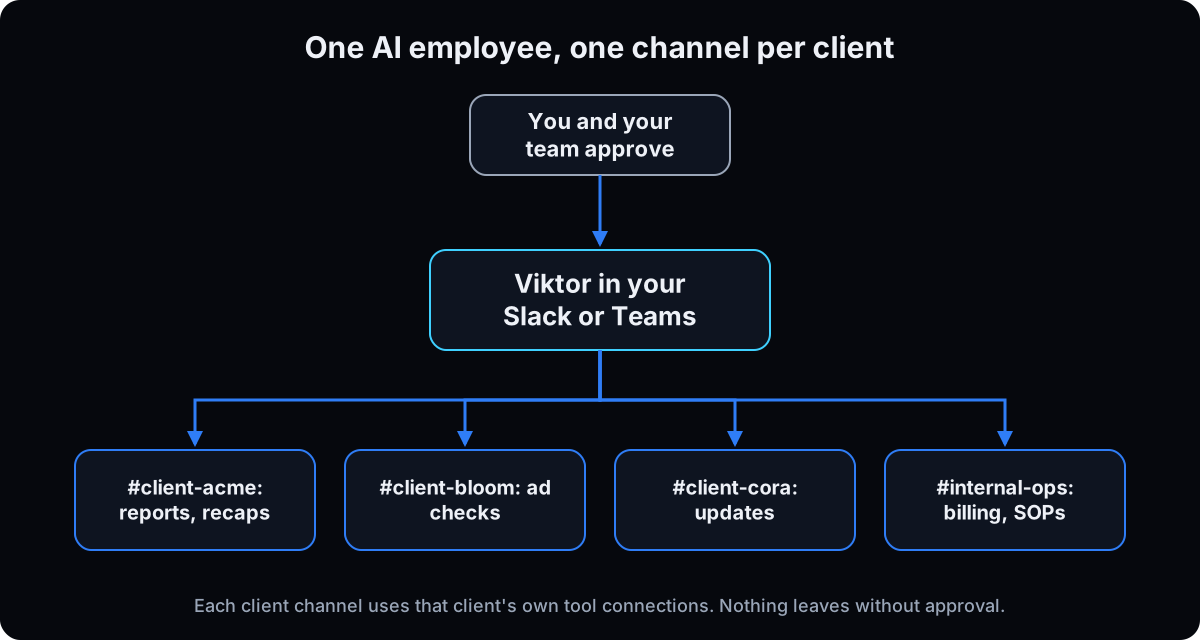 Put the AI employee in the Slack or Teams workspace your team already uses. Create one channel per client, like #client-acme, plus one internal channel for ops. Invite Viktor only to the channels where it should work. Viktor supports Slack and Teams; at signup you choose We use Slack or We use Teams (getting started). The first-week Viktor setup guide covers install in detail.
Why: a channel per client gives the agent one client's context at a time and gives your team one place to see that client's work.
3. Write client-data and approval rules before connecting any client account
Post these rules in a DM to Viktor and pin them in your internal channel. Viktor asks for approval before sensitive actions on its own (integrations); your rules add the agency-specific ones. Check each client contract for anything it says about data and third-party tools.
Why: once an ad account is connected, the rules are what stand between a draft and a live change. More on agent guardrails.
Client data rules:
- Each client's data stays in that client's channel. Never mention one client's numbers, names or plans in another client's channel.
- Use only the connections labeled for this client.
- Never make up numbers. If a tool can't be reached, say which and stop.

Always ask a person before you:
- send anything to a client or anyone outside this workspace
- change an ad, budget, audience or campaign
- edit or delete anything in a client's CRM
- post anything public
- spend money or start a trial
Internal drafts, reports and recommendations don't need approval.
4. Connect one client's tools, with separate connections per client
Pick your simplest client. Connect only the tools the first 3 jobs need, such as their Meta Ads or Google Ads account and your call recorder. Viktor connects to 3,200+ tools, including Google Ads, Meta Ads, HubSpot, Notion and Google Drive, and keeps multiple accounts of the same tool separate (integrations). Name each connection with the client's name.
Why: one client first means one set of access to check, and clearly named connections are how the right account gets used in the right channel.
5. First job: the weekly client report
In the client's channel, ask for the report with the template below. Read it against the numbers in the ad platform before trusting it.
Why: reporting repeats every week, you already know what good looks like, and it's read-only, so a mistake costs a correction, not a budget.
For this client, pull last week's results from [Meta Ads / Google Ads / CRM].
Compare to the week before.
Format:
1. Spend, leads or conversions, cost per result
2. 3 bullets: what changed, likely why, what we should check
3. One line for the client update, in plain language
Show the date range and the account you used. If data is missing, say which and stop.
This is a draft for our team. Don't send it to the client.
6. Second job: call recap and to-dos
After a client call, ask Viktor to pull the recording or transcript from your call tool, write the recap, and create the to-dos in your project tool. In my agency, call recaps get pulled from Fathom and action items go to GHL and Notion.
Why: recaps are the job people skip when the day gets busy, and missed to-dos are what clients notice.
Pull the transcript for today's call with [client] from [call tool].
Post in this channel:
- 5-line recap
- decisions made
- to-dos with owner and due date
Create the to-dos in [project tool] for our team.
Draft a short follow-up email to the client, and wait for my approval before sending.
7. Third job: ad account check, recommendations only
Ask for a weekly check of the client's ad account: what to pause, what to scale, what's fatiguing. The output is a list of recommendations. A person makes every change in the ad platform.
Why: a wrong recommendation costs a minute to ignore; a wrong budget change costs the client money. For what a full account review covers, see the Meta ads audit guide.
Review [client]'s [Meta Ads / Google Ads] account for the last 7 days.
List, with campaign and ad names and the numbers behind each:
- what to pause and why
- what to scale and why
- creative that looks fatigued
Recommendations only. Do not change any ad, budget or audience.
8. Save each job as a skill, and schedule it after it works twice
When a job's output is right, ask Viktor to save the steps as a skill. Run it by hand again on a different day. If both runs are right, schedule it to post in the client's channel. Skills in Viktor work like Claude skills: saved instructions it follows each time.
Why: a saved skill runs the same way for every client, and a job that fails on a schedule fails every week without anyone asking.
Save what you did as a skill called "weekly client report".
Every Monday at 8am my time, run it for this client and post the draft here.
If a tool can't be reached, post that instead of guessing.
9. Roll out client by client, and review credits weekly
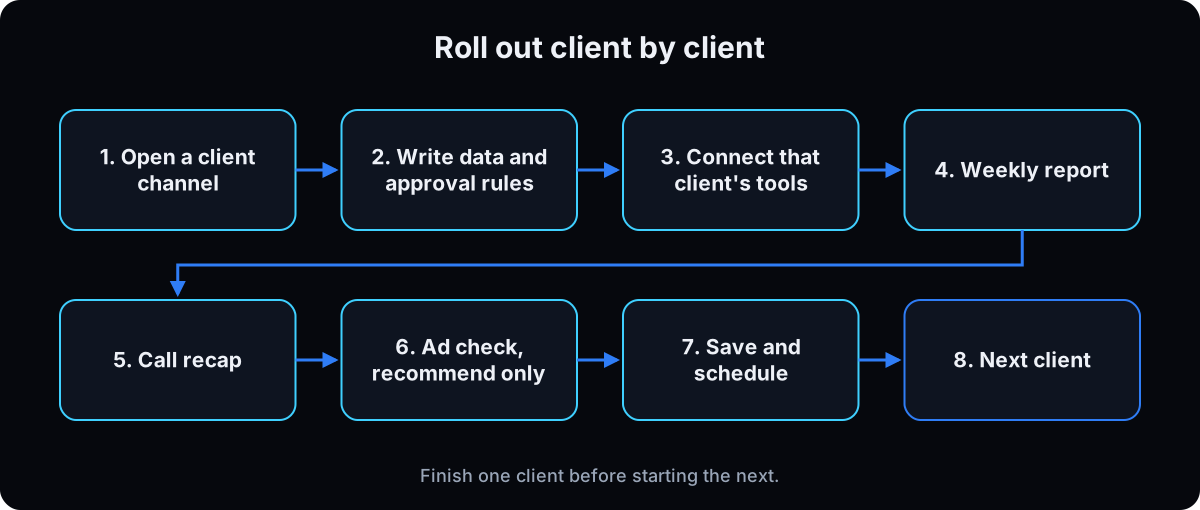 Once the first client's 3 jobs run on schedule for 2 weeks, add the next client: new channel, that client's connections, the same skills. Every Friday, check which jobs used the most credits and whether anyone read the output. Pause or rewrite anything expensive that nobody reads. How Viktor credits and pricing work.
Why: credits are shared across the workspace, so one noisy client's schedule can drain the budget for everyone.
Other options: Viktor fits agencies that run on Slack or Teams and want one workspace bill. Grok Bot is priced per person, so it suits an owner working alone. Hermes Agent and OpenClaw are free, self-hosted software and need a technical owner for setup, updates and security. Claude in Slack brings Claude into your workspace if your team already pays for Claude. The full comparison says when each one wins.
If this happens, do this
Every one of these has happened to me or to someone I set this up for.
| Failure | Fix |
|---|---|
| One client's numbers appear in another client's channel | Label every connection with the client name, repeat the client-data rule in each channel, and check which account it used |
| The report numbers don't match the ad platform | Ask for the date range, time zone and account it used; add 'show the date range and account' to the skill |
| It asks for approval on every internal draft | Rewrite the rules so internal drafts, reports and recommendations don't need approval |
| A client asks whether AI touches their account | Tell them what it reads, what it can't change without a person, and where their data stays; check your contract first |
| Credits dropped fast after adding clients | Pause schedules nobody reads, tighten the job briefs, then add clients one at a time |
| The weekly report comes back different each week | Save the version you approved as a skill and schedule the skill, not a fresh request |
| The team keeps asking in DMs instead of channels | Move client asks into client channels so the context and history stay with that client |
The tools I use for this
| Tool | What it is for here | |
|---|---|---|
| Viktor † | The AI employee in Slack or Teams, billed per workspace from shared credits. My link adds $150 in trial credits. | Start free |
| Viktor pricing | Team plans and how credits work. | Read |
| Viktor integrations | Which tools it connects to, and how multiple accounts stay separate. | Read |
| HubSpot 2026 State of Marketing | Survey data on how marketing teams use AI. | Read |
| Productive: Agencies in the AI Era 2.0 | Survey of 174 agencies on where AI shows results. | Read |
Related guides
- Viktor AI review: my 6-agent roster and the jobs I hand it.
- Viktor setup in Slack: the first week, step by step.
- Viktor AI pricing: credits, real costs, and keeping the bill predictable.
- How to run a marketing agency: the operating structure this plugs into.
- AI agent alternatives: when Grok Bot, Hermes, OpenClaw or Claude fits better.
Questions people ask
How do marketing agencies use AI?
Most use it for content, media and ad work, plus admin. HubSpot's 2026 report found content creation, media creation, administrative task automation and advertising automation as the top uses. Agencies that set up agents also hand off recurring client work: weekly reports, call recaps, status updates and ad account checks.
What AI tools do marketing agencies need?
Start with what your team already uses: a chat tool for drafting, plus one AI agent connected to your ad platforms, CRM and call recorder for recurring client work. An AI employee in Slack or Teams, like Viktor, covers the agent side with a channel per client. Add more tools only when a job on your hours list needs one.
Can AI do client reporting?
Yes, if it's connected to the client's ad and analytics accounts. Have it pull the numbers, compare periods and draft the summary in the client's channel, then have a person check it against the platform and approve it before it goes to the client. Schedule it only after it has come back right twice.
Is it safe to connect client ad accounts to AI?
It can be, with limits. Use a separate connection per client, check the client contract, and write rules that the agent recommends and a person makes every change to ads, budgets and audiences. Viktor asks for approval before sensitive actions and says it is SOC 2 Type 1 certified, with Type 2 in progress.
How much does an AI employee cost for an agency?
Viktor's Team plans are $50, $75, $100 or $200 a month for 20,000 to 80,000 credits shared by the whole workspace, with a $100 credit trial ($150 through my link), checked 15 September 2026. What you spend depends on how many clients and scheduled jobs draw on those credits, so review usage weekly.
The free skill
It walks an agency through the rollout: hours list, client channels, client-data and approval rules, per-client connections, the first 3 jobs, skills, schedules and the weekly credit review.
---
name: agency-ai-employee
description: Rolls out one AI employee (Viktor in Slack or Microsoft Teams) across a marketing agency's clients. Hours list, one channel per client, client-data and approval rules, separate connections per client, weekly report, call recap, ad check, skills, schedules, weekly credit review. Trigger on "set up ai for my agency", "ai for marketing agencies", "ai employee for my agency".
---

# AI Employee for an Agency

Take recurring client work off the team's calendar, one client at a time, without mixing client data or letting drafts go out unreviewed.

## In order
1. **Hours list.** For one normal week, list every job that repeats per client with hours and owner. Rank by hours. The top 3 are the first jobs.
2. **Where it lives.** The Slack or Teams workspace the team already uses. One channel per client (#client-name) plus #internal-ops. Invite the agent only there.
3. **Rules before access.** Write and pin: each client's data stays in its channel; use only connections labeled for that client; never invent numbers. Ask a person before anything goes to a client or outside the workspace, any ad/budget/audience change, CRM edits, public posts, spending. Check client contracts about data and third-party tools.
4. **One client's tools.** Simplest client first. Connect only what the first 3 jobs need. Separate, client-named connections per account.
5. **Weekly client report.** Pull last week vs the week before: spend, results, cost per result, 3 bullets, one client-ready line. Show date range and account. Draft only. Verify against the platform.
6. **Call recap.** Pull transcript, post recap, decisions, to-dos with owner and date; create to-dos in the project tool; draft client follow-up and wait for approval.
7. **Ad account check.** Last 7 days: pause, scale, fatigued creative, with names and numbers. Recommendations only; a person makes every change.
8. **Skill, then schedule.** Save each correct job as a skill. Schedule only after it comes back right on 2 different days. If a tool can't be reached, post that.
9. **Roll out and review.** After 2 clean weeks, add the next client with its own channel and connections, same skills. Every Friday: credits by job, who read the output, pause or rewrite anything expensive nobody reads.

## Rules
- One client at a time until its 3 jobs run on schedule.
- Internal drafts, reports and recommendations don't need approval. Anything a client or the public sees, and any spend change, does.
- Never mention one client's data in another client's channel.
- Never invent numbers.

## Done when
Every live client has a channel with a scheduled weekly report, recaps after calls and a weekly ad check, each approved by a person before it reaches the client, and the owner knows what it costs per week.
Want this set up across every client?
We set up Viktor for your agency done for you: a channel per client, the report, recap and ad-check skills, schedules, approval and client-data rules, and a weekly credit review so the bill stays predictable. Apply for the AI Leverage Audit and we'll map which of your clients and jobs to start with.