 AI CEO Lab
GoHighLevel Tutorial: What It Is, What It Costs, and the First Workflows to Build
A plain answer to what GoHighLevel is, the plan prices and usage fees checked on 15 September 2026, who should skip it, and the 5 workflows I'd build first, step by step.

Plenty of people open GoHighLevel, see a sidebar full of menus, and close the tab. Or they pay for a month, build nothing, and cancel.
This guide fixes both. First, a plain answer to what GoHighLevel is, what each plan costs, and the usage fees that land on top, all checked on GoHighLevel's own pricing page and help center on 15 September 2026. Then an honest section on who should skip it. Then the build: the setup to finish before any workflow, and the 5 workflows I'd build first in any account that takes calls and bookings.
I'm a doctor who runs an agency, not an engineer. Almost every broken workflow I've debugged was broken by build order, not logic, so the order is the part I'll push hardest on.
New to GoHighLevel? Start with the next section. Already paying for it? Skip to step 6 for the workflows.
What you have by the end
Not concepts. Things that exist on your machine when you close the tab.
- A plain picture of what GoHighLevel does and how it differs from a basic CRM
- Current plan prices, the free trial terms and the usage fees for texts, email, premium actions and AI
- A clear call on whether it's worth it for your business
- Texting registration and an email sending domain started before you build
- Missed call text back running without double texts
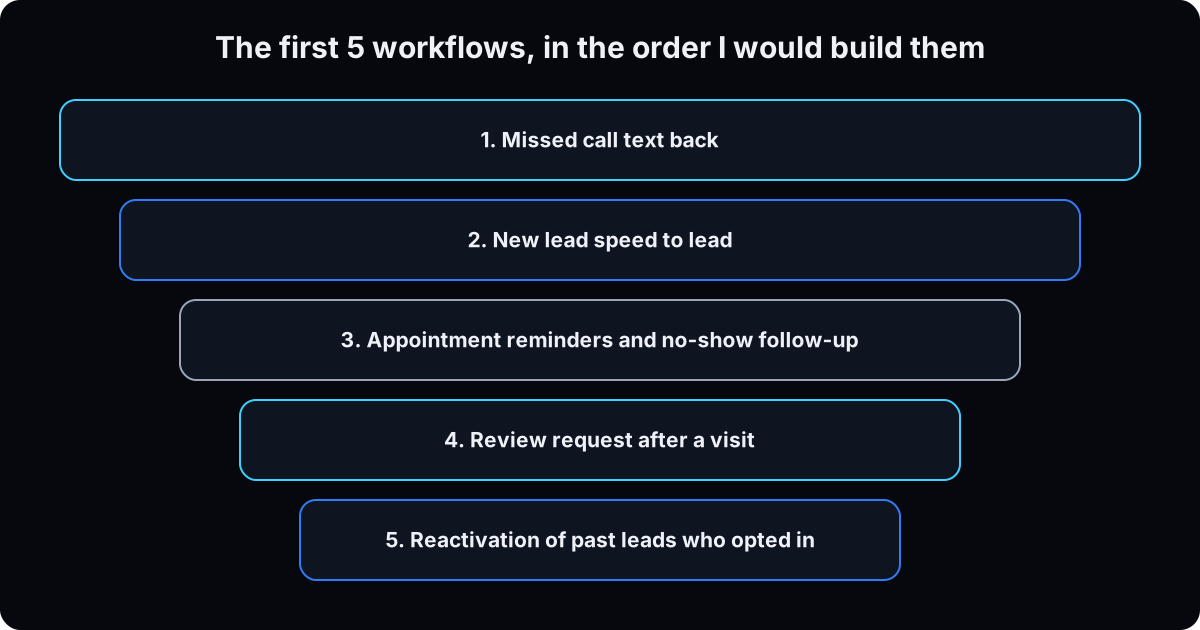
- Speed to lead, appointment reminders, no-show follow-up, review requests and reactivation built and tested
- A test routine that proves a workflow sent a message, not only that it ran
Start here: what GoHighLevel is and what it costs
If you've only used a spreadsheet, a basic CRM or a booking app, 5 ideas make the rest of this page click.
What GoHighLevel is
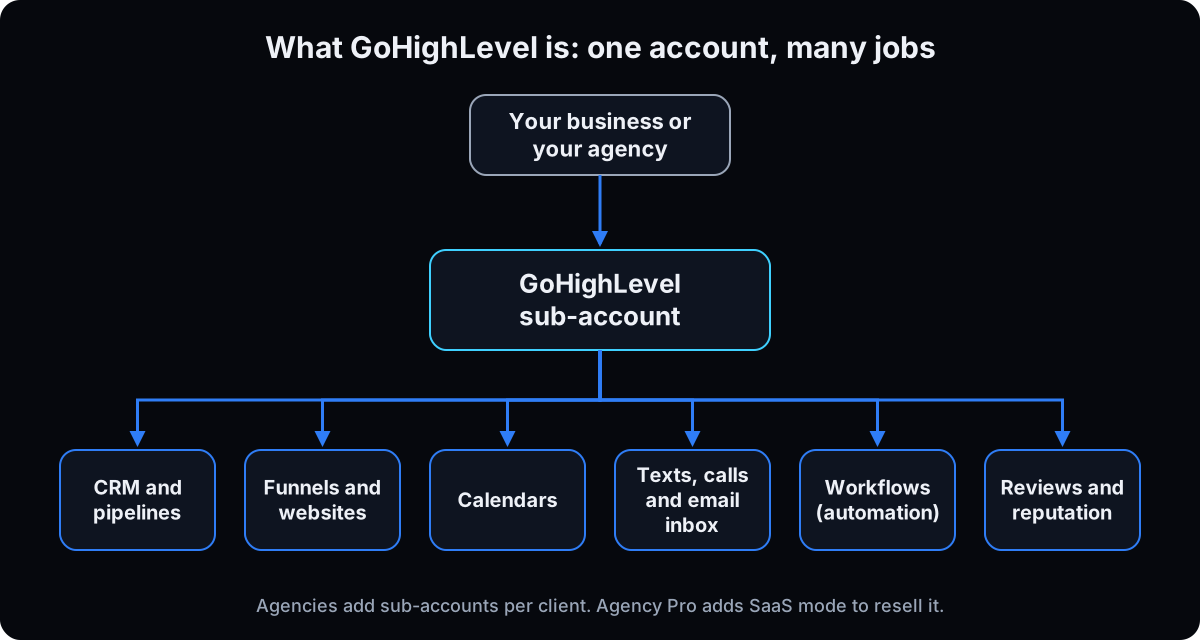 GoHighLevel (often shortened to GHL, and branded HighLevel) is one account that holds the tools a small business usually rents separately: a CRM (the database of every lead and client), pipelines, funnels and websites, calendars, one inbox for texts, calls and email, review requests, and workflows that automate all of it.
Each business lives in a sub-account. An agency gets several sub-accounts, one per client. On the Agency Pro plan, SaaS mode lets an agency resell GoHighLevel under its own brand with automated sub-account creation, per the GoHighLevel's pricing page.
How it differs from what you use now
A basic CRM stores contacts. GoHighLevel also texts them, books them, reminds them and asks for the review, from the same record. The upside is fewer tools. The cost is setup: nothing happens until someone builds it.
A thread in r/gohighlevel this month put it plainly: either spend the time to learn it or pay someone to manage it.
What each plan costs
Checked on the GoHighLevel's pricing page on 15 September 2026. Every plan includes unlimited contacts and unlimited users. The table below shows the differences.
Free trial: 14 days with full feature access. Billing starts automatically when the trial ends unless you cancel, so put a reminder in your calendar on day 12. You'll see 30 day trial offers around the web. I couldn't confirm those on the official page, so plan on 14.
Disclosure: links marked † are my GoHighLevel referral link. If you sign up through one, I may earn a commission. It doesn't change anything on this page.
The catch: usage fees on top of the plan
The plan price isn't the whole bill. Texts, calls, email and some automation run on a prepaid wallet. From GoHighLevel's pricing and billing guide (updated 22 August 2026) and linked help articles, checked 15 September 2026:
LC Phone (texts and calls): US local numbers are $1.15 a month. Texts are $0.00747 per segment, sent or received. Outbound calls are $0.0166 a minute, per the LC Phone pricing guide (updated 1 September 2026). Carriers add their own per-text fee on top, for example $0.003 per outbound SMS on AT&T.
Texting registration (A2P 10DLC): a one-time $24.49875 for a sole proprietor or low volume standard brand, plus $10 a month for a standard campaign, per the A2P fees article (updated 29 July 2026).
LC Email: $0.675 per 1,000 emails.
Premium triggers and actions: each sub-account gets 100 free lifetime runs, then $0.01 per run. Workflow Pro tiers bundle runs: $10 a month for 10,000, $25 for 30,000, $50 for 65,000. Normal steps like send SMS or add tag don't count.
AI: AI Employee is pay per use, or $50 a month per sub-account for Growth (1,000 Conversation AI responses and 100 Voice AI minutes) or $97 a month for Unlimited, per the AI Employee pricing article. Phone charges stay separate.
Other add-ons: WhatsApp is $10 a month plus usage. HIPAA compliance is a $297 a month add-on.
For scale: 1,000 texts is about $7.47 in LC Phone fees before carrier fees. Prices change, so check the pages above before you quote a client.
Is GoHighLevel worth it? Who it's for, who should skip it
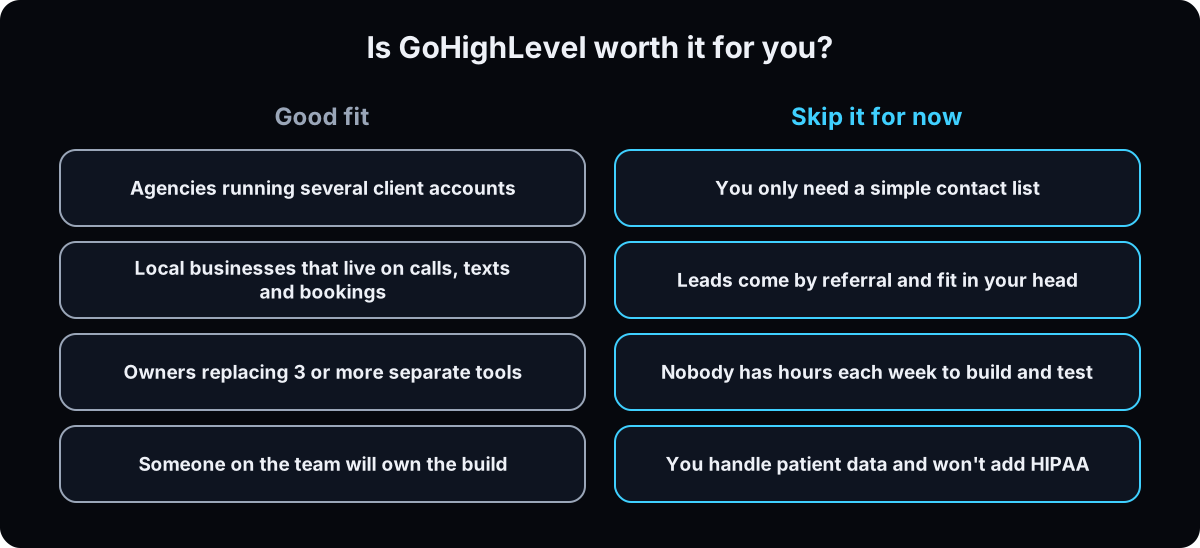 It's worth it if your revenue depends on answering calls, texts and form leads fast, and someone will own the build. For an agency, the Unlimited plan's unlimited sub-accounts are the point.
Skip it for now if you need a simple contact list, if your leads arrive by referral and fit in your head, or if nobody has a few hours a week to build and test. A cheaper CRM, or HubSpot's free CRM, is the saner start.
Health businesses: the HIPAA add-on is $297 a month. Without it, keep medical details out of forms, texts and notes entirely. My landing page guide shows a lead form with no clinical fields.
The honest downside: the usage fees add up at volume, the menu is crowded, and a half-built account does nothing.
| Plan | Monthly | Yearly | What it adds |
|---|---|---|---|
| Starter | $97 | $970 | 3 sub-accounts, all core features, 24/7 support |
| Unlimited | $297 | $2,970 | Unlimited sub-accounts, rebill phone and email at cost, basic API access |
| Agency Pro | $497 | $4,970 | SaaS mode with automated sub-account creation, rebilling with markup, advanced API access |
| Enterprise | Custom | Custom | White-label mobile app, HIPAA compliance and more, through their sales team |
| Term | What it means |
|---|---|
| Sub-account | One business inside GoHighLevel, with its own contacts, number and workflows |
| SaaS mode | An Agency Pro feature for reselling GoHighLevel under your own brand |
| Wallet | The prepaid balance that pays for texts, calls, email and premium actions |
| LC Phone | GoHighLevel's built-in phone system for numbers, texts and calls |
| A2P 10DLC | The US carrier registration a business number needs before automated texts send |
| Dedicated sending domain | Your own domain set up for GoHighLevel email, so it doesn't land in spam |
| Workflow | A saved automation: when something happens, do these steps |
| Trigger | The event that starts a workflow, like a missed call or a booked appointment |
| Action | A step the workflow takes, like sending a text or adding a tag |
| Premium action | A trigger or action billed per run, like a webhook or a marketplace app |
| Tag | A label on a contact that workflows can react to |
| Recipe | A prebuilt workflow template inside GoHighLevel |
| Affiliate link † | A link that pays the writer a commission if you buy |
The mental model
Open the builder, drag nodes left to right until it looks right, hit save, and wonder why nothing happened.
Trigger, then actions. Settings before nodes. Build whatever gets referenced before the thing that references it. Small workflows joined by tags beat one big one.
| Term | What it means |
|---|---|
| Trigger | When something happens. One, sometimes two. Never where you solve a problem |
| Action | What the system does next. All the work lives here |
| Tag | A label that carries state between workflows. Fields hold data, tags hold state |
| Wait | The step that makes branching possible |
Should I use a recipe, or let the AI builder do it?
There are recipes and a build-with-AI button. Why build by hand?
Use them, but not as the thing you ship. A recipe or the AI builder gets nodes on the canvas so you're editing instead of staring at an empty screen.
- They fail invisibly. They don't know your build order, so they point at tags, calendars and workflows that don't exist yet, and you can't debug what you didn't design.
- Nothing generated sets your sender details, time zone or execution window. That's where the 3am text comes from. And premium actions are billed per run, which adds up when a workflow fires on every contact.
Use the recipe, strip it, rename every node, set the settings, and test with a contact you delete. That's about 15 minutes, and those 15 minutes are the whole skill.
The build, in order
1. Start the trial and pick the right plan
Start the 14 day trial on the plan you'd keep. One business, or an agency with 3 clients or fewer: Starter. An agency with more clients: Unlimited. Reselling GoHighLevel as your own software: Agency Pro.
Then open your sub-account and fill in the business profile: name, address, phone and time zone.
Why: texting registration and email setup both pull from the business profile, and the account time zone is the fallback for every workflow. Menu names shift between versions, so if a label doesn't match, use the closest one.
2. Get a number and start texting registration today
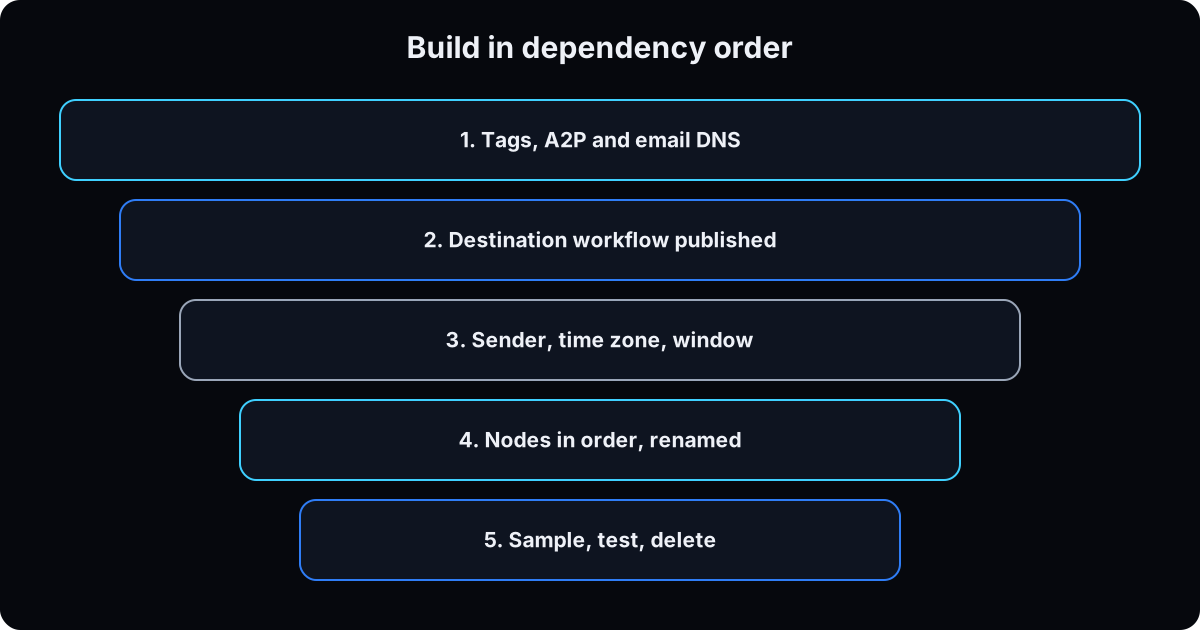 Buy a local number in LC Phone, then register it for A2P 10DLC in the Trust Center. The standard brand registration guide walks through the form. Use your legal business name and details exactly as they appear on your tax records.
Why: US carriers block automated texts from unregistered numbers, and approval takes days. Every workflow on this page sends a text, so this is the long pole. Start it before you build anything. Fees are in the pricing section above.
3. Set up your email sending domain
Go to Settings, then Email Services, then Dedicated Domain, and add a subdomain such as mail.yourdomain.com. You'll add 5 DNS records where your domain is hosted: 2 TXT, 2 MX and 1 CNAME, then verify them in GoHighLevel, per the dedicated domain guide. Add a DMARC record too.
Why: without your own authenticated domain, reminders and review requests land in spam or nowhere. A subdomain keeps this separate from your Google Workspace or Outlook email.
4. Build what the workflows point at, before any workflow
Workflows only automate other things in your account. If those things don't exist yet, you're pulling levers attached to nothing. Create these first:
Tags, by name: missed-call, new-lead, no-show, review-sent, reactivate. An add-tag step creates a missing tag on the fly, but a trigger waiting for one shows a warning badge and does nothing. If a new tag doesn't show in the picker, refresh instead of creating it twice.
A calendar with your booking link, and a pipeline with stages like New, Contacted, Booked, Showed.
Your review link, in the reputation settings.
Why: build in dependency order, not left to right. If workflow A hands off to workflow B, build and publish B first.
5. Learn trigger and action, then set the settings before any node
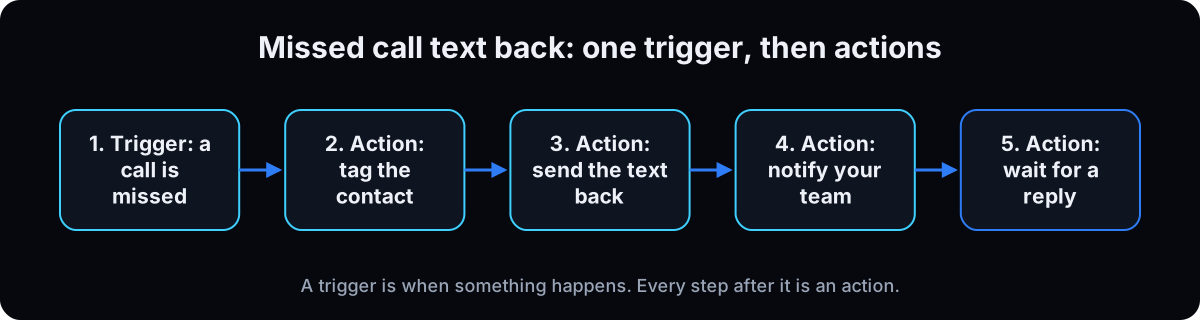 A trigger is when something happens: a missed call, a form submitted, an appointment status changing. An action is what the system does next: send a text, add a tag, wait, branch. Everything in the builder is one or the other. You'll only ever have 1 or 2 triggers per workflow, so stop solving problems by adding more.
Before your first node, open the workflow Settings tab:
Sender details. From name, email and number, set once so every step inherits them.
Time zone. Pick the contact's time zone. The contact's wins when that field is filled, and the account time zone is the fallback. This fixes the 3am text to someone in California.
Execution window. Set the days and hours, and check Saturday and Sunday are included, or weekend leads wait until Monday.
Stop on response and allow re-entry. Stop on response ends the workflow when a contact replies, so a sequence doesn't talk over a real conversation.
Then rename every node for what it does. The default name is the node type, so a month later your workflow reads "SMS, SMS, SMS".
6. Workflow 1: missed call text back
 There are two ways to do this. The quick one is a setting: Settings, then Phone System, then Voice, then Voicemail & Missed Call Text Back. Tick the box, write the message, send yourself a test and save, per GoHighLevel's missed call text back guide (updated 7 September 2026). The same article sets how many seconds of ringing count as missed, between 10 and 20.
The catch: that setting texts on every missed call, even when the same person calls 3 times in a row. GoHighLevel's own fix is the workflow recipe, which is the version I build:
1. Open Automation, create a workflow from the Missed Call Text Back recipe, and turn the Settings version off so you don't send twice.
2. After the trigger, add an If/Else: does the contact already have the missed-call tag? If yes, end.
3. On the no branch: add the missed-call tag, send the text, send an internal notification to whoever calls back.
4. Add a Wait of about 20 minutes, then remove the missed-call tag so a caller tomorrow gets a fresh text.
Why: one text per caller reads like a person. Three read like a bot.
Hi {{contact.first_name}}, this is [name] at [business]. Sorry we missed your call. How can we help? You can reply here or book at [booking link].
Reply STOP to opt out.
7. Workflow 2: new lead speed to lead
Trigger: the form or lead source where new leads arrive, for example Form Submitted or a Facebook lead form trigger. Filter it to the one form this workflow is for.
1. Create or update opportunity in your pipeline at stage New.
2. Add tag new-lead.
3. Send SMS right away with your booking link, and send an internal notification to the person who calls.
4. Wait, type The contact to reply, channel SMS, with a timeout of 1 day.
5. If/Else on the reply. Replied: move the opportunity to Contacted and stop. Timed out: send one email, then one last text 2 days later.
Why the wait comes before If/Else: you can't branch on a reply until a wait step exists. There's nothing to branch on yet. GoHighLevel's Wait action has 8 types (checked 15 September 2026): a set period of time, a specific date and time, a recurring schedule, an upcoming appointment or booking, the contact to reply, the contact to take an action, specific conditions, and a user to reply. 3 cover almost everything: a set time, the contact to reply, and an upcoming appointment.
Adding N conditions to an If/Else gives you N+1 branches, because the builder adds a "none" branch. Branches don't merge back, so repeat shared steps or use a Go To step.
Consent: only text people who gave you their number and agreed to texts on the form. The carrier industry's CTIA Messaging Principles expect opt-in, sender identification and a working STOP.
Hi {{contact.first_name}}, it's [name] from [business]. Got your request for [offer]. Want to grab a time? [booking link]
Or reply with a good time to call. Reply STOP to opt out.
8. Workflow 3: appointment reminders and no-show follow-up
Reminders first, and pick one place for them. Calendars can send confirmations and reminders on their own: open the calendar's settings, then the Notifications tab, per the calendar notifications guide. That's the simplest route for a beginner. If you build reminders in a workflow instead, turn the calendar reminders off, or clients get every reminder twice.
The workflow version: trigger Appointment Status, status New or Confirmed, filtered to your calendar. Add Wait, type An upcoming appointment or booking, set to 1 day before, and send a text. Add a second wait for 2 hours before, and send a shorter text.
No-show follow-up is its own workflow: trigger Appointment Status, status No-show, per the Appointment Status trigger guide. Add tag no-show, send a kind rebook text with the link, wait 2 days, and if they haven't booked, send one email. Then stop.
Why: the no-show status only fires if your team marks the appointment. Make that part of closing the day, or this workflow never runs.
Reminder: {{contact.first_name}}, you're booked with [business] on [date] at [time]. Need to change it? [reschedule link]

---

Hi {{contact.first_name}}, we missed you today. No problem, it happens. Want to pick a new time? [booking link]
9. Workflow 4: review request
Trigger: Appointment Status, status Showed, or a pipeline stage change to Showed if that's how your team marks visits.
1. Wait a set time, about 2 hours, so the ask arrives after they've left.
2. If/Else: does the contact have the review-sent tag? If yes, end.
3. Add the Send Review Request action and pick SMS or email. The message itself comes from your reputation settings, per the Review Request action guide.
4. Add tag review-sent.
Why the tag: a regular client with 12 visits a year shouldn't get 12 review requests. Ask every client the same way. Google's Maps user content policy prohibits offering incentives for reviews and selectively asking happy customers only.
10. Workflow 5: reactivation of past leads
This one wakes up old leads who never booked. Build it last, because it sends to the most people at once.
1. Filter your contacts to people who gave consent to texts, haven't booked, and aren't marked Do Not Disturb. Save it as a smart list.
2. Select them and use the bulk action to add the tag reactivate. Start with a batch of 50, not your whole list.
3. Trigger: Contact Tag added, reactivate. Send one text with a clear reason to reply now.
4. Wait, type The contact to reply, timeout 3 days. Replied: notify your team and move them into the pipeline. No reply: one email, then remove the tag and stop.
Why small batches: a burst of texts to old numbers draws opt-outs and carrier filtering, and every text costs wallet money. Watch the replies and STOP rate on the first 50 before sending more. Never add people who didn't opt in.
Hi {{contact.first_name}}, it's [name] at [business]. You asked about [service] a while back. We have openings this week. Still interested? Reply YES and I'll send times.
Reply STOP to opt out.
11. Test that it sent, not that it ran, then delete the test contact
A green node means it ran. It doesn't mean a message went out.
Create a test contact with your own phone and an email you control. Fire each workflow the real way: call your number and hang up, submit the form, book and mark a test appointment. Check in order: the contact exists, the tags are on it, the text arrived on your phone, the email arrived, and any wait is pending.
Then delete the test contact, now. Leave it and it gets a reactivation text next month and shows up in every report for a year.
Why: the execution log shows the other silent failure too: one contact messaged by 3 workflows at once. Fewer workflows joined by tags fixes most of it.
12. Publish, then prove it's published
A draft workflow never runs, with no error or warning, and you spend an hour staring at a trigger.
Toggle each workflow to Publish and save. Fire the test again and watch the contact appear in the execution log.
If it saved fine and won't publish, the publish check is stricter than save. Open each node and re-save it until the error clears.
The workflow I clone for every lead magnet
Once the first 5 run, this is the shape I use for every lead magnet: a tool captures an email, posts it to a webhook, and GoHighLevel delivers the resource. Need a lead magnet to plug in? Start with lead magnet ideas. The webhook trigger is a premium trigger, so it bills per run after the free 100.
7 nodes, built in dependency order
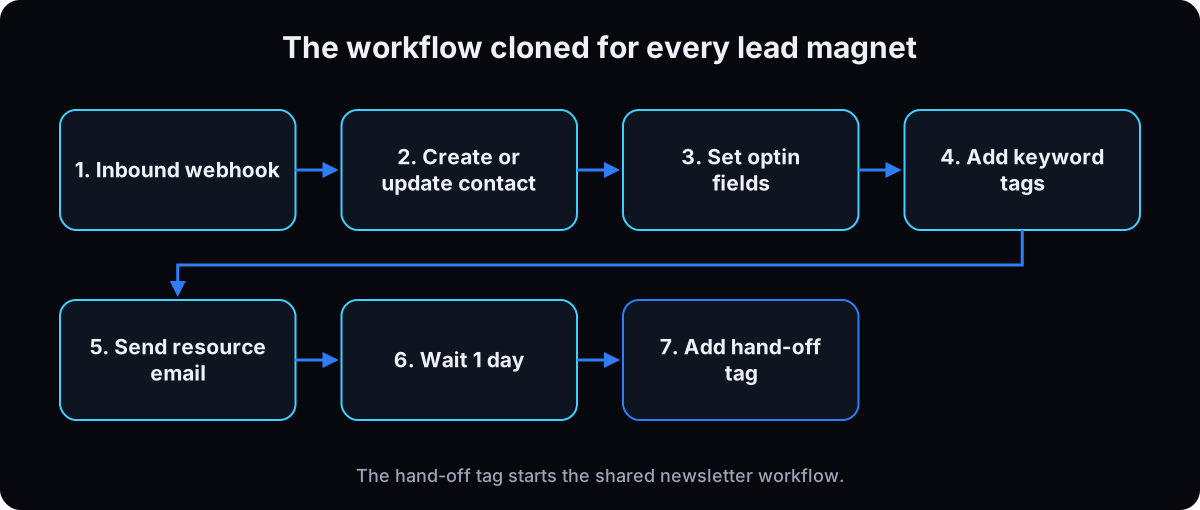 The last node is the trick. Every lead magnet ends by adding one shared hand-off tag, and a single newsletter workflow triggers on it. Build and publish that newsletter workflow first.
Why the 1 day wait: the resource email has to land alone. 2 emails inside a minute reads as a broadcast.
A new lead magnet is a copy with 4 changes: the name, the resource email, the keyword tag and a new webhook trigger. The hand-off tag stays.
Send a sample before you map any field (terminal step)
The inbound webhook trigger can't show a field picker until it has seen a request. Post one sample to the webhook URL first, and mapping becomes a dropdown instead of typing field names from memory. Paste this into Terminal on a Mac with your own URL:
curl -s -X POST "https://services.leadconnectorhq.com/hooks/<LOCATION_ID>/webhook-trigger/<TRIGGER_ID>" -H 'Content-Type: application/json' -d '{"name":"Test Person","email":"you+test@yourdomain.com","source":"instagram-dm","resource":"grok-bot-setup"}'Where clicking stops: the API
GoHighLevel's public V2 API can list workflows but, as of 15 September 2026, documents no endpoint to create one. It reads and writes contacts, opportunities, tags and conversations. So every "automate GHL with AI" demo you've seen drives the internal builder instead.
I've created workflows that way with a script, including a keyword build in September 2026. It works, and it's fragile: triggers must be registered separately or they never display, and premium and third-party nodes can't be set up at all. For most people, build in the UI, keep the shape small so cloning is cheap, and use a webhook as your integration point.
If this happens, do this
Every one of these has happened to me or to someone I set this up for.
| Failure | Fix |
|---|---|
| Nothing fires and nothing says why | It's still a draft. Publish, fire a test, watch the execution log |
| Texts never send | The number isn't A2P approved yet. Check the Trust Center status and wait for approval before testing |
| Emails land in spam or bounce | Finish the dedicated sending domain: all 5 DNS records verified, plus DMARC |
| A caller got 3 texts in 2 minutes | Turn off the Settings version of missed call text back and use the recipe with the tag check (step 6) |
| Clients get every reminder twice | Reminders are on in both the calendar Notifications tab and a workflow. Keep one |
| Warning badge on the tag trigger | The tag doesn't exist yet. Create it, then refresh the page |
| A contact got a text at 3am, or weekend leads wait until Monday | Use the contact's time zone and include weekends in the execution window |
| The no-show workflow never runs | Nobody marks appointments as no-show. Add it to your team's end-of-day routine |
| The wallet drains faster than expected | Check premium action runs and AI usage in billing. A webhook or AI step firing on every contact adds up |
| Field mapping is blank on the webhook | No sample was ever posted. Post one before you map |
| It saved fine and won't publish | Publish checks harder than save. Open each node and re-save it |
The tools I use for this
| Tool | What it is for here | |
|---|---|---|
| GoHighLevel † | The CRM, phone, calendars and workflow builder this whole guide runs in. 14 day free trial. | Start trial |
| GoHighLevel help center | Official setup guides for every trigger, action and pricing detail cited here. | Read |
| Trust Center (A2P 10DLC) | Where your phone number gets registered. Until it's approved, automated texts don't send. | Read |
| Claude | Writes the node list, the text copy and the reminder wording before you open the builder. | Open |
What I'd tell you over coffee
- Start A2P registration and the email domain on day one. They take days, and you can't test a single send without them.
- Build one workflow, test it, delete the test contact, then build the next. Five half-built workflows help nobody.
- When a workflow gets big enough to scare you, split it. 2 workflows joined by a tag run more reliably than one long one.
- Put a calendar reminder 2 days before the trial ends. Decide on purpose, not because billing started.
- Check the wallet after your first week live. The usage fees are where surprises show up, not the plan price.
Questions people ask
What is GoHighLevel?
An all-in-one CRM and marketing platform for small businesses and agencies. One account holds your contacts, pipelines, funnels and websites, calendars, a shared inbox for texts, calls and email, review requests and workflow automation. Agencies run one sub-account per client, and the Agency Pro plan adds SaaS mode for reselling it under your own brand.
How much does GoHighLevel cost?
On the GoHighLevel's pricing page (checked 15 September 2026): Starter is $97 a month, Unlimited $297 and Agency Pro $497, or $970, $2,970 and $4,970 a year. Enterprise is custom. Texts, calls, email, premium workflow actions and AI usage cost extra from a prepaid wallet. See the fee breakdown in the Start here section.
Is there a GoHighLevel free trial?
The official pricing page offers a 14 day free trial with full feature access (checked 15 September 2026). Billing starts automatically when it ends unless you cancel. Longer trials advertised elsewhere couldn't be confirmed on the official page. Usage fees like texts still draw from your wallet during the trial.
Is GoHighLevel worth it?
For agencies with several clients, and for local businesses that live on calls, texts and bookings, usually yes, if someone owns the build. If you only need a contact list, or nobody has time to set it up, a simpler CRM costs less and does more for you on day one.
How do I set up missed call text back in GoHighLevel?
The quick way: Settings, then Phone System, then Voice, then Voicemail & Missed Call Text Back, tick the box and write the message. It texts on every missed call, even repeat calls, so GoHighLevel suggests the workflow recipe instead. Add a tag check and a short wait so each caller gets one text. Full steps are in step 6.
GoHighLevel vs HubSpot: which should I pick?
HubSpot has a free CRM and charges per seat on paid plans, per its pricing page. GoHighLevel charges a flat plan price with unlimited users and contacts, and includes texting, calls, calendars, funnels and review requests. Pick HubSpot for a sales team that lives in email. Pick GoHighLevel for a local business or agency that lives on texts, calls and bookings.
Do I need to know how to code?
No. Everything in steps 1 to 12 is built by clicking. The only terminal step is the optional webhook sample in the lead magnet section, and you can skip it if you use GoHighLevel's own forms.
The free skill
It walks you through setup in dependency order, builds the 5 first workflows (missed call text back, speed to lead, reminders and no-shows, review requests, reactivation), enforces the test-then-delete check, and holds the lead magnet shape you clone per keyword. Related guides: med spa marketing system and how to run a marketing agency.
---
name: ghl-automations
description: Sets up a GoHighLevel sub-account in dependency order and builds the first 5 workflows (missed call text back, new lead speed to lead, appointment reminders and no-show follow-up, review request, reactivation), then the lead magnet workflow shape cloned per keyword. Enforces settings before nodes, tags before triggers, wait before If/Else, and a test contact that gets deleted. Trigger on "build my ghl workflow", "set up gohighlevel", "missed call text back", "why isn't my workflow firing", "clone the resource workflow".
---

# GoHighLevel Setup and First Workflows

Help the user set up GoHighLevel in the right order and build one workflow at a time. Confirm each step before the next. Menu names shift between versions, so use the closest label.

## When to use
- They're new to GoHighLevel, building their first automations, adding a keyword lead magnet, or a workflow isn't firing.

## Before any workflow (in this order)
1. **Plan and profile.** Starter for one business or up to 3 clients, Unlimited for more clients, Agency Pro for SaaS reselling. Fill in the business profile and time zone.
2. **Number and A2P 10DLC.** Buy a local number, register the brand and campaign in the Trust Center. Approval takes days, so start first.
3. **Email domain.** Settings > Email Services > Dedicated Domain. Use a subdomain. Add all 5 DNS records plus DMARC and verify.
4. **Build what workflows reference.** Tags by name (`missed-call`, `new-lead`, `no-show`, `review-sent`, `reactivate`), a calendar, a pipeline (New, Contacted, Booked, Showed), the review link in reputation settings. If workflow A hands off to B, publish B first.
5. **Workflow settings before nodes.** Sender details, the contact's time zone, an execution window that includes weekends, stop on response, re-entry. Rename every node for what it does.

## The first 5 workflows
1. **Missed call text back.** Use the Missed Call Text Back recipe, not the Settings checkbox (it texts on every repeat call). Turn the Settings version off. If/Else on the `missed-call` tag; if absent: add tag, send text, notify team, wait about 20 minutes, remove tag.
2. **Speed to lead.** Trigger on the one form or lead source. Create or update opportunity, add `new-lead`, send SMS with booking link, notify the caller, Wait (the contact to reply, SMS, 1 day timeout), If/Else: replied moves to Contacted; timed out gets one email then one last text.
3. **Reminders and no-shows.** Reminders live in one place only: the calendar Notifications tab, or a workflow (Appointment Status New/Confirmed, Wait for upcoming appointment 1 day and 2 hours before). No-show is its own workflow: Appointment Status = No-show, tag `no-show`, rebook text, wait 2 days, one email. Remind them staff must mark no-shows.
4. **Review request.** Appointment Status = Showed, wait about 2 hours, If/Else on `review-sent`, Send Review Request (SMS or email), add `review-sent`. Ask every client; no incentives, no asking only happy clients (Google policy).
5. **Reactivation.** Smart list of opted-in, unbooked, not-DND contacts. Bulk add `reactivate` to a batch of 50. Trigger Contact Tag added. One text, Wait for reply 3 days, reply notifies team; no reply gets one email, remove tag. Never include people who didn't opt in.

## Lead magnet shape (clone per keyword)
**Newsletter workflow (one, shared, build first).** Trigger: tag added `health-wealth`. Add `newsletter-subscriber`, send issue one.

**Resource workflow (per keyword).** Trigger: inbound webhook (premium, billed per run after 100 free).
1. Create or update contact from `name` and `email`
2. Update fields: optin source, optin resource
3. Add tags `kw-<keyword>`, `ig-dm-lead`
4. Send the resource email
5. Wait 1 day
6. Add tag `health-wealth` (the hand-off)

Post a sample payload before mapping: `{"name":"ZZ_TEST","email":"zz_test@example.com","source":"instagram-dm","resource":"<keyword>"}`. Clone = change name, keyword tag, resource email, new webhook trigger. The hand-off tag stays.

## Test and publish
- A green node means it ran, not that it sent. Fire each workflow the real way with a test contact you control. Check contact, tags, text on phone, email received, pending wait.
- Delete the test contact immediately.
- Publish, fire again, watch the execution log. Draft workflows do nothing and show no error.

## Rules
- Tags before triggers. Settings before nodes. Wait before If/Else (N conditions make N+1 branches). Published, not draft.
- Every text: consent at collection, sender named, working STOP.
- Health businesses: no medical details in forms, texts or notes unless the HIPAA add-on is in place.
- No API keys in workflow nodes. The public V2 API can list workflows but can't create them. Build in the UI.
- Never invent prices. Point to gohighlevel.com/pricing and the help center pricing guide and say when they were checked.
Want it built with you, live, in your account?
A GoHighLevel account does nothing until someone builds it. Inside AI CEO Lab we build these 5 workflows and the lead magnet flow in your own account, and test them before you leave.