 AI CEO Lab
Viktor AI Pricing: What It Costs a Team
Viktor starts at $50 a month for 20,000 credits your whole team shares. Here's what a credit buys, why some teams spend 3 to 4 times that, and how to keep the bill predictable.
Viktor's pricing page says $50 a month. Reviews say $150 to $400. Both are true, and the gap is how you set it up.
Viktor doesn't charge per seat. Your whole workspace shares one pool of credits, and every credit is the AI model cost passed through with no markup, per Viktor's pricing page. So the bill tracks how much work you hand it and how clearly you hand it over.
I run 6 Viktor agents across my agency. This page covers the plans, what a credit buys, where credits leak, and the habits that keep the monthly number close to what you planned. New to Viktor? Start with my Viktor review.
What you have by the end
Not concepts. Things that exist on your machine when you close the tab.
- A clear picture of what you pay for and what a credit buys
- A one-week burn test that tells you which plan fits
- 7 habits that stop credits leaking on re-runs and idle schedules
- A rule for when to move up a plan, and when not to
Start here: how Viktor pricing works
3 facts explain almost every Viktor bill.
You pay per workspace, not per person
Everyone in your Slack or Teams workspace uses the same credit pool. Adding a teammate doesn't add a seat fee. Adding work does add cost.
A credit is the AI model's cost, passed through
Viktor says every credit maps to what Anthropic, OpenAI and other model providers charge, with no platform fee on top. Its own examples: a quick task uses 100 to 300 credits, a complex workflow 500 to 1,500, and a full project 2,000 to 5,000.
The plans
Team plans: $50 a month for 20,000 credits, then $75, $100 and $200 for 30,000, 40,000 and 80,000.
Larger companies: $300 to $5,000 a month for 125,000 to 2 million credits, with bigger tiers above that.
Free trial: $100 in credits with no card, per Viktor. Sign up through my affiliate link and the trial comes with $150.
Rollover: unused monthly credits roll over for one month. Trial and bonus credits don't expire.
Prices checked on viktor.com/pricing on 15 September 2026.
Why real bills run higher
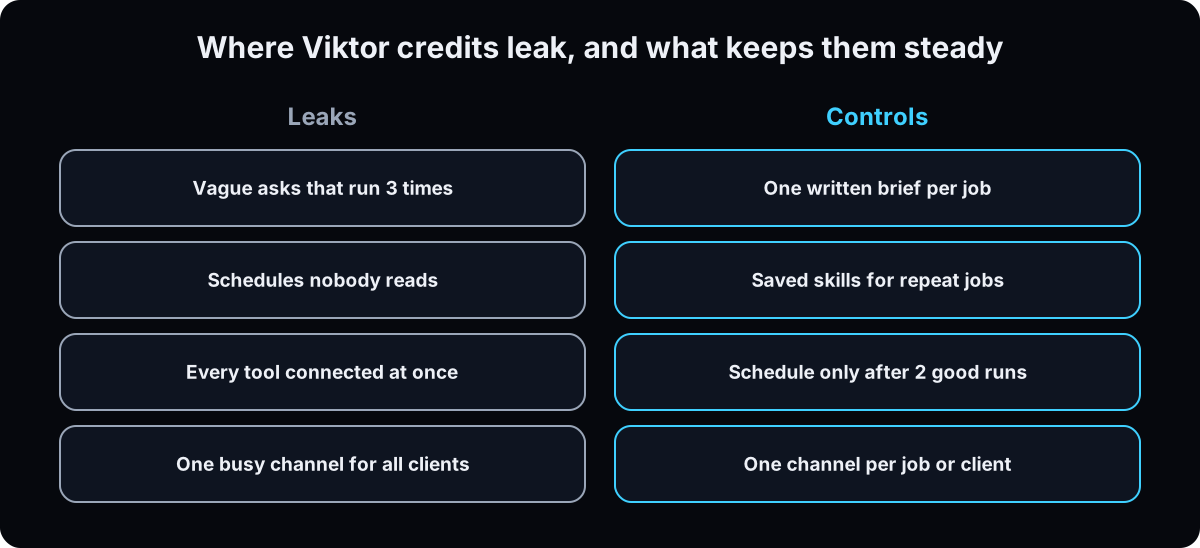 The most common complaint in reviews is credit burn while people learn. One published review describes a team of 5 using 20,000 credits in 36 hours (thisandthat.chat). A competitor's review reports heavy users spending $150 to $400 a month (Lindy, which sells a rival product). The pattern behind both: vague asks, re-runs, and schedules nobody checks.
| Term | What it means |
|---|---|
| Credit | The unit Viktor bills in; it tracks the AI model's cost for the work |
| Workspace | Your Slack or Teams account; everyone in it shares one credit pool |
| Scheduled task | A job Viktor runs on a timer without being asked |
| Skill | Saved instructions for a repeated job, so it doesn't work the steps out again each time |
| Rollover | Unused monthly credits carry into the next month, once |
7 habits that keep the bill predictable
1. Measure one normal week on trial credits
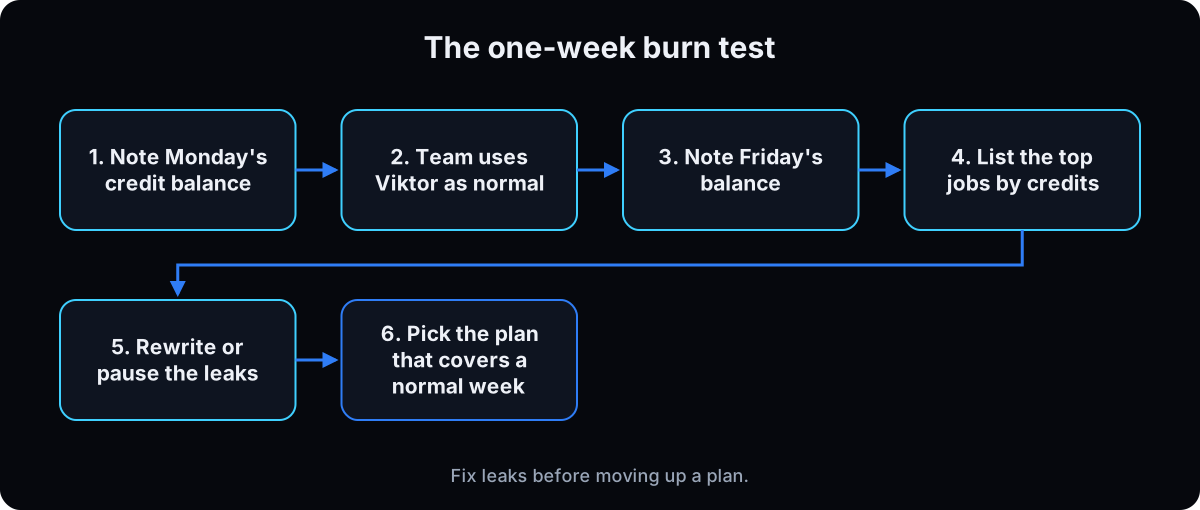 Before picking a plan, note your credit balance on Monday and again on Friday, with your team using Viktor the way they would every week.
Why: the plan that fits is the one that covers a normal week with room to spare, not the cheapest one on the page.
2. Give every job one clear brief
Most wasted credits are re-runs: Viktor does the job, misses what you meant, and does it again. Put the outcome, the source and the format in the first message.
Why: a clear ask runs once. A vague one runs three times.
Job: [what you want done]
Source: [the tool, channel or file to use]
Format: [bullets, table, doc link]
Don't: [what to skip]
Check with me before: [sending, posting or changing anything]
3. Turn repeated jobs into skills
When a job comes back right, ask Viktor to save the steps as a skill for next time. Viktor says it documents what it learns as skills so it works more effectively with your team (viktor.com).
Why: a saved skill skips the trial and error that burns credits on the first run.
4. Schedule only what has worked twice
A daily report that runs broken still spends credits every day. Run a job by hand on 2 different days, and only then put it on a schedule.
Why: scheduled tasks are where quiet credit leaks live.
5. Connect only the tools this week's jobs need
Viktor connects to thousands of tools through one-click sign-in (integrations). Connect the 3 or 4 your jobs use, not everything.
Why: fewer tools means less for it to search through, and less access to worry about.
6. One channel per job or client
Agencies: give each client or each recurring job its own channel, and invite Viktor only where it works.
Why: focused channels give it focused context, so answers come back right the first time. It's also the setup reviewers praise most for account management.
7. Review usage every Friday for a month
Look at which jobs used the most credits and whether each one was worth it. Pause or rewrite the expensive ones before moving up a plan.
Why: moving up a plan fixes a real workload. It doesn't fix a leaky one.
If this happens, do this
Every one of these has happened to me or to someone I set this up for.
| Failure | Fix |
|---|---|
| Trial credits gone in 2 days | Pause schedules, give each job a written brief, and re-measure a normal week |
| The same report runs 3 times | Save the working version as a skill and schedule that |
| Nobody knows what's using credits | Friday review: list the top 5 jobs by credits and cut or rewrite the bottom 2 |
| You upgraded and still run out | Look for re-runs and schedules nobody reads before paying for more |
| Clients share one busy channel | Give each client its own channel and invite Viktor to each one |
The tools I use for this
| Tool | What it is for here | |
|---|---|---|
| Viktor † | The AI employee in Slack or Teams. My link adds $150 in trial credits. | Start free |
| Viktor pricing | The official plans and credit rules. | Read |
| Viktor docs | Setup and integrations documentation. | Read |
Related guides
- Viktor AI review: what it does and how I use it across an agency.
- Set up Viktor in Slack: the first-week walkthrough.
- Grok Bot: the per-person alternative, and when each one fits.
- Viktor vs Claude: Claude Tag, Cowork and Viktor for a team.
Questions people ask
Is Viktor AI free?
There's a free trial: $100 in credits with no card, per Viktor's pricing page. Through my affiliate link the trial includes $150. After that, paid plans start at $50 a month.
How much does Viktor cost per month?
Team plans run $50, $75, $100 and $200 a month for 20,000 to 80,000 shared credits. What you spend depends on how much work you hand it and how clearly. Reviews report heavy users at $150 to $400.
Is Viktor priced per user?
No. Viktor bills per workspace, and the whole team shares one credit pool.
Do unused Viktor credits roll over?
Unused monthly plan credits roll over for one month. Free trial and bonus credits don't expire, per Viktor.
Is Viktor worth it for an agency?
It's worth it when it replaces hours of reporting, inbox triage and client updates that someone does by hand every week. Measure one normal week first, then decide. My full Viktor review covers what I hand it.
The free skill
It runs the one-week burn test with you, writes the brief for each job, and flags the schedules and re-runs using the most credits.
---
name: viktor-credits
description: Keeps a team's Viktor bill predictable. Runs a one-week credit burn test, writes a clear brief for each recurring job, and flags the schedules and re-runs using the most credits. Trigger on "viktor credits", "viktor is expensive", "which viktor plan", "we ran out of credits".
---

# Viktor Credits

Help the user pick the right Viktor plan and stop credits leaking. Viktor bills per workspace in shared credits that track AI model costs (viktor.com/pricing).

## Facts to work from
- Team plans: $50, $75, $100, $200 a month for 20,000, 30,000, 40,000, 80,000 credits.
- Viktor's own ranges: quick task 100 to 300 credits, complex workflow 500 to 1,500, full project 2,000 to 5,000.
- Unused monthly credits roll over one month. Trial and bonus credits don't expire.
- Prices change. Tell the user to confirm on viktor.com/pricing.

## Steps
1. **Burn test.** Record the credit balance at the start and end of one normal week.
2. **List jobs.** For each recurring job: who asks, how often, which tools, roughly how many credits.
3. **Brief each job.** Outcome, source, format, what to skip, what needs approval.
4. **Find leaks.** Re-runs of the same job, schedules nobody reads, broad asks with no source.
5. **Skills.** Any job that came back right gets saved as a skill.
6. **Schedules.** Only jobs that worked twice by hand. Pause the rest.
7. **Plan.** Pick the plan that covers a normal week with room to spare. Fix leaks before upgrading.

## Rules
- Never guess credit numbers. Use what the user measured.
- Don't recommend upgrading until leaks are fixed.
- One channel per job or client.

## Output
A short table: job, credits per week, keep / rewrite / pause, and the recommended plan.
Want it set up so the bill stays predictable?
We set Viktor up across your team and clients: channels, skills, schedules and a usage review, so it saves hours without surprise bills. That's what we do inside AI CEO Lab.