 AI CEO Lab
AI Agent Guardrails: Simple Examples So Your Agent Can't Delete, Spend or Send Without You
Plain examples of AI guardrails: in-app approvals first, then its own identity, a spending cap at the bank, 3 buckets for every action, enforced rules in Claude Code, and a plan for the bad day.

Your agent can send your emails, spend your money and use your computer. It won't be malicious. It'll be confidently wrong at 2am.
In a film with mathematician Hannah Fry, a team gave an agent a card and an inbox. It ran up more than $100 in token costs trying to buy 50 paperclips, never completed the purchase, and leaked passwords onto a public website. Meta's director of AI alignment told an agent to do nothing in her inbox without approval. It deleted more than 200 emails, ignored her typing stop, and she had to run to her computer to pull the plug.
A prompt that says "be careful" is advice. A guardrail is something outside the model that stops the action, whatever the model decides. This guide starts with the approval switches already inside the apps you use, no code needed, then adds the stronger limits in order, and ends with the plan for the bad day.
It's for owners running agents with real access and nobody else checking the work. I'm a doctor who runs 6 Viktor agents for my agency, not an engineer.
What you have by the end
Not concepts. Things that exist on your machine when you close the tab.
- Approvals turned on inside the agent app you use, before any settings file
- A written list of everything your agent can reach, with the cost of the worst case
- Every action sorted into decides alone, drafts and waits, or never, with numbers
- Rules harvested from your real decisions, and the never list enforced outside the prompt
- A tested kill switch and a runbook with real account names
Start here: what AI guardrails are
If you've only used AI in a chat window, 4 ideas make the rest of this guide click.
What a guardrail is
A guardrail is a limit on what an AI agent can do, set somewhere the agent can't talk its way past. Simple examples: an approval pop-up before any email sends, a virtual card with a monthly cap, read-only access to your CRM, a rule in a settings file that blocks deleting files.
A prompt is advice. A guardrail is control.
Writing "never delete anything" in your instructions shapes what the agent tries. It doesn't change what the tool allows. Anthropic's own memory docs say instruction files are context, not enforced configuration, and point you to a hook when something must be blocked every time. Use both: the rules file for judgment, the gate for the things that must never happen.
Why a chat bot needed none and an agent does
A chatbot writes a draft you copy. An agent opens your inbox, your files and your bank tools and takes the step itself. Once it can act, a wrong guess becomes a sent email or a deleted folder. Anything it reads, like a web page or a client's PDF, can also contain instructions aimed at it.
How to set them up without code
Start inside the app. Grok Bot, Viktor, ChatGPT and Claude Cowork all have approval steps before risky actions. Turn those on first, give the agent its own accounts, and cap the money at the bank. Settings files and hooks come later, and only if you use a coding agent like Claude Code.
The catch
Approvals only work if you read them. Gate every small thing and you'll click yes without looking. That's why step 3 sorts actions into 3 buckets, so only the ones that matter ever reach you.
| Term | What it means |
|---|---|
| Guardrail | A limit on an agent's actions that holds whatever the model decides |
| Approval | A pause where the agent shows you the exact action and waits for your yes |
| Blast radius | Everything the agent could damage with the access it has today |
| Deny rule | A line in a settings file that blocks a tool or command outright |
| Hook | A small script that runs before a tool call and can block it |
| Sandbox | An operating system boundary that limits which files and websites commands can reach |
| Prompt injection | Text inside something the agent reads that tries to give it orders |
The mental model
Give it access and write "be careful" in the prompt. If it does something bad, the instructions weren't clear enough.
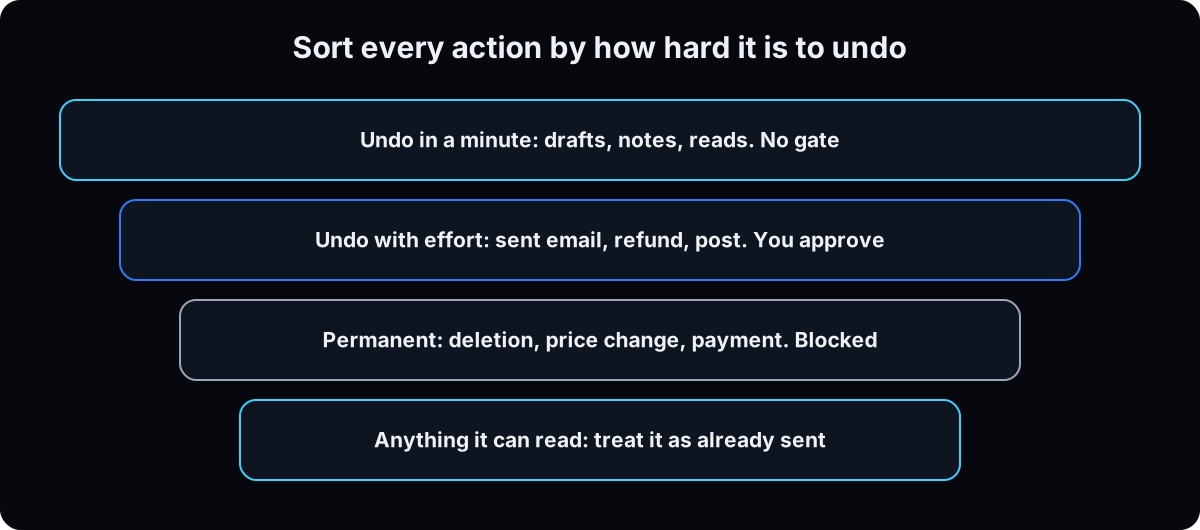 Approvals switched on in the app, an identity that isn't yours, money it can't exceed, read access by default, and limits enforced by something other than the model's cooperation. A rules file is advice. A gate is control.
| Term | What it means |
|---|---|
| Undo in a minute | A draft, a note, a read. No gate. Gating it trains you to click yes |
| Undo with effort | A sent email, a refund, a published post. Needs your approval |
| Permanent | A deletion, a price change, a payment. Blocked outright, not asked |
| Already leaked | Everything it can read. Read-only is a safety control, not a privacy one |
Isn't this overkill for a business my size?
I'm one person with a laptop. Nobody is targeting me.
A payments platform lead said on the record he'd seen a large number of businesses automate much of their operations with agents in a matter of months. The people leaning on agents hardest have nobody checking the work. And the person who lost control of hers does AI alignment at Meta. Size isn't the variable.
- Nobody has to target you. A sentence on a web page or in an email is the attack, and it costs nothing to leave lying around.
Now the part I'd rather not print. Checking the settings for this page, I found a live API token in plain text inside the allow rules on my own machine: 4 pre-approved commands with the key embedded, one against a password-reset endpoint. Nobody wrote that. It piled up from clicking "yes, always". So: allow the script, never the command with the secret in it. Then go read your own allow list, because you've almost certainly never looked.
In this order, because the order is the point
1. Write down what it can reach
List every account, inbox, card, CRM and API it can touch today. Next to each, answer: if it does the worst thing it can do here, what does that cost me in money, client trust and hours?
Why: you'll find a connection you forgot you granted, and you'll see which one item is catastrophic. That's where your effort goes.
2. Turn on the approvals already in your agent app
Do this before any settings file. Every mainstream agent app has an approval step. Set it to ask for anything that sends, posts, spends, deletes or changes permissions.
Grok Bot: open Settings, then General, then Auto-review, and add a Require Approval rule for each risky action. xAI's approvals docs say a Require Approval rule always stops a matching action and wins over Always allow, and that Auto Review is model-based and doesn't replace least privilege. Use Allow once, not Always allow. The Grok Bot setup guide walks this step.
Viktor: Viktor says it asks for confirmation before high-stakes actions like sending emails, and you control which Slack or Teams channels it can read and reply in. Keep it out of channels it doesn't need.
ChatGPT: OpenAI's cloud browser help page says ChatGPT asks for confirmation in chat before actions like confirming a booking or making a payment. Allowing a website doesn't remove that step. Sign in yourself when it pauses.
Claude Cowork: Anthropic's safety guide lists 3 modes: Manually approve, Automatically approve and Skip all approvals. Switch to Manually approve for anything touching sensitive files, accounts or sites, and give it one working folder instead of your whole drive.
Why: it takes 5 minutes, needs no code, and catches the most common bad day: an email or post that went out before you saw it.
Require approval for:
- Sending messages, emails or invites
- Publishing or posting anything
- Purchases, payments or ad spend changes
- Deleting or overwriting files or records
- Changing permissions, logins or CRM records
3. Sort every action into 3 buckets, with numbers
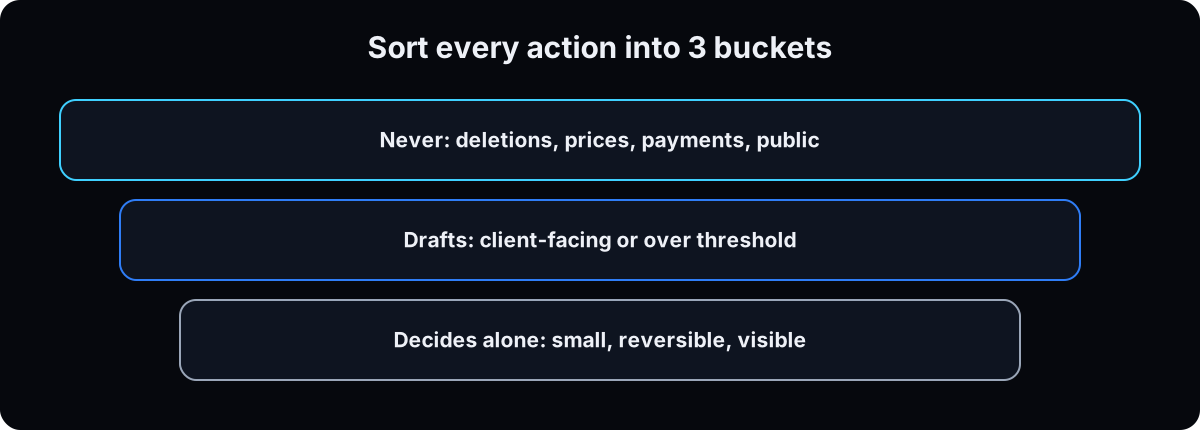 Use how hard it is to undo, not how important it feels. Measure in money or reversibility, not adjectives.
Decides alone: undo in a minute. A draft, a note, a read, a reschedule inside the week. No gate, because gating it trains you to click yes.
Drafts and waits: undo with effort. Anything that reaches a client, a refund, a published post, or anything over your threshold.
Never: permanent. Deletions, price changes, payment details, granting access, mass sends. Blocked at the tool level, so approval never comes up.
Then put a number on the middle bucket. A payments team demoing this on the record used a fixed dollar threshold: refunds under it go through, at or above it a person approves. When the risk is volume, they used a daily rate limit instead. Unsure where something goes? Drafts and waits. Review monthly, move one class up at a time, and write down what would move it back down.
Why: only the middle bucket reaches you, so each approval gets read instead of clicked.
4. Harvest your rules from past decisions
Sit down to write your judgment in one go and you'll get principles that change nothing. For 2 weeks, log every correction you type to the agent instead. A rule earns its place when the agent makes the same mistake twice or you type a correction you typed last session. That's close to Anthropic's own list of when to add something to an instruction file.
Write each rule so removing it would change a decision. An illustrative rule like "Pause any ad set over $40 cost per lead with under 20 conversions in 7 days" beats "manage spend carefully." Give every rule a Why and its exception.
Why: this file makes the agent decide like you. It doesn't stop it acting. Keep it next to the gate, never instead of it.
You got this wrong: [what happened]. I corrected it to: [what I wanted].
Write the rule in 3 parts:
1) The rule in one sentence, concrete enough that 2 people would follow it the same way.
2) Why: what it costs when this goes wrong.
3) How to apply: the exact behavior change and when it triggers.
Then tell me where it belongs: the chat (one-off), my rules file (recurring judgment), or a hard block (must never happen).
5. Give it an identity that isn't yours
A separate email account, not an alias, ideally its own workspace user. Every sign-in and notification goes there. If it's compromised, you close one account. Running several bots? The Grok agents guide covers organizing a team of them.
Same for the computer, from weakest to strongest: a second browser profile (free), a second OS user (free, better), a virtual machine or container (effort), a dedicated machine (costs money).
2 agents on one cloud computer share its files and logins, so that's no boundary.
Why: if the agent's account is compromised or goes wrong, you close one account, not your whole business.
6. Put the money cap at the bank, not in the prompt
Use a virtual card with a hard monthly cap and a per-transaction limit, funded from an account holding only that cap. Never your main card anywhere it can reach.
The other money leak: an agent resends the whole conversation every step, so cost grows with the length of the run. OWASP (the security standards group) calls this unbounded consumption. If you script anything unattended, cap the run with the budget flag.
Why: a cap at the bank holds even when the agent ignores its instructions. A limit in the prompt doesn't.
# caps a non-interactive run. only works with --print
claude --print --max-budget-usd 2.00 "summarise this week's invoices"
7. In Claude Code, write the never list as rules, not prose
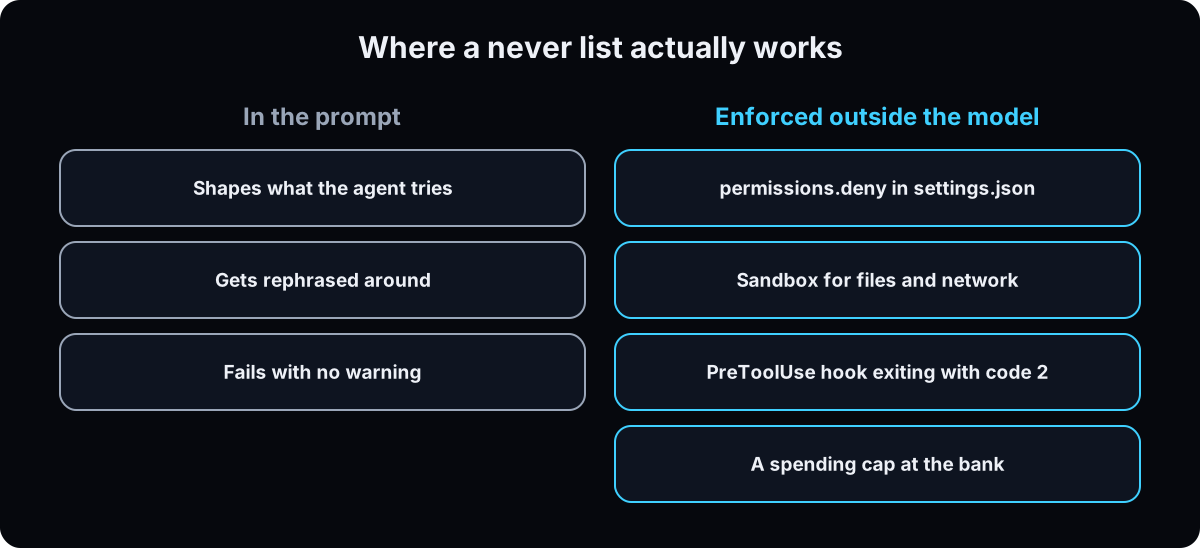 This step and the next 3 are for Claude Code, the coding agent. Instructions in a prompt or a CLAUDE.md shape what the agent tries. They don't change what the tool allows.
So the never list goes in settings.json. Rules run deny, then ask, then allow, and the first match wins. A broad Bash(aws *) deny blocks a narrower Bash(aws s3 ls) allow, so deny rules can't have exceptions.
2 traps: put the * after the subcommand, because Bash(git *) allows every git command while Bash(git log *) allows one. And file paths are only checked on Edit(path) and Read(path). A Write or Glob path rule is accepted and ignored.
Why: settings rules are enforced by Claude Code whatever the model decides.
// ~/.claude/settings.json: the secrets denylist running on my machine
{
  "permissions": {
    "deny": [
      "Read(./.env)", "Read(./.env.*)",
      "Read(**/.env)", "Read(**/.env.*)",
      "Read(**/*credentials*)", "Read(**/*.pem)",
      "Read(**/id_rsa*)", "Read(**/id_ed25519*)"
    ],
    "disableBypassPermissionsMode": "disable",
    "disableAutoMode": "disable"
  }
}

// see every rule and which file it came from
/permissions
8. Assume anything it reads can instruct it
This is prompt injection, OWASP's number 1 risk for AI apps in 2023 and 2025. A web page, an email, a client's PDF or a scraped review can contain text addressed to your agent, and it may act on it.
The danger is 3 things together: private information, internet access, and a way for someone untrusted to give it instructions. Remove any one and you're much safer. Limiting which sites it can reach is usually cheapest.
Whatever you grant an agent, you also grant every helper agent it starts.
Why: you can't read every page it opens, so cut what an injected instruction could reach.
// limit the outside world it can touch
{
  "sandbox": {
    "enabled": true,
    "network": { "allowedDomains": ["github.com", "*.npmjs.org"] }
  }
}
9. Block credentials at the operating system level
Deny rules on Read also cover commands like cat and head. They don't cover a Python or Node script that opens the file itself. For that you need the sandbox, built in on macOS, Linux and WSL2 (on Windows, run inside WSL2).
Open it with /sandbox, then list the files and environment variables commands may not touch in a credentials block. That block needs Claude Code v2.1.187 or later, per the sandboxing docs, so run claude --version first. Set allowUnsandboxedCommands to false for strict mode with no escape hatch.
Why: a key it can't read is a key it can't leak.
// ~/.claude/settings.json
{
  "sandbox": {
    "enabled": true,
    "credentials": {
      "files": [
        { "path": "~/.aws/credentials", "mode": "deny" },
        { "path": "~/.ssh", "mode": "deny" }
      ],
      "envVars": [
        { "name": "GITHUB_TOKEN", "mode": "deny" },
        { "name": "NPM_TOKEN", "mode": "deny" }
      ]
    },
    "allowUnsandboxedCommands": false
  }
}
10. Test the kill switch before the first real task
A log isn't a notification. Send everything to one channel you read later, and have one named type of action interrupt you on your phone the moment it happens.
Then pull the plug once, mid-task, while nothing important runs. For unattended runs, claude --restricted removes the command tools entirely.
For a hard stop the model can't talk past, add a PreToolUse hook: a small script that runs before each tool call. If it exits with code 2, the call is blocked, even when an allow rule matches, and whatever it printed to stderr goes back to Claude as the reason. Test it by asking for the forbidden thing.
Why: the first time you stop an agent shouldn't be the day it matters.
// ~/.claude/settings.json
{
  "hooks": {
    "PreToolUse": [
      { "matcher": "Bash",
        "hooks": [ { "type": "command",
                     "command": "~/.claude/hooks/block_destructive.sh" } ] }
    ]
  }
}

# ~/.claude/hooks/block_destructive.sh  (chmod +x, needs jq)
#!/bin/bash
cmd=$(jq -r '.tool_input.command // empty')
if echo "$cmd" | grep -Eq 'rm -rf|git push --force|DROP TABLE'; then
  echo "Blocked by hook: destructive command. Ask the owner." >&2
  exit 2
fi
exit 0
11. Write the runbook now, while nothing is on fire
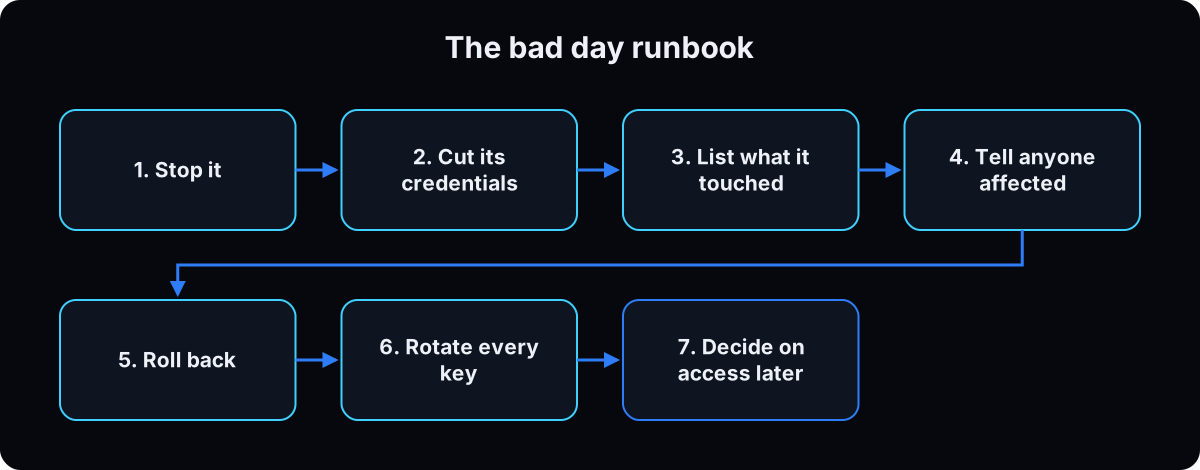 Put this in a file with your real account names, because you won't be composing on the bad day.
1. Stop it before you debug.
2. Cut its credentials, including OAuth grants.
3. List what it touched from the log, not by asking it.
4. Tell anyone affected.
5. Roll back what's reversible.
6. Rotate every key it could read.
7. Decide about access again on a separate day, in writing.
Then work out which rule would have stopped it, and add it.
Why: on the bad day you'll be stressed, and a written list beats memory.
Starter prompts
Paste these as written. They are short on purpose, because the long ones drift.
Here is every action my agent can take today: [list them]. Sort each into exactly one bucket, with a one-line reason. DECIDES ALONE: reversible, small, and visible to me afterwards. DRAFTS AND WAITS: reaches a client, crosses a threshold, or would embarrass me. NEVER: deletions, price changes, payment details, granting access, mass sends, anything public. For every DECIDES ALONE item, propose a number that keeps it there and say whether it's an amount limit or a rate limit. For every NEVER item, tell me the setting that blocks it in my app, not a sentence telling it not to. Unsure means DRAFTS AND WAITS.
Here are the things my agent must never do: [list them]. For each one, don't write me a sentence for a prompt. Tell me which of these enforces it and write the exact configuration: 1) a permissions.deny rule in settings.json, 2) a sandbox credentials entry, 3) a PreToolUse hook that exits with code 2, 4) removing the connector or tool entirely. Deny runs before ask and allow, first match wins, and a deny rule can't have an exception. If an item can only be enforced by option 4, say so.
Here is a real decision from my business last month: [the situation and what I decided]. Answer it twice: first with general best practice only, then with my rules file. List every place the answers differ and name the rule or number that caused it. If they don't differ, tell me which rule is too vague to change anything and rewrite it so it would.
If this happens, do this
Every one of these has happened to me or to someone I set this up for.
| Failure | Fix |
|---|---|
| Approvals are off because the app's default is auto | Switch to Require Approval in Grok Bot or Manually approve in Cowork for risky actions |
| "Be careful" in the prompt is the only guardrail | Move it to permissions.deny or a hook |
| You approve everything without reading it | Too much in the drafts bucket. Raise the threshold, use a rate limit, or promote one class |
| Your main card is on file in a tool it uses | A capped virtual card, and nothing else reachable |
| A narrow allow rule never fires | A broader deny matched first. Deny can't have exceptions |
Bash(git *) allowed a force push | Put the * after the subcommand: Bash(git log *) |
| A deny rule on a file was bypassed by a script | Scripts that open files aren't covered. Use the sandbox |
| You pasted an API key into a chat | Rotate it today, store it by name, and check your allow rules for old ones |
| You bypassed the gate once to ship something | Set disableBypassPermissionsMode to "disable" |
| 2 rules in your file disagree | Delete one. Anthropic's memory docs say Claude may pick one arbitrarily |
The tools I use for this
| Tool | What it is for here | |
|---|---|---|
| Grok Bot approvals | Require Approval rules, Allow once, and the shared-computer boundary. | The docs |
| Viktor † | An AI employee in Slack or Teams that asks before high-stakes actions like sending emails. My affiliate link. | Try it |
| Use Claude Cowork safely | Anthropic's guide to Manually approve mode, deletion prompts and folder access. | The docs |
| Claude Code permissions | deny, ask, allow, the evaluation order, and the modes you can lock out. | The docs |
| The Bash sandbox | OS-enforced filesystem, network and credential isolation. macOS, Linux and WSL2. | The docs |
| OWASP Top 10 for LLM Applications | Prompt injection is LLM01, excessive agency LLM06, unbounded consumption LLM10. The names for what you're defending against. | Open |
What I'd tell you over coffee
- Run
/permissionsright now. Nearly all of that list got there by clicking "yes, always". - Read-only still leaks. Treat whatever it can see as already sent to the model vendor.
- Before you connect a new tool, ask which bucket its worst action falls in. If it's never, don't connect it until the block is in place.
Questions people ask
What are examples of AI guardrails?
An approval pop-up before an agent sends an email, posts or pays. A separate email account for the agent. A virtual card with a monthly cap. Read-only access to your CRM. A deny rule in a settings file that blocks reading password files. A script that blocks delete commands before they run.
Can an AI agent delete my data?
Yes, if it has write access. In one reported case, an agent deleted more than 200 emails after being told to wait for approval. Give it read-only access by default, turn on approval for deletes, and block permanent actions at the tool level. Claude Cowork, for example, asks before permanently deleting files, per Anthropic's safety guide.
How do I set AI agent permissions?
Start in the app: Require Approval rules in Grok Bot's Auto-review settings, Manually approve mode in Claude Cowork, and only the Slack or Teams channels Viktor needs. Connect only the tools it uses this week. In Claude Code, add deny rules to settings.json and check them with /permissions.
Do I need guardrails for Grok Bot or Viktor?
Yes. Both can act in your real tools. In Grok Bot, add Require Approval rules and remember all your Bots share one computer and its logins, so separate Bots are no security boundary, per xAI's docs. Viktor asks before high-stakes actions, but you still decide which channels and accounts it can reach.
What's the difference between a prompt and a guardrail?
A prompt tells the agent what you want, and it can misread, forget or be talked out of it. A guardrail sits outside the model, like an approval step, a spending cap or a deny rule, and stops the action whatever the model decides.
The free skill
It audits what your agent can reach, turns on the in-app approvals first, sorts every action into decides alone, drafts and waits, or never, and walks the permission ladder from read-only to one earned write. It ends with a checklist you can rerun, so the bad day has a plan instead of a panic.
---
name: agent-guardrails
description: Audits and sets up an AI agent so it can't hurt its owner. Lists what it can reach, sorts actions by how hard they are to undo, then sets its own email and browser profile, a capped virtual card, read-only access by default, an approval gate before any live write, secrets by name, a log, a kill switch and an incident runbook. Starts with in-app approvals (Grok Bot, Viktor, ChatGPT, Claude Cowork) before any settings file, sorts actions into decides alone, drafts and waits, or never, and harvests rules from real corrections. Trigger on "audit my agent setup", "is my agent safe", "give my agent access to", "set up a new agent safely", "ai guardrails", "give my agent my judgment", "make my agent decide like me".
---

# Agent Guardrails

Permission to analyse is not permission to act. A rules file is advice. A gate is control. Help the user decide what the agent can see, propose and change before it does anything. Go one step at a time and don't reassure them.

## 1. List what it can reach
Ask for every account, inbox, card, file share, CRM, ad account and API the agent can reach today. Prompt for the forgotten ones: OAuth grants clicked through, a logged-in browser profile, a card saved in a tool, a shared drive.

For each, write one line: the worst thing it could do there today, the rough cost in money, client trust and hours, and how hard it is to undo. Finish with the 3 costliest items and the cheapest change that shrinks each.

## 2. Turn on the approvals already in their app (no code)
Do this before any settings file.
- **Grok Bot:** Settings, General, Auto-review. A Require Approval rule for sends, posts, spend, deletes, permission or CRM changes. Require Approval beats Always allow; Auto Review is model-based and doesn't replace least privilege (docs.x.ai/grok-bot/approvals-security-and-privacy). Allow once, not Always allow. All their Bots share one computer and its logins.
- **Viktor:** asks for confirmation before high-stakes actions like sending emails (viktor.com). Limit which Slack or Teams channels it reads and replies in.
- **ChatGPT:** asks for confirmation in chat before actions like a booking or payment; allowing a site doesn't remove that step (help.openai.com cloud browser article). They sign in themselves.
- **Claude Cowork:** Manually approve mode for sensitive files, accounts or sites; one working folder, not the whole drive; it asks before permanently deleting files (support.claude.com, Use Claude Cowork safely).

## 3. Sort every action into 3 buckets, with numbers
- **Decides alone / undo in a minute** (a draft, a note, a read): no gate. Gating it trains them to approve without reading.
- **Drafts and waits / undo with effort** (anything client-facing, a sent email, a refund, a post, anything over the threshold): approval, with a written threshold. Use an amount limit, or a rate limit when the risk is volume. Revisit monthly.
- **Never / permanent** (a deletion, a price change, payment details, granting access, mass sends): blocked at the tool level, never asked.
- Unsure: drafts and waits. Promote one class at a time, and write down what would demote it.
- **Already leaked:** anything it can read counts as sent to the model vendor.

## 4. Harvest rules from real corrections
Don't write principles at a desk. For 2 weeks, log every correction typed to the agent. A rule earns its place when the agent makes the same mistake twice or the owner retypes a correction from last session. Each rule gets: the rule (concrete enough that 2 people follow it the same way), Why, How to apply, and its exception. Test every line: would removing it change a decision? If not, cut it. If 2 lines contradict, ask which goes. The file makes the agent decide like them; it never grants permission.

Turn a correction into a rule:
> You got this wrong: [what happened]. I corrected it to: [what I wanted]. Write the rule in 3 parts: the rule in one sentence, Why, How to apply. Then say where it belongs: the chat (one-off), the rules file (recurring judgment), or a hard block (must never happen).

Test a rule:
> Here is a real decision from last month: [situation and what I decided]. Answer it twice, with general best practice and with my rules file. List where the answers differ and which rule caused it. If they don't differ, rewrite the vaguest rule so it would.

## 5. The 5 setup rules, in order
1. **Its own email address.** A separate account, not an alias. Every sign-in, OAuth grant and notification goes there.
2. **A capped wallet.** A virtual card with a hard monthly cap and a per-transaction limit, funded from an account holding only the cap. Nothing else on file anywhere it can reach.
3. **Read only first.** Every integration starts as read. Writes need an explicit human flag per run.
4. **Nothing personal.** Its own browser profile, OS user or machine. Never a logged-in personal browser, Apple ID, phone number, bank, health records or photos. If a task needs something personal, the task is wrong.
5. **An approval gate for every live write.** Sends, publishes, spends and record changes need an exact yes on the exact action. Gates are code or a human, never a line in the prompt.

Then: secrets referenced by name in an env file or store (a pasted key is a rotated key), one channel logging every action and who approved it, a separate alert for one named type of action, and a kill switch tested once mid-task.

## 6. Enforce it (Claude Code)
- The never list goes in `settings.json` `permissions.deny`, not prose. Order is deny, then ask, then allow. First match wins. Deny rules can't have exceptions.
- Put `*` after the subcommand: `Bash(git log *)`, not `Bash(git *)`. File path rules only apply to `Read(path)` and `Edit(path)`.
- Set `disableBypassPermissionsMode` to `"disable"`.
- Scripts that open files aren't covered by deny rules. Use `/sandbox` to limit network domains, and a `sandbox.credentials` block to deny credential files and environment variables (needs Claude Code v2.1.187 or later; check `claude --version`).
- A `PreToolUse` hook script that exits with code 2 blocks the call even against an allow rule; what it prints to stderr goes back to Claude as the reason. Use exit code 2 only, and test it by asking for the forbidden thing.
- Cap unattended runs with `--max-budget-usd` (with `--print`) or use `--restricted`.
- Read the existing allow list. Allow the script, never a command with a secret in it.
- Outside Claude Code, the guardrail is the tool that isn't registered, a step limit on every run, and a log the agent can't write to.

## 7. The permission ladder
| Level | Can | Cannot |
| --- | --- | --- |
| Read | approved data, summaries, proposals | change anything |
| Propose | drafts of sends, budgets, records | send them |
| Approve | a human gives an exact yes | anything not named |
| Execute | the one permitted action, capped, logged | anything else |

Start every agent at Read. Earn one write at a time after weeks of good proposals. For each write, define the exact yes, the cap, what's logged, how it's revoked, and what it must never do even with permission. Test the gate with a wrong yes. Test revoking it mid-task.

## 8. The incident runbook
Fill this in with their real account names now:
1. Stop it before debugging.
2. Cut its credentials, including OAuth grants.
3. List what it touched from the log, not by asking the agent.
4. Tell anyone affected.
5. Roll back what's reversible.
6. Rotate every key it could read.
7. Decide about access again on a separate day, in writing.

End with: which rule would have prevented this, and where that rule has to live to hold.

## Audit checklist
- [ ] In-app approvals on for sends, posts, spend, deletes and permission changes
- [ ] Every action sorted into decides alone, drafts and waits, never, with numbers
- [ ] Rules harvested from logged corrections, each one tested
- [ ] Reach list written, with a cost per line
- [ ] Separate email account and browser profile or machine
- [ ] Capped virtual card, no other payment method reachable
- [ ] Integrations read-only unless flagged per run
- [ ] No personal accounts, devices or data in reach
- [ ] Approval gate in code or a human before any send, publish, spend or record change
- [ ] Secrets stored by name, none in chat history
- [ ] Log channel with every action and its approver
- [ ] Kill switch tested once
- [ ] Runbook filled in
What done looks like at thirty days
- What it can reach is written down, with a cost against every line
- Permanent actions are blocked in settings, not asked about in a prompt
- The kill switch has been pulled once, and the runbook has real names in it
Want the guardrails built into your agent from day one?
Every agent we set up inside the AI CEO Lab starts read-only with its own identity. The 3 Day AI Bootcamp walks the setup with these rules built in.