 AI CEO Lab
Grok Bot Alternatives: 6 AI Agents Compared for Teams
Viktor, Hermes Agent, OpenClaw, Claude, ChatGPT workspace agents and Lindy: where each one runs, what it costs per person or per workspace, who it suits, and the catch nobody puts on the pricing page.
Grok Bot is a strong personal agent. People look for alternatives for 3 reasons: it's priced per person, your team talks to it in its own app instead of where they already work, and all of your Bots share one computer, which xAI says isn't a security boundary.
This page compares 6 alternatives on the same 5 questions: what it is, where it runs, how it's priced, who it's best for, and the catch. Every price comes from the vendor's own site, checked 15 September 2026.
I'm a doctor and agency owner, not an engineer. I run 6 Viktor agents across my agency, I've used Grok Bot, and I moved off Hermes because it cost me hours I didn't have. Looking for OpenClaw alternatives or Hermes Agent alternatives? Both are on this list, and the other 5 options apply to you too.
What you have by the end
Not concepts. Things that exist on your machine when you close the tab.
- A plain-English picture of 6 AI agents and how they differ
- One comparison table with verified prices and the catch for each
- A rule for picking by where your team already works
- A short list of 1 or 2 tools worth a trial this week
Start here: how to compare AI agents
If you've only used ChatGPT or Grok chat, 3 ideas make this comparison easy.
A chatbot answers. An agent does the steps.
Ask a chatbot for a client update and it writes one for you to paste. Ask an agent and it pulls the numbers, drafts the update in your tools, and waits for your yes before sending. Every tool on this page is an agent in that sense. My Grok Bot guide explains agents from zero.
Where it runs decides who does the upkeep
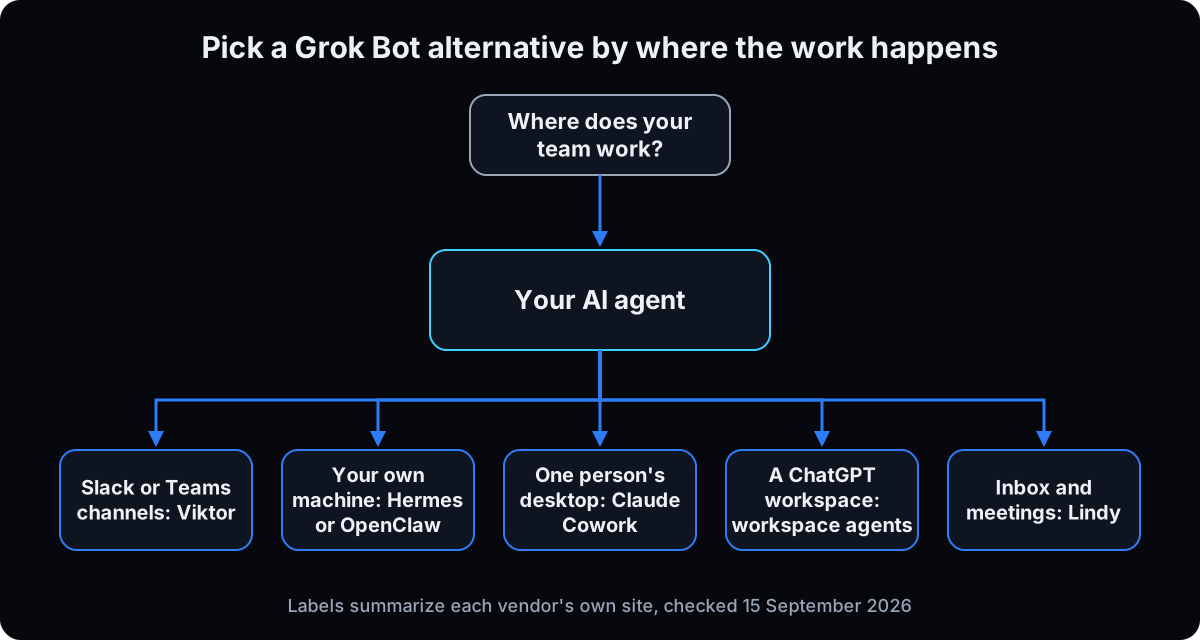 Hosted tools (Viktor, Claude, ChatGPT, Lindy, Grok Bot) run in the vendor's cloud. You sign up and connect your apps.
Self-hosted tools (Hermes Agent, OpenClaw) are free, open-source software you install and run on your own machine or server. You own the setup, the updates, the security and the model bills.
How you pay: per person, per workspace, or model costs
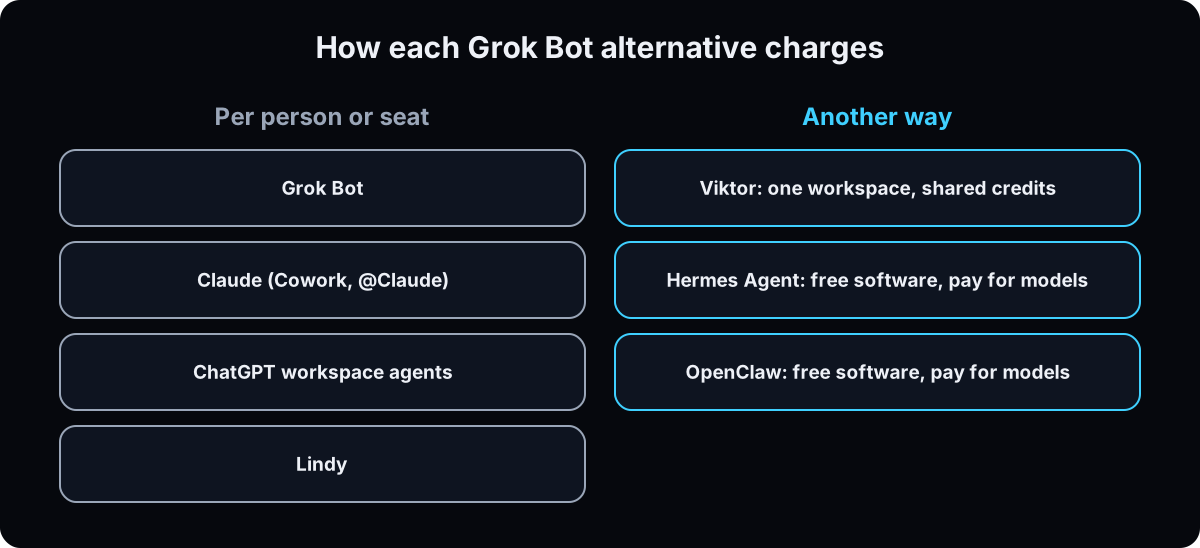 Per person: Grok Bot, Claude, ChatGPT and Lindy charge for each seat.
Per workspace: Viktor charges once for your whole Slack or Teams workspace, with shared credits.
Model costs only: Hermes Agent and OpenClaw are free software, but the AI models they call are not.
For one person, per-person pricing is often cheapest. For a team, the unit you pay for matters more than the sticker price.
The catch with all of them: access
An agent that can send email or change a CRM can do it wrong. Whatever you pick, turn on approvals for sends, posts, payments and deletes before you connect anything important. Here's how to set those guardrails.
| Tool | Where it runs | How it's priced (checked 15 Sep 2026) | Best for | The catch |
|---|---|---|---|---|
| Viktor | Inside Slack or Microsoft Teams, hosted | Per workspace: $50 to $200 a month for 20k to 80k shared credits | Teams that already work in Slack or Teams | Credits burn fast while you learn; lives only in Slack or Teams |
| Hermes Agent | Your computer or server; desktop apps and a Linux install | Free (MIT). Pay your model provider, or Nous Portal from $20 a month in credits | Technical owners who want full control | You set it up and keep it running |
| OpenClaw | Your Mac, Windows or Linux machine | Free (MIT), no hosted tier. Pay for the models you connect | Tinkerers who want an agent in WhatsApp, Telegram or iMessage | Your machine, your security, your updates |
| Claude (Cowork and @Claude) | Claude desktop app; @Claude in Slack | Pro $20 a month; Team $25 per seat monthly ($20 annual) | Owners who want an agent on their own desktop | @Claude in Slack is beta and needs a Team or Enterprise plan |
| ChatGPT workspace agents | ChatGPT, deployable to Slack channels | Business $25 per seat monthly ($20 annual), 2 to 200 people | Teams already on ChatGPT Business | Needs a paid Slack plan and admin setup first |
| Lindy | Hosted; Slack threads, inbox, meetings, iMessage | $29.99, $99.99 or $199.99 per user a month, credits pooled | Inbox, meeting and follow-up heavy teams | Priced per user, so cost grows with headcount |
| Grok Bot (for reference) | Grok Bot app with its own cloud computer | Included with Cursor Pro ($20) and up, or SuperGrok ($30) and up | One owner running their own work | Per person; all your Bots share one computer |
| Term | What it means |
|---|---|
| Agent | AI that takes steps in your tools, not only writes answers |
| Hosted | The vendor runs it in their cloud; you sign up and connect apps |
| Self-hosted | You install and run it on your own computer or server |
| Open source (MIT) | Free software anyone can use, change and run |
| Seat | One person's paid place on a plan |
| Credits | The unit some tools bill in, tied to how much work the AI does |
Why is Viktor first when Hermes and OpenClaw are free?
Hermes Agent and OpenClaw cost nothing. Why would a team pay for Viktor?
Free software isn't a free agent. The price moves from the invoice to your model bills and your calendar.
- Self-hosted agents still call paid AI models, so you pay per use either way.
- Someone on your team installs, updates, secures and fixes it. For me, that was hours I didn't have, which is why I moved off Hermes.
- Viktor sits in the Slack or Teams channels your team already uses, with no server to maintain and one bill for the workspace.
If you enjoy running your own stack, the free tools win. If your time is the scarce thing, a hosted per-workspace tool usually wins.
The 6 alternatives, one by one
1. Viktor: best for teams that work in Slack or Teams
What it is: an AI employee that lives in Slack or Microsoft Teams. Your team asks it for work in channels and threads, and it asks for approval before sensitive actions (viktor.com).
Where it runs: hosted, inside your Slack or Teams workspace. Viktor lists 3,200+ integrations with one-click sign-in, and keeps multiple accounts for the same tool separate (integrations). It reports SOC 2 Type 1, with Type 2 in progress.
Pricing: per workspace. Team plans are $50, $75, $100 and $200 a month for 20,000 to 80,000 credits the whole team shares. Credits are model costs passed through, and unused monthly credits roll over one month (viktor.com/pricing, checked 15 September 2026). The trial is $100 in credits with no card, or $150 through my affiliate link.
Best for: agencies and small teams with client or job channels in Slack or Teams.
The catch: credits burn fastest in the first weeks, while people learn to brief it. My Viktor pricing guide covers how to keep that down. And if your team doesn't use Slack or Teams, it isn't for you.
Why it's first: it's the only option here that bills once for the whole workspace and works inside the channels your team already reads. I run 6 Viktor agents this way. My full Viktor review.
2. Hermes Agent: best for owners who want full control
What it is: an open-source personal agent from Nous Research with persistent memory, skills and scheduled jobs (hermes-agent.nousresearch.com).
Where it runs: on your computer or a server. There are desktop apps for macOS and Windows and a terminal install for Linux, and you reach it through Telegram, Discord, Slack, WhatsApp, Signal, email or the command line.
Pricing: the software is free under the MIT license. You pay a model provider, or use Nous Portal: a free tier with free models only, or Plus $20, Super $100 and Ultra $200 a month, where each paid tier includes its price in monthly credits plus a 10% bonus.
Best for: a technical owner who wants their agent, memory and data on their own hardware.
The catch: you're the IT department. Setup, updates, security and fixing what breaks are on you. That's why I moved off it. My Hermes setup guide shows what the work involves.
Why it made the list: it keeps your agent, memory and data on hardware you control, for owners who can't or won't send client data to a hosted service.
3. OpenClaw: best for tinkerers who want an agent in their messaging apps
What it is: an open-source AI assistant that handles inbox, calendar and errands, reached from the chat apps you already use (openclaw.ai). It's run by the OpenClaw Foundation, a US non-profit.
Where it runs: on your own Mac, Windows or Linux machine, with its state stored there. It connects to 29 channels, including WhatsApp, Telegram, Slack, Signal and iMessage, and a team can share one gateway.
Pricing: free under the MIT license. The site says there's no subscription and no hosted tier. You bring and pay for the AI models it uses.
Best for: someone comfortable running software who wants a personal assistant in WhatsApp or iMessage.
The catch: it runs on your machine, so the uptime, updates and security are yours. Looking for OpenClaw alternatives? Hermes Agent is the closest self-hosted pick, and Viktor or Lindy are the hosted ones.
Why it made the list: it reaches you in the chat apps you already use with no subscription, if you're willing to run and secure it yourself.
4. Claude (Cowork and @Claude): best for owners who want an agent on their desktop
What it is: Anthropic's Claude has 2 agent options. Claude Cowork works across your files and tools from the Claude desktop app, and can run scheduled tasks while you're away (Claude Cowork). @Claude is a Slack app you tag in threads, in beta (@Claude for Slack).
Where it runs: Cowork in the desktop app for macOS, Windows, ChromeOS and Linux. @Claude inside Slack.
Pricing: Cowork is included from Claude Pro, $20 a month billed monthly or $17 a month billed annually. @Claude needs a Team or Enterprise plan. Team seats are $25 a month billed monthly ($20 annually), or Premium seats at $125 ($100 annually), for 2 to 150 people (claude.com/pricing).
Best for: an owner who does document-heavy work on their own computer.
The catch: Cowork is one person's agent, and paid plans have usage limits that reset on a 5-hour window plus weekly limits. For a team in Slack, you need Team seats for everyone and a beta app.
Why it made the list: if you already pay for Claude, Cowork adds an agent without adding another vendor.
5. ChatGPT workspace agents: best for teams already on ChatGPT Business
What it is: OpenAI's workspace agents let a team build a shared agent in ChatGPT, connect it to other systems, and deploy it to Slack channels, where it can answer, do tasks and post on a schedule (ChatGPT Agents app in Slack). ChatGPT's pricing page also lists ChatGPT Work, with limited desktop access on Free and expanded access on Plus and Business.
Where it runs: in ChatGPT, with the ChatGPT Agents app bringing agents into Slack.
Pricing: workspace agents come with ChatGPT Business, $25 per seat a month billed monthly or $20 billed annually, for 2 to 200 people. Premium seats are $125 ($100 annually). Enterprise is custom (chatgpt.com/pricing).
Best for: a team that already pays for ChatGPT Business and wants agents in Slack.
The catch: the Slack app needs a paid Slack plan and a Business, Edu or Enterprise ChatGPT account, and an admin has to set up Slack before members can build agents. Every person is still a seat.
Why it made the list: if your team already pays for ChatGPT Business, workspace agents add a shared agent in Slack without a new tool.
6. Lindy: best for inbox and meeting-heavy teams
What it is: a hosted AI assistant that works in Slack threads, manages inboxes, records meetings and handles prep and follow-up, with approvals built in (lindy.ai/pricing).
Where it runs: hosted, in Slack, email, meetings and iMessage.
Pricing: per user. Plus is $29.99 a month with 3,000 credits, Pro $99.99 with 15,000, Max $199.99 with 35,000. Every seat's credits go into one shared pool, and Lindy pauses and tells you when the pool runs low. There's a 7-day free trial, and Enterprise adds HIPAA compliance with a signed BAA.
Best for: teams whose bottleneck is email, meetings and follow-ups.
The catch: you pay per user, so a team of 5 on Plus is $149.95 a month before anyone upgrades. Lindy also publishes reviews of competitors like Viktor, so read its comparisons knowing it sells a rival.
Why it made the list: its focus is email, meetings and follow-ups, with approvals built in.
7. When Grok Bot is still the right pick
Stay on Grok Bot if you're one owner running your own work, you like talking to Bots in their own app, and you want an agent with its own cloud computer that keeps going with your laptop closed. It's included from Cursor Pro at $20 a month (x.ai/bot, checked 15 September 2026). My Grok Bot pricing guide covers every plan, and Hermes vs OpenClaw vs Grok Bot goes deeper on those 3.
Why: an alternative only helps if it fixes a problem you have. If per-person pricing and a separate app aren't problems for you, switching costs more than it saves.
If this happens, do this
Every one of these has happened to me or to someone I set this up for.
| Failure | Fix |
|---|---|
| You picked a free agent and now spend weekends fixing it | Count your hours as cost. Move the team's jobs to a hosted tool and keep the self-hosted one for experiments |
| Your team never opens the agent's app | Pick a tool that works in the channels they already read, like Slack or Teams |
| The bill doubled when you hired 2 people | You're on per-seat pricing. Price a per-workspace tool before adding seats |
| The agent sent something it shouldn't have | Turn on approvals for sends, posts, spend and deletes before reconnecting it |
| You're trialing 4 tools at once and learning none | Pick 1 or 2 from the table and run the same 3 real jobs through each for a week |
The tools I use for this
| Tool | What it is for here | |
|---|---|---|
| Viktor † | AI employee in Slack or Teams, billed per workspace. My link adds $150 in trial credits. | Start free |
| Hermes Agent | Open-source personal agent from Nous Research. | Docs |
| OpenClaw | Open-source assistant you run on your own machine. | Open |
| Claude pricing | Plans that include Cowork and @Claude. | Read |
| ChatGPT pricing | Business seats that include workspace agents. | Read |
| Lindy pricing | Per-user plans with pooled credits. | Read |
| Grok Bot | xAI's agent app, for comparison. | Open |
Related guides
- Hermes vs OpenClaw vs Grok Bot: the 3 personal agents head to head.
- Grok Bot setup guide: what an agent is and how to set up your first one.
- Viktor review: how I run 6 Viktor agents across an agency.
- Hermes setup guide: what running your own agent involves.
Questions people ask
What is the best alternative to Grok Bot?
It depends on where your team works. For a team in Slack or Microsoft Teams, Viktor bills once per workspace and works in your channels. For full control on your own hardware, Hermes Agent or OpenClaw. For one person's desktop, Claude Cowork.
What are the best OpenClaw alternatives?
Hermes Agent is the closest self-hosted alternative: also free and open source, with memory, skills and messaging apps. If you'd rather not run software yourself, Viktor (Slack or Teams) and Lindy (inbox and meetings) are hosted options.
What are good Hermes Agent alternatives?
OpenClaw if you want to stay self-hosted and free. Grok Bot or Claude Cowork if you want a hosted personal agent with no server. Viktor if the agent is for a team working in Slack or Teams.
Is there a free alternative to Grok Bot?
Hermes Agent and OpenClaw are free, open-source software under the MIT license. You still pay for the AI models they use, and you run and maintain them yourself.
What is the best AI agent for Slack?
Viktor is built to live in Slack and bills per workspace. ChatGPT workspace agents and Lindy also work in Slack but charge per seat, and Claude's @Claude Slack app is in beta for Team and Enterprise plans.
The free skill
It asks where your team works, how many people need the agent and how much upkeep you'll accept, then shortlists 1 or 2 of these tools with current list prices and a one-week trial plan.
---
name: grok-bot-alternatives
description: Shortlists the right AI agent for a business team from Viktor, Hermes Agent, OpenClaw, Claude (Cowork and @Claude), ChatGPT workspace agents, Lindy and Grok Bot. Asks where the team works, headcount and upkeep tolerance, then recommends 1 or 2 with list prices and a one-week trial plan. Trigger on "shortlist my ai agent", "grok bot alternatives", "openclaw alternatives", "hermes agent alternatives", "best ai agent for slack".
---

# Grok Bot Alternatives

Help the user pick 1 or 2 AI agents worth trialing. Pick by where the team already works, then by pricing unit and upkeep.

## Facts to work from (checked 15 September 2026, confirm before quoting)
- **Viktor:** AI employee in Slack or Microsoft Teams, hosted. Per workspace: $50/$75/$100/$200 a month for 20k/30k/40k/80k shared credits; credits are model costs passed through; monthly credits roll over one month. Trial $100 credits, $150 via ref.viktor.com/emeka-ajufo (affiliate). 3,200+ integrations, approval before sensitive actions, SOC 2 Type 1 (Type 2 in progress). Catch: early credit burn; only for Slack or Teams users.
- **Hermes Agent (Nous Research):** MIT open source. Desktop apps for macOS and Windows, Linux terminal install; Telegram, Discord, Slack, WhatsApp, Signal, email, CLI. Pay a model provider or Nous Portal (Plus $20, Super $100, Ultra $200 a month in credits plus 10%). Catch: you maintain it.
- **OpenClaw:** MIT, OpenClaw Foundation non-profit, no subscription or hosted tier. Runs on your Mac, Windows or Linux machine; 29 channels incl. WhatsApp, Telegram, Slack, Signal, iMessage. Catch: your machine, security and model bills.
- **Claude:** Cowork (desktop app, scheduled tasks) from Pro $20 monthly ($17 annual). @Claude Slack app is beta, Team or Enterprise only. Team seats $25 monthly ($20 annual), Premium $125 ($100). Limits reset on a 5-hour window plus weekly limits.
- **ChatGPT workspace agents:** ChatGPT Business $25 per seat monthly ($20 annual), Premium $125 ($100), 2 to 200 people. Slack app needs a paid Slack plan and admin setup.
- **Lindy:** per user $29.99/$99.99/$199.99 with 3k/15k/35k credits into one shared pool; pauses when low; 7-day trial; Enterprise has HIPAA with BAA. Lindy sells a competitor to Viktor.
- **Grok Bot:** included from Cursor Pro $20 or SuperGrok $30; per person; all Bots share one cloud computer (not a security boundary).

## Steps
1. **Where they work.** Slack, Teams, email and meetings, WhatsApp or iMessage, or one person's desktop.
2. **Headcount.** How many people need it. Multiply per-seat prices; compare with Viktor's single workspace price.
3. **Upkeep.** Would anyone install, update and secure software? If no, drop Hermes and OpenClaw.
4. **Compliance.** Health data: flag which vendors offer a BAA on their own pages (Lindy Enterprise does); never assume.
5. **Shortlist.** 1 or 2 tools with the reason and the catch. Viktor first for Slack or Teams teams; Grok Bot or Claude Cowork for a solo owner; Hermes or OpenClaw for someone who wants control.
6. **Trial plan.** Same 3 real jobs through each tool for one week, approvals on for sends, posts, spend and deletes.

## Rules
- No invented prices or features. Say where to check if unsure.
- Always say when a non-Viktor option is the better pick.

## Output
A table: tool, monthly cost for their team, where it runs, catch. Then the shortlist and the one-week trial plan.
Want help picking and setting up the right agent?
We look at where your team works, pick the agent that fits, and set it up with approvals, channels and routines so it saves hours from week one. That's what we do inside AI CEO Lab.