 AI CEO Lab
Hermes Agent: What It Is and How to Set It Up Without the Mess
An honest look at Hermes Agent: who it's right for, what it costs to run, and the setup order that holds, starting with the desktop app.
Hermes Agent is free to download. Running it isn't free. You pay for the AI model, and you pay in hours: installs, updates, logins and fixes. One r/hermesagent member titled their post took me 3 months to connect it, almost quit twice.
I've run Hermes on my own machine. It worked. I moved my chief of staff off it because the upkeep cost me hours I should have spent on clients. I still use it to debug and build. So this guide starts with an honest check on whether Hermes fits you, then gives the setup that holds for people who want it: the desktop app first, the hosted option second, the terminal last.
I'm a doctor, not an engineer, and this guide assumes you've never installed an agent. New to Hermes? Start with the next section. Already installed? Skip to step 5.
What you have by the end
Not concepts. Things that exist on your machine when you close the tab.
- A clear yes or no on whether Hermes is worth your hours
- Hermes running in one place: the desktop app, Hermes Cloud or a terminal install
- One AI model connected, with a plain idea of what it costs
- Approval rules and a message allowlist set before it can act
- A 10-minute proof task that shows it works
- A short SOUL.md, a small memory, and Hermes on your phone
- One skill and one scheduled job that arrive without you asking
Start here: what Hermes Agent is and whether it's right for you
If you've only used ChatGPT or Claude in a browser, these ideas make the rest of the guide easy.
What Hermes Agent is
Hermes Agent is open-source agent software from Nous Research, released under the MIT license, per the official site. It runs on a computer, uses tools like files, a browser and a terminal, remembers you between conversations, and runs scheduled jobs. You can talk to it in the desktop app, the terminal, or from your phone through Telegram, Discord, Slack, WhatsApp or Signal.
Hermes isn't an AI model. It's the software around the model. You plug in the model you want: Claude, GPT, Grok, Gemini or a free one.
How it differs from ChatGPT
Ask ChatGPT for a research brief and it writes one for you to copy. Ask Hermes and it searches, saves the file to a folder on your machine, and messages you on Telegram when it's done. It can also do that every weekday at 8am without you opening anything.
That's the upside and the risk. Something that can act for you can also act wrongly, so approvals come before connections in this guide.
How it works
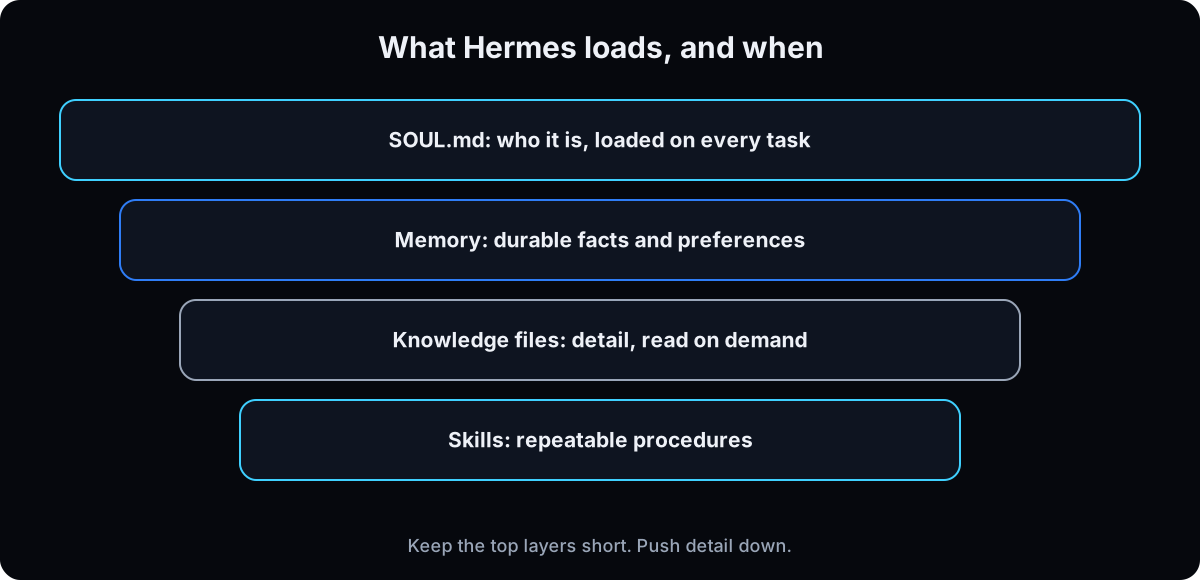 Every conversation, Hermes loads a short personality file (SOUL.md) and a small memory about you. It reads longer knowledge files only when a task needs them, and follows skills, which are saved instructions for jobs it repeats. A gateway connects it to your messaging apps, and cron runs jobs on a schedule. The model you connect does the thinking, and you pay that model's provider for it.
Is Hermes right for you?
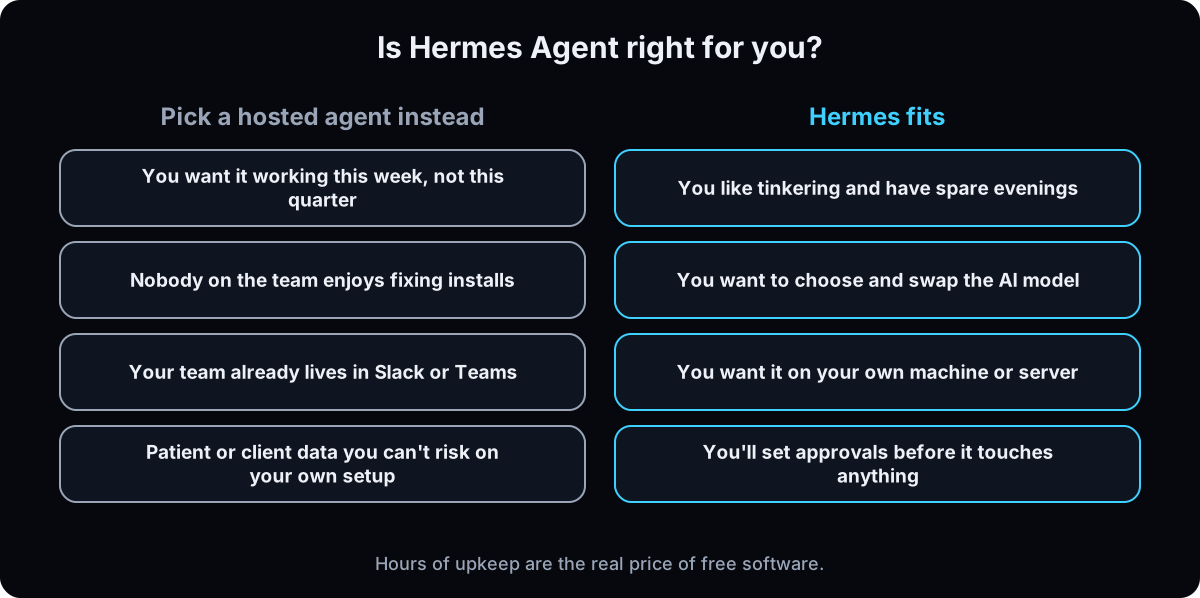 Answer honestly. If most of your answers sit on the left, don't start with Hermes. A non-technical team gets more from a hosted agent: compare the options in Hermes vs OpenClaw vs Grok Bot, or see Viktor if your team already works in Slack or Teams. That's where I ended up for my agency.
If most of your answers sit on the right, Hermes gives you control no hosted tool does. Keep reading.
The catch
Free software still costs money and time. Model usage is billed by the provider you pick, and a long, chatty conversation on an expensive model adds up fast (step 5 shows real prices). Self-hosted also doesn't mean private: when Hermes uses a cloud model, what you send goes to that provider on every message. And on your own machine, nobody else keeps it updated, backed up or safe. That job is yours.
| Desktop app | Hermes Cloud | Terminal install | |
|---|---|---|---|
| Setup | Download an installer, click through | Deploy in one click from Nous Portal | Paste one command, then a setup wizard |
| Cost to run it | Free app. You pay for the model | Medium instance $0.56 a day running, plus model use | Free. A rented server is extra |
| Runs when you're away | No. It stops when you quit the app | Yes, around the clock | Yes, if the machine stays awake and the gateway is installed as a service |
| Who keeps it running | You | Nous hosts the server. You own the setup | You |
| Best for | Trying Hermes this week | Always-on without a spare computer | People who want full control |
| Term | What it means |
|---|---|
| Agent | AI that takes steps in your tools, not only answers questions |
| Model | The AI that does the thinking, like Claude or GPT, billed by its provider |
| Provider | The company or service you connect a model through, like Nous Portal, OpenRouter or Anthropic |
| Tokens | The small chunks of text models are billed by, priced per million |
| Nous Portal | Nous Research's account for models, tools and Hermes Cloud, billed from one credit balance |
| Hermes Cloud | Hermes hosted by Nous on a cloud instance that stays on |
| Terminal | The text window where you type commands on your computer |
| VPS | A rented server that stays on when your laptop is closed |
| SOUL.md | The short file Hermes loads on every task: who it is and how it works |
| Memory | Short, lasting facts about you that Hermes keeps between conversations |
| Skill | Saved instructions for a job, so Hermes repeats it the same way |
| Gateway | The part of Hermes that connects it to Telegram and other messaging apps |
| Pairing | Approving who is allowed to message your Hermes |
| Approvals | Rules that make Hermes stop and ask before risky commands |
| Profile | A separate Hermes agent with its own memory, personality and model |
| Cron | A schedule that runs a job at set times without you asking |
| FileVault | The Mac's disk encryption, which protects your files if the machine is taken |
The mental model
Hermes vs Claude. One giant instruction file. Ten tool connections on day one.
 Hermes is the car. Claude, GPT and Grok are drivers you plug in, and you pay each driver by the mile. Give it the smallest correct context for the task in front of it, then check the result.
| Role | Talks to you | Job |
|---|---|---|
| Chatbot | Only when you open it | Answers. You still do the work |
| Hermes | In the desktop app, the terminal, or on your phone through Telegram | Uses your tools, reports back, and runs scheduled jobs |
How do I safely give Hermes access to my accounts?
It's connected to my accounts and running while I'm asleep. What stops it doing something stupid?
Only the limits you set, so set them on day one. The Hermes security docs and this guardrails guide go deeper.
- Its own accounts. A separate email and browser profile. It never signs in as you.
- Read only until it earns write. Widen access after you've watched it work for a week.
- Approval on anything that sends, spends or deletes. It drafts, you press send.
- A capped card, never your real one.
- Keys in a file, never in a conversation.
~/.hermes/.env, orhermes secretsto pull them from Bitwarden or 1Password at startup. Anything pasted into a chat stays in that chat's history. - FileVault stays on. If you need Hermes up after a power cut without anyone logging in, use Hermes Cloud or a rented server rather than weakening the Mac (step 10).
- No patient or client records on the machine.
It proposes, you approve. And remember: self-hosted doesn't mean private. Point it at a cloud model and your data goes to that provider on every message. If data can't leave the building, you need a local model, and that's a different guide with different hardware.
Day 0: from zero to a Hermes that works
1. Pick where it runs (one only)
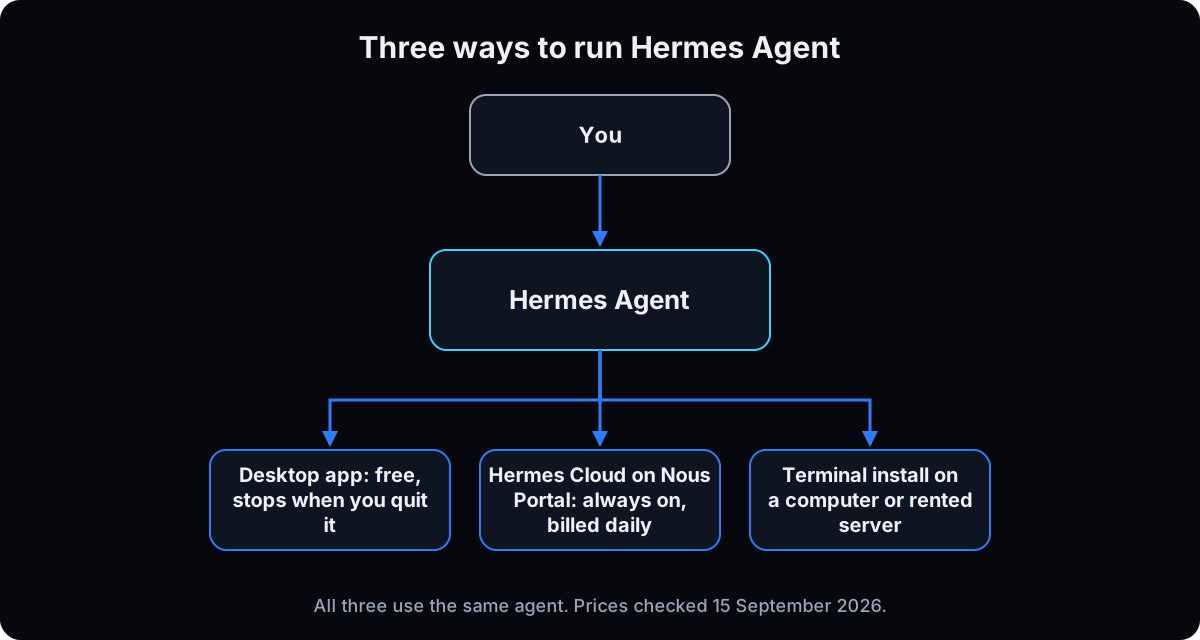 Desktop app: the easiest start. No terminal. It stops working when you quit the app.
Hermes Cloud: Nous hosts Hermes for you so it runs around the clock. Right when you want always-on without a spare computer.
Terminal install: on your own computer or a rented server. Most control, most upkeep.
The table in the section above compares them. Use your pick for 2 weeks before you switch.
Why: every switch means redoing logins, memory and messaging. Two setups at once doubles the upkeep that makes people quit.
2. The no-code path: install Hermes Desktop
Download the installer from the Hermes Desktop page. Per the install docs, the Mac version is Apple silicon only, and Windows 10 and 11 get an installer too. Intel Macs are not supported. On Linux, use the terminal path in step 4.
Open the app. The first screen asks you to pick a provider and model, or choose Choose provider later to look around first. Settings in the app cover providers, models, messaging and scheduled jobs, per the Desktop docs. No account is needed to run the base app.
Watch out: the Desktop docs say its built-in backend stops when you close the app. Fine for learning. For jobs that run while you sleep, you'll need step 3 or step 4 later.
Why: you learn what Hermes does before you take on a server or a terminal. Menu names can shift between versions. If a label doesn't match, look for the closest one.
3. The hosted path: Hermes Cloud on Nous Portal
Sign in at Nous Portal. It's one account for models, hosted tools and Hermes Cloud. Plans, checked 15 September 2026:
Free: $0, free models only.
Plus: $20 a month with $22 in credits.
Super: $100 a month with $110 in credits.
Ultra: $200 a month with $220 in credits.
Hermes Cloud needs $2 in credits or an active subscription to deploy. A Medium instance costs $0.56 a day while running, which is about $17 over 30 days. Large is $1.09 a day. A stopped instance costs $0.03 a day. Model and tool use are billed on top, from the same credits, and the instance is billed once a day for what it used.
Why: this is the always-on option without owning a server. You still own the approval rules, what you connect, and the model bill.
4. The terminal path (optional, for people who want control)
Skip this if steps 2 or 3 work for you. A terminal is the text window where you type commands: Terminal on a Mac, PowerShell on Windows. You paste one line, press Enter, and the installer fetches what Hermes needs. The install docs say Git is the only thing you need first, and the installer adds Python, Node.js and the rest.
The Mac installer is Apple silicon only. Then run doctor: it tells you what's missing now instead of failing 3 steps later with something cryptic.
Why: this is the path for a rented server or a spare always-on machine, and every step after this shows the commands if you chose it.
# Mac (Apple silicon), Linux or WSL2
curl -fsSL https://hermes-agent.nousresearch.com/install.sh | bash

# Windows PowerShell
iex (irm https://hermes-agent.nousresearch.com/install.ps1)

# then, in a new terminal window
hermes --version
hermes doctor          # what is missing
hermes doctor --fix    # let it repair what it can
hermes desktop         # optional: add the desktop app later
5. Connect one model, and know what it costs
Pick one way to pay for the model. The providers docs list these, checked 15 September 2026:
Nous Portal: one login for hundreds of models, paid from your plan's credits.
Claude: log in with a Claude Max subscription, or use an Anthropic API key. Claude Pro can't use the login path.
ChatGPT: log in with your OpenAI account.
OpenRouter: one key for many models, pay as you go.
Models charge per million tokens, the small chunks of text they read and write. Two real examples from OpenRouter, checked 15 September 2026: Claude Sonnet 5 is $2 per million tokens in and $10 per million out. DeepSeek V4.1 Flash is $0.15 in and $0.60 out. That gap is more than 13 times on input.
Free models exist, with limits: OpenRouter's rate limits page allows 50 free-model requests a day until you've bought at least 10 credits, then 1,000. An agent can use several requests on one task. The docs also say agent work needs a model with at least 64,000 tokens of context.
Why: the model bill is the cost that surprises people. Every message resends the conversation so far, so one endless thread on an expensive model costs the most. Keep keys in a file, never in a chat message or a screenshot.
hermes model           # pick provider and model
hermes portal          # or log in to Nous Portal
hermes chat            # say hello: does it answer, remember, know today's date?
hermes insights        # check usage after a few days
6. Set approval rules before it touches anything
Hermes has an approval system for risky commands. Per the security docs, the default smart mode lets a second model judge risk and auto-approve low-risk commands. Manual asks you every time. Start on manual for your first week. Never use YOLO mode, which skips approvals.
Lock who can message it too. When a stranger messages your bot, they get a pairing code, and nothing happens until you approve it. hermes pause is the emergency stop for scheduled jobs.
Why: your written rules tell Hermes to wait. The approval system stops it even when it forgets. Use both.
hermes config edit                 # set approvals mode to manual for week one
hermes approvals test "rm -r ~/Documents"   # dry run: would this be blocked?

hermes pairing list
hermes pairing approve telegram <code>

hermes pause                       # emergency stop
hermes resume
7. Run the 10-minute proof task
Paste this into Hermes with the brackets filled in. If it saves a real file, you're installed. Stop there for tonight. Don't add 10 tool connections.
Why: a small task with no accounts attached shows you how it thinks while mistakes are still cheap. Everything after this builds on something that already works.
Research [TOPIC] for my business as a [ROLE] selling [OFFER] to [IDEAL CLIENT].
Save a short markdown brief to [FOLDER PATH].
Tell me the file path when it's written.
Do not invent numbers. If a fact is missing, label it unknown.
8. Write a short SOUL.md, then let it grill you once
SOUL.md is the file Hermes loads on every task. Test every line: would it change behaviour on a random task? If not, cut it. The same discipline applies to a CLAUDE.md file.
Then paste the free skill at the bottom of this page into Hermes and say "grill me for hermes". It asks one question at a time, then saves lasting facts to memory, which Hermes keeps small on purpose. Detailed documents go in a knowledge folder with a README that says what's where.
Why: SOUL loads on every task, so every extra line costs tokens and attention. A short SOUL and a small memory stop you re-explaining yourself without the week-two bloat.
# Identity
You are [AGENT NAME], the personal operator for [YOUR NAME].
Your main job is to [PRIMARY OUTCOME].

# Operating style
- Be direct, practical, and honest.
- Inspect files and state before assuming.
- If information is missing, ask one focused question.

# Quality
- Do not claim success until you verified the result.
- Never invent metrics, quotes, or medical claims.

# Safety
- Never expose secrets.
- Ask before destructive, public, financial, or customer-facing actions.

# Communication
- Concise. Lead with the result, blocker, or decision needed.
9. Put it on your phone
In the desktop app, set up messaging in Settings. On the terminal path, run the commands below. The messaging docs cover Telegram, WhatsApp, Signal and more. Approve yourself with the pairing code, and nobody else.
The install flag is the one that matters: without --start-on-login, the gateway runs until the next restart and then quietly doesn't.
Why: an agent you can reach from your pocket is one you use. An agent you have to sit at a desk for gets forgotten.
hermes gateway setup                      # Telegram, WhatsApp or Signal
hermes gateway install --start-on-login   # starts again after each login
hermes gateway status
hermes send --to telegram "test from hermes"
10. Always-on Mac? Stop it sleeping, and keep FileVault on
Only for a terminal install on a Mac you leave running. A sleeping Mac isn't always-on. The flags below are in the pmset manual page.
Leave FileVault, the Mac's disk encryption, on. It stops someone reading the disk without your password. The trade: with FileVault on, Apple turns automatic login off, so after a power cut the Mac waits at the login screen and Hermes stays offline until someone logs in. If that's a problem, move the always-on work to Hermes Cloud or a rented server instead of weakening the Mac.
Why: overnight jobs and morning briefs need a machine that's awake. Encryption protects everything else on it.
sudo pmset -a sleep 0          # never sleep
sudo pmset -a disksleep 0      # never spin the disk down
sudo pmset -a autorestart 1    # power back on after a power cut

pmset -g | grep -E "sleep|autorestart"   # you want sleep 0 and autorestart 1
11. One skill, one scheduled job
Turn one weekly repeat into a skill with a clear note on when to use it (why the trigger note matters). Connect one tool with the least access that works, like drafting email instead of sending it. Then add one scheduled job. In the desktop app, Bot Mode calls these Routines.
Why: this is the moment Hermes stops being something you open and starts being something that arrives. One job you read beats five you ignore.
hermes cron create "0 8 * * 1-5" "Morning brief: today's calendar or say calendar \
not connected, top 3 priorities from memory, one risk to watch. \
Do not invent meetings or revenue." \
  --name "Morning brief" --deliver telegram

hermes cron list
12. Once it works, add a cheap second profile
A profile is a separate agent with its own memory, personality and model. Use an expensive model for planning and judgment, and a cheap one for summaries and lookups. Name them like people.
A profile isn't a security wall. Your computer's permissions and containers control access, not profiles.
Why: boring work on a cheap model is the easiest saving there is, and each profile carries only its own history.
hermes profile create money   --description "watches invoices and bills"
hermes profile create content --description "drafts and repurposes"
hermes profile list

# or drop the effort on a single run
hermes -m <cheap-model> --reasoning low -z "summarise this week's invoices"
If this happens, do this
Every one of these has happened to me or to someone I set this up for.
| Failure | Fix |
|---|---|
| You spent a weekend and it still doesn't work | Go back to the check at the top. If upkeep is the problem, a hosted agent is a fair answer, not a failure |
| Nothing ran overnight | The desktop app was closed, the Mac slept (step 10), or the gateway wasn't installed with --start-on-login |
| Offline after a power cut | FileVault kept the Mac at the login screen. Log in, or move always-on jobs to Hermes Cloud or a server |
| A bill far bigger than expected | One endless conversation on an expensive model. One job per session, a cheap profile for boring work, and check hermes insights in week one |
| Free model keeps stopping | Free models have daily request limits. Buy a small amount of credit or switch to a low-cost paid model |
| Install fails on a Mac | Intel Macs aren't supported. Use Hermes Cloud or a Linux server |
| A giant SOUL.md | Keep only lines that change behaviour on a random task |
| Memory used as a document dump | Facts and preferences only. Documents go in the knowledge folder |
| Keys pasted in chat | Move them to ~/.hermes/.env or hermes secrets, then get a new key from the provider |
| It did something you didn't approve | Set approvals to manual, never use YOLO mode, keep outbound email draft-only, and use hermes pause |
The tools I use for this
| Tool | What it is for here | |
|---|---|---|
| Hermes Desktop | The no-terminal way to install and use Hermes on Mac, Windows or Linux. | Download |
| Hermes docs | Official install, security, messaging, skills and cron documentation. | Read |
| Nous Portal | One account for models, hosted tools and always-on Hermes Cloud. | Open |
| OpenRouter | Pay-as-you-go access to many models, with prices listed per model. | Prices |
| Telegram | The simplest way to reach your Hermes from your phone. | Open |
| Viktor † | A hosted AI employee inside Slack or Teams, for teams that don't want to maintain an agent. | Try |
Pro tips
- Start with three small loops. The top answer on r/hermesagent's beginner thread suggests one chat that answers from a folder of yours, one daily scheduled job, and building from there. Good advice for week one.
- One conversation per subject. A single endless thread is the most expensive habit here.
- Run
hermes doctorwhenever something feels off. Faster than guessing. - Leave it alone once it works. Tinkering is why these setups break.
- Count your hours, not only the bill. After 2 weeks, add up the time you spent fixing Hermes against the time it saved. If fixing wins, a hosted agent is the cheaper tool.
Questions people ask
Is Hermes Agent free?
The software is free and open source under the MIT license. You pay for the AI model you connect, unless you use free models with daily limits, and for any server you rent. Nous Portal plans are $0, $20, $100 or $200 a month, checked 15 September 2026.
What is Hermes Agent used for?
Personal operator work: research briefs saved to files, email triage, a morning brief on Telegram, reminders, and repeat jobs saved as skills that run on a schedule. It uses tools on a computer rather than only answering in a chat window.
Does Hermes Agent run when my computer is off?
Not on that computer. The desktop app stops when you close it. For always-on, use Hermes Cloud on Nous Portal, which starts at $0.56 a day for a Medium instance plus model use (checked 15 September 2026), or install it on a rented server or a Mac that never sleeps.
What's the best cheap model for Hermes Agent?
There's no single best, and prices change often. Compare current per-token prices on OpenRouter or Nous Portal, and pick a model with at least 64,000 tokens of context. As a price example checked 15 September 2026, DeepSeek V4.1 Flash cost $0.15 per million input tokens against $2 for Claude Sonnet 5. Many people plan on a stronger model and run routine jobs on a cheaper one.
Is Hermes Agent safe?
It's as safe as the limits you set. Keep approvals on manual at first, lock messaging to your own account with pairing, keep keys out of chats, give it its own accounts, and never run YOLO mode. The security docs also block writes to sensitive folders like ~/.ssh by default.
Can I install Hermes Agent on Windows?
Yes. Windows 10 and 11 get a desktop installer, or you can install from PowerShell. The platform support page notes a few features aren't available on Windows. Intel Macs aren't supported at all.
Hermes Agent vs OpenClaw: which should I use?
Both are free, self-hosted agents that you keep running. Hermes also offers a hosted option through Nous Portal. The full comparison, including Grok Bot and Viktor for teams, is in Hermes vs OpenClaw vs Grok Bot.
The free skill
A personal Hermes starter skill. It checks whether Hermes fits you before you invest the hours, then runs the grill-me interview, writes a short summary of you for memory, and drafts a map of knowledge files. It refuses to dump the whole interview into SOUL or memory, and never saves keys. Related: AI agent guardrails.
---
name: hermes-grill-me
description: Helps a user start a personal Hermes Agent without week-two bloat. First checks honestly whether Hermes fits them or a hosted agent would serve them better. Then interviews them one question at a time and writes a short preference summary for memory and a README map of knowledge files, keeping SOUL.md short. Never dumps the interview into memory or SOUL and never saves secrets. Trigger on "grill me for hermes", "set up my hermes memory", "interview me for hermes", "is hermes right for me".
---

# Grill me for Hermes

Use this after Hermes is installed and answers a message. The goal is lasting context without week-two bloat: memory holds facts, knowledge files hold detail, SOUL stays short.

## When to use
- A new personal Hermes needs to learn the user.
- Memory feels empty, wrong or stuffed with documents.
- The user isn't sure Hermes is worth the upkeep.
- Not for a one-off research job that changes no lasting preference.

## Step 0: the fit check (ask these first, one at a time)
1. Do you enjoy fixing software setups, or do you want it working this week?
2. Does your team already work in Slack or Microsoft Teams?
3. Will you handle patient or client data you can't risk on your own setup?
4. Will you keep approvals on and connect tools slowly?

If the answers point to "wants it working now", "team in Slack or Teams" or "sensitive data", say so plainly and suggest comparing hosted options at /guides/hermes-vs-openclaw-vs-grok-bot or /guides/viktor. Continue only if the user still wants Hermes.

## Before the interview
Confirm where things are written and what's enabled, so you don't edit the wrong profile.

```
hermes profile list
hermes memory status
hermes skills list
```

Check approvals are on. For the first week, suggest manual mode. Never suggest YOLO mode.

## The interview
Ask one question at a time. Wait for the answer. Follow up only when an answer is vague. Cover:

1. Who they are and what they do
2. Who they serve
3. Their offers
4. This week's priorities
5. The tools they use
6. How they want you to talk to them
7. Their hard no's
8. What success looks like in 30 days

Stop after 8 to 12 answers. More questions make a longer transcript, not better memory.

## What to write
Write only these 3 things.

**1. Memory summary.** Short lasting facts and preferences. One line each:
> Name and role: [ ]
> Serves: [ ]
> Offers: [ ]
> Current priority: [ ]
> Tools: [ ]
> Talk to me: [tone, length, format]
> Hard no's: [ ]
> 30-day success: [ ]

**2. Knowledge map.** A README listing the knowledge files worth creating, one line on what each holds and when to read it. Without the map, Hermes never opens the folder.
> knowledge/README.md
> - offers.md: pricing and packages. Read when drafting sales or client messages.
> - [file]: [what it holds]. Read when [trigger].

**3. SOUL edits, usually none.** Only propose a SOUL.md line if it would change behaviour on almost every task. SOUL loads on every task, so every line costs tokens.

## Rules
- One question at a time.
- Never dump the full interview into memory, SOUL or knowledge.
- Memory is facts and preferences, not documents or transcripts.
- Never store API keys, passwords or secrets in memory, SOUL, knowledge or this output. Keys belong in `~/.hermes/.env` or `hermes secrets`. If the user pastes a key in chat, tell them to get a new key from the provider.
- Never make up metrics, revenue, patient volume or medical claims. If a fact is missing, mark it unknown.
- No patient information anywhere.
- Anything that sends, posts, spends or deletes waits for the user's yes.
- Show the user all 3 outputs before saving anything, and save only what they approve.

## If this happens
- They answer in paragraphs: pull out one line per fact for memory, put the detail in a knowledge file.
- Memory already holds documents: propose moving them to knowledge files and replacing them with one-line facts.
- They want everything in SOUL: apply the test. Would it change behaviour on a random task? If not, it goes elsewhere.
- They worry about the bill: suggest one conversation per subject, a cheaper model for routine jobs in a second profile, and `hermes insights` after a few days.

## Done when
The fit check was answered, memory has a short fact summary, a knowledge map exists or is proposed, SOUL stayed short, and nothing secret was saved.
Want an agent that doesn't cost you evenings?
I moved my chief of staff off Hermes because upkeep ate hours I needed for clients. Inside AI CEO Lab we pick the agent that fits how you work, set the approvals, and build the first useful job together.