 AI CEO Lab
Grok Bot Pricing: Every Plan and What a Team Pays
Grok Bot has no price tag of its own. It comes with a Cursor or SuperGrok plan from $20 a month, with usage that resets weekly. Here's every plan, why usage drains, and what a team of 5 pays.
Search for Grok Bot pricing and you won't find a Grok Bot price. You pay for a Cursor or SuperGrok plan, and Grok Bot comes with it, per Cursor's Grok Bot plans and billing page.
The cheapest paid route is Cursor Pro at $20 a month. What changes as you pay more is how much weekly usage you get. Neither xAI nor Cursor publishes that usage as a number, so the plan names are the only guide.
I've used Grok Bot for my own work and I run 6 Viktor agents across my agency. This page covers every plan, how usage limits work, what drains them, and what a team of 5 pays. New to Grok Bot? Start with my Grok Bot setup guide.
What you have by the end
Not concepts. Things that exist on your machine when you close the tab.
- Every plan that includes Grok Bot, with its price and usage tier
- A clear picture of weekly usage, on-demand usage and the monthly limit
- The habits that make weekly usage last
- A side-by-side cost for a team of 5, per person vs per workspace
Start here: how Grok Bot pricing works
4 facts explain almost every Grok Bot bill. Prices checked on x.ai/bot and cursor.com/pricing on 15 September 2026.
There's no separate Grok Bot subscription
Grok Bot is xAI's app for AI agents that work on their own cloud computer. You get it through a plan you may already have. Per Cursor's Grok Bot plans and billing page, access is included with Cursor Pro, Pro+, Ultra and Cursor Teams seats, or by linking an individual SuperGrok, SuperGrok Plus, SuperGrok Heavy or X Premium+ subscription.
Usage is metered on your Cursor account, even when it comes from a SuperGrok link.
Heads up: xAI's get started page lists a shorter set of plans. xAI's teams page names Cursor's billing page as the canonical plan list, so that's the one used here.
The plans, and what each one buys
The table below lists every plan with its monthly price and its Grok Bot usage tier, in the words Cursor uses. SuperGrok Lite doesn't include Grok Bot, and SuperGrok Team or Enterprise accounts can't be linked. X Premium+ can be linked, but its price isn't on the Grok Bot page, so check X's own subscription page.
Usage resets weekly, then on-demand takes over
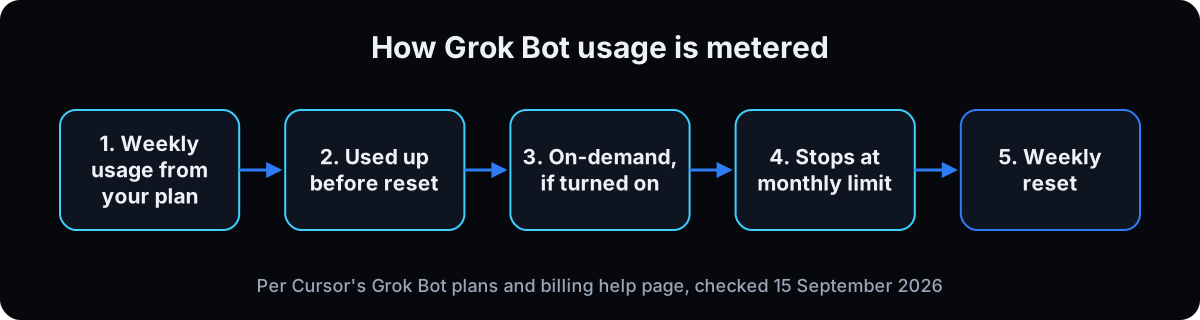 Every paid plan includes Weekly usage that resets each week. When it runs out, Grok Bot keeps going on on-demand usage only if you turned it on, billed through Cursor from model and token cost. On-demand stops at your On-demand monthly limit.
2 details from Cursor's Grok Bot plans and billing page: the limit isn't a hard stop mid-run, so a Bot already working can finish past it. And on Cursor Teams, on-demand is on by default.
If on-demand is off, Grok Bot stops when weekly usage runs out and starts again at the weekly reset.
Is there a free version?
There's a one-time free trial. Per Cursor's Grok Bot plans and billing page, it's a usage credit with a 7-day window, and it's drawn down by agent steps and tokens, not by how many messages you send. One large job can use most of it in a single run, and used credit isn't topped up. The trial never turns into a paid plan.
Watch out: a free trial started in the iOS app is an Apple intro offer, which does turn into a paid subscription unless you cancel it in your Apple ID settings.
Plans don't stack
Paying for both a Cursor plan and SuperGrok doesn't add Grok Bot usage. Cursor's page says Grok Bot uses one grant, not both. Upgrading within Cursor (Pro+ to Ultra) does raise usage. Buying a second subscription doesn't.
| Plan | Price (checked 15 Sep 2026) | Grok Bot usage |
|---|---|---|
| Cursor Pro | $20 a month | Weekly usage, below Pro+ |
| Cursor Pro+ | $60 a month | Generous weekly usage, below Ultra |
| Cursor Ultra | $200 a month | Highest weekly usage |
| Cursor Teams, Standard seat | $40 per seat a month | Follows the seat's allowance |
| Cursor Teams, Premium seat | $120 per seat a month | Follows the seat; Premium seats get 5x the usage of Standard, per Cursor team pricing |
| SuperGrok (linked) | $30 a month | Linked usage, below Plus |
| SuperGrok Plus (linked) | $100 a month | Generous linked usage, below Heavy |
| SuperGrok Heavy (linked) | $300 a month | Highest linked usage |
| X Premium+ (linked) | Check X's subscription page | Linked usage, below SuperGrok Plus |
| Cursor Enterprise | Custom, through Cursor sales | Managed by your admin |
| Term | What it means |
|---|---|
| Weekly usage | The Grok Bot usage included with your plan; it resets every week |
| On-demand usage | Extra usage after weekly usage runs out, billed through Cursor, only if enabled |
| On-demand monthly limit | The cap you set on on-demand spend; called Monthly Limit on cursor.com |
| Linked grant | Grok Bot usage you get by linking a SuperGrok or X Premium+ account to Cursor |
| Seat | One person's paid place on a team plan; usage doesn't move between seats |
Isn't $20 a month cheaper than a $50 team tool?
Grok Bot starts at $20 and Viktor starts at $50. Why would a team pay more?
For one person, it isn't more. For a team, the unit you pay for changes the math.
- Grok Bot is priced per person: each teammate needs an eligible plan, and each seat's usage stays with that seat.
- Viktor is priced per workspace: one plan covers everyone in your Slack or Teams, drawing on one shared credit pool.
- So a solo owner compares $20 to $50, and a team of 5 compares 5 plans to 1.
Price the team you have, not the plan card.
How to pick a plan and make usage last
1. Start on the free trial, with small jobs
Claim the trial and give your first Bot short, tightly scoped jobs. Check Weekly usage on the plan screen after each one to see what a job costs you.
Why: the trial is drawn down by steps and tokens, so one sprawling job can end it in a single run. Cursor's own advice is to start small and scale up (Cursor's Grok Bot plans and billing page).
2. Pick the plan by who uses it and how often
One owner, a few jobs a week: Cursor Pro or SuperGrok.
One owner, Bots running daily: Cursor Pro+ or SuperGrok Plus. Cursor recommends Pro+ for daily agent users and Ultra for power users (cursor.com/pricing).
A team that already pays for Cursor: Cursor Teams, where every member gets Grok Bot with no extra request.
Why: the plans differ in weekly usage, not features, so match the plan to the workload you measured on the trial.
3. Don't buy a second plan for more usage
If you already have Cursor Pro+, linking SuperGrok Plus adds nothing, and the reverse is also true. To get more, upgrade within one plan or turn on on-demand.
Why: Cursor's billing page says Cursor and SuperGrok grants don't stack, and a SuperGrok link can't be undone or moved to another Cursor account once it's made.
4. Think in a normal chat, then hand the job to the Bot
Brainstorm, outline and argue with ideas in Grok chat or any chat app. Bring the Bot a finished brief: outcome, sources, limits and what to hand back.
Why: Grok Bot usage is measured in agent steps and tokens. Every back-and-forth inside the Bot spends usage that a chat app would have covered. Here's how that split works.
5. Keep the number of Bots small
Start with one chief of staff and add a specialist only when the same job has piled up twice.
Why: all of your Bots draw on the same account's weekly usage. 12 Bots each checking in, researching and reporting spend it 12 ways. My Grok Bot setup guide walks through the one-agent setup.
6. Test a routine twice before you schedule it
Run the job by hand on 2 different days. Only schedule it once both runs pass, and give it an off switch: weekdays only, and pause after 2 failures in a row.
Why: routines run without you watching. A broken daily routine spends usage every day until someone notices.
7. Set a monthly limit before you turn on on-demand
In Grok Bot, open Settings and find On-demand monthly limit. If it asks for a card, finish on the web at cursor.com/dashboard, under Spending, then Monthly Limit.
Why: once weekly usage is gone, on-demand is billed from model and token cost with no weekly reset to save you. On Teams it's on by default, so set the limit on day one.
8. Price your team before you roll it out
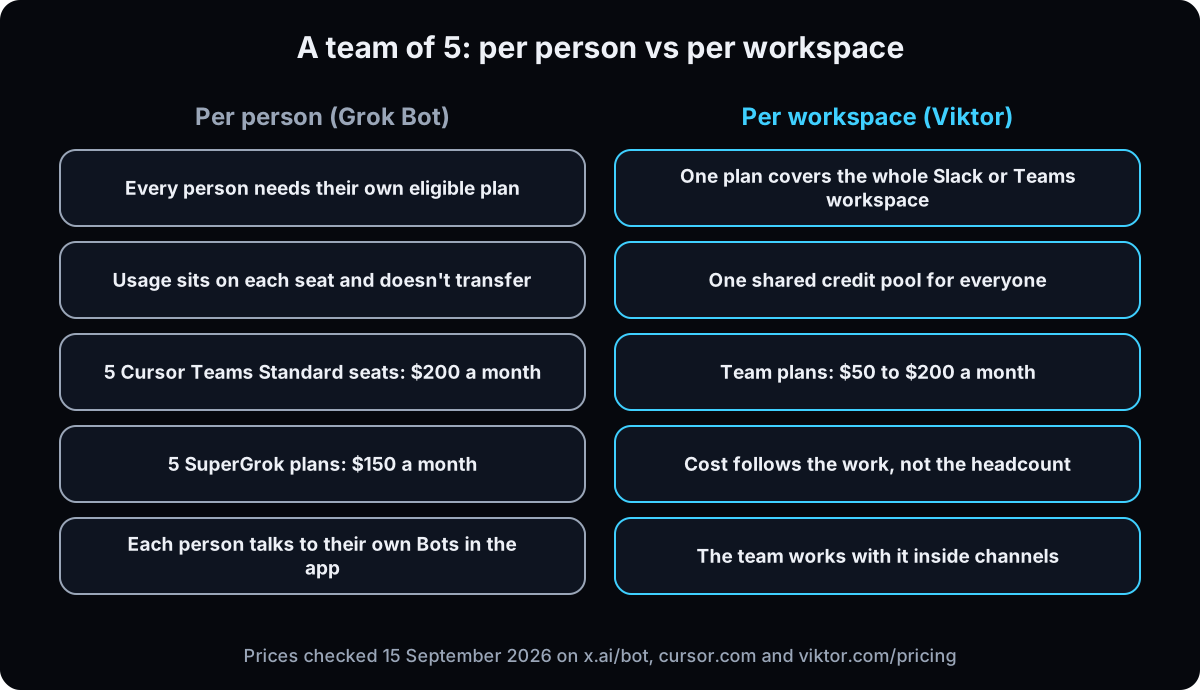 Here's a team of 5 at list prices, before any on-demand usage:
5 Cursor Pro plans: $100 a month, billed person by person.
5 SuperGrok plans: $150 a month.
5 Cursor Teams Standard seats: $200 a month, with central billing.
5 Cursor Teams Premium seats: $600 a month.
Each person gets their own Bots and their own usage. Nobody's unused usage helps a teammate who ran out.
Why: the per-person price looks small on the plan card and grows with every hire.
9. If your team lives in Slack, price a per-workspace tool too
Viktor is an AI employee that works inside Slack or Microsoft Teams. It bills per workspace: team plans are $50, $75, $100 and $200 a month for 20,000 to 80,000 credits the whole team shares, and adding a teammate doesn't add a fee (viktor.com/pricing, checked 15 September 2026). The trial is $100 in credits with no card, or $150 through my affiliate link.
The honest version: Viktor's credits track the work, so a busy team can outgrow $50. My Viktor pricing guide covers what real bills look like.
Why: for a team that works in Slack channels, one shared pool with no server to maintain usually beats 5 separate plans. For one owner running their own work from the app, Grok Bot at $20 to $60 a month is often the better value.
If this happens, do this
Every one of these has happened to me or to someone I set this up for.
| Failure | Fix |
|---|---|
| The free trial ended after one job | That's expected for a large run. Upgrade, or restart on a paid plan with smaller scoped jobs |
| Weekly usage gone by Wednesday | Move brainstorming to chat, cut idle Bots, and pause routines that haven't passed 2 test runs |
| You linked SuperGrok and got no extra usage | Grants don't stack. Upgrade within one plan or turn on on-demand with a limit |
| An on-demand bill you didn't expect | Set On-demand monthly limit in Settings, or Monthly Limit under Spending on cursor.com |
| The plan screen still shows your old SuperGrok tier | Allow up to 24 hours after an upgrade, then contact Cursor support with a screenshot |
| A team of 5 each hitting limits at different times | Usage doesn't move between seats. Compare a per-workspace tool before adding seats |
The tools I use for this
| Tool | What it is for here | |
|---|---|---|
| Grok Bot | xAI's agent app, with the plan prices on the page. | Open |
| Grok Bot plans and billing | Cursor's canonical list of plans, usage tiers, trials and on-demand rules. | Read |
| Cursor team pricing | Standard and Premium seat prices and how team usage works. | Read |
| Viktor † | The per-workspace AI employee in Slack or Teams. My link adds $150 in trial credits. | Start free |
| Viktor pricing | Official Viktor plans and credit rules. | Read |
Related guides
- Grok Bot setup guide: one chief of staff, specialists underneath, approvals on everything risky.
- Think in chat, execute in the Bot: the habit that saves the most usage.
- Grok Bot alternatives: 6 AI agents compared for business teams.
- Viktor AI pricing: credits, real monthly cost, and how to keep it down.
Questions people ask
How much does Grok Bot cost?
Grok Bot doesn't have its own price. It's included with Cursor Pro ($20 a month), Pro+ ($60), Ultra ($200) and Cursor Teams seats ($40 or $120 per seat), or through a linked SuperGrok ($30), SuperGrok Plus ($100) or SuperGrok Heavy ($300) plan. Prices checked on x.ai/bot on 15 September 2026.
Is Grok Bot free?
There's a one-time free trial. It's a usage credit with a 7-day window, and a large job can use most of it in one run. After that you need an eligible Cursor or SuperGrok plan, per Cursor's billing page.
What are Grok Bot's usage limits?
Each plan includes weekly usage that resets every week. Cursor ranks the tiers (Pro below Pro+, Pro+ below Ultra) but doesn't publish them as numbers. When weekly usage runs out, Grok Bot stops unless you've turned on on-demand usage, which is capped by the monthly limit you set.
How much is Grok Bot for a team?
Cursor Teams seats cost $40 a month (Standard) or $120 (Premium) per person, and every member gets Grok Bot. A team of 5 on Standard seats pays $200 a month before on-demand usage. Teams that work in Slack can compare a per-workspace tool like Viktor, where team plans start at $50 for everyone.
Do Cursor and SuperGrok plans stack for Grok Bot?
No. Grok Bot uses one usage grant, so a Cursor plan plus a linked SuperGrok plan doesn't add usage. Upgrading within Cursor, such as Pro+ to Ultra, does raise it.
The free skill
It asks who on your team would use Grok Bot and how often, prices the options per person and per workspace at today's list prices, and flags the habits and routines that burn weekly usage.
---
name: grok-bot-pricing
description: Prices Grok Bot for one owner or a team. Finds the plan that fits, explains weekly usage and on-demand billing, flags what burns usage, and compares per-person seats with a per-workspace tool. Trigger on "price my grok bot team", "grok bot pricing", "which grok bot plan", "grok bot usage ran out", "grok bot for teams".
---

# Grok Bot Pricing

Help the user choose how to pay for Grok Bot and keep weekly usage from running out. Grok Bot has no subscription of its own: it comes with a Cursor or SuperGrok plan (cursor.com/help/grok-bot/plans).

## Facts to work from (checked 15 September 2026, confirm before quoting)
- Included with: Cursor Pro $20, Pro+ $60, Ultra $200 a month; Cursor Teams Standard $40 or Premium $120 per seat a month; linked SuperGrok $30, SuperGrok Plus $100, SuperGrok Heavy $300 a month; linked X Premium+ (price: check X). Prices from x.ai/bot and cursor.com/pricing.
- Not included: SuperGrok Lite. SuperGrok Team and Enterprise can't be linked.
- Usage tiers are ranked, not numbered: Pro below Pro+ below Ultra; SuperGrok below Plus below Heavy.
- Weekly usage resets weekly. After it runs out, on-demand usage continues only if enabled, billed through Cursor from model and token cost, capped by the On-demand monthly limit. A run in progress can finish past the limit. On Teams, on-demand is on by default.
- Plans don't stack. A SuperGrok link is permanent and can't move to another Cursor account.
- Free trial: one-time usage credit with a 7-day window, drawn by agent steps and tokens. One big job can use it all. An iOS App Store trial is different and becomes paid unless cancelled.
- Viktor comparison: per workspace, team plans $50/$75/$100/$200 for 20k/30k/40k/80k shared credits (viktor.com/pricing). Trial $100 in credits, $150 via ref.viktor.com/emeka-ajufo (affiliate).

## Steps
1. **Who and how often.** Ask how many people would use Grok Bot, and whether jobs run a few times a week or daily.
2. **Solo owner.** Few jobs: Cursor Pro or SuperGrok. Daily Bots: Pro+ or SuperGrok Plus. Heavy: Ultra or Heavy.
3. **Team.** Multiply seats by price at list rates, then add a line for on-demand risk. Show Cursor Pro, SuperGrok and Teams Standard side by side.
4. **Slack or Teams team?** Also price Viktor per workspace. Say plainly when Grok Bot is the better value (one owner, working from the app).
5. **Usage leaks.** Check for: brainstorming inside the Bot, many idle Bots, routines scheduled before 2 passing test runs, long jobs started without checking Weekly usage.
6. **Guardrail.** If on-demand is on, set the On-demand monthly limit (Settings, or cursor.com/dashboard, Spending, Monthly Limit).

## Rules
- Never invent usage numbers. Cursor doesn't publish them.
- Don't suggest buying a second plan for more usage.
- Tell the user prices change and to confirm on x.ai/bot and cursor.com/pricing.

## Output
A short table: option, monthly cost for their headcount, usage tier, fit. Then the recommendation and the top 3 usage habits to fix.
Want the right agent setup for your team, priced before you buy?
We map who on your team needs an agent, pick per person or per workspace, and set it up so usage and bills stay predictable. That's what we do inside AI CEO Lab.