 AI CEO Lab
Best AI Tools for Small Business Owners: One Tool per Job, Priced
The AI tools a small business needs, sorted by job: assistant, writing and design, CRM and follow-up, automation, meeting notes, an AI employee and phone answering. Free options, vendor prices checked 15 September 2026, who should skip each, and a 4 question keep or cut test.
You pay for a pile of AI subscriptions, several do the same job, and you can't say what it all costs each month. Most lists of the best AI tools for small business make that worse, because they rank long lists of brands, and some print no prices at all.
This guide sorts tools by the job they do, not by brand. For each job you get what the tool is for, the free option if a real one exists, the price from the vendor's own pricing page (checked 15 September 2026), and who should skip it. Then a starter stack with a monthly total, and a 4 question test for cutting what doesn't earn its seat.
I'm a doctor who runs a lead generation agency, Dr. Lead Flow, not an engineer. Links marked † pay me a commission, and the list is the same either way. New to AI tools? Start with the next section. Already paying for a few? Skip to step 1 and list them.
What you have by the end
Not concepts. Things that exist on your machine when you close the tab.
- A plain-English map of the 7 jobs AI tools do in a small business, and which one comes first
- An access rule written down before any tool touches your inbox, CRM or money
- One pick per job, with the free option, the vendor price and date, and who should skip it
- A starter stack with a real monthly total, from $20 a month
- A 4 question keep or cut test you run on every subscription once a month
- A stack.md file with an owner and a number next to every tool
Start here: what an AI tool stack is, in plain English
If you've only used ChatGPT in a browser tab, 4 ideas make the rest of this page make sense.
What an AI tool is, and how it differs from your software
Your normal software follows fixed rules: a calendar books a slot, an invoice tool sends a bill. An AI tool reads and writes language, so it can draft a reply, summarize a call or answer the phone. That makes it useful for messy work, and it means it can be wrong in a confident voice.
Most businesses haven't added it yet. The US Census Bureau's Business Trends and Outlook Survey found overall business AI use between 17% and 20% from December 2025 to May 2026, with use among firms under 20 employees not changing significantly (published 26 May 2026).
Sort by job, not by brand
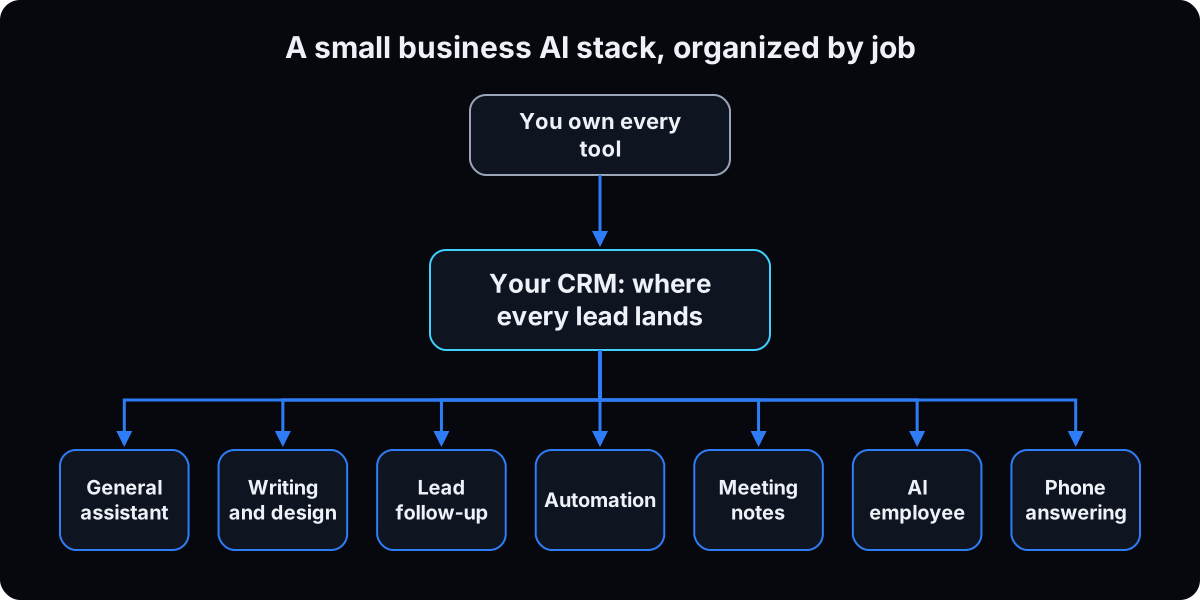 Brands change every month. The jobs don't. A small business AI stack has about 7: a general assistant, writing and design, CRM and lead follow-up, automation, meeting notes and reporting, an AI employee for teams, and phone answering.
The rule is one tool per job. Two tools doing one job usually means neither is set up. The table below is the whole page in one view.
How the pieces connect
The CRM, the customer database where every lead and client lives, sits in the middle. A design tool with nowhere for leads to land makes content for nobody, so the CRM gets set up before the content tools. The assistant drafts, the automation moves data between tools, and the phone and meeting tools feed notes back into the CRM.
The catch: subscriptions and access
Two things go wrong. Costs creep, which is why a thread in r/smallbusiness asking what replaced a monthly subscription drew 40 comments this month. And access creeps: a tool connected to your inbox can read everything in it. A second r/smallbusiness thread on trusting AI with business finances drew 26 comments. That's why the access rule is step 2, before you connect anything.
| Job | Pick one of | Free option | Skip the job if |
|---|---|---|---|
| General assistant | ChatGPT, Claude, Gemini | Yes, all three | Never. Everyone needs one |
| Writing, voice and design | Canva, Wispr Flow | Yes, both | You rarely make graphics or long text |
| CRM and lead follow-up | GoHighLevel, HubSpot, ManyChat | HubSpot and ManyChat | Leads come in by referral only and fit in your head |
| Automation | Your CRM's workflows, then Zapier, Make or n8n | Yes, limited | Your CRM already does it |
| Meeting notes and reporting | Fathom, Granola | Yes, both | You have few calls, or calls hold patient information |
| AI employee for teams | Viktor † | Trial credits | You're solo or your team isn't in Slack |
| Phone and receptionist | Goodcall and similar | Trial only | You answer every call, or you need a BAA it won't sign |
| Term | What it means |
|---|---|
| AI tool | Software that reads and writes language, so it can draft, summarize or answer |
| General assistant | A chat app like ChatGPT, Claude or Gemini that does many writing and thinking jobs |
| Stack | The full set of tools a business pays for |
| CRM | Customer relationship management: the database where every lead and client lives |
| Lead follow-up | Contacting a new inquiry fast, by text, email or DM, until they book or say no |
| Comment to DM | An automation that sends a direct message when someone comments a keyword on your post |
| Workflow | A saved rule in a tool: when this happens, do that |
| Automation platform | A tool like Zapier, Make or n8n that moves data between apps you already use |
| AI employee | An agent that works inside your team chat, takes requests and does multi-step work |
| AI receptionist | A voice agent that answers your business phone, takes messages or books appointments |
| Seat | One paid user on a plan |
| Credits | A prepaid usage balance some tools bill against instead of seats |
| Billed annually | You pay a year up front for a lower monthly rate |
| Read only | The tool can look at an account but can't change or send anything |
| PHI | Protected health information: anything that identifies a patient and relates to their care |
| HIPAA | The US law that protects patient health information |
| BAA | Business associate agreement: the contract a health business needs with any vendor handling PHI |
| Affiliate link † | A link that pays the writer a commission if you buy |
| Terminal | The text window where you type commands. Only the marked later section uses it |
Aren't these lists all affiliate links?
Every best AI tools article I read ranks its own product first or earns a cut. Why trust this one?
You're right to ask. Some of the pages ranking for this search are written by companies whose own product sits on the list. Here's how this page handles it:
- Every affiliate link is marked † at the tool name, and the ones I use most, like the notes folder my agents read, pay me nothing.
- Every price links to the vendor's own pricing page with the date it was checked, so you can check it yourself.
- Every tool has a who should skip it line, including the ones that pay me.
The keep or cut test in step 11 works on any tool, including the ones I recommend.
Build your stack in this order
1. List what you pay for now
Open last month's card statement and write down every software charge with its cost. Put each one under a job from the table above. Mark any job with 2 tools and any job with none.
Save it as a simple table, the stack.md below. The owner column matters more than the price column.
Why: you can't cut what you can't see, and a tool with no owner is the first one to go.
# stack.md: one file, one row per tool
| Tool | Job | Owner | Number it moves | $/mo | Reviewed | Verdict |
|------|-----|-------|-----------------|------|----------|---------|
| GoHighLevel | CRM and follow-up | me | leads in CRM per week | 97 | 2026-09-15 | keep |
| <tool> | <one job> | <a person> | <the number> | <cost> | <date> | keep / cut |

# a row with an empty Owner or Number is a cut candidate,
# not a row to fill in later.
2. Write the access rule before you connect anything
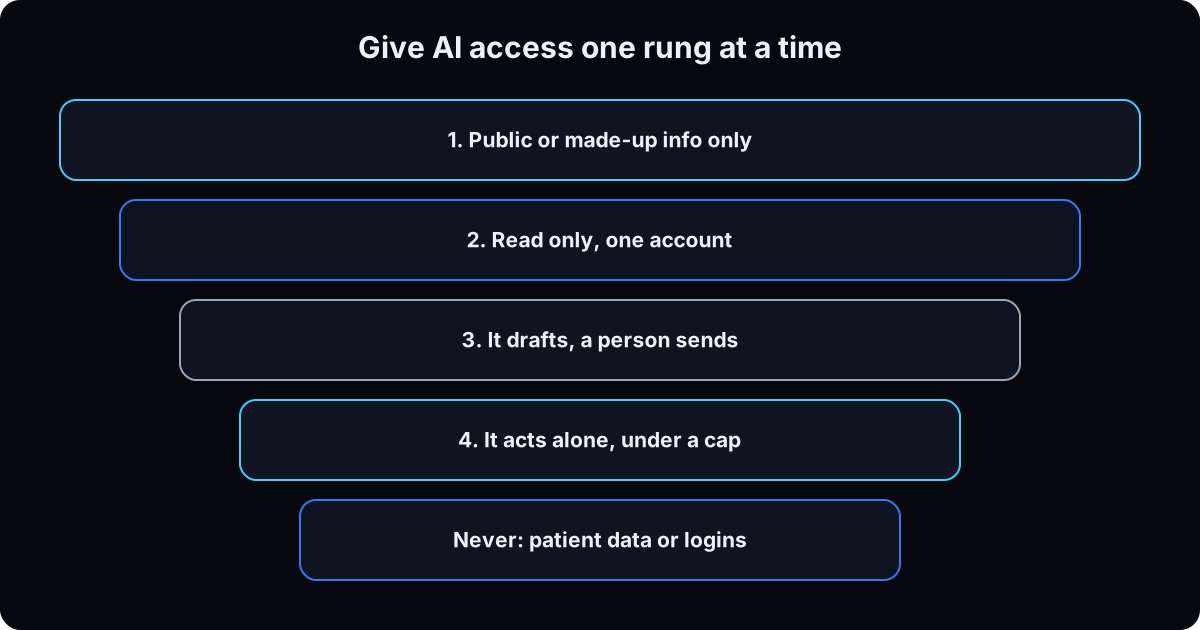 Every tool below will ask to connect to your inbox, calendar, CRM or phone. Decide what's allowed first. Climb one rung at a time: paste in nothing private, then read only on one account, then drafts a person sends, and only then actions under a cap.
The confidentiality rule I hold, because my agency's clients are health businesses: no patient-identifying information in any general AI tool, ever. Anything touching a medical claim gets clinician approval before it's published. Every agent connection is read only unless there's a specific reason. The full fence is in AI agent guardrails.
If you run a health business, HHS says a vendor that creates, receives, keeps or sends patient information for you is a business associate, and you need a written business associate agreement (BAA) with it. That includes cloud services. Plan level matters: OpenAI says it doesn't offer a BAA for ChatGPT Business, and Anthropic's BAA covers HIPAA-ready Enterprise plans and its API, not Pro or Team (checked 15 September 2026). Check your situation with your compliance advisor.
Why: connecting first and deciding later is how an inbox full of client details ends up inside a tool nobody vetted. Before you connect your inbox to anything, ask what's in your inbox.
AI access rules for [business name] (read before connecting any tool)

1. Nothing that identifies a patient or client's health goes into a
   general AI tool. Remove names, dates of birth, phone numbers first.
2. No passwords, bank logins or card numbers, ever.
3. New connections start read only. Write access is named per tool.
4. The tool drafts. A person sends, pays, publishes or deletes.
5. Every tool has an owner: [name]. No owner, no connection.
6. Health business: no patient data in a tool without a signed BAA.
   Checked with: [compliance advisor], on [date].
3. Pick one general assistant and give it one small task
This is the tool you'll open every day. Pick one and use it daily for a month before you buy a second.
ChatGPT. For: the widest set of features and integrations. Free: yes. Paid, per OpenAI's pricing page: Go $8 a month, Plus $20, Pro from $100; Business seats $25 a month billed monthly or $20 billed annually, 2 seat minimum (checked 15 September 2026). Skip it if you already use Claude or Gemini daily. Paying for two assistants is the most common duplicate.
Claude. For: long instructions, writing in your voice and careful multi-step work. It's the one I go deep on. Free: yes. Paid, per Claude's pricing page: Pro $20 a month, or $17 a month billed annually; Max from $100; Team Standard seats $25 monthly or $20 annually, 2 seat minimum (checked 15 September 2026). Anthropic says its commercial plans such as Team don't use your inputs to train models by default. Skip it if your team already runs on another assistant.
Gemini. For: businesses that live in Gmail, Docs and Drive. Free: yes. Paid, per Google's plans page: Google AI Plus $4.99 a month, Google AI Pro $19.99 (checked 15 September 2026). Skip it if you don't use Google's apps.
ChatGPT or Claude comes down to which one you'll use daily. My comparison for agencies is in Viktor vs Claude, and better prompts are in how to write better AI prompts.
Your first task uses public or scrubbed information only, per step 2. Fill in the template below.
Why: one small task you'd otherwise do by hand shows you what the tool gets right and wrong before it touches anything real.
My business: [what you sell] to [who buys it] at [typical price].
My tone: [3 words, e.g. warm, direct, brief].

Here is a customer email with names and details removed:
[paste it]

Draft a reply in 5 sentences or fewer.
Don't promise anything about [refunds / results / timelines].
End with one clear next step.
Then list anything you guessed that I should check.
4. Writing, voice and design
Canva. For: social graphics, flyers and simple video with AI features built in. Free: yes. Paid, per Canva's pricing page: Pro US$144 a year for one person, Business US$250 a year per person (checked 15 September 2026). Skip Pro if the free templates cover what you post.
Wispr Flow †. For: talking instead of typing, in any app. Free: yes. Paid, per Wispr Flow's pricing page: Pro $12 per user a month billed annually, $15 monthly (checked 15 September 2026). The same page lists HIPAA-ready dictation with a signed BAA. Skip it if you type fast and rarely write anything long.
What I run for video. I record in Tella †, turn research into scripts in Poppy AI †, caption short form in Submagic †, edit long form in DaVinci Resolve (free version; Studio is a $295 one-off, checked 15 September 2026), and publish everywhere with Blotato †. Skip this whole layer until the CRM in step 5 is catching leads.
Why: content without somewhere for leads to land makes leads for nobody.
5. CRM and lead follow-up
This is the center of the stack. A lead you can't find in the CRM one minute after it arrived isn't caught.
GoHighLevel †. For: CRM, funnels, SMS, booking, email and workflows in one account. It's the operating system I run. Free: a 14-day trial, no free plan. Paid, per GoHighLevel's pricing page: Starter $97 a month, Unlimited $297, Agency Pro $497; HIPAA compliance is a $297 a month add-on except on Enterprise (checked 15 September 2026). Skip it if you're a solo service with a handful of leads a month; HubSpot's free CRM will do.
HubSpot. For: a free CRM with contacts, email and basic reporting. Free: yes, per HubSpot's pricing page, for up to 2 users and 1,000 contacts (checked 15 September 2026). Paid seats are on the same page; read the billing terms, since the rate depends on commitment. Skip it if you need SMS, booking and funnels in one place.
ManyChat †. For: comment to DM on Instagram and Facebook, so a comment becomes a DM becomes a CRM contact with a source tag. Free: yes, 25 active contacts a month. Paid, per ManyChat's pricing page: Essential $14 a month and Pro $29 a month, both billed annually (checked 15 September 2026). I run Zernio for this on my own account; ManyChat is the one most people should start with. The build is in Instagram comment to DM automation. Skip it if you don't get comments or DMs.
CloseBot †. For: an AI appointment setter that answers in seconds, qualifies, books and takes the deposit. I run it for a clinic client, wired to the CRM by tags so it's easy to debug. I couldn't find a public price on its site, so there's no number here. Skip it until your CRM tags are clean.
Rule: test every way a lead can reach you with a real test lead before you spend on traffic.
Why: every other lane feeds the CRM. If it leaks, better content only makes the leak bigger.
6. Automation: check your CRM before you buy a platform
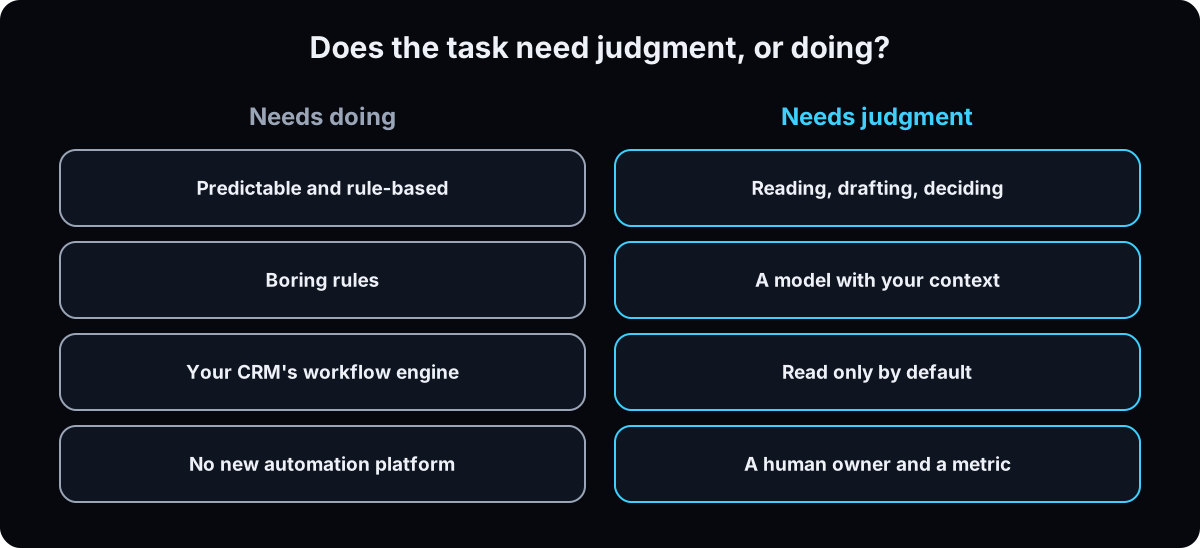 Most small business automation is predictable, rule based work, and plain rules beat AI agents there. Owners in r/smallbusinessowner opened a thread this week asking to talk automation without the AI hype.
I run none of the platforms below. My automation is the workflow engine already inside the CRM (GoHighLevel's workflow docs, and my GoHighLevel workflows guide), plus background jobs I wrote. If your CRM has workflows, start there.
Zapier. For: connecting apps with no code. Free: 100 tasks a month. Paid, per Zapier's pricing page: Professional from $19.99 a month (checked 15 September 2026). Skip it if every app involved is already inside your CRM.
Make. For: visual, multi-step automations at lower cost per run. Free: up to 1,000 credits a month. Paid, per Make's pricing page: Core listed at $12 a month for 10,000 credits (checked 15 September 2026). Skip it if Zapier's free plan covers you.
n8n. For: technical teams who want to self-host. Free: the self-hosted version. Paid cloud, per n8n's pricing page: Starter EUR 20 a month billed annually (checked 15 September 2026). Skip it if nobody on your team is comfortable running software.
What to do: write down every task you did Monday and Tuesday, and circle the repeats. For each, ask whether it needs judgment or needs doing. The ones that need doing should be boring rules.
Why: a platform bought for something your CRM already does is a second tool for one job.
7. Meeting notes and reporting
I run a meeting recorder connected so an agent can read call summaries. Pick one, and get recording consent at the top of every call.
Fathom. For: free call recording, transcripts and summaries. Free: yes, free forever. Paid, per Fathom's pricing page: Premium $16 a month billed annually, $20 monthly; Team $15 per user billed annually, 2 user minimum. The page lists a signed BAA on its top plan (checked 15 September 2026). Skip paid until the free plan runs out of room.
Granola. For: notes from your own device, with no bot joining the call. Free: Basic, with limited history. Paid, per Granola's pricing page: Business $14 per user a month (checked 15 September 2026). Skip it if your team needs shared recordings.
Health businesses: for any call with a patient, use a recorder only if the vendor signs a BAA for your plan, per step 2.
Why: call notes the CRM never sees are notes nobody reads twice.
8. An AI employee for teams
An AI employee is different from an assistant. It lives in your team chat, takes requests from anyone, and does multi-step work like reports and follow-ups on a schedule.
Viktor †. For: teams in Slack who want one AI coworker that watches the business and acts. It's the one I run. Free: a trial with $100 in credits and no card, and my link adds more (details in Viktor AI pricing). Paid, per Viktor's pricing page: from $50 a month for 20,000 credits, billed per workspace, not per seat, with unused monthly credits rolling over for one month (checked 15 September 2026). Skip it if you're solo or your team doesn't use Slack. Setup is in Viktor Slack setup.
Why: an AI employee earns its cost by replacing hours someone spends on reports and updates every week. Measure one normal week before you buy.
9. Phone and receptionist
An AI receptionist answers your business line, takes messages and books. It helps most when calls go to voicemail after hours. Callers don't all like it: the top comment in a 177-comment r/Entrepreneur thread on AI receptionists said people get frustrated when they expected a human. Give callers a way to reach a person.
Goodcall. For: an AI agent that answers calls with unlimited minutes. Free: a trial. Paid, per Goodcall's pricing page: Starter $79 a month per agent billed monthly, $66 billed annually, with 100 unique customers a month included (checked 15 September 2026). Skip it if you answer nearly every call yourself.
HIPAA note for health businesses. A receptionist hears names, dates of birth and reasons for visits, which is patient information. Use one only if the vendor signs a BAA for your plan. Goodcall's pricing page doesn't mention HIPAA (checked 15 September 2026), so ask in writing before any patient call goes through it. If you run GoHighLevel, its HIPAA add-on is $297 a month per its pricing page; confirm with GoHighLevel which features it covers.
Why: a missed call is a lost lead, and a receptionist that leaks patient information is a bigger loss.
10. What a starter stack costs
Here are two starter stacks from the prices above. Monthly billing where the vendor shows it; ManyChat shows its billed-annually rate. Check each page before you buy, since prices change.
Run the free version for a month first. Buy annual only after a tool survives its 30 day review.
Why: a stack you can total in one line is a stack you can manage.
STARTER STACK COSTS  (vendor pricing pages, checked 15 September 2026)

SOLO STARTER                               plan                 $/mo
General assistant   Claude or ChatGPT      Pro / Plus, monthly    20
Design              Canva                  Free                    0
CRM                 HubSpot                Free, up to 2 users     0
Meeting notes       Fathom                 Free                    0
Automation          Zapier                 Free, 100 tasks         0
                                                         total    20

LEAD-GEN STARTER
General assistant   Claude                 Pro, monthly           20
CRM, follow-up,     GoHighLevel            Starter                97
  workflows
Comment to DM       ManyChat               Pro, billed yearly     29
Dictation           Wispr Flow             Pro, monthly           15
Meeting notes       Fathom                 Premium, monthly       20
                                                         total   181

ADD WHEN A TEAM OR PHONE LOAD NEEDS IT
AI employee         Viktor                 from, per workspace    50
AI receptionist     Goodcall               Starter, per agent     79
Team assistant      Claude Team            Standard, 2 seat min   50
11. The keep or cut test, and the tools I cut
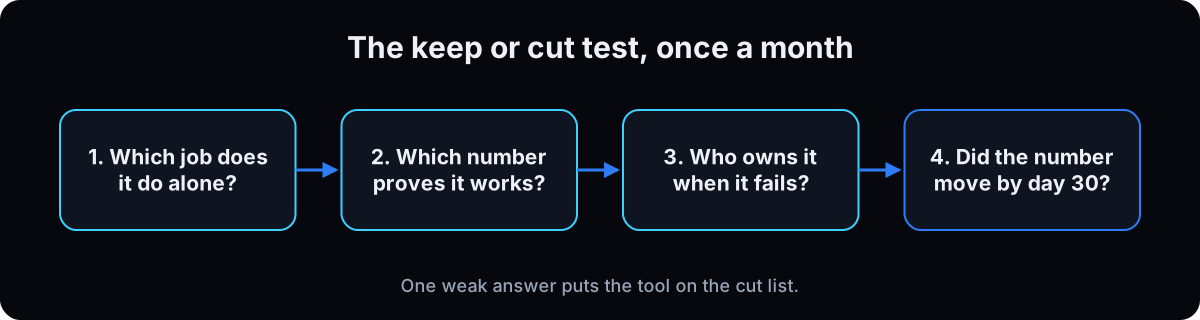 Run these 4 questions on every tool, once a month. One weak answer puts it on the cut list.
1. Which job does it do that nothing else I pay for does? 2. Which number proves it works, and where is it today? 3. Who owns it when it gets something wrong? 4. At day 30, did the number move? Cheaper than the old way isn't a result.
The tools I cut, and why. Airtable, dropped as a source of truth in July 2026, because monday.com held the same client and lead facts, and 2 homes for one fact is what this stack avoids. A local model, still installed and serving with zero models pulled, kept for the idea of it rather than a job. The setter bot is on notice: it works, but the job outgrew the product.
This week, do one thing. Put a name in the owner column of your stack.md. Whatever has no name is your first cut. Paste the prompt below before any new purchase.
Why: tools get added in a minute and cut in a year unless someone asks these questions on a schedule.
I'm considering [tool] for [job]. Before I buy, make me answer 4 things
and refuse to continue until each answer is specific:
1. Which job does it do that nothing I already pay for does?
2. Which number proves it works, and what is that number today?
3. Who owns it, checks its work and decides when it gets something wrong?
4. What result at day 30 means keep, and what means cut?
Then tell me whether a free plan or a workflow in a tool I already pay
for would do the job, and whether this tool will touch customer,
patient or financial data.
Later, for terminal users: an honest inventory in a minute
Skip this if you don't use a terminal. Everything above works without it.
Why my models run as command-line tools
The assistants I use most are installed on my machine as command-line tools, not only browser tabs, so they can read my files, run my scripts and run on a schedule. They read a folder of markdown notes first, the same idea as a CLAUDE.md file at company scale: Obsidian holds the operating file, SOPs, decisions and client notes, and monday.com is the source of truth for client status. One home per fact.
Why: a new chat that knows nothing about your business answers like it could be anyone's.
Run a read-only inventory
These commands only list what's installed; they change nothing. Anything claude mcp list says needs authentication has been dead a while and is a cut candidate. Version numbers are what my Mac returned on 8 September 2026; yours will differ.
Why: an honest inventory beats a list of what you meant to use.
# what I ran on 8 September 2026. read-only commands.
$ claude --version        # 2.1.258 (Claude Code)
$ hermes --version        # Hermes Agent v0.20.5
$ gemini --version        # 0.46.0
$ openclaw --version      # OpenClaw 2026.6.5
$ ollama --version        # 0.33.2

$ ls ~/.claude/skills | wc -l       # 255 skills
$ claude mcp list                   # every connected system, with health
$ ls ~/Library/LaunchAgents         # 8 background jobs I wrote

$ ollama list
NAME  ID  SIZE  MODIFIED        # empty: installed, serving, holds nothing
If this happens, do this
Every one of these has happened to me or to someone I set this up for.
| Failure | Fix |
|---|---|
| Two assistants, both paid, both half used | Keep the one you open daily. Cancel the other this billing cycle |
| Three tools doing one job | One per job. Keep whichever already connects to the CRM |
| A subscription nobody owns | Put a name in the owner column or put it on the cut list |
| Bought a tool because a list said so | Check the list for affiliate links or its own product, then run the 4 questions |
| Bought an automation platform for something the CRM does | Check the workflow engine you already pay for first |
| Connected the inbox without thinking about what's in it | Disconnect, write the access rule, reconnect read only |
| Patient details went into ChatGPT or Claude on a standard plan | Stop, tell your compliance advisor, and move that work to a tool with a signed BAA |
| Callers hang up on the AI receptionist | Add a clear way to reach a person, and review 10 call recordings a week |
| The monthly total keeps growing | Run the keep or cut test on the first of each month, in the calendar |
The tools I use for this
| Tool | What it is for here | |
|---|---|---|
| Claude | The general assistant I go deep on. Free plan; Pro $20 a month or $17 billed annually (checked 15 Sep 2026). | Open |
| GoHighLevel † | CRM, funnels, SMS, booking and workflows. Starter $97 a month, 14-day trial (checked 15 Sep 2026). | Get it |
| ManyChat † | Comment to DM. Free for 25 active contacts; Pro $29 a month billed annually (checked 15 Sep 2026). | Get it |
| CloseBot † | The AI appointment setter I run for a clinic client, wired to the CRM by tags. | Get it |
| Viktor † | The AI employee I run in Slack. Trial credits, then from $50 a month per workspace (checked 15 Sep 2026). | Get it |
| Wispr Flow † | Talk instead of type. Free plan; Pro $12 a month billed annually (checked 15 Sep 2026). | Get it |
| Tella † | Record walkthroughs, sales videos and lessons from one take. | Get it |
| Poppy AI † | The visual canvas that turns research into scripts in my voice. | Get it |
| Submagic † | Captions, b-roll and effects for short form. | Get it |
| Blotato † | Publish one video to every platform on a schedule. | Get it |
| Vidalytics † | Conversion video hosting. Who watched what, and where they left. | Get it |
| DaVinci Resolve | Long form editing. The free version is enough for most; Studio is a $295 one-off (checked 15 Sep 2026). | Open |
| Obsidian | The notes folder my agents read before they act. Free. | Open |
| AI CEO Lab on Skool | The free community where the stack is taught job by job. | Join free |
What I'd tell you over coffee
- Pay for one assistant, not three. The skill of using one well transfers; the product tricks expire.
- Put the access rule in the assistant's project instructions, so every chat starts with it.
- Price each tool against the real alternative once: the hours a person spends on that job, not zero.
- Buy annual only after a tool survives its 30 day review.
Questions people ask
What are the best free AI tools for small business?
Start with the free plans that cover a whole job: ChatGPT, Claude or Gemini as your assistant, Canva for design, HubSpot's free CRM for up to 2 users, Fathom for call notes and Zapier's free plan for 100 tasks a month (all checked 15 September 2026). That's a working stack at $0. Upgrade only the tool that runs out of room first.
What AI tools do small businesses need?
Most need a general assistant and a CRM first. After that, add tools by job only when the job exists: writing and design, automation, meeting notes, an AI employee if you have a team, and phone answering if calls go unanswered. One tool per job keeps the monthly total small.
ChatGPT or Claude for a small business?
Pick the one you'll use every day, and don't pay for both. Both have free plans and $20 a month paid plans (checked 15 September 2026). ChatGPT has the widest set of features; Claude is the one I use for long instructions and writing in my own voice. Try the same real task in both free plans for a week, then pay for one.
Is it safe to give AI access to my business accounts?
It can be, if you set the rule first. Start read only on one account, let the tool draft while a person sends or pays, and never share passwords, bank logins or card numbers. Health businesses need a signed BAA before any patient information goes in, and plan level matters: OpenAI doesn't offer one for ChatGPT Business, and Anthropic's covers Enterprise and its API. Step 2 has the full rule.
How much should a small business spend on AI tools?
There's no reliable industry benchmark, so price against the hours a tool saves. From vendor prices checked 15 September 2026, a solo starter stack runs about $20 a month and a lead generation starter stack about $181. Any tool that can't name the number it moves should be cut, whatever it costs.
What's the best AI receptionist for a small business?
The one that answers the calls you miss and gives callers a path to a person. Goodcall's Starter plan is $79 a month per agent billed monthly (checked 15 September 2026). If you're a clinic or med spa, only use a receptionist whose vendor signs a BAA for your plan, and get that in writing first.
The free skill
It audits your stack the way I do: sorts every paid tool into the 7 jobs, finds duplicates and empty jobs, checks the access rule before anything connects, asks for the owner and the number behind each tool, runs the 4 question keep or cut test, and returns a keep or cut table with the monthly saving. It never invents a price. Related guides: AI agent guardrails and business operating system.
---
name: ai-stack-by-job
description: Audits a small business's AI and software stack by job, the way an operator does. Sorts every paid tool into 7 jobs, finds duplicates and empty jobs, checks the access rule before anything connects, asks for the owner and the number behind each tool, runs the 4 question keep or cut test, and returns a keep or cut table with the monthly saving. Also vets a tool before purchase. Trigger on "audit my stack", "what AI tools should my business use", "am I paying for too many tools", "should I buy this tool", "is it safe to connect this".
---

# AI Stack by Job

A tool stays only if it does a job nothing else in the stack does and moves a number someone owns. Audit by job, not by brand. Never recommend a tool the owner didn't mention unless a job is empty and the owner asks.

## Inputs
Every tool the owner pays for, with monthly cost. A card statement or billing export is fine. Also ask: what the business sells, team size, whether they're a health business (clinic, med spa, therapy, wellness), and which CRM they use. If they can't produce the tool list, the first finding is that the list doesn't exist.

## Step 1: Sort by job
Put every tool under exactly one job:
1. **General assistant.** ChatGPT, Claude, Gemini. One is enough.
2. **Writing, voice and design.** Design, dictation, video tools.
3. **CRM and lead follow-up.** The CRM, comment to DM, appointment setters, booking. Every lead lands here.
4. **Automation.** First check whether the CRM's own workflow engine already does it.
5. **Meeting notes and reporting.** Call recorders, summaries, dashboards.
6. **AI employee for teams.** An agent inside team chat that takes requests and does multi-step work.
7. **Phone and receptionist.** AI call answering and booking.
8. **Other.** Ask what job it does. If the owner can't say, that is the answer.

Name every job with 2 or more tools and every job with none. The CRM is the center. If there is no CRM, it comes before any content tool.

## Step 2: The access rule, before any connection
Before recommending that any tool connect to an inbox, calendar, CRM, phone or bank, confirm the owner has these written down:
- No passwords, bank logins or card numbers in any AI tool.
- New connections start read only. Write access is named per tool.
- The tool drafts. A person sends, pays, publishes or deletes.
- Every tool has a named human owner.
- Health business: no patient-identifying information in any tool without a signed business associate agreement (BAA) for that plan. Plan level matters. Tell the owner to confirm BAA coverage with the vendor in writing and with their compliance advisor. Don't state that a tool is HIPAA compliant.

If the rule isn't written, write it with the owner first and stop connecting until it is.

## Step 3: Owner and number, one tool at a time
For each tool ask:
- Who owns it: checks its work, catches failures, decides what happens when it misses?
- Which one number proves it's working, and what is that number today?

"Unknown" is accepted. Mark it. Don't fill it in for them.

## Step 4: The keep or cut test
Run 4 questions per tool. One weak answer puts it on the cut list.
1. Which job does it do that nothing else they pay for does?
2. Which number proves it works, and where is it today?
3. Who owns it when it gets something wrong?
4. At day 30, did the number move?

"Cheaper than the old way" isn't a result.

For a tool they're considering buying, don't continue until all 4 answers are specific. Then name the existing tool it replaces, ask whether a free plan or a workflow in a tool they already pay for would do the job, ask whether it will touch customer, patient or financial data, and recommend a free month before paying. Recommend annual billing only after it survives the 30 day review.

## Step 5: The output
A table sorted by job:

| Tool | Job | Owner | Number it moves | $/mo | Verdict | Reason |

Verdict is keep or cut. Reason is one sentence. Below the table:
- Monthly saving from the cuts, and the running total still spent.
- Duplicate jobs, and which tool to keep (prefer the one connected to the CRM).
- Empty jobs, and only then one suggestion per empty job, with its free option if one exists. Tell the owner to check the price on the vendor's own pricing page before buying.
- Any fact that lives in 2 tools, and which one should be its home. One home per fact.
- Any tool holding patient-identifying information without a confirmed BAA: flag it to stop.

## Step 6: The stack file
Return the table as `stack.md` so every agent and teammate reads the same list. Columns: tool, job, owner, number it moves, $/mo, reviewed date, verdict. A row with an empty owner or number, or past its review date, is a cut candidate, not a row to fill in later.

## Rules
- One tool per job. One general assistant, not three.
- CRM before content.
- Check the CRM's workflows before buying an automation platform.
- A human owns every tool. AI isn't accountable to itself.
- Never invent a price, a plan name or a compliance claim. Unknown stays unknown.
- Connections are read only by default. Name every one that can write, send or spend.
- Never ask for or accept passwords, bank logins or card numbers.
Want the stack set up job by job on your business?
Inside the AI CEO Lab each job is a classroom, and the community is where the people running these tools every day answer the questions vendors won't.