 AI CEO Lab
What Is a Lead Magnet? Ideas and Examples That Get Opened
A lead magnet is a free, useful thing you trade for an email address. Here are the 7 main types and when each works, lead magnet ideas for 5 kinds of business, how to deliver one, and the follow-up email that turns it into a call.
You made a free guide. People downloaded it. Nobody booked a call, and you started to wonder whether lead magnets work at all.
Usually the problem is the magnet, not the idea. A 30-page PDF about a whole topic gets saved to a downloads folder and forgotten. A short thing that fixes one problem, delivered the right way and followed by one good email, gets opened and gets replies.
This guide gives you a plain definition, the 7 main types and when each one works, lead magnet ideas for agencies, coaches, local service businesses, clinics and SaaS, and a step-by-step build: pick the problem, draft it with Claude in one sitting, deliver it by landing page or comment-to-DM, and send the follow-up email. I'm a doctor who runs a marketing agency, not an engineer, and the rules below are the ones I use on my own magnets.
New to lead magnets? Start with the next section. Already have one nobody opens? Skip to step 6.
What you have by the end
Not concepts. Things that exist on your machine when you close the tab.
- A plain-English answer to what a lead magnet is and how it differs from a newsletter signup
- The right type for your offer, picked from 7, with a reason
- A lead magnet idea for your kind of business that passes 4 rules
- Your own claims and data rules written down before anything goes live, including what a health quiz may never ask
- A first version drafted with Claude from a fill-in prompt
- Delivery set up by landing page or comment-to-DM, tested with a throwaway contact
- A follow-up email to copy, and a simple rule for which magnets to keep
- Optional, for terminal users: the same magnet packaged as a skill file people can run
Start here: what a lead magnet is
If you've never built one, these 5 ideas make the rest of the guide easy to follow.
What is a lead magnet?
A lead magnet is something useful you give away free in exchange for contact details, usually an email address. Mailchimp describes it as a lead generation tool where people trade their contact information for a free sample, resource or tool.
The "magnet" part only works if the free thing solves a problem the person has today. A checklist, a template, a quiz, a calculator or a short consult can all be lead magnets.
How it differs from a newsletter signup or a contact form
A newsletter signup asks people to trust you with their inbox before they've got anything. A contact form asks them to talk to you before they're ready. A lead magnet sits in between: they get a useful thing now, you get permission to follow up, and the follow-up is where the sale happens.
That makes it the easiest first yes for a stranger who found you through a post, an ad or a search.
How a lead magnet works
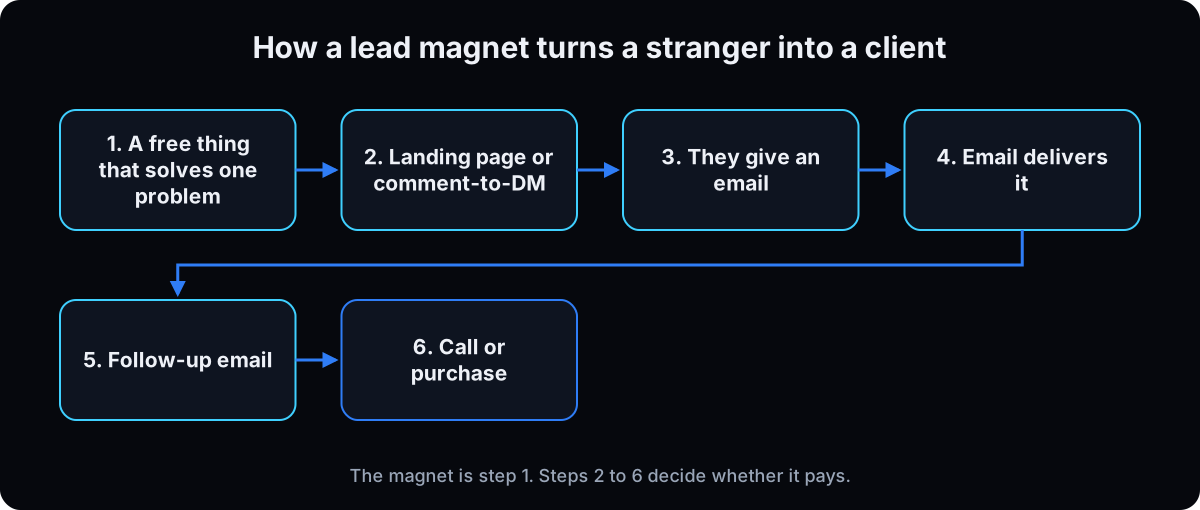 Someone sees your offer, gives an email on a page or through a DM, and gets the magnet on screen and by email. A few days later a follow-up email asks what they found and offers the next step.
The magnet is only step 1. Most magnets that "don't work" are missing steps 4 to 6: the delivery email never arrives, or nothing follows it.
The 7 main types, and when each one works
Checklist. Best when the reader already knows the task and keeps missing steps, like a pre-launch ad check. Fastest to make and to finish.
Template. Best when the reader has to produce something, like a proposal, a content calendar or an intake form. It saves them hours, so it feels valuable.
Quiz or assessment. Best when people don't know what their problem is yet. The result tells them. Keep health quizzes away from health questions (step 4 explains why).
Calculator. Best when the pain is a number: wasted ad spend, cost per lead, what a missed call costs. It needs a simple page or spreadsheet.
Mini-course. A few short lessons by email or video. It works when the method has several steps, but it's the most effort to make and the easiest to abandon, so build it last, not first.
Swipe file. A collection of proven examples, like ad hooks or email subject lines. Best for audiences who make marketing themselves.
Free consult or audit. Best for high-ticket services where the buyer needs to talk first. It costs you time per lead, so cap how many you do each week.
Alex Hormozi groups all of these into 3 jobs in $100M Leads: reveal a problem, give a free trial or sample, or hand over one step of a bigger process. Step 3 uses that grouping.
The catch: most downloads never get opened
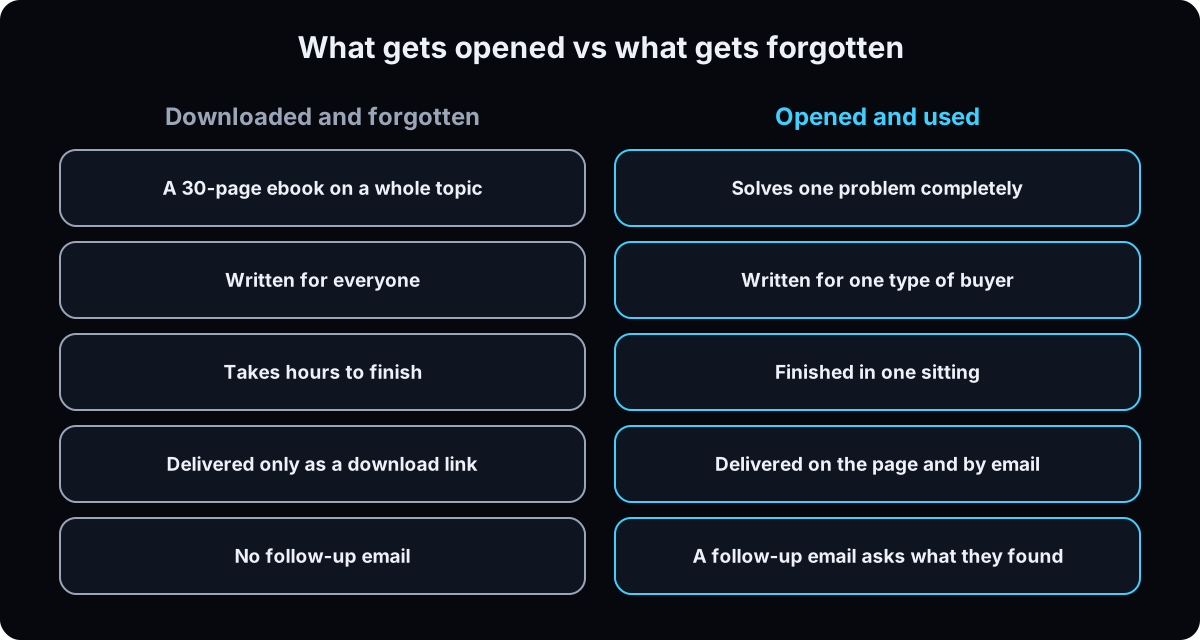 In the 10 YouTube breakdowns I studied for this guide, one operator said nearly everyone who downloads a PDF never opens it, and nobody in the set disagreed. I couldn't find a published study that measures this, so treat it as a practitioner's observation, not a statistic.
It still changes how you build. Make the thing short enough to finish in one sitting, show it on the thank-you page as well as in the email, and let the follow-up email do the selling.
| Business | Checklist or template idea | Quiz, calculator or audit idea | Consult, trial or swipe file idea |
|---|---|---|---|
| Marketing agency (see AI for marketing agencies) | Ad account pre-launch checklist: the 12 settings to check before spending | Wasted ad spend calculator: spend, leads and close rate in, monthly waste out | Free 15-minute ad account audit, capped at 5 a week |
| Coach (business, fitness or health) | Weekly plan template for clients who work full time | "Which plan fits your week?" quiz about schedule and goals, never symptoms or conditions | Swipe file of 20 check-in messages that keep clients on track |
| Local service business (plumber, roofer, cleaner) | Home maintenance checklist by season | Repair or replace cost calculator with your price ranges | Free on-site estimate with a clear time limit |
| Clinic or med spa | "Questions to ask before you book" checklist for a treatment | Treatment cost and session planner that asks for no health details | Free consult booked through the practice's own HIPAA-ready system |
| SaaS or software | Setup template that gets a new user to their first result | ROI calculator: hours saved times hourly rate | Free trial limited by time or uses, with a setup email on day 1 |
| Term | What it means |
|---|---|
| Lead magnet | A free, useful thing you give in exchange for contact details |
| Opt-in | The moment someone gives their email and agrees to hear from you |
| Landing page | A web page with one job, here collecting an email for the magnet |
| Thank-you page | The page people see after the form, where the magnet should appear |
| Comment-to-DM | A post asks people to comment a keyword, and an automation sends them a direct message with a link |
| Keyword | The one word people comment to get the magnet, like AUDIT |
| Follow-up email | The email a few days after delivery that asks what they found and offers the next step |
| CRM | Customer relationship management tool, where contacts and tags live |
| Conversion rate | The share of visitors who do the thing you asked, such as give an email |
| Swipe file | A collection of proven examples people can copy and adapt |
| CAN-SPAM | The US law that sets rules for commercial email, including a working unsubscribe |
| PHI | Protected health information under HIPAA, such as health details tied to a person |
| BAA | Business associate agreement, the HIPAA contract a vendor signs before handling PHI for a health business |
| Skill file | A text file of instructions an AI agent opens by itself when a job matches (optional, step 11) |
Do lead magnets still work?
Everyone has a free guide now. Inboxes are full. Is a lead magnet still worth building?
The generic ones are worth less every year. A specific one still does its job, because the job hasn't changed: a stranger needs a small, safe first yes before a big one.
- Specific beats long. "The 12 settings to check before your next Meta campaign" gets finished. "The ultimate guide to Facebook ads" gets saved and ignored.
- Delivery matters as much as the magnet. Show it on the thank-you page and send it by email, so it's there when they look.
- The follow-up email is where it pays. A magnet with no follow-up is a donation.
- Judge it on your own numbers. Count emails captured and calls booked per magnet, not downloads, and compare against your own last magnet.
If you only build one, build a checklist or a calculator for the question clients ask right before they pay. Leave the mini-course for later.
How to make a lead magnet, step by step
1. Set up an email tool that can tag and send
Before you make anything, check you have somewhere for the email to land. Your tool needs 3 things: a form or an integration to capture the email, a tag per magnet so you can count them, and an automation that sends an email when the tag is added. I use GoHighLevel for this; GoHighLevel workflows shows the setup. Most email tools can do the same.
Why: if the email has nowhere to go, the magnet can't be delivered or followed up, and you'll find out after the post is live.
2. Pick the one question clients ask before they pay
List the 5 things clients pay you for. For each, write the question they ask right before they pay, in their words. That question is your magnet, not the topic around it. My audit skill exists because new clients kept asking where they were wasting ad spend.
Why: a business coach in my research built "steps to start a business" when his audience's struggle was starting one while working full time. The magnet they wanted was a time-management template. A topic you know is not the same as a problem they have this week.
3. Pick the type from the question
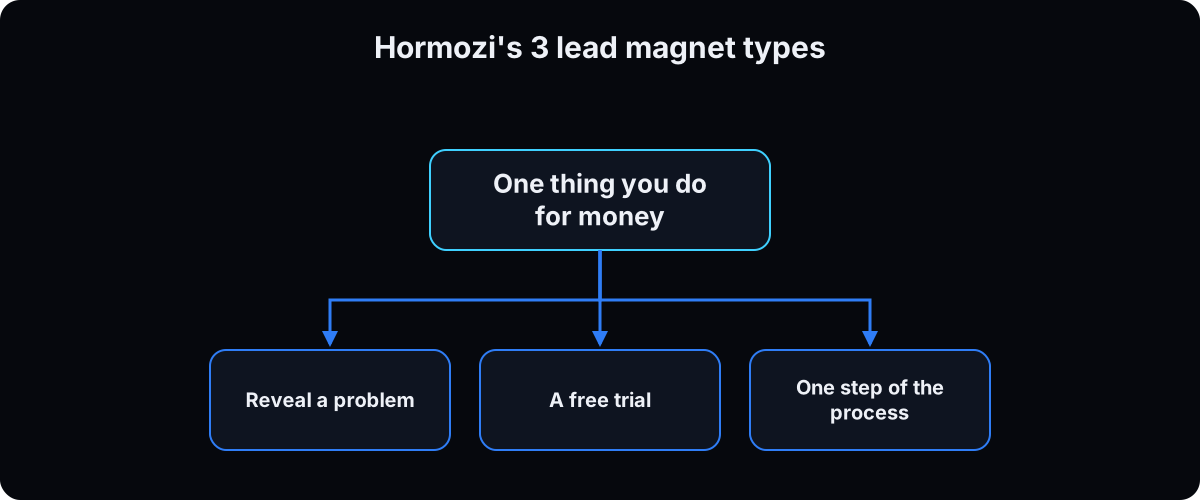 Hormozi's grouping from $100M Leads tells you which of the 7 types fits.
Reveal a problem when the problem gets worse while they wait and they can't see it: a quiz, a calculator or an audit.
Give a free trial or sample when trying it is the fastest proof: a free consult, a limited trial, a first result.
Hand over one step of a bigger process when your paid work has parts: give one part away whole as a checklist, template or swipe file.
Why: the type decides the shape and the effort. Pick it before you write a word, or you'll end up with an ebook by default.
4. Write your rules before anything goes live
Write down what your magnet and its emails may never claim or collect. Mine: no outcome I didn't measure, a placeholder like [X] instead of a plausible number, no before-and-after the magnet can't produce, and no testimonial doing the method's job.
Email rules. The FTC's CAN-SPAM guide says commercial email needs an accurate subject line, your physical address and a working opt-out honored within 10 business days, with penalties of up to $53,088 per email, and it applies to business-to-business email too (checked 15 September 2026). Send people what they asked for, plus the newsletter only if the page told them about it.
Health businesses. The FTC's health products guidance is the baseline for any health claim. A quiz that asks about symptoms, conditions or treatments, sent to a clinic, can create protected health information. Per the HHS page on business associates, a vendor that receives PHI on a health business's behalf needs a business associate agreement (BAA). Check whether each form, quiz, email and DM tool will sign one before any health detail touches it, and if it won't, don't collect health details there. So a health quiz asks about goals and schedule, never health details, and anything clinical goes through the practice's own HIPAA-ready system. This is general information, not legal advice; check with your compliance lead.
Why: your free thing is the first proof people check. One invented result or one careless health form costs more than the leads it brings in.
5. Draft a first version with Claude in one sitting
Open Claude and paste the prompt below with your blanks filled in. Ask for the checklist, template or calculator as a document you can download; Claude handles Word, PDF and spreadsheet files with its built-in skills when code execution is on (Using skills in Claude, checked 15 September 2026).
Then do the magnet yourself, start to finish, with a timer. If it takes you more than 15 minutes, cut it.
Why: a short first version you've tested beats a polished one you haven't. You'll see what's missing the moment you use it.
I want to make a lead magnet. Interview me one question at a time before you write anything.

My business: [WHAT YOU SELL, TO WHOM]
The question clients ask right before they pay: [QUESTION, IN THEIR WORDS]
The type I picked: [checklist / template / quiz / calculator / mini-course / swipe file / free consult]
What I do for clients that this is one step of: [YOUR PAID WORK]

Rules:
- It must solve that one question completely and be finishable in 15 minutes.
- Use only facts and numbers I give you. Where you need a number I haven't given, write [X].
- No results, testimonials or before-and-after claims.
- [If health business] Ask no questions about symptoms, conditions or treatments.

Then give me: the lead magnet itself, 3 names ranked, and a 1-line promise for the page.
6. Run the 4 rules
Check the draft against 4 questions. If one fails, fix it or go back to step 2.
Does it solve the whole of one problem, so something changes when they finish?
Would you be annoyed if a competitor gave it away? If not, it isn't valuable enough.
Can they finish it in one sitting, in minutes? If not, it's a course.
Does it lead to what you sell, because doing it is harder than knowing it?
Why: Hormozi's line is give away the secrets, sell the implementation. A thin magnet drives away the people who would have bought, because the free thing is the evidence they judge you on.
7. Name it and test the name before you build more
The name gets the opt-in; what's inside gets the sale. Write 3 names that say the result in the reader's words, such as "The 12-point ad account check" rather than "Ads Success Guide".
Test without an audience, cheapest first: message 10 people in your market and ask which one they'd want, or run a poll in a post. The best sign is when someone asks you to send it.
Why: in my research, the test data people shared on this topic was almost all about names and first lines, not design. A plain page with a sharp name can outperform a pretty one with a vague name.
8. Deliver it by landing page or comment-to-DM
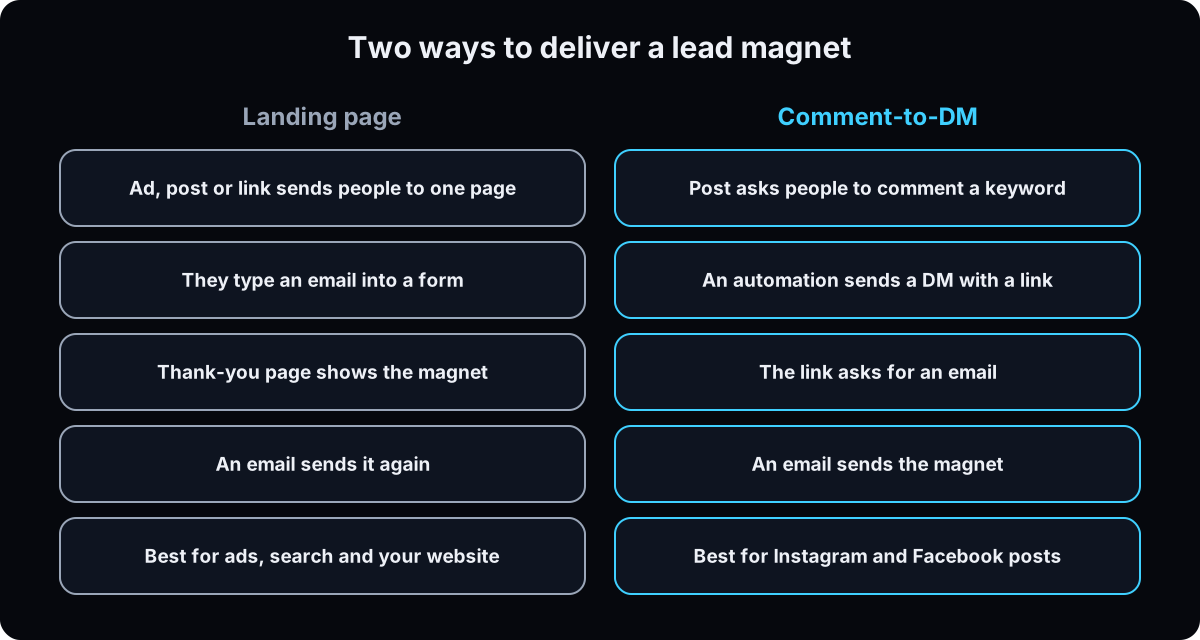 Landing page. One page, one promise, one form, and the magnet on the thank-you page. How to build a high-converting landing page covers the layout.
Comment-to-DM. The post says "comment AUDIT", an automation sends a DM with the link, and the link collects the email. Instagram DM automation walks through the setup.
Either way, give each magnet one keyword that's obvious from the promise, isn't a word people comment anyway (never YES or LOVE), and hasn't been used on another magnet. Keep a list.
Why: two magnets on one keyword fire together, and people get the wrong thing. Delivering on the page and by email means the magnet is there when they look for it.
9. Write the follow-up email
Send the magnet straight away, then one follow-up email 2 or 3 days later. Keep it short, ask one question, and offer one next step. Adapt the template below.
Include your business address and an unsubscribe line in every email, per CAN-SPAM. If the page promised a newsletter, add them to it; if it didn't, don't. My newsletter setup is in the newsletter that sends itself.
Why: the delivery email proves you keep promises. The follow-up is where a reader who used the magnet tells you what they found, and that reply is the start of a sales conversation.
Subject: Did the [MAGNET NAME] find anything?

Hi [FIRST NAME],

A few days ago you grabbed [MAGNET NAME]. Here it is again in case it got buried: [LINK]

One question: when you ran it, what was the first thing it flagged?

Hit reply and tell me. If it's something you'd rather have handled for you, you can book a [LENGTH]-minute call here: [BOOKING LINK]

[YOUR NAME]

You're getting this because you asked for [MAGNET NAME] at [WHERE]. [BUSINESS ADDRESS]. Unsubscribe: [LINK]
10. Test it end to end, post it, then keep only what moves
Before the post goes up, run the whole path with a throwaway contact: comment the keyword from a non-admin account or fill in the form, confirm the DM or thank-you page, confirm both emails arrive, then delete the contact.
Set honest expectations. Unbounce's landing page benchmark (Q4 2024 data, 41,000 landing pages of all kinds, not only lead magnets) put the median conversion rate at 6.6% across industries (checked 15 September 2026). Use that as a rough reference for any landing page, and compare each magnet against your own last one.
Tag each magnet separately and count emails captured and calls booked. My rule: make more of the kind that captures emails, and retire the kind that gets comments and nothing after.
Why: "coming soon" or a broken link is the first impression people keep. And the number decides which magnet stays, not how long you spent on it.
Later, for terminal users: package the magnet as a skill file
Skip this if you don't use a terminal or an AI agent. Everything above works without it. This is how I package my own magnets, and it's one bet on this page with no outside data behind it.
Why a skill file
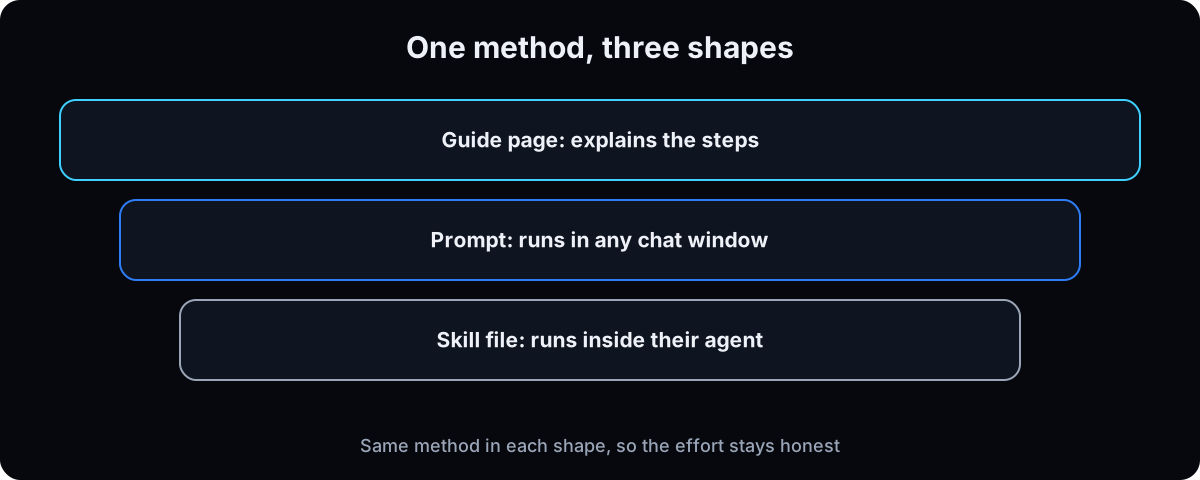 I give each magnet away in 3 shapes: a guide page that explains the steps, one prompt that runs in any chat window, and a skill file people paste into their own agent. A skill that runs is closer to done-for-you than a PDF that describes, and it can't be faked.
My ad method is public at github.com/drleadflow/clinic-ad-launch-playbook; the assets stay in a private repo. That's give away the method, sell the doing, in practice.
Why: none of the 10 breakdowns I studied mentioned a prompt or skill file. That means no competition, and also no proof yet that the audience wants it. The page and the prompt cover everyone else.
Create the skill folder
A skill is a folder with a SKILL.md file inside. The top of the file holds a name and a description written as trigger phrases, which is what makes an agent open it without being asked (Claude Code skills docs). On 15 September 2026 I had 280 skill folders on my machine, and 276 of them follow that name-and-description shape. For a no-code version in claude.ai, see Claude skills.
Put the skill on your page as text with a copy button rather than a download, so it doesn't get lost in a downloads folder.
Why: the description decides whether the skill ever fires. Write it with the words your reader would type.
mkdir -p ~/.claude/skills/my-magnet
open -e ~/.claude/skills/my-magnet/SKILL.md

# the top of the file:
# ---
# name: my-magnet
# description: What it does. Use when the user says "...", "...", or asks to ...
# ---
Run it cold, then check your keywords
Open a fresh session, paste only the skill file, and run it on a real case. If it doesn't produce what the magnet promises, fix the skill, not the promise.
If you run several magnets, keep them in one list and check it before each post. The script below confirms every keyword is unique and every link loads.
Why: a skill that fails for the first stranger who runs it undoes the trust the magnet was meant to build.
# magnets.json: [{"slug": "...", "keyword": "AUDIT", "link": "https://..."}]
python3 - <<'EOF'
import json, urllib.request
ms = json.load(open('magnets.json'))
kw = [m['keyword'] for m in ms]
assert len(kw) == len(set(kw)), 'duplicate keyword'
for m in ms:
    assert urllib.request.urlopen(m['link']).status == 200, m['slug']
print('ok', len(ms), 'magnets, keywords unique, links load')
EOF
If this happens, do this
Every one of these has happened to me or to someone I set this up for.
| Failure | Fix |
|---|---|
| Downloads, but no replies or bookings | There's no follow-up email, or the magnet solved half of a big problem. Add step 9 and solve all of a small one |
| A long PDF nobody finished | Cut it to one sitting. Turn it into a checklist, template or calculator |
| You built it for the topic, not the person | Go back to step 2 and write the question they ask right before they pay |
| The comment keyword went live before the magnet existed | Build delivery first, test with a throwaway contact, then post |
| Two magnets sent on one comment | They share a keyword. Give each magnet its own word and keep a list |
| Your health quiz asks about symptoms | Remove every health question, or move the quiz into a system covered by a BAA |
| A single-digit opt-in rate feels like failure | Unbounce's all-landing-page median is 6.6%. Compare against your own last magnet, not a screenshot |
The tools I use for this
| Tool | What it is for here | |
|---|---|---|
| Claude | Interviews me, drafts the checklist or template, and runs the skill file cold to prove it works. | Open |
| Wispr Flow † | I talk the process out loud before Claude shapes it into a magnet. | Get it |
| GoHighLevel † | Captures the email, tags the magnet, and sends the delivery and follow-up emails. | Get it |
| Dr. Lead Flow skills library | My own lead magnets, packaged as skills, free to browse. | Browse |
| Clinic Ad Launch Playbook | The public half of my ad system. The assets live in a private repo. | Open |
What I'd tell you over coffee
- Your best magnet is probably something you already made. A checklist you hand new clients on day 1, a template from a paid project, a walkthrough you've recorded. It's proven and written.
- Show it on the thank-you page, not only in the email. Emails land in promotions tabs. The page is where attention is.
- Put [X] where you don't have a number. An invented statistic in a free guide is the first thing a skeptical buyer checks.
- One magnet, one keyword, one tag. Otherwise you can't tell which one brought the call.
- Read the replies to the follow-up email yourself. They tell you what the next magnet should be.
Questions people ask
What is a lead magnet?
A lead magnet is a free, useful thing a business gives away in exchange for contact details, usually an email address. Common types are checklists, templates, quizzes, calculators, mini-courses, swipe files and free consults. It works when it solves one specific problem the reader has now, and when a follow-up email offers the next step.
What are examples of lead magnets?
A marketing agency might offer a wasted ad spend calculator. A coach might offer a weekly plan template, a roofer a repair-or-replace cost calculator, a clinic a "questions to ask before you book" checklist, and a software company an ROI calculator or a free trial. The table in the Start here section has ideas for 5 kinds of business, written for this guide.
What makes a good lead magnet?
It solves the whole of one problem, it's valuable enough that you'd mind a competitor giving it away, it can be finished in one sitting, and it leads to what you sell. The name matters too: say the result in the reader's words. Then deliver it on the thank-you page and by email, and follow up.
Do lead magnets still work?
Specific ones do. Generic ebooks on broad topics get downloaded and ignored, but a short checklist, template or calculator for the question clients ask before they pay still earns emails. Judge yours on emails captured and calls booked, not downloads.
How do I deliver a lead magnet?
Use a landing page with a form and show the magnet on the thank-you page, or ask people to comment a keyword on a post and send the link by DM. In both cases, send it by email as well, with your address and an unsubscribe line as CAN-SPAM requires, and send one follow-up email a few days later. See landing pages and Instagram DM automation.
What are good lead magnet ideas for health and fitness coaches?
A weekly plan template for busy clients, a swipe file of check-in messages, or a quiz about schedule and goals. Keep quizzes away from symptoms, conditions and treatments, because a tool that receives health information for a health business needs a HIPAA business associate agreement, and many quiz and email tools don't offer one.
What is Alex Hormozi's lead magnet framework?
In $100M Leads, Hormozi groups lead magnets into 3 kinds: ones that reveal a problem, free trials or samples, and one step of a bigger process. His advice is to give away the secrets and sell the implementation. Step 3 of this guide shows how to use it to pick a type.
The free skill
It interviews you for the question clients ask before they pay, picks the lead magnet type, scores the idea against the 4 rules, and drafts the magnet, 3 names, the keyword and the follow-up email. It refuses to invent numbers or results and won't write a health quiz that asks for health details.
---
name: lead-magnet-people-open
description: Interviews the owner for the question clients ask right before they pay, picks the lead magnet type, scores it against 4 rules, and drafts the magnet, 3 names, a unique keyword, the delivery email and the follow-up email. Never invents numbers or results. Trigger on "pick my lead magnet", "lead magnet ideas for my business", "what should I give away", "turn this into a lead magnet".
---

# A Lead Magnet People Open and Use

A lead magnet is a free, useful thing traded for an email address. The good ones solve one problem completely, in one sitting, and lead to what the owner sells.

You interview, pick, score and draft. Never invent a number, result, client or testimonial. If the owner has no real number, write `[X]`.

## 1. Interview, one question at a time
1. What they sell and to whom.
2. The 5 things clients pay them for.
3. For each, the exact question clients ask right before they pay, in the client's words. That question is the magnet, not the topic around it.
4. Which question they could answer completely, in 15 minutes, with a method they already use. Ask for the steps as they do them.
5. Whether they are a health business (clinic, med spa, health or fitness coach).
6. How they will deliver it: landing page, comment-to-DM, or both. Which email tool they use.

Push on vague answers. "Marketing help" isn't a problem. "Where am I wasting ad spend" is.

## 2. Pick the type
Match the question to a job (framework credited to Alex Hormozi, $100M Leads):
- Reveal a problem they can't see: quiz, calculator or audit.
- Free trial or sample: free consult, limited trial, first result.
- One step of the bigger paid process: checklist, template or swipe file.

Recommend one of: checklist, template, quiz, calculator, mini-course, swipe file, free consult. Say why in one sentence. Recommend a mini-course only if the owner already has the lessons recorded.

## 3. Score the 4 rules
Pass or fail, one sentence each:
1. Solves the whole of one specific problem.
2. The owner would be annoyed if a competitor gave it away.
3. Finishable in one sitting, 15 minutes at most.
4. Leads to what the owner sells, because doing is harder than knowing.

If any rule fails, fix the idea or go back to step 1.

## 4. Apply the rules before drafting
- No outcomes, testimonials or before-and-after claims the owner hasn't measured.
- Every email includes an accurate subject, the business address and a working unsubscribe (CAN-SPAM).
- Health businesses: never ask about symptoms, conditions or treatments in a quiz, form or DM. Ask about goals and schedule only. Anything clinical goes through the practice's own HIPAA-ready system with a BAA. Tell the owner to confirm with their compliance lead.

## 5. Draft the package
From the owner's answers only:
1. **The lead magnet itself**, in the chosen type, finishable in 15 minutes.
2. **3 names**, ranked, each saying the result in the reader's words, plus the message to send 10 people asking which they'd want.
3. **The keyword.** One word, obvious from the promise, not a common comment word (never YES or LOVE), unique across the owner's magnets. Ask for their list and check it.
4. **The delivery email.** Under 120 words: the link, one line on why they got it, address, unsubscribe.
5. **The follow-up email** for 2 to 3 days later: one question about what the magnet found, one next step (reply or book), address, unsubscribe.

No em dashes anywhere.

## 6. Test before posting
Tell the owner to run the full path with a throwaway contact: comment or form, DM or thank-you page, both emails, then delete the contact. The magnet shows on the thank-you page and arrives by email. Nothing goes live as "coming soon".

## 7. Keep what moves
Each magnet gets its own tag. Count emails captured and calls booked per magnet and compare against the owner's own previous magnet. Make more of what captures emails. Retire what gets comments and nothing after.
Want your first lead magnet built and wired this week?
Inside the AI CEO Lab we take one thing you already do for clients, turn it into a lead magnet, and connect the page or comment-to-DM, the delivery email and the follow-up in the same session.