 AI CEO Lab
ChatGPT and Claude Prompts for Business: A Simple Formula and 25 Templates
Why AI answers come out generic, the 4-part prompt formula with before and after examples, what differs between ChatGPT and Claude per their own docs, and 25 copyable business prompt templates grouped by job.
You ask ChatGPT or Claude for an ad, a follow-up text or a client email. It comes back polite, tidy and usable for nobody. You reroll, add a sentence, and settle for the third try.
The fix isn't a secret prompt. It's 4 things the model can't guess: the task, your real material, one example of good, and the format you need. This guide gives you that formula with before and after rewrites, the few places ChatGPT and Claude differ according to OpenAI's and Anthropic's own docs, and 25 business prompt templates you can copy, grouped by job, each with fill-in brackets and a line on when to use it.
I'm a doctor who runs an ad agency, not an engineer. Every prompt published in the guides on this site follows this shape, and I checked it against the current prompting guides from OpenAI, Anthropic and Google.
New to prompting? Start with the next section. Already writing prompts and want templates? Skip to step 8.
What you have by the end
Not concepts. Things that exist on your machine when you close the tab.
- A plain answer to why AI output comes out generic, and what to add so it doesn't
- The 4-part formula (task, context, example, format) and when to add a role, rules, an interview or a self-check
- One of your own prompts rewritten from before to after
- 25 business prompt templates for marketing and ads, sales and follow-up, client work and reporting, operations and SOPs, and writing in your own voice
- Your best prompts saved as custom instructions, a Project or a skill so you stop retyping them
- A short list of which tips hold in both ChatGPT and Claude, and which depend on the product
Start here: what a prompt is and why answers come out generic
If you've only typed quick questions into ChatGPT or Claude, 5 ideas make the rest of this guide click.
What a prompt is
A prompt is everything you give the model before it answers: your question, the instructions around it, and any text or files you paste or attach. Saved instructions count too, like ChatGPT's custom instructions or a Claude Project.
Anthropic's advice is to treat Claude like a brilliant but new employee who lacks context on your norms and workflows. OpenAI's ChatGPT guide calls a prompt a clear handoff to a new intern. Both mean the same thing: write the brief you'd give a smart person on their first day.
Why answers come out generic
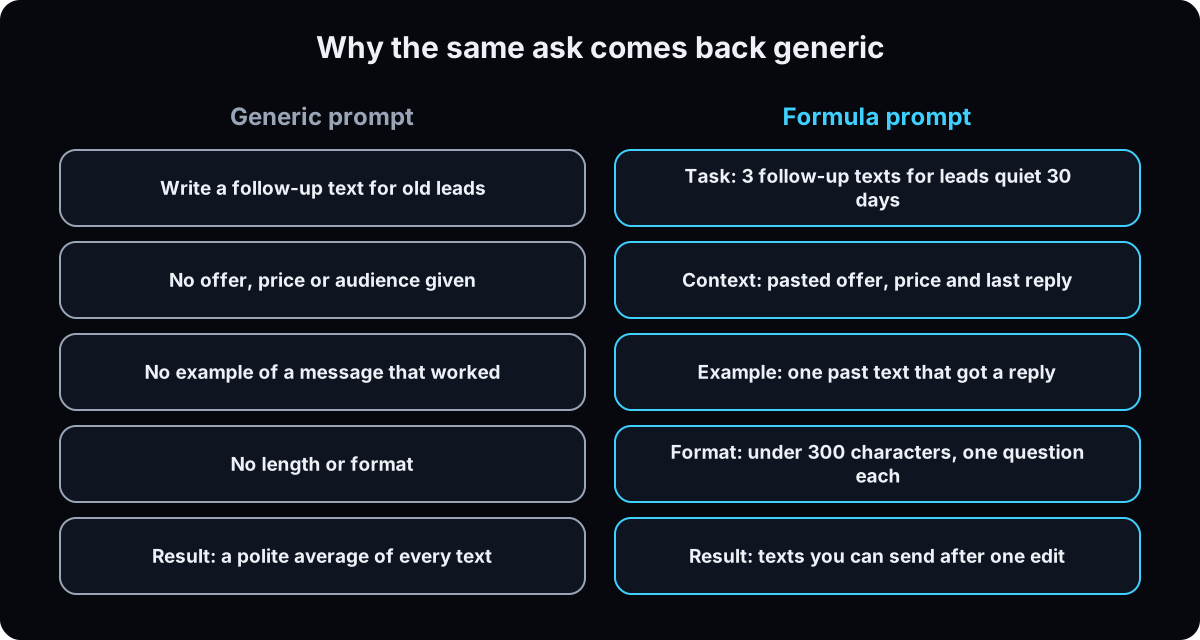 A model writes the most likely answer to what you gave it. Every gap you leave, it fills with the most common version. Ask for a follow-up text and you get the average of every follow-up text. Tell it the offer, the price, what the lead last said, and show it one text that got a reply, and there's nothing left to average.
Anthropic's golden rule is a good test: show your prompt to a colleague with minimal context on the task. If they'd be confused, the model will be too.
The simple formula: 4 parts, plus add-ons
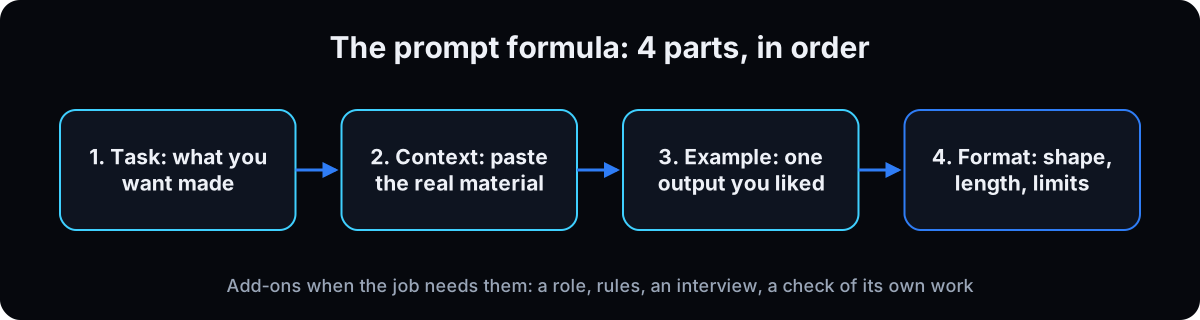 1. Task: what you want made, for whom, and what it's for. 2. Context: the real material, pasted, not described. 3. Example: one past output you liked. 4. Format: the shape, length and limits of the answer.
Add these when the job calls for them: a role ("act as my ad account auditor"), rules ("don't invent numbers; I don't know is an acceptable answer"), an interview ("ask me questions first") and a check ("list the assumptions you made").
The 4 parts line up with the vendors' own guides. OpenAI's ChatGPT guide structures a prompt as Context, Instructions and Additional Information or Constraints. Its API guide orders a developer message as identity, instructions, examples and context. Google's Gemini guide says prompts without few-shot examples are likely to be less effective (page updated 10 June 2026).
ChatGPT vs Claude: what is different
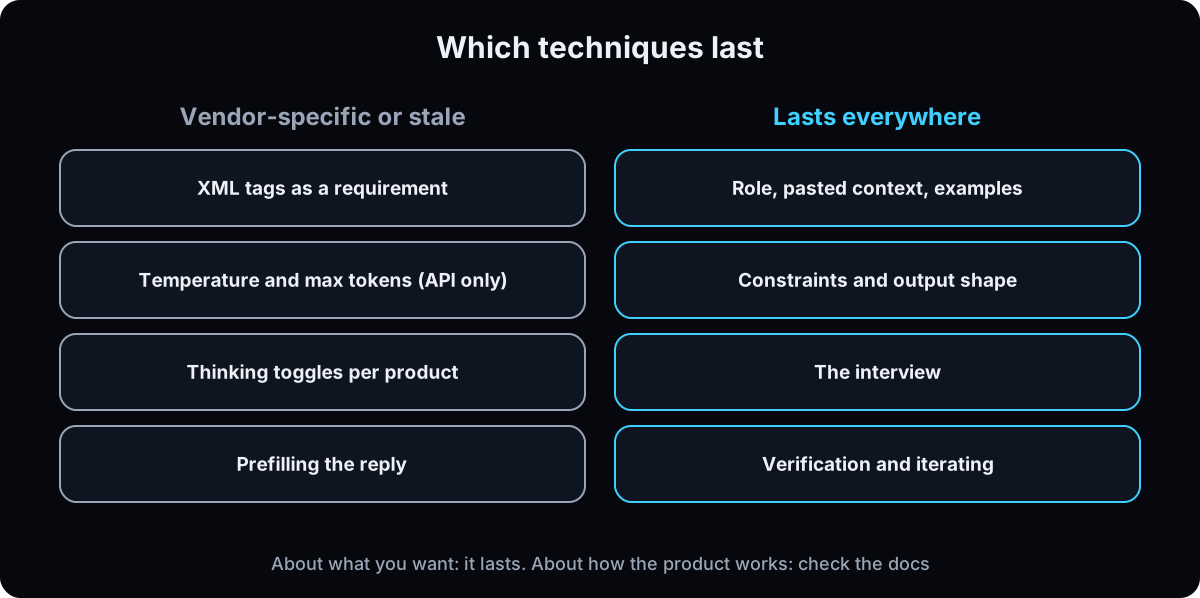 Less than most "Claude prompts" pages suggest. The formula works in both, because every vendor's guide asks for the same things: a clear task, context, examples and a stated format. "Do Claude prompts work in ChatGPT?" Yes, as long as the prompt is about what you want.
Where the docs do differ:
Examples: Anthropic suggests 3 to 5 examples wrapped in <example> tags. OpenAI recommends a handful of input and output examples. One good example still beats none.
Tags: Anthropic recommends XML tags like <context> when a prompt mixes instructions, context and examples. OpenAI's API guide also suggests Markdown and XML tags to mark where content starts and ends, so tags help in both.
Model type: OpenAI says its reasoning models do better with high-level goals, like a senior co-worker, while its GPT models need more explicit instructions, like a junior one.
Saving prompts: ChatGPT has custom instructions, Projects and GPTs. Claude has account instructions, Projects and skills. Step 13 covers both.
Already stale: prefilling Claude's reply, which you'll still see taught. Anthropic's docs say that starting with Claude 4.6 models, prefilled responses on the last assistant turn are no longer supported and return a 400 error (checked 15 September 2026). That only matters if you call the API.
I reviewed 9 popular prompting video tutorials with about 12 million views between them. By my count about a third of what they teach is specific to one vendor, and several teach techniques their own vendor has since changed. If a tip is about what you want, it lasts. If it's about how one product works, check that vendor's docs first.
Prompt engineering for beginners, and the catch
"Prompt engineering" sounds technical. For a business owner it means writing clear briefs and improving them one change at a time. OpenAI's ChatGPT guide says to optimize for clarity, not cleverness and not to expect your first prompt to work perfectly. The coding side of prompt engineering, like message roles and settings, only applies if you build with the API (step 14).
The catch: a better prompt makes a better draft, not a fact-checked one. Models still make things up. Anthropic's first technique for reducing hallucinations is to give the model explicit permission to say "I don't know", and it still says to validate critical information. Keep a person on anything that goes to a client, costs money or makes a claim.
If you run a health business, keep patient names and details out of your prompts unless your plan and agreements cover that kind of data.
| Part | What it tells the model | What goes wrong without it | Example line |
|---|---|---|---|
| Task | What to make, for whom, and why | It picks a random goal and audience | Write 3 follow-up texts for leads who went quiet 30 days ago |
| Context | Your real material | It invents your offer, price and customer | Here's the offer, price and what they last said: [paste] |
| Example | What good looks like | Wrong tone, wrong length | Match the length and tone of this text that got a reply: [paste] |
| Format | Shape, length and limits | An essay when you needed a list | Under 300 characters each, one question, no emojis |
| Role (add-on) | The standard to judge against | A generic point of view | Act as my front desk lead for a [type of business] |
| Rules (add-on) | Lines it can't cross | Made-up numbers and claims | Use only numbers I gave you. I don't know is an acceptable answer |
| Interview (add-on) | Ask before guessing | It guesses what only you know | Ask me up to 5 questions, one at a time, before you write |
| Check (add-on) | Mark its weak spots | A confident mistake you ship | List every assumption you made, most doubtful first |
| Term | What it means |
|---|---|
| Prompt | Everything you give the model before it answers: the ask, instructions, pasted text, files and saved instructions |
| Context | The real material the model needs: your offer, notes, numbers, past messages |
| Few-shot example | One or more samples of good output included in the prompt so the model copies the pattern |
| Output format | The shape you ask for: a table, numbered list, word limit or template |
| Role | A job title you ask the model to work as, like ad account auditor |
| Custom instructions | ChatGPT's saved preferences that apply to all your chats |
| Project | A workspace in ChatGPT or Claude with its own files and instructions |
| Skill | A saved set of instructions Claude opens when a matching job comes up |
| Hallucination | A confident answer that is false, like an invented number or source |
| Prompt engineering | Writing and testing prompts to get reliable output; for business owners, writing clear briefs |
| System prompt or developer message | Instructions set by whoever builds an app on the API, which take priority over the user's message |
| Prefill | Starting the model's reply for it in the API, no longer supported on Claude 4.6 and later models |
Why not copy a list of the best ChatGPT prompts?
There are pages with 500 ChatGPT prompts. Why learn a formula when I can paste one?
A copied prompt has the task and the format. It can't have the other two parts, and those are the ones that stop generic answers.
- No list knows your offer, your price or what your customer said on the phone. That's the context part, and only you have it.
- No list has an example of output you liked. That's what fixes tone and length.
- A "best prompt" for everyone is written for the average business, which is how you get the average answer.
- The 25 templates below are built so you can't skip those parts: every bracket is a place you paste your material.
Use templates as the shape. The brackets are where the result gets good.
The formula step by step, then 25 templates
1. Task: say what you want made, for whom, and why
Start with one sentence that names the output, the audience and the goal. OpenAI's ChatGPT guide puts it as background, the specific task and what success looks like.
Why: "write an ad" leaves the model to choose the offer, the audience, the platform and the goal. It picks the most common answer for each.
BEFORE
Write a Facebook ad for my business.

AFTER
Write 3 Facebook ad primary texts for [business] selling [offer] at [price]
to [who it's for] in [city]. The goal is booked [consults / calls],
not likes. Each ad takes a different angle: [angle 1], [angle 2], [angle 3].
2. Context: paste the material, don't describe it
Paste the offer with price and what's included, three customer reviews, your call notes, last week's numbers. Too long? Attach the file.
With long material, put it at the top and your question at the end. Anthropic's docs say queries at the end can improve response quality by up to 30 percent in its tests with long, multi-document inputs.
Why: "my customers are busy professionals" is your summary, and the model guesses the rest. The customer's own words give it the details a summary drops.
BEFORE
My customers are busy professionals who want results.

AFTER
<context>
Offer: [paste the offer, price, what's included, guarantee]
What customers said, word for word: [paste 3 to 5 reviews or call notes]
What they worried about before buying: [paste]
</context>

Using only the context above, write the 3 ads.
3. Example: show one output you liked
Paste one past output you were happy with, label it, and say "match this shape and level of detail." No good one yet? A bad one labeled "avoid this" helps too.
Anthropic calls examples one of the most reliable ways to steer format, tone and structure. Here's the kind of line I paste when I want a campaign summary in my format.
Why: one example carries the date format, the separator, the comparison number and the length. You'd never think to write all of those as instructions.
<example_of_good>
2026-08-14 | HealthProCEO / Video 12 - Gift For You | SCALE
| CPL $5.41 vs $12 book benchmark | raising budget 25% Monday,
| holding creative, one test angle queued behind it
</example_of_good>

Match this shape and this level of detail for every campaign
in the data I pasted above. One line each. No commentary between them.
4. Format: never leave the shape open
Ask for a table with named columns, a numbered list in the order you'll use it, or one paragraph under a word limit. Say what to do, not only what to avoid: Anthropic suggests telling Claude what to do instead of what not to do, and notes that the style of your prompt can shape the style of the reply.
Why: an open prompt gets an essay. A shaped prompt gets something you can paste into your CRM, ad account or email.
BEFORE
Give me some ideas for follow-up.

AFTER
Return a table with these columns: Day | Channel | Message | Goal.
Days 1, 3 and 7 only. Each message under 300 characters.
Write in plain sentences a person would text.
5. Add-ons: a role and rules
Role: give it a job, not a compliment. "Act as my ad account auditor" sets a standard. "You are a world-class genius" narrows nothing. Anthropic notes even a single sentence of role makes a difference.
Rules: put the lines it can't cross before the ask, and repeat the important ones at the end. Always include permission to say "I don't know". Anthropic lists that as the first way to reduce hallucinations.
Why: a model will give you a confident false number before it admits a gap, unless you tell it a gap is allowed.
Act as my [job title, like ad account auditor].

Rules:
- Use only numbers and facts I give you. If one is missing, write "missing".
- Don't invent links, reviews, results or client names.
- "I don't know" is an acceptable answer.
- Plain words, short sentences, no dashes.

[your task, context, example and format]

Reminder: use only numbers I gave you.
6. Add-on: make it interview you first
Before: "Write me a follow-up message for leads who went quiet." You get something polite and generic.
After: the same ask plus the interview below. Now it asks how long they've been quiet, what they last said, what the offer was, and whether they booked and no-showed or never booked. Only you know those answers, and they're the gaps it was averaging over.
OpenAI's ChatGPT guide suggests the same move: have ChatGPT ask you questions, then write up a clean prompt.
Why: the model didn't get smarter. The input changed.
Before you answer, interview me one question at a time.
Push back on any answer that is vague. Don't move on until my answer
has a specific number, name, date or example.
Ask at most 6 questions. Then do the task in the format above.
7. Add-on: make it check its own work
You have an answer. Now find out which parts were guessed. Append the pass below to anything with a number or a claim in it.
The assumptions list gives you the most for the least time, because it shows every gap the model filled. OpenAI's ChatGPT guide also suggests asking it to quote directly from the provided material when accuracy matters.
Why: a check before you ship is cheaper than a correction after a client reads it.
Now check your answer. Don't rewrite it yet.
1. List every assumption you made, most doubtful first.
2. Redo every number in the open and show the math.
3. For each claim, quote the line in my material that supports it.
   If nothing supports it, mark it UNSUPPORTED.
4. Name the one line that would do the most damage if it were wrong.
8. Templates 1 to 5: marketing and ads
Fill every bracket with your real material before you send. Each template has the 4 parts built in, and the line under the title says when to use it. For how to judge the ads these produce, see what makes a good Facebook ad, and for hooks on video, how to write hooks for Reels.
Why: marketing is where generic output costs the most, because it reads like everyone else's ad.
1. AD ANGLES FROM CUSTOMER WORDS
When: before you write a new ad and you have reviews or call notes.

Act as my direct-response copywriter.
Here is what customers said, word for word: [paste 5 to 10 reviews or call notes]
Our offer: [offer, price, what's included]
Find 5 ad angles in their words. For each: the angle in one line, the exact
customer phrase it came from, and one hook under 12 words.
Return a table. Don't invent quotes.

2. AD COPY VARIATIONS
When: you have one offer that works and need versions to test.

Write [3] Facebook and Instagram primary texts for [offer] at [price] for [audience].
Match the tone and length of this ad that worked: [paste it]
One per angle: [angle 1], [angle 2], [angle 3].
Each: a hook line, 2 to 4 short sentences, one call to action: [book / call / message].
No claims I didn't give you. Label each by angle.

3. LANDING PAGE REVIEW
When: a page gets clicks but not enough leads.

Act as a conversion reviewer. Here is my page copy: [paste]
The ad that sends traffic: [paste]  Visitor: [who clicks]  Goal: [form / call / booking]
List the 5 biggest reasons a visitor would leave without acting, most costly first.
For each: the line on the page, why it loses them, and a rewrite.
Table format. If you need data you don't have, say so.

4. A MONTH OF CONTENT FROM REAL QUESTIONS
When: planning posts and you're out of ideas.

Here are questions customers asked us this month: [paste from DMs, calls, emails]
Our business: [what you sell, to whom]
Turn them into 12 post ideas. For each: the question, a hook under 12 words,
the one point the post makes, and the format [Reel / carousel / post].
Return a table. Keep the customer's wording in the hooks.

5. COMPETITOR OFFER COMPARISON
When: you've saved competitor ads or pages and want a gap to aim at.

Here are [3] competitor ads or offers: [paste each, labeled by name]
Here is ours: [paste]
Compare them in a table: offer, price if shown, promise, proof, call to action.
Then list 3 things none of them say that we can prove. Use only what's pasted.
9. Templates 6 to 10: sales and follow-up
These work for text, email or DM. If you run your follow-up inside GoHighLevel, GoHighLevel workflows shows where these messages go once they're written.
Why: follow-up is repetitive, so a template saves the most time here, and the example part keeps it sounding like you.
6. QUIET LEAD FOLLOW-UP
When: leads asked about your offer and stopped replying.

Act as my front desk lead.
Leads went quiet [number] days ago. Their last message: [paste]
Offer: [offer, price]  What changed since: [new availability / bonus / nothing]
This text got replies before: [paste]
Write 3 follow-up texts for day [1], [3] and [7]. Under 300 characters each,
one question each, no pressure lines. Interview me first if anything above is missing.

7. SALES CALL PREP
When: 10 minutes before a call with a prospect.

Here's what I know about the prospect: [form answers, notes, website text]
What I sell: [offer, price range]
Give me: 1) 3 likely goals, 2) 3 likely objections, 3) 5 questions to ask,
in that order, as short bullets. Mark anything you're guessing as GUESS.

8. OBJECTION ANSWERS
When: you hear the same objection every week.

The objection, in the prospect's words: [paste]
What's true about our offer: [price, guarantee, results you can prove, timeline]
Write 3 replies I can say on a call: one that asks a question,
one that reframes, one that uses proof. Under 50 words each.
Use only the facts above.

9. PROPOSAL SUMMARY EMAIL
When: after a sales call, before you send pricing.

Call notes: [paste]  Package: [what's included]  Price: [price]  Start date: [date]
Write a follow-up email under 200 words: what they told me they want,
what we'll do, the price, and one clear next step: [sign / book / reply].
Use their words for their goals. No hype.

10. NO-SHOW REBOOK MESSAGES
When: someone booked and didn't show.

Appointment type: [consult / call / demo]  Missed on: [date]
Booking link: [link]  Our tone: [paste one message we sent that got a reply]
Write a same-day text, a next-day text and a day-4 email.
Texts under 250 characters. No guilt, one link each.
10. Templates 11 to 15: client work and reporting
These suit agencies and any business that reports to clients. For the judgment calls behind an ad report, see the Meta ads audit guide.
Why: client work is where invented numbers do the most damage, so every template here says what to do when data is missing.
11. WEEKLY AD REPORT
When: you have last week's campaign numbers and a client or boss to update.

Act as my ad account analyst.
Numbers: [paste export or table]  Target cost per lead: [$]
Match this line format: [paste one past report line you liked]
One line per campaign with a call: SCALE, HOLD or FIX, and the reason.
Use only the numbers above. If one is missing, write "missing". Never estimate.

12. CLIENT UPDATE EMAIL
When: every week or month, from your rough notes.

Notes: [paste]  Client: [name, what they care about most]
Sections in this order: Wins, Numbers, What we're doing next, What we need from you.
Under 200 words, plain language. Flag anything in my notes that looks wrong
instead of fixing it. End with one question. Draft only.

13. MEETING NOTES TO ACTION ITEMS
When: right after a call, from a transcript or messy notes.

Transcript or notes: [paste]
Return a table: Action | Owner | Due date | Quote from the call that supports it.
If no owner or date was said, write "not set". Then 3 lines on decisions made.
Don't add actions nobody said.

14. CLIENT ONBOARDING QUESTIONS
When: a new client signs and you need the right information on day one.

What we deliver: [service]  What we need to start: [access, assets, approvals]
What went wrong with past onboardings: [paste]
Write a welcome email under 150 words and a questionnaire of at most 12 questions,
grouped by topic, each answerable in one line.

15. REPLY TO AN UNHAPPY CLIENT
When: a client sends a frustrated message and you want to answer calmly.

Their message: [paste]  What happened, the facts: [paste]
What we can offer: [fix, timeline, credit or nothing]
Write a reply under 150 words: acknowledge the specific problem, state the facts
without blame, give the next step with a date. No excuses, no promises beyond what's above.
Give 2 versions: one warmer, one shorter.
11. Templates 16 to 20: operations and SOPs
SOPs are the easiest win for most owners: talk through a task once, and the model writes it down. To see how these fit into one system, read business operating system.
Why: a written process is what lets you hand work to someone else, and dictating it takes a fraction of the time typing does.
16. SOP FROM A VOICE MEMO OR SCREEN RECORDING
When: you do a task yourself and want someone else to do it next time.

Transcript of me doing the task: [paste]
Write an SOP: purpose in one line, tools needed, numbered steps
(one action each), what good looks like at the end, and common mistakes.
Where I skipped a step or said "you know", ask me instead of guessing.

17. CHECKLIST FROM AN SOP
When: the SOP exists but people skip steps.

SOP: [paste]
Turn it into a checklist of at most 15 items a person can tick in order.
Each item starts with a verb and has a visible result, like "invoice sent in [tool]".
Mark the 3 items that cause the most damage if skipped.

18. JOB POST AND INTERVIEW SCORECARD
When: hiring for a role you've described out loud but never written down.

Role: [title]  What they'll do each week: [paste]  Pay: [range]  Must-haves: [list]
Write a job post under 300 words and a scorecard with 5 criteria,
each with one interview question and what a strong answer includes.
No buzzwords. Don't invent benefits.

19. WEEKLY PRIORITIES FROM A MESSY LIST
When: Monday morning, when the to-do list is longer than the week.

My list: [paste everything]  Goal this quarter: [one goal]
Hours I have this week: [number]
Sort into: Do this week (max 5), Delegate (who: [names]), Later, Drop.
One line on why for each item in "Do". Ask if any item is unclear.

20. DECISION MEMO: TWO OPTIONS
When: you're stuck between two choices, like two tools or two hires.

Option A: [paste details]  Option B: [paste details]
What matters most to me, in order: [cost, time, quality, risk]
Return a table comparing both on those points, then a recommendation
in 3 sentences, then what would change your answer. Say "I don't know"
where my information isn't enough.
12. Templates 21 to 25: writing in your own voice
This is the fix for AI writing that sounds like AI. Adjectives like "friendly and professional" don't describe a voice. Your past writing does. Anthropic's docs also note that the formatting style of your prompt can influence the response, so a prompt full of bullet points tends to get bullet points back.
Why: the model can only copy a voice it has seen. Give it 3 to 5 real samples and a list of words you'd never use.
21. BUILD YOUR VOICE GUIDE
When: once, before any of the other writing templates.

Here are [5] things I wrote that sound like me: [paste emails, posts, texts]
Describe my voice so another writer could copy it: sentence length,
how I open, words I use often, words I never use, how I end.
Quote my samples as evidence. Under 250 words. I'll save this.

22. REWRITE A DRAFT IN MY VOICE
When: a draft is right on content but doesn't sound like you.

My voice guide: [paste from template 21]
Two samples of my writing: [paste]
Draft: [paste]
Rewrite it in my voice. Keep every fact, cut anything I wouldn't say.
Don't add stories, results or numbers. Show the rewrite, then list what you cut.

23. REMOVE THE AI TELLS
When: a final edit pass on anything written with AI.

Text: [paste]
Find and fix: dashes used as pauses, "it's not X, it's Y" lines, groups of three
used for rhythm, questions answered in a fragment, filler openers like
"in today's world", and words from this list: [your banned words].
Return the edited text, then a list of each change.

24. VOICE MEMO TO POST
When: you talked through an idea and want a post from it.

Transcript: [paste]  Platform: [LinkedIn / Instagram caption / Facebook]
My voice guide: [paste]
Write one post under [150] words using my phrases from the transcript.
Open with the most specific line I said. No hashtags unless I ask.
Give 2 openings to choose from.

25. NEWSLETTER FROM THE WEEK'S NOTES
When: you owe your list an email and have notes but no draft.

This week's notes: [paste wins, lessons, questions from customers]
Last newsletter I liked: [paste]
Write this week's email in the same shape and length: subject line options (3),
opening line, one main idea with one example from my notes, one call to action: [link].
Use only what's in my notes.
13. Save the winners so you stop retyping them
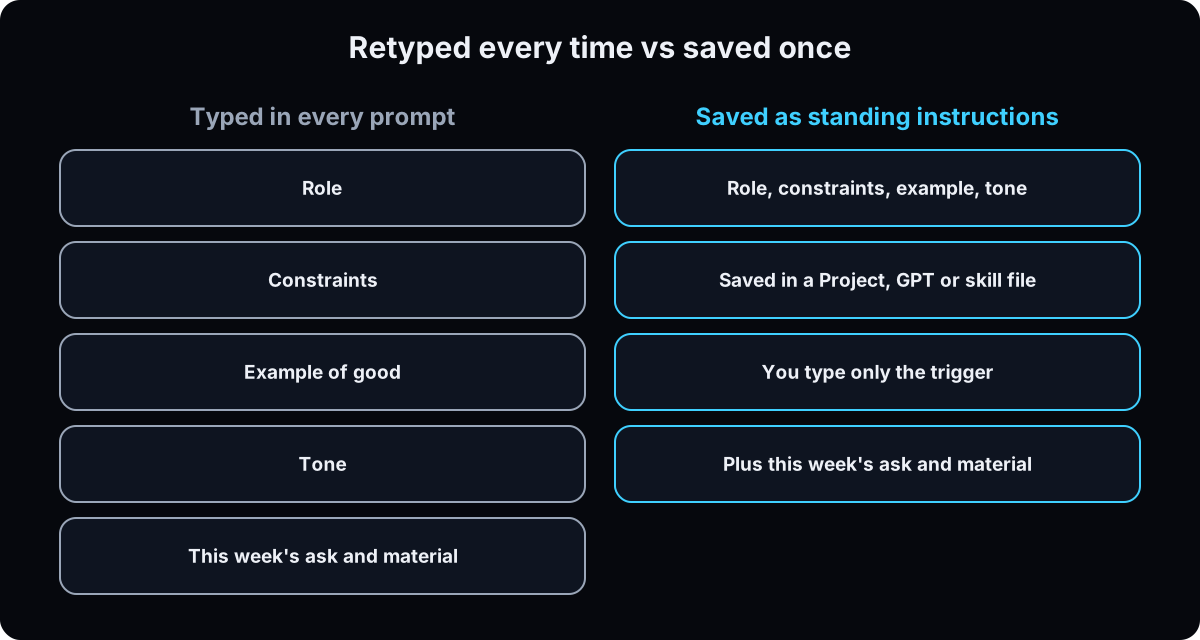 Once a prompt works 3 times, save the parts that don't change: role, rules, example and format. Then you only type the new material.
In ChatGPT: custom instructions apply to all your chats and are available on all plans. A Project holds its own files and instructions, and its instructions override your global ones inside that Project.
In Claude: account-wide instructions live in Settings, and project instructions apply only inside one Project. Anthropic's help center says free accounts can create up to five Projects, and its personalization article lists project instructions under paid plans (checked 15 September 2026). For a job that needs the same steps every time, a Claude skill opens by itself when the job comes up.
In Claude Code: standing rules for a folder go in a CLAUDE.md file.
Why: the saved version stays the same every run. A prompt you retype from memory drifts.
Save this as project instructions, then type only the new material.

Act as my [role].
Rules: use only facts and numbers I give you. If something is missing,
say "missing" and ask. "I don't know" is always acceptable.
Any send, post or spend waits for my yes in a separate message.
Voice: [paste your voice guide from template 21]
Format: [the table or structure you always want]
Example of good: [paste one]
End every answer with the one thing that needs me.
14. Optional, for the API: what changes in code
Skip this step unless you or your developer call ChatGPT or Claude from code. In the chat apps none of it applies.
In the API, the parts that never change go in the system prompt or developer message, and the new material goes in the user message. OpenAI says developer messages are prioritized ahead of user messages. Anthropic suggests setting the role in the system prompt.
Two things to check in the vendor docs before relying on old tutorials. Prefilling Claude's reply returns an error on Claude 4.6 and later models, per Anthropic's migration notes. And settings like temperature and thinking controls differ by model and change often.
Why: API techniques are the part of prompt engineering that goes stale fastest. The 4 parts don't.
If this happens, do this
Every one of these has happened to me or to someone I set this up for.
| Failure | Fix |
|---|---|
| The answer could be for any business | Paste your real material. A description of it is a guess about it |
| Right facts, wrong tone or length | Paste one past output you liked and say "match this" |
| An invented number, link or review | Add "use only what I gave you" before the ask and repeat it at the end |
| A confident claim with no source | Add the check from step 7 and say "I don't know" is allowed |
| An essay when you needed a list | Name the format: columns, numbered items, a word limit |
| It guessed your price, audience or rules | Add the interview from step 6 |
| The writing sounds like AI | Give it 3 to 5 samples of your writing and a banned-word list (templates 21 to 23) |
| A tip from a tutorial returns an error | It was product-specific. Check the vendor's current docs, not the video |
| A saved prompt stopped working as well | Change one thing at a time and compare, so you know which change helped |
The tools I use for this
| Tool | What it is for here | |
|---|---|---|
| ChatGPT | Same formula. Custom instructions and Projects hold the parts that never change. | Open |
| Claude | Where I prompt most. Projects and skill files hold my rules and examples. | Open |
| Wispr Flow † | I dictate prompts. Speaking forces plain words and gets more context in than I'd type. | Get it |
| Anthropic prompting best practices | The current rules for Claude, including the prefill change. Check it when a tip seems out of date. | Read |
| OpenAI ChatGPT prompting guide | OpenAI's plain-language guide to prompting ChatGPT at work. | Read |
What I'd tell you over coffee
- Dictate, then cut. I talk most prompts out loud, because speaking gets the context out of my head. Then I delete anything that isn't one of the 4 parts or an add-on I need.
- Change one thing per reroll. If you can't say which part fixed an answer, you changed 3 things at once and learned nothing.
- Don't know who the experts are? Ask it to list the people or methods that would do this job best, then paste that list back in. It pulls the answer away from the average.
- Keep a swipe file of outputs you liked. Your examples folder is worth more than a prompt library, because examples are the part nobody can sell you.
- Drafts only for anything live. Any prompt that could send, post or spend should end with a draft for your yes. See AI agent guardrails.
Questions people ask
What are the best ChatGPT prompts?
The best ChatGPT prompts for business have 4 parts: the task, your real material, an example of good output and the format you want. A prompt that works for everyone was written for the average business, so fill in the brackets. The 25 templates in steps 8 to 12 cover marketing, sales, client work, SOPs and writing in your own voice.
How do I write a good prompt?
Say what you want made, for whom and why. Paste the material instead of describing it. Show one example you liked. Name the format and length. For harder jobs, add a role, rules like "I don't know is acceptable", ask it to interview you first, and ask it to list its assumptions. OpenAI's ChatGPT guide says to optimize for clarity, not cleverness.
Do Claude prompts work in ChatGPT?
Yes, when the prompt is about what you want. OpenAI, Anthropic and Google all ask for a clear task, context, examples and a stated format. The differences are in product features: Anthropic recommends XML tags and 3 to 5 examples, the way you save instructions differs, and prefilling a reply in the API no longer works on Claude 4.6 and later models.
What is prompt engineering?
Prompt engineering is writing and testing instructions so an AI model gives reliable output. For a business owner it means writing clear briefs, giving examples, and changing one thing at a time until the answer is usable. The technical side, like system prompts and model settings, only matters if you build with the API.
Is there a prompt template?
Yes. A simple one: Task (what to make, for whom, why), Context (paste your material), Example (one output you liked), Format (shape, length, limits). OpenAI's ChatGPT guide uses Context, Instructions and Additional Information or Constraints. This page has 25 filled-out business templates built on the same shape.
Why does my AI writing sound like AI?
Because the model writes the most common version of what you asked for, and you didn't show it yours. Paste 3 to 5 samples of your own writing, list words you never use, and ask for an edit pass that removes common tells like dashes and "it's not X, it's Y" lines. Templates 21 to 23 do this. Anthropic also notes the style of your prompt can influence the style of the reply.
The free skill
It rewrites any rough ask into the 4-part formula (task, context, example, format), adds a role, rules, an interview or a self-check only when the job needs them, and lists every place your original prompt would have forced a guess. Ask it to save a prompt and it separates the parts for custom instructions, a Project or a Claude skill.
---
name: business-prompt-formula
description: Rewrites any rough ask for ChatGPT or Claude into the 4-part business prompt formula (task, context, example, format), adds a role, rules, an interview or a self-check only when needed, and flags every place the original would have forced a guess. Can split a working prompt into saved instructions. Trigger on "shape this prompt", "fix my prompt", "why is the answer generic", "make this a template", "save this as instructions".
---

# Business Prompt Formula

A model writes the most likely answer to what it was given. Every gap the user leaves, it fills with the most common version. Your job is to close the gaps with the user's own material, not with more adjectives.

## The 4 parts (always)

1. **Task.** One sentence: what to make, for whom, and what it's for. Name the platform or channel if there is one.
2. **Context.** List exactly what the user must paste, not describe: the offer with price and what's included, customer words, notes, numbers, past messages. Long material goes at the top, the ask at the end. Too long to paste means attach a file.
3. **Example.** Say which past output they should paste as the standard and what it needs to show. No good one? A bad one labeled "avoid this" helps too.
4. **Format.** Table with named columns, numbered list in the order they'll use it, or one paragraph with a word limit. Say what to do, not only what to avoid.

## Add-ons (only when the job needs them)

- **Role.** "Act as my [job title]." A job someone could be hired for, never "world-class genius".
- **Rules.** Before the ask, important ones repeated at the end. Default set: use only facts and numbers the user gave; write "missing" instead of estimating; don't invent links, reviews, results or client names; "I don't know" is an acceptable answer; plain words, no dashes. If the task touches a live account: any send, post, spend or record change waits for the user's yes in a separate message.
- **Interview.** When the answer depends on things only the user knows: "Interview me one question at a time. Push back on vague answers. Don't move on until the answer has a specific number, name, date or example. Ask at most 6 questions."
- **Check.** For anything with numbers or claims: list every assumption, most doubtful first; redo every number in the open; quote the supporting line from the user's material for each claim or mark it UNSUPPORTED; name the line that would do the most damage if wrong.

## What you return

1. The rewritten prompt with each part labeled, brackets left where the user must paste material.
2. Every place the original ask would have forced a guess, one line each.
3. If they asked to save it: the parts that never change (role, rules, voice, format, example) separated for ChatGPT custom instructions or a Project, Claude project instructions, or a Claude skill. The typed prompt then becomes the new material plus one line.

## Writing in the user's voice

If the output is writing that must sound like the user, ask for 3 to 5 samples of their own writing and a list of words they never use before drafting. Describe their voice from the samples with quotes as evidence. Never invent stories, results or numbers about them or their clients.

## Rules for you

- Keep prompts short. Delete motivation paragraphs and praise. Long prompts drift.
- Keep the user's own specific words.
- The formula works in ChatGPT and Claude alike. If a technique depends on one product (XML tags as a requirement, prefilling a reply, temperature, thinking settings), tell the user to check that vendor's current docs. Prefilled assistant replies return an error on Claude 4.6 and later models in the API.
- If the business handles patient or client personal data, remind the user to keep identifying details out unless their plan and agreements cover it.
- A better prompt makes a better draft, not a verified one. Anything that goes to a client, costs money or makes a claim gets a human check.
Want your best prompts turned into saved instructions and skills?
Inside the AI CEO Lab we take the jobs you prompt for every week and save them as Projects and skills with your examples and rules, so the prompt you type becomes one line.