 AI CEO Lab
Grok Bot: What It Is and How to Set Up Your First Agent
New to Grok Bot? Start with what it is and how agents work, then set up one agent you talk to, specialists underneath it, and nothing going out without your yes.

Most people set up Grok agents wrong. They build 12 bots in an afternoon, name them after departments, and by Friday they're managing 12 more inboxes.
Here's the setup I run instead. One agent you talk to: a chief of staff. Specialists work underneath it. Nothing that sends, posts, spends money or changes your CRM goes out without your yes. Talk to one agent. Let it run the rest.
My ads agent watches Meta and flags it when a campaign drifts outside the rules I set. I don't open the ad account. I read a short note and decide.
I'm a doctor, not an engineer, and this guide assumes you've never used an agent. New to Grok Bot? Read the next section first. It explains what Grok Bot is and how agents work in plain English. Already using it? Skip to step 2.
What you have by the end
Not concepts. Things that exist on your machine when you close the tab.
- A clear picture of what an agent is and what Grok Bot adds on top of a chat app
- One pinned chief of staff that hands work to specialists instead of doing it all
- Approval rules so every send, post, spend or CRM change waits for your yes
- Your inbox, calendar and notes connected once
- A morning brief and an evening meeting summary every weekday
- A 5-line handoff card so the Bot spends usage on settled jobs, not brainstorms
- A 2-week plan that only adds specialists when you need them
- A small roster and one group chat pattern for when you need them
Start here: what Grok Bot is and how agents work
If you've only used ChatGPT or the Grok chat app, 3 ideas make everything else in this guide click.
What Grok Bot is
Grok Bot is xAI's app for AI agents. xAI's overview describes each Bot as a persistent agent with a name, a role and context that builds up over time. It works on a cloud computer with a browser, files and a terminal, so the work finishes in your real tools instead of ending as a chat draft. It runs on Mac, Windows and Linux, with phone apps for checking in.
A chatbot answers. An agent does the work.
Ask a chatbot for a follow-up email and it writes one for you to copy. Ask an agent and it opens your inbox, finds the thread, drafts the reply and waits for your approval to send. Same request, but the agent takes the steps itself.
In practice: think in a normal chat, then give the finished job to an agent. Step 4 below shows why that split saves usage.
How a Grok agent works
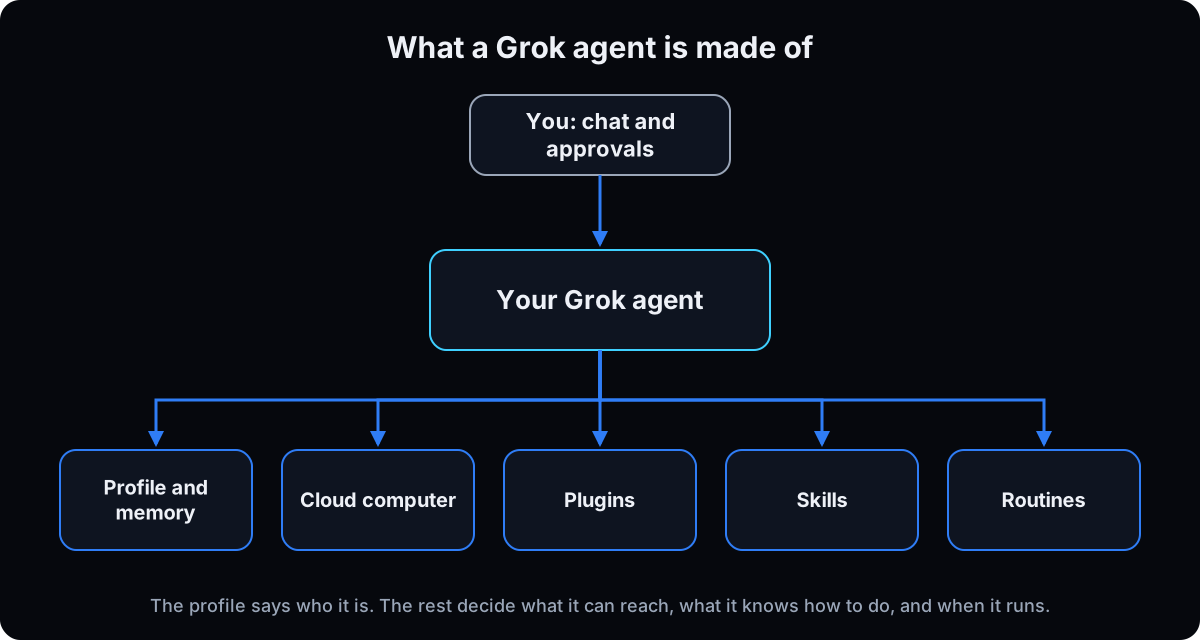 Every agent is built from the same few parts. Its profile holds its name, job and standing rules. Its memory keeps preferences and key facts from past work. Its computer is where it browses and saves files. Plugins connect it to apps like Gmail and Slack. Skills are jobs it knows how to repeat. Routines decide when it runs without you. Approvals stop it before anything risky. The table below is a cheat sheet.
What sets Grok Bot apart
It keeps working with your laptop closed, because the computer lives in the cloud, not on your machine.
You can teach by showing. With Teach a task, you do a job on screen for up to 10 minutes and it drafts a skill from what it watched.
Agents work together. Bots can message each other and share a group chat, which is what makes a chief of staff with specialists possible.
Approvals are built in. You can set rules that always stop certain actions, like sending or deleting, until you say yes.
One catch: all your agents share one computer, with the same files and logins. xAI's security docs say not to treat separate agents as a security boundary.
Grok Bot or Viktor for a team?
Grok Bot is a personal app on a per-person plan: you talk to your agents in the Grok Bot app, and they reach Slack through a plugin. If your whole team already works in Slack or Microsoft Teams, Viktor sits inside those channels instead and bills per workspace, so everyone shares one credit pool. For one owner running their own work, Grok Bot fits. For an agency team with client channels, look at Viktor in Slack.
| Term | What it means |
|---|---|
| Bot or agent | One AI teammate with a name, a job and its own conversation |
| Description | Standing rules that shape everything the agent does, set in its profile |
| Agent Computer | The shared cloud computer your agents use to browse, log in and save files |
| Plugins | Connections to apps like Gmail, Calendar and Slack, added in Settings |
| Skill | Saved instructions for a job, so the agent can repeat it the same way |
| Routine | A schedule or event that runs a job without you asking |
| Approval | A pause where the agent shows you an action and waits for your yes |
The mental model
Treating Grok like ChatGPT with plugins. 12 department bots you message one by one. Brainstorming inside the Bot, where it burns usage.
 Hire a chief of staff. It hands work to specialists. You talk to one agent. Then grow 4 things together: context (what it knows about your business), connections (the tools it can reach), skills (jobs it knows how to do) and routines (when it runs on its own). xAI's own docs describe the same idea: give each Bot a clear job with its own tools and approval boundary.
| Role | Talks to you | Job |
|---|---|---|
| Chief of staff | Yes, it's your one chat | Sorts requests, briefs you, hands work to the right specialist |
| Specialists | No, unless you open them | One job each: ads, content, money, delivery |
| Group chats | Optional | Specialists work on a draft together and bring you decisions only |
Won't one agent become the bottleneck?
If everything goes through one chief of staff, doesn't it become a new bottleneck?
No, because your chief of staff doesn't do the work. It routes it.
- The specialists do the actual work, each on one job.
- Your chief of staff decides who handles a request and brings the result back.
- The only thing that reaches you is the decision that needs a human.
You stop being the bottleneck. The chief of staff is a switchboard, not a worker.
Day 0: from zero to your first agent
1. Check your plan and install the app
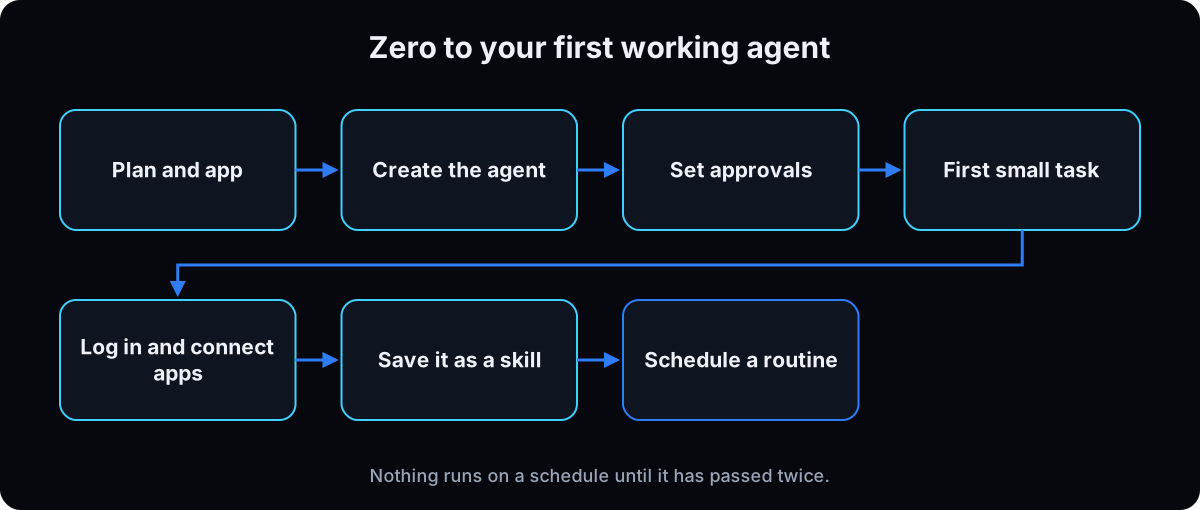 Grok Bot needs a paid plan. xAI's get started guide lists SuperGrok Plus, SuperGrok Heavy, Cursor Pro+, Cursor Ultra, and Cursor Teams Standard or Premium. Usage resets weekly.
Download the desktop app for your computer, open it, choose Get started, and finish signing in in the browser window that opens.
Menu names can shift between app versions. If a label doesn't match, look for the closest one.
2. Create your chief of staff and pin it
Choose New in the sidebar (or Cmd/Ctrl+N), then Create new agent. Open Bot actions, then Edit Profile, and give it a name, a title and the description below. Then pin it to the top of the sidebar.
Why: the description is its standing rules. Per xAI's Bot docs, rules that always apply go in the description, and today's task goes in a chat message. This one makes it hand work to specialists instead of doing everything itself.
You are my chief of staff. You are the only agent I talk to.
Before any task, check whether another agent owns it and hand it off first. Only do the work yourself if no specialist fits, then bring the result back here.
Anything that sends, posts, pauses ads, spends money or changes the CRM waits until I say an exact yes.
Keep briefs short. Put what needs me first. Never make up numbers.
3. Set your approval rules before it touches anything
 Open Settings, then General, then Auto-review. Add a Require Approval rule for each action below. When the agent asks, Allow once approves one action. Always allow creates a lasting rule, so keep those narrow.
Why: your description tells the agent to wait, but a rule in approvals stops it even if it forgets. Use both.
Require approval for:
- Sending messages, emails or invites
- Publishing or posting anything
- Purchases, payments or ad spend changes
- Deleting or overwriting data
- Changing permissions or CRM records
4. Think in regular chat, then give it one small, settled task
Start with something that needs no apps, like summarizing a document you paste in. Work out what you want in regular Grok chat first, then paste the finished job into the Bot. The template below is the 5-line handoff card: once it's filled in, the job is settled.
Why: Grok Bot usage is measured by agent steps and tokens, not by how many messages you send, per the plans and billing page, and it resets weekly. A half-formed idea in the Bot means steps spent on rewrites. You also learn how it thinks before it can do anything that matters. Ask for changes until you like the format, then tell it to remember that format.
Job: [one sentence: what gets made]
Inputs: [the document, link, thread or notes to use]
Limits: [what not to do, what to skip, tone, length]
Done when: [what a finished result looks like]
Needs my yes: [what waits for me before it sends, posts or spends]
5. Let it interview you once
Paste the prompt below into your chief of staff chat and answer one question at a time. Save business facts where every agent can see them. Keep your personal preferences with the chief of staff only.
Why: every specialist you add later starts out knowing your business.
Interview me about my business, one question at a time, until you understand it. Cover who I am, who I serve, my offers, this week's priorities, the tools I use, how I want you to talk, my hard no's, and what success looks like in 30 days.
After 8 to 12 answers, write 3 things: (1) business facts every agent needs, (2) preferences only you, my chief of staff, should keep, (3) which specialist agents are worth adding next.
Don't copy the whole interview into every agent. Never make up numbers.
6. Log in to your tools inside the agent's computer
When the agent needs a site, open Agent Computer, take over control, sign in yourself, then hand control back. Logins stay on that computer, so it can work while you sleep.
Why: never paste a password, verification code or CAPTCHA into chat. xAI's computer and apps docs also note that all your agents share this computer and its logins, so only sign in to what they need.
If the computer gets stuck, look under Settings, then Beta. Try Update or Recover first. Reset rolls it back to the last saved snapshot.
7. Connect only what you use this week
Open Settings, then Plugins, choose Add on Gmail, Calendar and Slack, and approve each one in your browser. Add Notion or Monday and your call recorder next. In chat, type @ to point the agent at a specific plugin.
Why: every tool you connect is one more place something can go wrong. Missing one, like LinkedIn? Composio, a service that connects extra tools, can fill the gap. Leave your bank and ad accounts off for now.
8. Turn a job that worked into a skill, and test it twice
 Once a job comes back right, ask the agent to save it as a skill, or use Teach a task to show it on screen. Type / in chat to run a saved skill. Then run it fresh on 2 different days against a pass test you wrote first.
Fix the skill between runs, never during one. Only a skill that passes both runs goes on a schedule. Otherwise you find out it's broken at 7am.
Skill: [name]
Pass test: [what a good result looks like]
Run 1, [date]: pass / fail. What was missing: [ ]
Run 2, [date]: pass / fail. What was missing: [ ]
Only schedule it if both runs pass.
9. Save 2 routines with your time zone
Ask your chief of staff to create a routine, and give it the schedule, your time zone, where the input comes from and what to send back. Start with a morning brief and an evening meeting summary. Use Test run before you turn it on. You'll find them later under View conversation details, then Routines.
Why the time zone: skip it and your 7am brief can arrive in the middle of the night. Details are in xAI's skills and routines docs.
Weekdays at 7am [your time zone]: overnight Slack and email that need a reply, today's calendar, and open items from yesterday's call notes. Put what needs me first. If nothing happened, send one line.

---

Weekdays at 6pm [your time zone]: pull today's meetings, save the notes, and write a one-page summary with an overview, my to-do list only, handoffs for the specialists, and 3 to 5 content ideas. Send me the link and the top actions.
10. Give every routine an off switch
A routine that fails quietly can run wrong for days before you notice. Limit each one to weekdays and your waking hours, and have it stop and tell you after 2 failures in a row.
Weekdays only, between [start] and [end] my time.
Run the [skill name] skill and check it against its pass test.
If it fails twice in a row, pause this routine and tell me what went wrong.
Anything that sends, posts, spends or changes the CRM waits for my yes.
Never make up numbers.
11. Add specialists only after a job piles up twice
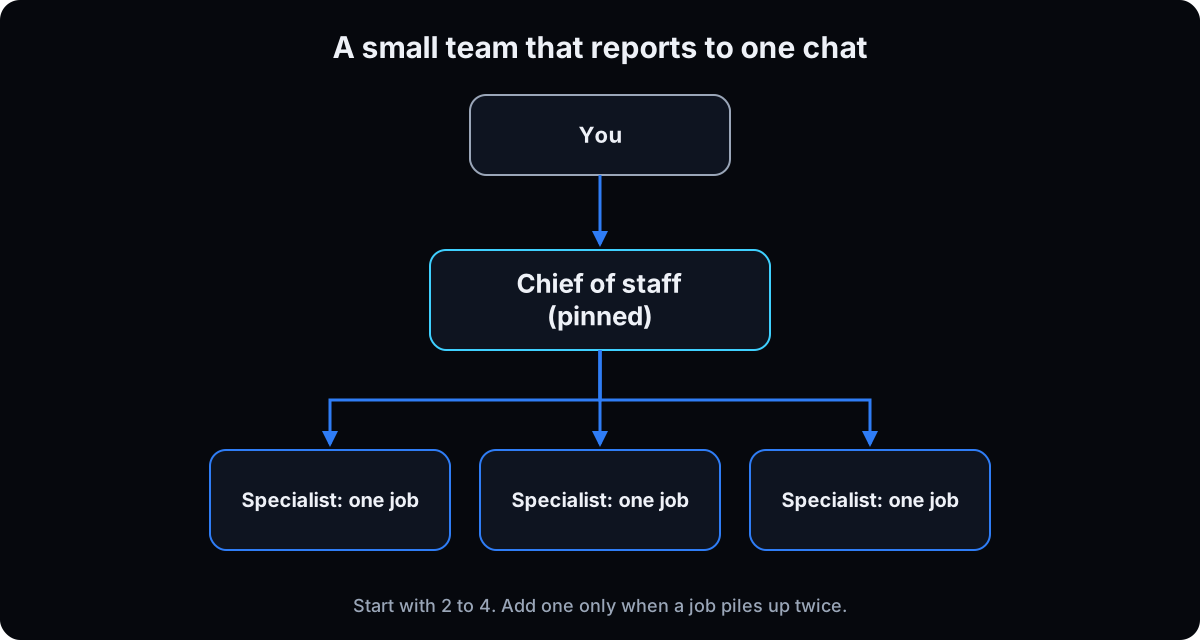 When the same job has landed on your chief of staff twice, ask it to draft a roster with the prompt below. Cut every candidate that fails one of the 3 questions at the end, and keep 2 to 4 specialists with one job each. Create each one and paste the specialist description into its profile.
Why: xAI's team guidance says to start with the smallest useful roster and add specialists only when the work needs a stable role. Bots can hand work to each other, so route one real task through your chief of staff to prove it before you add anyone else.
You are my chief of staff. Draft a small specialist roster for my business from what you already know. Output a table: Name | One job | Reports to | What waits for my yes | Which piled-up job justifies it.
Limits: 2 to 4 specialists. One job each. Every one reports to you. No write access to money or ads. Never make up numbers.
Then cut any candidate where one answer is no: (1) Has this job piled up twice in the last 2 weeks? (2) Is it clear what done looks like? (3) Would you still route the work?

---

You are [name]. Your one job: [one sentence]. You report to the chief of staff.
Don't message me unless the chief of staff escalates. If a task isn't your job, hand it back.
Anything that sends, posts, spends money, changes the CRM or touches logins waits for my exact yes. Never make up numbers.
12. Give drafts that need rounds a group chat
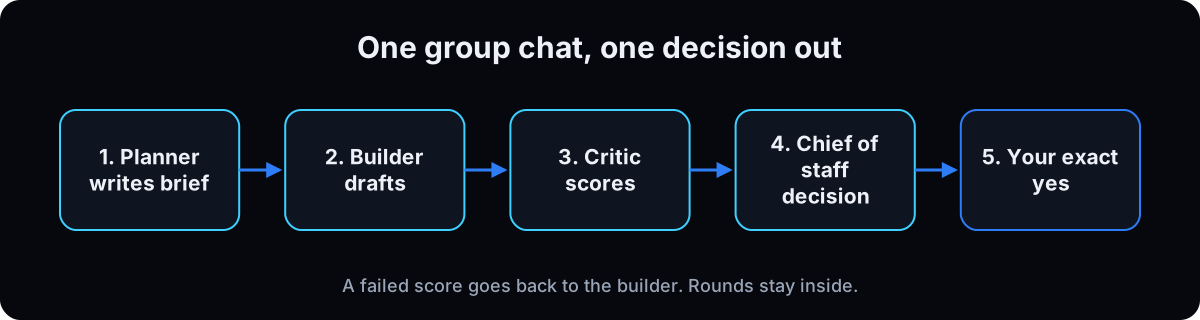 Use a group chat when a draft needs several passes, like a newsletter or a landing page, and a specialist keeps sending you every version. Start a group chat with 2 to 6 Bots, for example a planner that writes the brief, a builder that drafts and a critic that checks it against done-when. Name it after one weekly job.
Open with the message below. It sets a cap on rounds, and only a decision leaves the room.
Why: xAI's docs say to use a group when several Bots need one shared outcome and visible handoffs, and to describe the shared outcome and who owns the next step. Without a round cap, a critic and a builder can keep polishing and spend usage. Settle the brief in regular chat first.
Shared outcome: [the finished piece and its done-when].
Planner owns the brief. Builder drafts. Critic checks the draft against done-when in 5 lines max.
Stop after [3] rounds. If it still fails, send the chief of staff what's blocking it.
Drafts, screenshots and small fixes stay here. Don't message me mid-round.
When it passes, send the chief of staff this: Job, Recommendation, Options, Risks, Ask (exact yes to publish, send or spend, or no).
Never make up numbers.
13. Keep the sidebar calm
Right-click agents to group them into folders like content, finance and general, and keep your chief of staff pinned on top. Hide or archive any specialist with no weekly job, and keep group chats rare: don't open a second one until the first has run cleanly twice.
Why: one chat on top keeps you talking to one agent.
Watch out: per xAI's Bot docs, hiding a Bot doesn't pause it or its routines. Turn its routines off first. Deleting a Bot removes its profile, conversation and routines, so hide instead if you might need the work later.
If this happens, do this
Every one of these has happened to me or to someone I set this up for.
| Failure | Fix |
|---|---|
| You're chatting with 12 agents | Go back to one pinned chief of staff |
| You brainstorm inside the Bot and burn usage | Think it through in regular chat, then paste a 5-line handoff card. See step 4 |
| Your chief of staff does everything itself | Rewrite its description so it hands work off first |
| Call notes pile up with no to-dos | Add the evening summary and a morning check for open items |
| Your ads agent can change campaigns | Recommendations only until you say an exact yes |
| A specialist sends you every draft | Move the rounds into a group chat that brings you decisions only (step 12) |
| It reports numbers it can't reach | Have it say the connection is broken and stop, then fix the connection |
| A routine runs broken for a week | Test it twice first, and make 2 failures in a row pause it |
| You built 12 specialists in an afternoon | Cut to 2 to 4 with one job each, using the 3 cut questions in step 11 |
| A hidden specialist still runs its routines | Hiding doesn't pause routines. Turn the routines off, then hide it |
| A group chat keeps going round and round | Put a round cap in its first message and have it escalate the blocker |
The tools I use for this
| Tool | What it is for here | |
|---|---|---|
| Grok Bot | Where your chief of staff, specialists, group chats and routines live. | Open |
| Grok Bot docs | xAI's official setup, routines and approvals documentation. | Read |
| Grok Bot 101 | xAI's own beginner guide to how a Bot and its computer work. | Read |
Your first 2 weeks
- Days 1 to 3: prove the morning brief. Connect Slack, Gmail and Calendar, save the morning routine, and paste your offer, your ideal client and this quarter's priority once. Done when you get a short brief you read every morning.
- Days 4 to 7: add context and a work log. Run the interview prompt, create a shared folder your agents can write to, and have your chief of staff log finished work where you can see it. Done when a call turns into 3 to-dos for you, not a 20-page transcript.
- Days 8 to 14: add a specialist only when you need one. Add one only after the same job has piled up on your chief of staff twice, and ask your chief of staff which specialist is missing. Keep the team at 2 to 4. Done when "check Meta" comes back as a short recommendation from your ads specialist. The roster prompt is in step 11.
- Put the think-first rule in writing. Add this line to your chief of staff's description: "If my ask is still fuzzy, push back in chat and ask for a 5-line handoff card before you start computer work." Then it stops you from opening Bot work on a guess.
- Count before you claim savings. After a week, mark each Bot thread as brainstorm or settled job. Count the threads. The number tells you whether thinking still leaks into the Bot. Don't guess at usage saved.
Questions people ask
Do I need to know how to code?
No. You set up agents by writing what you want in plain English, and you can show it a job on screen with Teach a task.
Which plan do I need for Grok Bot?
xAI's get started guide lists SuperGrok Plus, SuperGrok Heavy, Cursor Pro+, Cursor Ultra, and Cursor Teams Standard or Premium. Usage resets weekly.
Why are my Grok usage limits running out?
Grok Bot usage is measured by agent steps and tokens, not by how many messages you send, so bigger tasks use more, per Cursor's Grok Bot plans page. It resets weekly. The common leak is brainstorming inside the Bot. Think in regular Grok chat, then hand the Bot a finished 5-line handoff card.
Is Grok Bot the same as the Grok chat app?
No. The chat app answers questions. Grok Bot agents take steps in your tools on their own computer, keep memory between tasks, and can run on a schedule.
Does it keep working when my laptop is closed?
Yes. The agent's computer runs in the cloud, so routines and long tasks keep going without your laptop.
Is it safe to log in to my accounts?
Sign in yourself by taking over the Agent Computer, never by pasting passwords into chat. All your agents share that computer and its logins, so connect only what they need and set approval rules for anything risky.
How many agents should a beginner make?
One. Start with a chief of staff, and add a specialist only after the same job has piled up twice. Even then, keep the team at 2 to 4 specialists with one job each. xAI's Bot docs also say to start with the smallest useful roster.
Is Grok Bot good for a team that works in Slack?
It can connect to Slack, but each person works in the Grok Bot app on their own plan. Teams that want one AI employee inside their Slack or Teams channels, billed per workspace, usually fit Viktor better.
The free skill
It explains the basics, walks you through day 0 and the first 2 weeks, and holds 3 rules: you talk to one agent, you think in regular chat before the Bot starts work, and you don't add a specialist until the same job has piled up twice. Related guides: AI agent guardrails and Viktor in Slack for teams.
---
name: grok-agents
description: Sets up a Grok Bot team the user runs like a CEO. One pinned chief of staff they talk to, specialists underneath, and every send, post, spend or CRM change waiting for their yes. Walks day 0 (about 30 minutes), then a 2-week plan that only adds specialists when the same job has piled up twice. Also covers thinking in chat before Bot work, a 2 to 4 specialist roster, and group chats that bring back decisions only. Trigger on "set up my grok bot", "build my bot team", "who should my first agent be", "my agents are chaos", "my grok usage keeps running out", "build my roster", "stop screenshot spam from agents".
---

# Grok Agents

Help the user set up one chief of staff in Grok Bot, with specialists underneath it. They talk to one agent. Nothing that sends, posts, spends money or changes their CRM goes out without their exact yes.

Most people do this backwards. They build 12 bots, name them after departments, and end up managing 12 inboxes. Steer them away from that.

## When to use
- They want a Grok Bot team, their agents feel chaotic, or they ask who their first agent should be.
- They're new to agents and need the basics first.
- Their Grok usage runs out, they want specialists, or specialists flood them with drafts.
- Not for a one-off research chat with no ongoing team.

## If they're new, explain this first
- **Grok Bot** is xAI's app for persistent AI agents. Each agent has a name, a job and memory, and works on a cloud computer with a browser, files and a terminal, so it keeps going with the laptop closed.
- **Chatbot vs agent:** a chatbot writes the email; an agent opens the inbox, drafts the reply and waits for a yes to send.
- **Parts of an agent:** profile and description (standing rules), memory, the shared Agent Computer, Plugins (app connections), skills (repeatable jobs), routines (schedules or events), approvals.
- **Watch out:** all their agents share one computer and its logins. Separate agents are not a security boundary.
- Plans listed by xAI: SuperGrok Plus or Heavy, Cursor Pro+, Cursor Ultra, Cursor Teams Standard or Premium. Usage resets weekly and is measured by agent steps and tokens, not messages (cursor.com/help/grok-bot/plans).

## Day 0, in order
Go one step at a time. Confirm each is done before the next. Menu names change between versions, so use the closest label.

1. **Plan and app.** Confirm an eligible plan, install the desktop app, Get started, sign in.
2. **Create and pin the chief of staff.** New, Create new agent, Bot actions, Edit Profile. Real name, pinned, the description below.
3. **Set approval rules.** Settings, General, Auto-review. Require Approval for sends, posts, spend, deletes, permission or CRM changes. Allow once beats Always allow.
4. **Think in chat, then one small settled task.** Brainstorm in regular Grok chat, not the Bot. Paste a filled-in 5-line handoff card. No apps yet.
5. **Run the interview once.** Business facts go where every agent can read them. Preferences stay with the chief of staff.
6. **Log in inside the Agent Computer.** Take over, sign in, hand back. Never paste passwords or codes into chat. Stuck: Settings, Beta, Update or Recover before Reset.
7. **Connect only what they use this week.** Settings, Plugins, Add: Gmail, Calendar, Slack, then Notion or Monday and a call recorder. Bank and ad accounts stay off.
8. **Save a skill and test it twice.** Ask it to save the job or use Teach a task. Run fresh on 2 different days against a pass test written first. Fix only between runs.
9. **Save 2 routines with a time zone.** Morning brief and evening meeting summary. Test run before enabling.
10. **Add an off switch to each routine.** Weekdays and waking hours only. 2 failures in a row pause it and alert them.
11. **Add specialists only after a job piles up twice.** Run the roster prompt in the chief of staff chat, cut with the 3 questions, keep 2 to 4, one job each. Route one real task before adding anyone else.
12. **Group chat for drafts that need rounds.** 2 to 6 Bots (docs.x.ai/grok-bot/chat-and-collaboration). First message states the shared outcome, who owns the next step, a round cap and that only decisions leave.
13. **Keep the sidebar calm.** Folders, chief of staff pinned. Hide or archive idle specialists, but hiding doesn't pause a Bot's routines (docs.x.ai/grok-bot/bots): turn routines off first. Deleting removes profile, conversation and routines. No second group chat until the first has run cleanly twice.

## First 2 weeks
- **Days 1 to 3:** prove the morning brief. Done when they read it every morning.
- **Days 4 to 7:** interview, shared folder, a visible log of finished work. Done when a call turns into 3 to-dos.
- **Days 8 to 14:** add a specialist only after the same job piles up twice. Ask the chief of staff which one is missing. Done when "check Meta" returns a short recommendation.

## Rules
- One agent they talk to. It hands work off first.
- Every send, post, spend or CRM change waits for an exact yes.
- Think in chat. The Bot gets settled jobs from a handoff card.
- 2 to 4 specialists, one job each. No new one until a job piles up twice.
- Group chats cap their rounds and escalate decisions only.
- Nothing runs on a schedule until it passes twice.
- Never make up numbers, revenue or medical claims. If a connection is broken, say so and stop.
- No passwords or patient information in chat.
- Start smaller than they want.

## If this happens
- Chatting with 12 agents: back to one pinned chief of staff.
- Brainstorming inside the Bot: think in a normal chat, hand the finished job to the Bot.
- The chief of staff does everything itself: rewrite its description to hand off first.
- Call notes with no to-dos: add the evening summary.
- The ads agent can change campaigns: recommendations only until a yes.
- A specialist sends every draft: move it to a group chat.
- A routine ran broken for days: test twice, add the off switch.
- Usage runs out: count last week's Bot threads as brainstorm or settled job. Move brainstorms to regular chat. Don't guess at savings.
- 12 specialists from the roster prompt: run the cut questions, keep 2 to 4.
- A hidden specialist still runs: turn its routines off.
- A group chat goes round forever: add a round cap, escalate the blocker to the chief of staff.

## Chief of staff description
> You are my chief of staff. You are the only agent I talk to. Before any task, check whether another agent owns it and hand it off first. Only do the work yourself if no specialist fits, then bring the result back here. Anything that sends, posts, pauses ads, spends money or changes the CRM waits until I say an exact yes. Keep briefs short. Put what needs me first. Never make up numbers.

## Think-first line for the chief of staff description
> If my ask is still fuzzy, push back in chat and ask for a 5-line handoff card before you start computer work. Anything that sends, posts, spends money, changes the CRM or touches logins waits until I say an exact yes.

## 5-line handoff card
> Job: [one sentence: what gets made]
> Inputs: [links, folders, threads, people]
> Limits: [tone, length, tools allowed, what not to touch]
> Done when: [checklist the Bot must hit]
> Needs my yes: [what waits for me before it sends, posts or spends]

## Usage check
> Before you start: does this job need connectors or the agent's computer? If no, answer in chat only and help me settle the job, inputs and done-when. If yes, wait for my 5-line handoff, then do the job. Anything that sends, posts or spends waits for my yes.

## Roster prompt
> You are my chief of staff. Draft a small specialist roster for my business from what you already know. Output a table: Name | One job | Reports to | What waits for my yes | Which piled-up job justifies it. Limits: 2 to 4 specialists. One job each. Every one reports to you. No write access to money or ads. Never make up numbers. End with which ones to cut if I can only keep 2.

## Cut questions
> For each candidate: (1) Has this exact job piled up on my chief of staff or me twice in the last 2 weeks? (2) Is it clear what done looks like? (3) Would my chief of staff still route the work? Any no: delete it.

## Specialist description
> You are [name]. Your one job: [one sentence]. You report to the chief of staff. Don't message me unless the chief of staff escalates. Before any task, check it's your job. If not, hand it back to the chief of staff. Anything that sends, posts, spends money, changes the CRM or touches logins waits for my exact yes. Never make up numbers.

## Hiring rule
> No new specialists until the same job has piled up on the chief of staff twice. The team started at 2 to 4. Every specialist reports to the chief of staff.

## Group chat opening message
> Shared outcome: [the finished piece and its done-when]. Planner owns the brief. Builder drafts. Critic checks the draft against done-when in 5 lines max. Stop after [3] rounds. If it still fails, send the chief of staff what's blocking it. Drafts, screenshots and small fixes stay here. Don't message me mid-round. Never make up numbers.

## Planner, builder, critic descriptions
> Planner: own the brief: audience, limits, done-when and hard no's. Don't draft. Don't message me. Update the limits when the critic finds gaps.
> Builder: draft from the planner's brief only. Revise when the critic says it misses done-when. Don't message me. Don't publish, send, spend or touch logins.
> Critic: score the draft against the written done-when. List gaps in 5 lines max. Fail sends it back to the builder. Pass writes the decision for the chief of staff. Never make up quality scores without the checklist.

## Decision format
> Decision from the group chat
> Job: [name]
> Recommendation: [one sentence]
> Options: [A / B]
> Risks: [what could go wrong]
> Ask: exact yes to [publish / send / spend / login change] or no
> Done-when evidence: [checklist items hit]

## Morning brief
> Weekdays at 7am my time: overnight Slack and email that need a reply, today's calendar, and open items from yesterday's call notes. Put what needs me first. If nothing happened, send one line.

## Evening meeting summary
> Weekdays at 6pm: pull today's meetings, save the notes, and write a one-page summary with an overview, my to-do list only, handoffs for the specialists, and 3 to 5 content ideas. Send me the link and the top actions.

## Interview
> Interview me about my business, one question at a time, until you understand it. Cover who I am, who I serve, my offers, this week's priorities, the tools I use, how I want you to talk, my hard no's, and what success looks like in 30 days. After 8 to 12 answers, write 3 things: (1) business facts every agent needs, (2) preferences only you, my chief of staff, should keep, (3) which specialist agents are worth adding next. Don't copy the whole interview into every agent. Never make up numbers.

## Done when
They open one chat most mornings, fuzzy asks stay in regular chat, the briefs lead with what needs them, 2 to 4 specialists exist only for repeated jobs, any group chat brings back decisions only, and nothing goes out without a yes.
Want me to build the first one with you?
By Friday, most people have 12 bots and 12 inboxes. You'll have one chat, a morning brief, and a team working underneath it. Talk to one agent. Let it run the rest. Want to build yours live? That's what we do inside AI CEO Lab.