 AI CEO Lab
CLAUDE.md File: What It Is, Where It Goes, and a Full Example
What a CLAUDE.md file is, where each one goes, how Claude loads it, and a full example for a small business you can copy, plus the same idea for Claude Projects and Cowork if you never open a terminal.

 Every new Claude session starts from zero. It doesn't know your offers, how you talk to clients, or that nothing goes out without your yes. So you explain it again, every morning, and it still drafts a reply that promises results you'd never promise.
A CLAUDE.md file fixes that. It's a short text file Claude Code reads before it does anything, so every session starts from you. Anthropic's best practices describe it as context Claude can't work out on its own.
This guide covers what the file is, where each one goes, how it loads, and how it compares to AGENTS.md, skills and Project instructions. Then you get a full example for a marketing agency you can copy, and the same idea for Claude Projects and Cowork if you never open a terminal. Every mechanic is checked against Anthropic's docs on 15 September 2026.
I'm a doctor who runs an agency, not an engineer. New to Claude Code? Start with the next section. Already using it? Skip to step 4.
What you have by the end
Not concepts. Things that exist on your machine when you close the tab.
- A plain-English picture of what Claude Code and CLAUDE.md are, and how the file loads
- The right location for your file, and a check of what you already inherit
- A business brief in Claude Project or Cowork instructions, if you skip the terminal
- Approval rules so nothing sends, posts, spends or deletes without your yes
- Your own CLAUDE.md, adapted from a full example, under 200 lines
- Proof it loaded, and a with-and-without test on a real task
- A 20 minute monthly routine that keeps the file true
Start here: what Claude Code and CLAUDE.md are
If you've only used Claude in a chat window, 5 ideas make the rest of this guide click.
What Claude Code is
Claude Code is Anthropic's AI agent that works inside a folder on your computer. Per the overview, it reads files, edits them and runs commands. You can use it in a terminal, in the Code tab of the Claude desktop app, in code editors, or on the web. It's built for software, but a folder of offers, SOPs and client notes works the same way.
Claude Code and Cowork need a paid plan. Pro is $20 a month, or $17 a month billed yearly, per Claude's pricing page (checked 15 September 2026).
What a CLAUDE.md file is
CLAUDE.md is a plain text file, written in Markdown, that Claude reads at the start of every session. Think of the note you'd hand a new hire on day one: who we are, how we talk, what never happens without asking.
Per Anthropic's memory docs, its contents arrive as a message after Claude's system prompt. Claude reads it and tries to follow it. It isn't a setting that forces anything.
How the files load
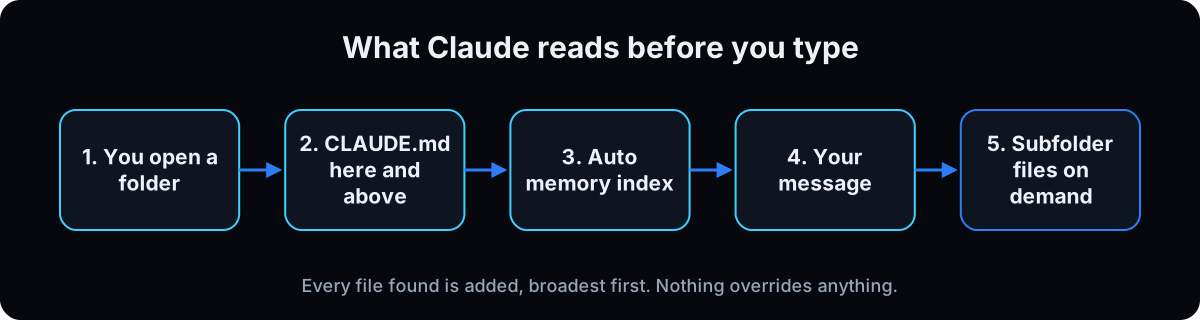 Open Claude Code in a folder and it loads CLAUDE.md from that folder and every folder above it. Files don't override each other. They're stacked, broadest first, so the file closest to your folder is read last. A CLAUDE.md inside a subfolder loads only when Claude opens files there.
Claude also keeps its own notes, called auto memory. The first 200 lines or 25KB of its index file, MEMORY.md, load every session, per the memory docs.
CLAUDE.md, AGENTS.md, Project instructions and skills
They sound alike but do different jobs. CLAUDE.md is what Claude Code always reads. AGENTS.md is the same idea for other coding agents: agents.md calls it an open format used by more than 60,000 open-source projects and read by tools like OpenAI Codex, Cursor and Gemini CLI. Claude Code doesn't read AGENTS.md on its own.
Project instructions and Cowork instructions are the no-terminal versions, typed into the Claude app. Skills are saved workflows that load only when needed, so they don't cost space every session. The table below sums it up, and the Claude skills guide goes deeper.
The catch: it's guidance, not a lock
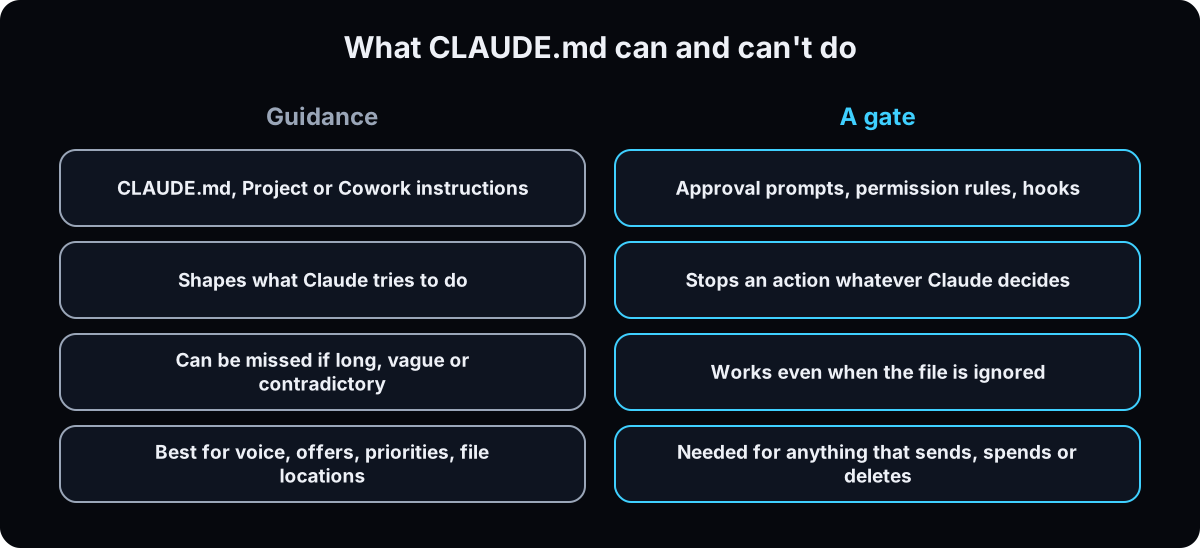 Per Anthropic's memory docs, CLAUDE.md shapes behavior but isn't a hard enforcement layer. Write "never send without approval" in the file, and also turn on an approval setting that stops the action. Hooks are the Claude Code version: scripts that run every time, whatever Claude decides. The AI agent guardrails guide covers them.
| Where it lives | Who reads it | When it loads | Best for |
|---|---|---|---|
| CLAUDE.md | Claude Code (terminal, desktop Code tab, editors) | Every session, at launch | Who you are, rules, voice, where files live |
| AGENTS.md | Codex, Cursor, Gemini CLI and other agents | Claude Code only if you import it | Sharing one brief across several AI tools |
| Claude Project instructions | Claude chats inside that Project | Every chat in the Project | A no-terminal brief for one client or offer |
| Cowork global instructions | Every Cowork session | Every session | Who you are and how you like work delivered |
| Skills | Claude Code and Cowork | Only when needed or called | Step-by-step jobs like a weekly report |
| Auto memory (MEMORY.md) | Claude Code | First 200 lines or 25KB each session | Notes Claude takes from your corrections |
| Term | What it means |
|---|---|
| Claude Code | Anthropic's AI agent that works in a folder on your computer: reads, edits, runs commands |
| CLAUDE.md | A text file of standing instructions Claude Code reads at the start of every session |
| Markdown | Plain text with simple marks: # for a heading, - for a bullet |
| Session | One conversation with Claude Code, from opening it to closing it |
| Context window | Everything Claude can see at once. The file takes up part of it every session |
| Scope | Which projects a file applies to: your whole machine, you everywhere, one project, or only you in one project |
| Terminal | The text window where you type commands. The desktop app's Code tab skips it |
| /init | A command that has Claude draft a CLAUDE.md for the folder you're in |
| /memory | A command that lists your CLAUDE.md files and opens one to edit |
| /context | A command that shows what's loaded. Look under Memory files |
| /doctor | A setup checkup that can propose trims to a long CLAUDE.md |
| @ import | A line like @offers.md that pulls another file in at launch |
| CLAUDE.local.md | Your private notes for one project, kept out of shared files |
| .gitignore | A list of files that git, a tool for sharing and versioning folders, should never share |
| .claude/rules/ | A folder of topic files; a rule can load only when Claude opens matching files |
| claudeMdExcludes | A setting that tells Claude Code to skip specific CLAUDE.md files |
| Auto memory | Notes Claude writes for itself about your corrections and preferences |
| MEMORY.md | The index of auto memory; its first 200 lines or 25KB load every session |
| AGENTS.md | The same kind of file for other AI coding agents, as an open format |
| Skill | A saved workflow Claude loads only when it's needed |
| Hook | A script Claude Code runs at a fixed moment, whatever Claude decides |
| Project instructions | Standing instructions for every chat in a Claude Project |
| Cowork | The Claude desktop app's tab for longer tasks on your files and apps |
| Safe mode | Starting Claude Code with CLAUDE.md, skills and other extras switched off |
The mental model
A settings file that forces Claude to obey. Write it from a blank page, put everything in it, and the more you add, the safer you are.
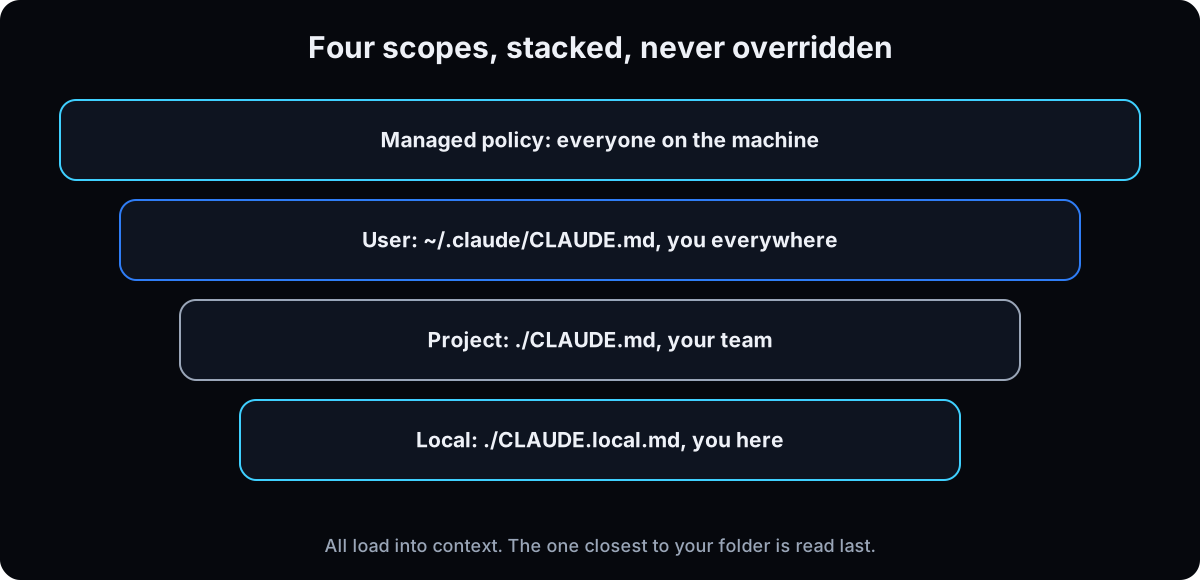 An onboarding note added to the start of every session. Let Claude draft it, then correct it. Files stack and never override. Short and specific beats long and ignored. Anything that must never happen gets an approval setting too.
| Term | What it means |
|---|---|
| Managed policy | Set by IT for everyone on the machine. On a Mac: /Library/Application Support/ClaudeCode/CLAUDE.md. Can't be excluded |
| User | ~/.claude/CLAUDE.md. You, in every project on this computer |
| Project | ./CLAUDE.md or ./.claude/CLAUDE.md in the folder. Everyone who works in it |
| Local | ./CLAUDE.local.md. You, in this one project. Add it to .gitignore |
Short CLAUDE.md, or no CLAUDE.md at all?
I keep seeing people say to delete the file, and others say to write a huge one. Which is it?
Both camps are reacting to the same problem: a bloated file. One popular video headline says Boris Cherny told people to delete their CLAUDE.md files. Anthropic's own docs, checked 15 September 2026, still recommend one file and set a size: under 200 lines, because longer files reduce how well Claude follows them. Their best practices give the test for every line: "Would removing this cause Claude to make mistakes?" If not, cut it.
- No file means Claude re-learns your business every session and guesses at the rest. Fine for a one-off. Costly when you do the same work every week.
- A huge file buries the one rule that matters. Anthropic's best practices say bloated files cause Claude to ignore your actual instructions.
- A short, specific file holds only what Claude can't work out and gets wrong without it: your offers, voice, approval rules and where things live. Everything else points to another file or becomes a skill.
Start with a day of no file. Whatever you correct twice earns a line. That's close to Anthropic's own list of when to add to CLAUDE.md.
From zero to a file that works
1. Pick where you'll use it
You don't need a terminal to get the benefit. Pick the one that matches how you work today.
Claude chat with a Project (no terminal): standing instructions plus uploaded files for every chat in that Project. Per Anthropic's Projects help page, free accounts get up to 5 Projects.
Cowork (no terminal): the desktop app tab for longer tasks on your files, on paid plans, on Mac and Windows, per the Cowork help page. Running a team in Slack? Compare it in Viktor vs Claude.
Claude Code: the full CLAUDE.md file, with scopes, imports and memory. Use it in the desktop app's Code tab or a terminal.
Why: the content is the same in all three. Start where you already work, then move the same brief to a file later.
2. No terminal? Paste a short brief into your instructions
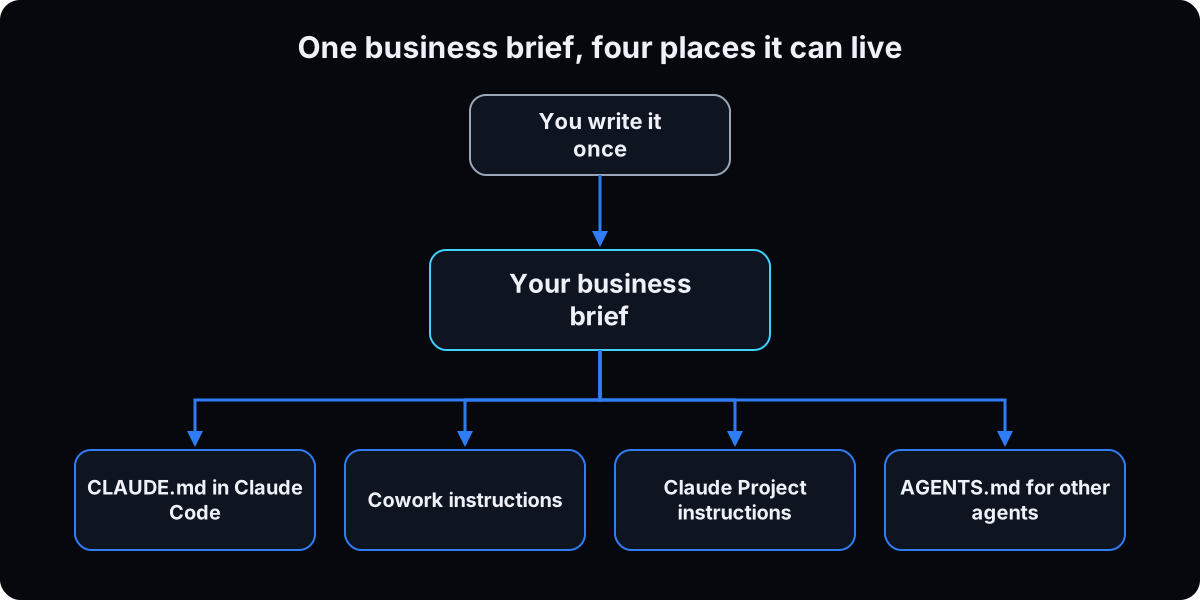 Claude Project: open the Project, click Set project instructions, paste the brief below, and choose Save instructions. Upload your offers and price list to the Project's files so it reads them instead of guessing (Anthropic's steps).
Cowork: go to Settings, then Cowork, then Edit next to Global instructions, per the Cowork help page. For one client or offer, a Cowork project has its own Instructions that apply only there (Cowork projects).
Fill in every bracket. Leave one blank rather than guess.
Why: Claude Code features like @ imports and hidden comments don't apply here. Keep this version short and put the detail in uploaded files.
About me and my business
I run [business name], a [type of business] for [who you serve] in [where].
We sell [offer 1], [offer 2] and [offer 3]. Check the uploaded offers doc for prices; never quote from memory.
Right now the priority is [one goal with a number and a date].

How I sound
Plain, short sentences. Words I use: [2 or 3]. Words I never use: [2 or 3].
Two real things I've said to a client: "[sentence]" and "[sentence]".

Rules
- Draft only. Never send, post, publish, spend or delete anything without my exact "yes, send".
- If something is missing, ask me one question. Don't guess numbers, names or prices.
- No passwords, card numbers or client private details in any draft.
- Answer first, then the detail. Mark anything unsure with [CHECK].
3. Set approval rules before anything can act
Do this before you give Claude access to email, ads or your CRM. Two layers.
In the words: an approval block like the one in step 6. It shapes what Claude tries.
In the app: a setting that stops the action whatever Claude decides. In Cowork, choose Manual so Claude pauses and asks before actions (Cowork help page). In the Code tab, pick Manual in the mode selector next to send, and Claude asks before editing files or running commands (desktop docs). In a terminal, set permission rules with /permissions.
Why: the file is guidance. A bad day is an email that went out before you saw it, and only a gate stops that. The guardrails guide walks the stronger limits.
4. Create the file in Claude Code
No terminal (desktop app): open the Code tab, choose Local, click Select folder and pick your business folder. Then type /init, or ask: "Create a CLAUDE.md with instructions for this folder." That prompt comes from Anthropic's desktop quickstart.
Terminal (optional): the commands below open your folder, start Claude Code and run /init. Per the memory docs, /init looks around and writes a starter file. If one exists, it suggests improvements instead of overwriting it.
Want it to interview you first? Start Claude Code with CLAUDE_CODE_NEW_INIT=1. /init then asks what to set up, asks follow-up questions, and shows a proposal before writing anything.
Why: correcting a draft is faster than writing from a blank page, and /init finds things you'd forget to mention.
# terminal version. cd means "go into this folder"
cd ~/Documents/my-business
claude

# inside the session
/init

# or the version that asks you questions first
CLAUDE_CODE_NEW_INIT=1 claude
5. Prove it loaded, then run one small task
Type /context and look under Memory files. If your file isn't listed, Claude can't see it and rewriting it won't help. /memory lists every CLAUDE.md location, including ones that don't exist yet, and opens the one you pick. If a command isn't available in the desktop Code tab, run it from a terminal (desktop docs).
Then give it one small, safe task with the prompt below.
Why: a small draft shows in 2 minutes whether the file changed anything, before you trust it with real work.
Using only what my CLAUDE.md says, draft a reply to this lead. Don't send anything.
Lead's message: [paste a real message from last week]
Then list:
1) Every line of the file you used.
2) Anything you had to guess because the file didn't say.
3) Any line that's vague enough that two people would read it differently.
6. Fill it in: a full example for a marketing agency
Below is a complete CLAUDE.md for a made-up 6 person agency. It's under 100 lines. Copy it into your file and swap every detail for yours. Don't keep anything that isn't true for your business.
Who we are and north star let Claude judge whether a task matters. Offers point to a price file, because a price written in 2 places ends up with 2 values. I learned that the day I found one of mine that way. Voice uses real sentences, not adjectives. Approval rules come before everything else. Where things live points to files instead of copying them.
Dates on every status tell Claude and you what might be stale. For the bigger structure behind a file like this, see the business operating system.
Why: Anthropic's memory docs say specific instructions work best: "Put drafts in drafts/" beats "be careful". Every line here can be checked.
# Northside Growth Co. operating file
# SAMPLE: a made-up agency. Replace every detail with yours.
Last full review: 2026-09-15

<!-- Notes for humans go in comments like this one. Claude Code strips them before Claude reads the file. -->

## Who we are
- A 6 person marketing agency for dental and med spa clinics in the US.
- We run Meta ads, landing pages and lead follow-up for clinics that want more booked consults.
- North star: 40 active retainer clients by 2027-06-30. Today: 27 (updated 2026-09-01).
- The long bet: become the default growth partner for independent clinics in 3 states.

## Offers (never quote a price from memory: read `offers/offers.md` first)
- Free: 20 minute ad account audit.
- Core: Launch and Leads retainer. Ads, one landing page, follow-up texts and emails.
- Add-on: Content Studio. 8 short videos a month.
- Not offered anymore: SEO retainers (see decisions log).

## Who we serve
- Clinic owners with 1 to 3 locations, already spending on ads, unhappy with lead quality.
- Not a fit: clinics with no budget for ads, franchises that need corporate approval for every post.

## Team (who owns what)
- Maya: owner. Final say on pricing, hiring and anything a client sees first.
- Chris: ads. Budgets, audiences, reporting.
- Jordan: client success. Onboarding, weekly check-ins, renewals.
- Sam: content. Scripts, captions, video edits.

## Voice
- Plain English. Short sentences. Sound like a helpful clinic operator, not an agency.
- Say "booked consults" and "cost per booked consult". Never say "guaranteed" or "skyrocket".
- Never promise results, rankings or a number of leads.
- Healthcare: no patient names, photos or health details in any draft. No before and after claims.
- How we sound:
  - "Your ads are getting clicks but few booked consults. We'd fix the landing page first."
  - "We'd rather tell you now than bill you for another month of this."

## Approval rules (these come before every other instruction)
Never do any of these without my written "yes, send" in this session:
- Send, schedule or reply to any email, text, DM or comment.
- Publish, schedule or boost any post, ad or page.
- Change an ad budget, bid or audience, or pause or launch a campaign.
- Spend money, start a trial, buy anything or accept terms.
- Delete, overwrite or bulk edit files, contacts or CRM records.
- Contact a client, lead or vendor directly.
Always:
- Put drafts in `drafts/` and tell me the file name.
- If you can't tell whether an action counts as sending, treat it as sending and ask.
- Never write passwords, API keys, card numbers or patient information into any file.

## Where things live (one home per fact; this file points, it doesn't copy)
- Offers, prices, inclusions: `offers/offers.md`
- Client list and status: the Clients board in our project tool
- Brand voice examples: `brand/voice-examples.md`
- How recurring jobs get done: `sops/` (one file per job)
- Weekly report template: `sops/weekly-report.md`
- Passwords and keys: our password manager. Never in this folder.

## How to work with me
- Answer first, then the detail. Keep internal notes under 150 words.
- If something is missing, ask one question at a time. Don't guess names, numbers, prices or dates.
- Client-facing drafts: one page max, a clear next step, no jargon.
- Mark anything you're unsure of with [CHECK].
- When a fact changes during a session, update it in its one home, date it, and show me the diff.

## Standing priorities (ranked, re-ranked monthly, updated 2026-09-01)
1. Keep every current client past month 3.
2. Fill 5 retainer spots from the audit offer this quarter.
3. Get weekly reports to clients by Monday noon.
4. Build the Content Studio waitlist.

## Decisions log (date, decision, why)
- 2026-08-12: Stopped selling SEO retainers. Slow results for clinics and low margin.
- 2026-07-03: Every audit call gets a written summary within 24 hours. Clients who got one booked more often.
7. Put it in the right place, and check what you inherit
Business brief used everywhere? ~/.claude/CLAUDE.md. Only for one client folder? CLAUDE.md in that folder. Private notes nobody else should see? CLAUDE.local.md, added to .gitignore.
The trap: a CLAUDE.md sitting in your home folder is a parent of every project under it, so it loads almost everywhere. When I counted on 8 September 2026, I had 78 CLAUDE.md files under my home folder, median 88 lines. Check yours with the terminal commands below.
To skip a parent file you don't want, list it under claudeMdExcludes in a settings file (memory docs). IT-managed policy files can't be skipped.
Why: 2 files that disagree leave Claude picking one at random, per the memory docs.
# terminal: count and measure the CLAUDE.md files you already have
find ~ -maxdepth 3 -name CLAUDE.md | wc -l
wc -l ~/CLAUDE.md ~/.claude/CLAUDE.md

# .claude/settings.local.json: skip a parent file
{ "claudeMdExcludes": ["**/old-projects/CLAUDE.md"] }
8. Keep it under 200 lines
 Anthropic's target is under 200 lines per file. Longer files take more space and get followed less (memory docs). Claude Code still loads a file up to 4 MiB, so length doesn't break it. It weakens it.
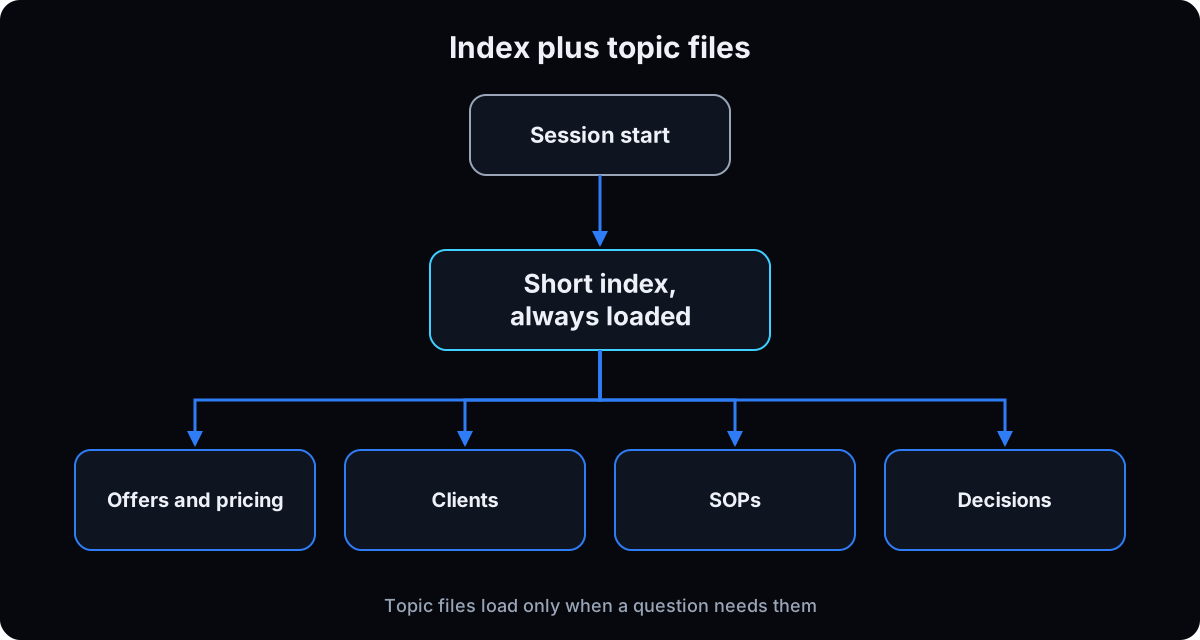
Point, don't paste. "Read offers/offers.md before quoting a price" costs nothing until needed. An @ import such as @offers/offers.md loads the whole file at launch every session, and imports can nest 4 levels deep.
Split by topic. A file in .claude/rules/ with paths: at the top loads only when Claude opens matching files. Jobs you run sometimes, like a weekly report, belong in a skill.
Let Claude trim. In Claude Code v2.1.206 or later, /doctor proposes cuts to a checked-in CLAUDE.md and asks before changing anything (commands reference).
Auto memory already works this way: a short index that always loads and topic files read on demand. My own index was 21 lines pointing at 19 topic files when I counted on 8 September 2026.
Why: every line you add makes the others a little less likely to be followed.
# .claude/rules/pricing.md: loads only when Claude opens a proposal
---
paths:
  - "proposals/**/*.md"
---
- Quote only prices from offers/offers.md.
- Every proposal ends with one next step and a date.
9. Test it with and without the file
Take one real question from last week. Ask it in a normal session. Then start Claude Code in safe mode, which switches off CLAUDE.md, skills, hooks and auto memory while keeping sign-in and permissions (CLI reference), and ask again.
If the 2 answers sound the same, your file is generic. Add specific stories, prices and real sentences, not more principles.
Why: the only proof a line earns its place is that Claude behaves differently without it. Anthropic's best practices say to test changes by watching whether behavior shifts.
# terminal: the "without" run
claude --safe-mode

# the "with" run: a normal session, and check it loaded
claude
/context
10. Keep it true every month
Book 20 minutes a month. Re-rank priorities, delete rules that stopped being true, fix any 2 lines that disagree, and move the review date on line 3. When a fact changes mid-session, update it in its one home, dated, before you close.
Using other agents too? Keep the brief in AGENTS.md and make line 1 of CLAUDE.md @AGENTS.md, so Claude Code and the others read the same words (memory docs). In Claude Code v2.1.213 or later, /import brings another coding agent's setup into Claude Code in one step.
In a Claude Project or Cowork, there's no file to update: edit the instructions and re-upload changed files.
Why: a stale price or a finished priority is worse than none, because Claude acts on it with confidence.
# CLAUDE.md that shares one brief with other agents
@AGENTS.md

## Claude Code only
- Use plan mode before editing anything in proposals/.
If this happens, do this
Every one of these has happened to me or to someone I set this up for.
| Failure | Fix |
|---|---|
| It's ignoring my rules | Run /context first. If the file isn't under Memory files, it never loaded |
| It loaded and still ignored one rule | The file is too long or 2 lines disagree. Trim with /doctor, or add IMPORTANT to that one line only |
| It asks questions the file already answers | The wording is unclear. Make the line concrete, not longer |
| A rule for one project shows up everywhere | It's in a parent folder like ~/CLAUDE.md. Move it, or skip it with claudeMdExcludes |
| It sent something I didn't approve | The file is guidance. Turn on Manual approval in Cowork or the Code tab, and see the guardrails guide |
| Claude never reads my AGENTS.md | Claude Code doesn't read it. Make line 1 of CLAUDE.md @AGENTS.md |
| Instructions vanished after /compact | A project-root CLAUDE.md is re-read from disk. Rules typed only in chat aren't, so add them to the file |
| An API key ended up in the file | Rotate the key now. The file points to your password manager and never holds secrets |
The tools I use for this
| Tool | What it is for here | |
|---|---|---|
| Claude Code | Where CLAUDE.md is read. /init drafts it, /context proves it loaded, /memory edits it, /doctor trims it | The memory docs |
| Claude desktop app | Code tab for CLAUDE.md without a terminal, Cowork tab for global and project instructions | Get it |
| Obsidian | Where my business notes live, synced to every machine and pointed at from CLAUDE.md, not copied in | Get it |
| Wispr Flow † | How I answer the questions that fill the file. Speaking gets the real stories and sentences out | Get it |
| Give Your Agent Your Judgment | The free interview for the next layer: the numbers you check first and the rules you don't break | Get the skill |
What I'd tell you over coffee
- Write the approval rules first. Voice and offers can be rough on day one. The rules can't.
- Use real sentences for voice. 2 things you've said to a client teach more than 10 adjectives.
- Read what auto memory has saved about you:
/memory, then the auto memory folder. It's plain text you can edit or delete. - Deleting a line is often the best edit. It's the only one that makes the rest more likely to be followed.
- Leave notes for your team inside
<!-- -->comments. Claude Code strips them before Claude reads the file, per the memory docs.
Questions people ask
What is a CLAUDE.md file used for?
It gives Claude Code standing instructions it reads at the start of every session: who you are, how you work, rules it should follow and where things live. Anthropic's memory docs say to add to it when Claude makes the same mistake twice or you type a correction you typed last session.
Where is the CLAUDE.md file located?
Your personal file for every project is ~/.claude/CLAUDE.md. A project file is CLAUDE.md or .claude/CLAUDE.md in the project folder. Private project notes go in CLAUDE.local.md. IT-managed files sit at /Library/Application Support/ClaudeCode/CLAUDE.md on a Mac, /etc/claude-code/CLAUDE.md on Linux, and C:\Program Files\ClaudeCode\CLAUDE.md on Windows, per the memory docs.
What's the difference between AGENTS.md and CLAUDE.md?
Both hold instructions for AI coding agents. AGENTS.md is an open format read by tools like Codex and Cursor. Claude Code reads CLAUDE.md, not AGENTS.md. To use one brief for both, put @AGENTS.md on line 1 of CLAUDE.md, per the memory docs.
CLAUDE.md vs skills: which should I use?
Put it in CLAUDE.md if Claude should always know it, like your voice or approval rules. Make it a skill if it's a job or reference Claude needs only sometimes, like a weekly report checklist. Skills load on demand, per Anthropic's features overview.
How long should a CLAUDE.md file be?
Under 200 lines per file, per Anthropic's memory docs. Longer files still load up to 4 MiB, but Claude follows them less reliably. Move detail into files it points to, rules in .claude/rules/, or skills.
Can I use CLAUDE.md in Claude Cowork or a Claude Project?
Use the instructions boxes instead. In a Claude Project, click Set project instructions. In Cowork, go to Settings, then Cowork, then Edit next to Global instructions. Cowork sessions on your desktop also read your user file at ~/.claude/CLAUDE.md, but skip any @ import in it that points outside the session's folder, per the memory docs.
Why is Claude ignoring my CLAUDE.md?
Run /context and check Memory files. If the file isn't listed, it didn't load. If it did, the file may be too long, vague, or contradict another file. It's guidance, not enforcement, so anything that must never happen needs an approval setting or a hook.
The free skill
It asks where you'll use the file, interviews you one question at a time for your business, offers, voice and approval rules, and writes a CLAUDE.md under 200 lines, or the short version for Claude Project or Cowork instructions. It points instead of copying, dates every status, keeps secrets out, and leaves blank anything you didn't say.
---
name: write-my-claude-md
description: Writes a business owner's CLAUDE.md file, or the short version for Claude Project or Cowork instructions. Interviews one question at a time for the business, offers, voice, approval rules and where facts live, then writes a file under 200 lines that points instead of copying, dates every status, keeps secrets out and never invents anything the owner didn't say. Trigger on "write my claude.md", "build my one file", "set up my CLAUDE.md", "write my project instructions", "write my Cowork instructions".
---

# Write My CLAUDE.md

This file is what every Claude session reads before it does anything for the owner. Your job: interview, compress, write, then prove it loaded. Never invent a fact, price, name or rule. A question with no real answer stays blank.

## Step 0: where will it live?
Ask one question: "Where will you use this: Claude Code (terminal or the desktop app's Code tab), Cowork, or a Claude Project?"
- Claude Code: write a full CLAUDE.md (Part 3A).
- Cowork or a Claude Project: write the short instructions version (Part 3B). Tell them @ imports and hidden comments don't work there, and to upload offers and price files instead.
If they're unsure, recommend where they already work today.

## Part 1: the business (one question at a time)
1. Who you are, who you serve, and where.
2. What you sell today, from free to your top offer. Where do prices live? Only write prices if they give them, and prefer a pointer to the price file.
3. The one number the business is aimed at, today's value, target and date.
4. Who does what, by first name and role.
5. The 3 to 5 current priorities, ranked.
6. Where each kind of fact lives: offers and prices, client list and status, SOPs, brand examples, decisions. One home per fact. Secrets: where they're stored, never the values.

## Part 2: voice and rules
7. 2 or 3 real sentences they've said to a client or on camera. Not a description of tone. Push until you have real sentences.
8. Words they use and words they never use.
9. Claims they never make (results, guarantees, anything regulated in their field).
10. Approval rules. Read this default list and ask what to add or remove: sending or replying to any message, publishing or boosting posts or ads, changing ad budgets or campaigns, spending money or accepting terms, deleting or bulk editing files or records, contacting clients or leads directly.
11. How they like work delivered: length, format, where drafts go.
12. One decision they've made that an agent might reopen, with the date and the reason.

Don't move on from a vague answer. Ask for a number, a name, a date or an example.

## Part 3A: write the CLAUDE.md
```
# [Business] operating file
Last full review: [date]
<!-- notes for humans; stripped before Claude reads the file -->

## Who we are          (who, for whom, north star with today's value and date)
## Offers              (names only; point to the price file)
## Who we serve        (fit and not a fit)
## Team                (name: role, what they own)
## Voice               (rules, words to use and avoid, 2 or 3 real sentences)
## Approval rules      (never without "yes, send"; always draft to a folder; unsure means ask)
## Where things live   (pointers only; secrets live in the password manager)
## How to work with me (format, length, ask one question when missing, mark unsure with [CHECK])
## Standing priorities (ranked, dated)
## Decisions log       (date, decision, why)
```
Rules for the file:
- Under 200 lines. If it grows, move detail into files it points to, `.claude/rules/` files with `paths:`, or skills.
- Every line must pass: "Would removing this cause Claude to make mistakes?" If not, cut it.
- Point, don't paste. An `@file` import loads the whole file every session; a plain pointer loads only when needed.
- Date every status. No secret values, ever.
- No 2 lines that disagree.

## Part 3B: write the short instructions version
Under 25 lines: about me and the business, offers with "check the uploaded offers doc for prices", the priority, how I sound with 2 real sentences, and the rules (draft only; never send, post, publish, spend or delete without "yes, send"; ask one question when something is missing; no passwords or private client details; answer first).
Tell them where to paste it:
- Claude Project: Set project instructions, then Save instructions.
- Cowork: Settings, then Cowork, then Edit next to Global instructions. For one client, use that Cowork project's Instructions.

## Part 4: place, gate, prove, test
1. Placement (Claude Code): `~/.claude/CLAUDE.md` for every project, `CLAUDE.md` in the folder for one project, `CLAUDE.local.md` for private notes (add to .gitignore). Warn that a CLAUDE.md in the home folder loads into every project under it.
2. The gate: remind them the file is guidance, not a lock. Turn on Manual approval in Cowork or the Code tab, or permission rules in Claude Code, before connecting email, ads or a CRM.
3. Proof: in Claude Code, run `/context` and confirm the file is under Memory files.
4. First task: have them paste a real lead message and ask for a draft reply using only the file, plus a list of what Claude had to guess. Fill those gaps.
5. With and without: ask the same real question in a normal session and in `claude --safe-mode`. If the answers sound the same, go back for specific stories, prices and sentences.

## Write back
When a session changes a fact, update it in its one home, date it, and log any decision with its reason. Show the diff, not the whole file. Touch nothing else.

## Rules
- Never invent. Blank beats guessed.
- Specific beats impressive. One real sentence beats 3 adjectives.
- No one else's private data, no patient or client private details, no secret values.
- If other agents need the same brief, suggest keeping it in AGENTS.md with `@AGENTS.md` on line 1 of CLAUDE.md.
- A rule that stops being true gets removed, not defended. Suggest a 20 minute monthly review.
Want your file written with you and loaded into your agents?
Inside the AI CEO Lab the first session is this file: your business, voice and approval rules, written with you, trimmed to length, and loaded so every agent you run starts from you.