 AI CEO Lab
Instagram DM Automation: Comment-to-DM Setup That Books Appointments
Set up the comment keyword that sends a DM, follow the platform rules that make it deliver, then turn the conversation into a booked appointment.
Someone comments your keyword. A DM should arrive. Sometimes it doesn't, and when it does, people click a link and nobody books.
In my own review, the 10 videos ranking for this search have about 3 million views and roughly 185,000 words of transcript between them. "Book a call" appears zero times. Every one ends at a link click or an email address.
This guide does both halves. First the comment-to-DM setup, in beginner order, with the platform rules that decide whether your message is delivered at all. Then the part that turns a DM into a booked appointment. The rules come from a bot that has handled thousands of real conversations for my agency and the clinics I work with.
It's for agency owners and service businesses that get comments and DMs and want appointments on the calendar.
What you have by the end
Not concepts. Things that exist on your machine when you close the tab.
- One keyword on one post, delivering a plain-text DM that says it's automated
- Emails captured before the 24 hour window closes
- A booking step that writes the appointment to your CRM
- A weekly count from comment to confirmed appointment
Start here: how Instagram DM automation works
If you've only ever replied to DMs by hand, 4 things explain the whole setup.
A comment starts it
You post, and ask people to comment a word. A tool watches that post, and when the word appears it replies publicly and sends a private message. Meta calls that message a private reply.
Meta sets the rules, not your tool
ManyChat, GoHighLevel and the rest all send through Meta's official API, so they share the same limits: one private reply per comment, within 7 days, and follow-ups only within 24 hours of the person responding (Meta's private replies docs).
The reply is what opens the door
Your first message can't pitch much. Its job is to get a reply. A reply, a quick reply tap or a regular button tap opens the 24 hour window. An open website button doesn't, per ManyChat's trigger docs.
The catch
A comment-to-DM tool gets you a conversation, not an appointment. Appointments come from what happens next: a readiness check, an explicit yes before the link, a booking step, and a hand off to email before the window closes.
| Term | What it means |
|---|---|
| Private reply | The one DM Meta lets you send to someone because they commented |
| 24 hour window | After someone messages you, the time you have to reply, promotions included |
| Keyword | The word people comment to trigger the DM |
| Quick reply | A tappable answer chip under a message; a tap counts as a message |
| Non-follower | Someone who commented but doesn't follow you; their DM lands in Message Requests |
| Kill switch | A field a human flips to stop the bot in one conversation |
The mental model
The keyword sends a DM with a button and a link, and you're done. Half the messages quietly fail, and the ones that land end at a click nobody books from.
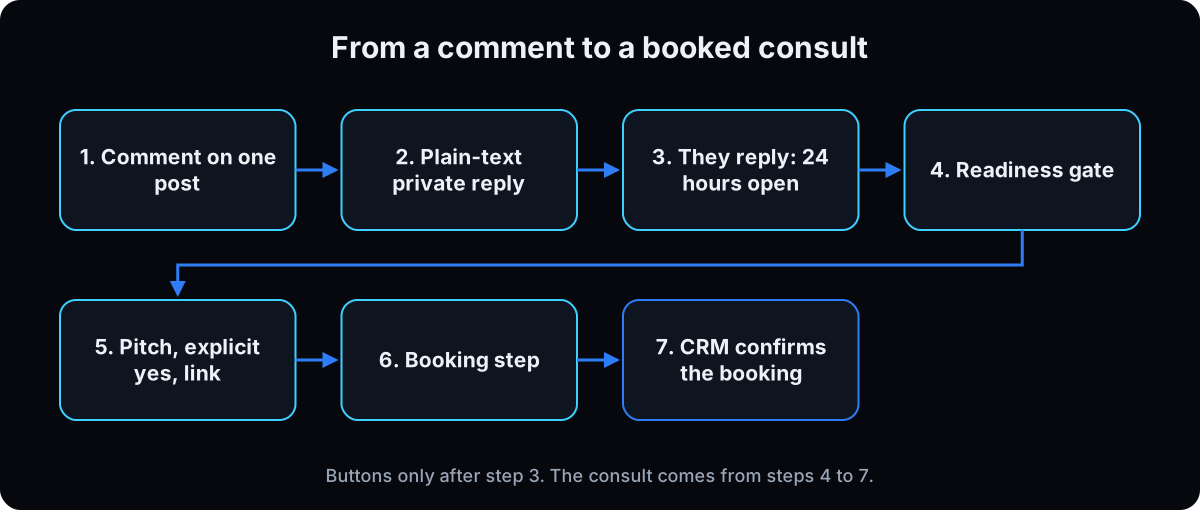 A comment buys one message. Spend it earning a reply. Anything that costs you money when it fails gets enforced in code, not the prompt.
| Term | What it means |
|---|---|
| The trigger | Comment keyword on one post, in ManyChat or GoHighLevel |
| The opening message | Plain text, says it's automated, asks for a reply |
| Hard guardrails | Code, never the prompt: promises, crisis, consent, links |
| Booking | The step no tutorial shows. Pick 1 of 3 |
| Measurement | CRM-confirmed bookings next to the chat's own count |
Will this get my account restricted, and does it feel sleazy?
I've heard automation gets accounts banned, and I don't want to DM strangers a pitch.
2 different things get called Instagram DM automation, and only one is built on Meta's rules.
- Inbound runs on Meta's own API. Someone comments or messages you first, and you answer through a tool that uses Meta's private replies and messaging features, inside the published limits. Cold DMs to strangers at scale through unofficial tools aren't part of that.
- Disclosure and consent keep it clean. Say it's automated. No pitch until they name a problem, no link until they say yes. And a human reads every thread, which is also where the appointments come from.
Treat people as a conversation, not a list.
The build, in beginner order
1. Pick your path
3 options, in the order I'd try them.
Meta Business Suite automated responses. Built in. Meta's help center describes an instant reply, FAQs, and custom keyword responses with up to 5 keywords. They answer messages, not comments. I couldn't confirm a comment-to-DM automation on Meta's own help pages, so I'm not claiming one. Use it so nobody waits while you build.
ManyChat. The easiest comment-to-DM tool. Its Free plan is $0 with up to 25 active contacts a month and 4 live automations, and adds a "Powered by Manychat" message on first contact (checked 15 September 2026). Enough to test one keyword.
GoHighLevel. Pick it if your CRM, calendar and email already live there, because the booking lands in the same place. It has an Instagram comment on a post trigger.
Why: the tool matters less than the rules in step 2. Every tool here sends through the same Meta API.
2. Learn the platform rules
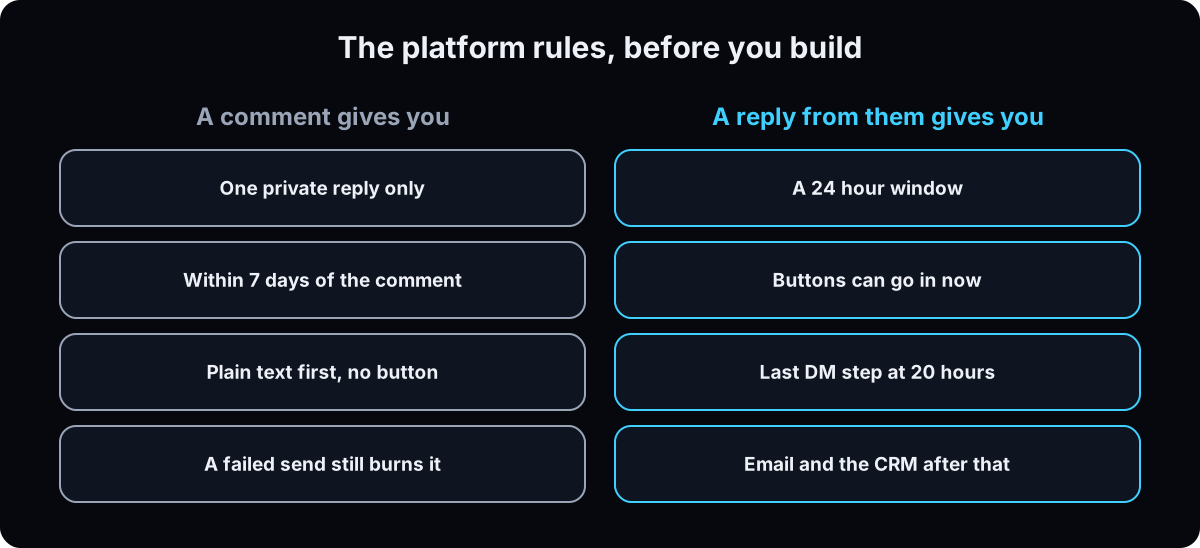 1 reply per comment. Meta's private replies docs: only one message can be sent to the commenter. No follow-up, no retry.
7 days to send it. On an Instagram Live, only during the broadcast.
24 hours after they respond. Follow-ups can only go out if they respond, and within 24 hours of that response. Meta's messaging policy allows promotional content inside that window.
Text first, buttons later. Meta's docs describe the private reply as a text message. Since late August 2026, on my own account, Instagram has refused buttons, cards and attachments sent to a commenter who doesn't follow me, and the failed attempt still used up the comment's one reply. Some tools' builders still let you add a button to message one. Don't.
Why: when a promised DM never arrives, it's usually a refused send the creator never saw.
# One private reply per comment, within 7 days. Text only.
# The recipient is the COMMENT id, not a user id.
curl -X POST "https://graph.instagram.com/<IG_USER_ID>/messages" \
  -H "Authorization: Bearer <TOKEN>" \
  -H "Content-Type: application/json" \
  -d '{
    "recipient": { "comment_id": "<COMMENT_ID>" },
    "message":   { "text": "This is an automated message. Reply GUIDE and I will send it." }
  }'

# permissions, Instagram Login: instagram_business_basic, instagram_business_manage_comments
# permissions, Facebook Login:  instagram_basic, instagram_manage_comments, pages_read_engagement
3. Set up the comment trigger
Trigger on one specific post, never every post.
In ManyChat (the trigger docs): New Automation, then the User comments on your Post or Reel trigger, choose Specific post or reel, add include keywords and exclude words like "not interested", and add a few public reply variations. ManyChat rotates them. Then add an Instagram message set to Send as a Private Reply.
In GoHighLevel (the trigger docs): pick the post, then choose Exact Match over Contains Phrase, because contains fires on any comment with your phrase inside it. Turn on Track First Level Comment Only so replies under a comment don't fire it.
Pick a word that's hard to misspell and rare in normal comments. Never yes, love or this. Add likely misspellings as extra keywords.
Why: loose matching is how strangers get DMs they never asked for. Menu names change between versions, so use the closest label.
4. Write the opening message: text, disclosure, one question
Message one is plain text, 2 sentences, no link, no button. It says it's automated and asks for a one-word reply.
Meta's policy lists when to disclose automation: at the start of a thread, after a significant lapse of time, and when a chat moves from a human to a bot. Its sample wording includes You are interacting with an automated experience.
Why: the biggest creator on this term left disclosure out, got "I know this is a bot" replies, added one line, and says it changed the results. And the reply is what opens the 24 hour window.
Hi, this is an automated message from [Business].
Reply GUIDE and I'll send the [resource] here.
5. After they reply: buttons, then the email ask
Once they've replied, the window is open and you can use quick replies and buttons. Ask for the email in one line, say what list they're joining and that they can leave any time, then send the link. Deliver the link even if they skip the email.
Only a reply, a quick reply or a regular button tap counts as opting in. An open website button doesn't open the window or add a contact, per ManyChat's docs.
Send name, email and source to your CRM with a webhook (in GoHighLevel, an inbound webhook trigger; the GoHighLevel workflows guide has the build).
Why: the email is what survives the 24 hour window.
Test from a second account that doesn't follow you: comment, reply, give an email you control, get the link, check the CRM. Then delete the test contact.
curl -s -X POST "$CRM_WEBHOOK_URL" \
  -H 'Content-Type: application/json' \
  -d '{"name":"Test Person","email":"you+test@yourdomain.com",
       "source":"instagram-dm","resource":"guide","ig":"@yourtesthandle"}'
6. Build the plumbing, if a bot writes the replies
Steps 1 to 5 need no code. This step and the next 2 are for an AI bot that answers in the thread.
Give every contact a kill switch field. A human flips it to take the thread, and the bot checks it before every send. Without it, your setter and bot talk over each other in front of the customer.
People send several short messages in a row. Store each, drop identical text inside 5 minutes, and reply to the batch. Our bot waits about 20 seconds on a new conversation, 90 to 150 on a slow replier. If the model returns nothing, block the send. Re-host voice notes and images on arrival, because their links expire.
Why: duplicate and crossed replies are what make people call it a bot.
7. Gate the pitch on readiness, and the link on a yes
No pitch until 6 or more exchanges (or a clearly high-intent opener) and they've named a concrete problem in their own words. In our own bot, this gate gave the biggest single conversion lift we measured.
Then pitch, wait for an explicit yes, then send the link. Never together. "Ok", "hmm" or an emoji isn't a yes.
Why code: in our bot, the consent rule lived in the prompt for 9 days and failed 87% of the time. Every URL is a constant the model never picks; ours pasted the booking link into the wrong flow for 4 days. AI agent guardrails goes deeper.
const YES = /^(yes|yeah|yep|yup|sure|ok(ay)? send|send it|please|i'?m (in|down)|interested)\b/i;
const LINKS = {
  book:    "https://your-domain.com/book",
  guide:   "https://your-domain.com/guide",
};

function gate(reply, lastUserMessage) {
  if (YES.test(lastUserMessage.trim())) return reply;
  // strip the whole sentence with the URL, not only the URL
  return reply.replace(/[^.!?]*https?:\/\/\S+[^.!?]*[.!?]?/gi, "").trim();
}
8. Build the booking step
Pick 1 of 3.
A scheduling link. Cheapest and needs no staff, but a click isn't a booking, so you reconcile 2 numbers daily.
Buttons with real time slots. The tap writes to your calendar and sends a confirmation. Only if your calendar can be checked live.
A named human setter. The bot flips the kill switch and queues the contact for someone who works the queue twice a day. Best for high ticket.
In all 3, the bot never promises a person or a time. Ours sent "He's dialing you right now" 6 times while 2 people waited.
Send each booking to your CRM as an event you can count. In GoHighLevel, every Instagram messenger action needs a Wait step with a Default Timeout branch, or the flow stalls.
Why: this is the step every tutorial skips.
9. Hand off to email at 20 hours
The window shuts 24 hours after their last message. Put the last DM step at 20 hours, and exit on any reply. Everything later happens in email and your CRM, like an automated newsletter.
Inside the window, run 2 follow-up chains. Engaged, not asked yet: a nudge around 4 hours. Link sent, no booking: 5 minutes, 4 hours, then hand to a human before the window closes. Any reply cancels the rest.
The Human Agent tag lets a person reply manually within 7 days. It's for humans, not bot broadcasts.
Why: a send after 24 hours errors, and the error usually goes unseen.
10. Report the confirmed number next to the guessed one
Send one daily report to one channel before you tune anything. Show what the chat thinks converted next to what the CRM confirms. Every real bug hides in that gap. It's how we found that 62.5% of our deep conversations never got an ask.
Weekly, track the funnel: comments, DMs delivered, replies, emails captured, appointments confirmed in the CRM. Comments to replies grades your opening message. Replies to emails grades your ask.
Why: you fix the biggest drop, not the loudest complaint.
Starter prompts
Paste these as written. They are short on purpose, because the long ones drift.
Act as my Instagram comment-to-DM builder. Tool: [ManyChat / GoHighLevel]. Keyword: [WORD]. Resource: [name] at [link]. Booking: [scheduling link / live slots / human setter]. Produce, in build order: 1) The trigger settings: one specific post, keyword match that fires only on the word, exclude words, public reply variations. 2) Message one as PLAIN TEXT: 2 sentences, says it's automated, asks for a one-word reply. No link, no button. 3) The message after they reply: one email ask saying what list they join and that they can leave, then the link, delivered even with no email. 4) The webhook payload to my CRM. 5) One follow-up at 20 hours that exits on reply, and nothing after that in DMs. 6) The test from a second account that doesn't follow me, and what I should see in the CRM. Do not invent any link, number or claim.
250 characters per bubble, 2 to 4 bubbles per turn. Never end a turn on a statement. Use their words for the problem. Open by saying this is an automated assistant and a real person reads every conversation. Only claim what's on the allowlist of cleared services, locations and results. Never promise a person, a time or an outcome. For a clinic: no diagnosis, dosing, outcome promises, insurance quotes or before and after claims.
Here is last week of DM conversations and the CRM export for the same period. List every conversation where the bot believes a booking happened but the CRM doesn't, or the reverse, and every conversation that reached the pitch stage with no ask. Give me ids, not a summary. Then tell me which single guardrail, written as code, would have prevented the largest group.
If this happens, do this
Every one of these has happened to me or to someone I set this up for.
| Failure | Fix |
|---|---|
| The DM never arrived for someone who doesn't follow me | Message one had a button, card or attachment. Plain text first, buttons after they reply |
| People clicked the link but no contact appeared | The button was an open website action, which doesn't opt anyone in. Use a reply, quick reply or regular button |
| It fired on comments that didn't say the keyword | Contains matching or an any-comment trigger. Use exact match on one post |
| It worked once, then not for the same person | ManyChat says the trigger only runs on a person's first comment on that post. Test with a fresh account |
| It works, then errors a day later | The 24 hour window closed. Last DM step at 20 hours, email owns the rest |
| Bot and setter reply in the same thread | A kill switch. Every send checks a per-contact ai_bot_active flag first |
| "He's dialing you right now" and nobody is | Block names, times and live calls in code |
| A link goes to someone who said "hmm" | Consent in code with an explicit yes pattern, links as constants |
The tools I use for this
| Tool | What it is for here | |
|---|---|---|
| Meta private replies docs | One reply per comment, 7 days, Live rules, the 24 hour follow-up rule and the permissions. | Read |
| Meta messaging policy | The 24 hour window, the Human Agent tag and when to disclose automation. | Read |
| Meta Business Suite automated responses | Instant reply, FAQs and up to 5 custom keywords for messages. Answers DMs, not comments. | Read |
| ManyChat | The easiest comment-to-DM tool. Free plan: 25 active contacts a month, 4 live automations (checked 15 September 2026). | Plans |
| GoHighLevel † | The comment trigger, the messenger action, and the CRM and calendar the appointment lands in. My affiliate link. | Get it |
What I'd tell you over coffee
- Write the opening message first. Plain text, disclosure, one question. It's the cheapest conversion change on this page.
- If a rule matters financially and it lives in your prompt, it isn't a rule yet.
- Read 20 real transcripts before you change anything.
Questions people ask
Is there a free Instagram DM automation?
Yes, with limits. ManyChat's Free plan is $0 with up to 25 active contacts a month and 4 live automations, including a comment trigger (ManyChat Free plan, checked 15 September 2026). Meta Business Suite also has automated responses for messages, like an instant reply and keyword replies, but they answer DMs, not comments.
Is DM automation against Instagram's rules?
Replying to people who comment or message you first, through a tool on Meta's API, is what Meta's private replies feature exists for. Stay inside the limits: one private reply per comment within 7 days, follow-ups within 24 hours of their response, and disclose that it's automated, per Meta's messaging policy.
How do I auto DM people who comment?
Use ManyChat or GoHighLevel. Trigger on comments on one post, match your keyword exactly, send a plain-text private reply that says it's automated and asks for a one-word reply, then send buttons, links and the email ask after they answer.
Why isn't my comment automation working?
The common causes: a button or attachment in message one to someone who doesn't follow you, testing from an account that already commented (ManyChat only triggers on a person's first comment on a post), a comment older than 7 days, or a loose keyword match. Test from a fresh account that doesn't follow you.
ManyChat or GoHighLevel for Instagram DMs?
ManyChat if you want the quickest setup and a free plan to test one keyword. GoHighLevel if your CRM, calendar and email already live there, because the appointment and the follow-up email land in the same system. Both send through the same Meta API and follow the same rules.
The free skill
It holds the whole build: the platform rules, the text-first opening message, the comment trigger settings for ManyChat or GoHighLevel, the email handoff, the readiness and consent gates, the booking options, the follow-up chains and the daily report. Hand it to your builder and say the trigger.
---
name: ig-dm-bot
description: Builds Instagram DM automation that books appointments. First the comment-to-DM setup (ManyChat or GoHighLevel, one post, exact keyword, a plain-text opening message that survives non-followers, the email ask after they reply), then the parts that turn a DM into an appointment (plumbing, readiness and consent gates in code, a booking step, a 20 hour email handoff, a CRM-confirmed report). Trigger on "build my dm bot", "wire my keyword funnel", "comment to DM", "why isn't my comment automation working", "why isn't my dm bot booking".
---

# Instagram DM Automation That Books Appointments

Help the user turn Instagram comments and DMs into booked appointments. The rules come from a live bot that has handled thousands of DMs for an agency and its clinic clients, and from keyword funnels run on a real account.

Two rules above the rest:
- A comment buys one message. Spend it earning a reply, in plain text.
- Anything that costs money when it goes wrong is enforced in code, not the prompt.

You design and check. The human clicks the settings and activates. Never turn on a customer-facing automation yourself. Never invent a link, a number or a claim.

## When to use
- They want comment-to-DM, a DM bot, their DMs don't deliver, or nothing books.
- Not for cold DMs to strangers at volume.

## Platform rules to design around (Meta docs, checked 15 September 2026)
- One private reply per comment, within 7 days. On a Live, only during the broadcast. (developers.facebook.com/docs/instagram-platform/private-replies)
- Follow-ups only if they respond, within 24 hours of that response. Promotions allowed inside the window. (Meta messaging policy)
- Disclose automation at the start of a thread, after a significant lapse, and when a human hands to a bot.
- Human Agent tag: a person replying manually within 7 days. Not for bot broadcasts.
- Text first. On the author's account since late August 2026, Instagram refused buttons, cards and attachments to commenters who don't follow the account (code 2, subcode 1545133), and the failed send still used the one reply. Meta's docs don't state this, so treat it as a safety rule: message one is plain text, buttons only after they reply.
- An open website button is not an opt-in. Only a reply, quick reply or regular button tap opens the window and creates a contact (ManyChat docs).
- ManyChat's comment trigger only runs on a person's first comment on a post.

## Pick the path
- Meta Business Suite automated responses: instant reply, FAQs, up to 5 custom keywords. Messages only, not comments. Use while building.
- ManyChat: easiest comment-to-DM. Free plan $0, 25 active contacts a month, 4 live automations, "Powered by Manychat" message (checked 15 September 2026).
- GoHighLevel: when CRM, calendar and email live there. Trigger "Instagram Comment(s) On A Post".

## Build order
Go one step at a time. Confirm each works before the next.

1. **Trigger.** One specific post. ManyChat: "User comments on your Post or Reel", Specific post, include keywords, exclude words, rotated public replies, message set to Send as a Private Reply. GoHighLevel: Exact Match, not Contains Phrase; Track First Level Comment Only on. Keyword hard to misspell, rare in normal comments; add misspellings.
2. **Message one.** Plain text, 2 sentences, says it's automated, asks for a one-word reply. No link, no button.
3. **After the reply.** Quick replies and buttons allowed. Ask for the email in one line (what list, can leave any time), send the link, deliver the link even with no email. Webhook to the CRM: `{"name":"...","email":"...","source":"instagram-dm","resource":"[slug]","ig":"@handle"}`.
4. **Stranger test.** From a second account that doesn't follow: comment, reply, give an email, get the link. In the CRM: contact exists, tags present, resource email sent. Delete the test contact.
5. **Plumbing (bot replies only).** Kill switch field per contact, checked before every send. Batch rapid messages (about 20 seconds new, 90 to 150 slow). Drop identical text inside 5 minutes. Block empty replies. Re-host media on arrival.
6. **Logging and the daily report**, before tuning the prompt.
7. **Readiness gate.** No pitch until 6 or more exchanges (or a high-intent opener) and a concrete problem in their own words.
8. **Consent gate in code.** Pitch, wait for an explicit yes (yes, yeah, sure, I'm down, send it, interested), then the link. Vague replies get the link stripped and the question asked again. Strip the whole sentence around a removed URL. Links are constants the model never picks.
9. **Guardrails and crisis check.** No volume without them.
10. **Booking step.** Pick 1 of 3 below.
11. **Follow-ups inside 24 hours**, last DM step at 20 hours, exit on reply. Email and the CRM own everything later.
12. **CRM confirmation** of every booking, then human queues.

## Hard guardrails (code, with an event log)
1. Never promise a time, a named person or a live call.
2. Crisis check: distress words or symptom red flags stop all pitches and follow-ups, send the scripted response with emergency resources, alert a human and lock the conversation.
3. Final states (disqualified, declined, disengaged) are final.
4. Consent gate before any link. Links are fixed constants with a cooldown.
5. Fit rubric: qualified gets the main offer, partial fit a lower cost option, no fit a polite exit and a logged reason.
6. Empty reply guard and send guard.

## Booking step
- **Scheduling link:** cheapest, no staff, reconcile clicks against bookings daily.
- **Buttons with real slots:** only if the calendar can be checked live.
- **Named human setter:** kill switch flips, contact goes to a queue worked twice a day. Best for high ticket.

Every booking reaches the CRM as a countable event. GoHighLevel: action "Instagram Interactive Messenger" needs a Wait step with a Default Timeout branch after it.

## Follow-up chains
- Engaged, no ask yet: nudge around 4 hours.
- Link sent, no booking: 5 minutes, 4 hours, then a human before the window closes.
- Last DM step at 20 hours. Any reply cancels the rest. Never send a bare "...?".

## Report
Daily: the chat's conversion count next to the CRM's, consent gate compliance, 3 to 5 transcripts to read, open bugs. Exclude test accounts.
Weekly funnel: comments, DMs delivered, replies, emails captured, appointments confirmed. Comments to replies grades message one. Replies to emails grades the ask. Fix the biggest drop.

## Clinics and agencies
Clinics: never diagnose, dose or promise outcomes. Send symptoms to an urgent script, treat transcripts as sensitive, and send insurance and pricing to a human.
Agencies: ask budget, revenue and who decides by message 4 to 6. Never quote a custom price in DMs.
What done looks like at thirty days
- A stranger's comment ends with an email in your CRM and a DM delivered to a non-follower
- An appointment has landed on a calendar through your booking step
- The weekly report shows the CRM number next to the chat number
Want the bot, the setter and the follow-up built with you?
This framework is what runs inside my agency for cash-pay clinics. The plumbing, the guardrails and the reports are taught step by step inside the AI CEO Lab.