 AI CEO Lab
How to Make a YouTube Thumbnail With AI: Size, Examples and a Free ChatGPT Prompt
The official YouTube thumbnail size and upload limits, 4 annotated thumbnail layouts, a free ChatGPT prompt and a Gemini alternative, a 320 pixel readability check, and YouTube's free Test & compare to pick the winner on watch time.
Search for a YouTube thumbnail size and you get cheat sheets that disagree, some saying 1280 x 720 and some 3840 x 2160. Search for how to make one with AI and you get tutorials that skip the size, who's allowed to upload a custom thumbnail, or how to tell whether it worked.
Quick answer: YouTube recommends 3840 x 2160 pixels for video thumbnails, at least 640 pixels wide, in a 16:9 ratio, as JPG or PNG, under 2 MB from a phone or 50 MB from a computer. Your account has to be verified to upload one (YouTube Help, checked 15 September 2026). The full table, including Shorts, is in the next section.
This guide gives you that spec, 4 annotated thumbnail layouts, the free ChatGPT prompt I use (plus a Gemini version), a readability check at phone size, and YouTube's own A/B test to pick the winner. It's for business owners and agencies making their own videos without a designer.
New to thumbnails? Start with the next section. Already making them? Skip to step 7 for the prompt, or step 12 for the test.
What you have by the end
Not concepts. Things that exist on your machine when you close the tab.
- A thumbnail that meets YouTube's size, ratio and file limits the first time you upload
- A headline of 3 words or fewer that adds to your title instead of repeating it
- An outlier ratio for the video you borrowed the idea from
- 4 candidates in one of 4 tested layouts, made from a free prompt
- Every candidate judged at 320 pixels wide by you, not the model
- A video running YouTube's Test & compare with up to 3 thumbnails
Start here: YouTube thumbnail size and how AI thumbnails work
A thumbnail is the still image people see before they click. YouTube picks one from your video unless you upload your own. The table is YouTube's own spec (Add custom thumbnails on YouTube, checked 15 September 2026).
The size, in one line
Make it 16:9 and big. 3840 x 2160 is what YouTube recommends. 1920 x 1080 and 1280 x 720 are also 16:9 and above the 640 pixel minimum width, so they upload fine; they're smaller files, not a different spec. Keep phone uploads under 2 MB.
One trap: if your video is vertical and you upload a 16:9 thumbnail, YouTube's help page says it replaces it with an auto-generated 4:5 thumbnail on the home, explore and subscriptions pages.
How making one with AI works
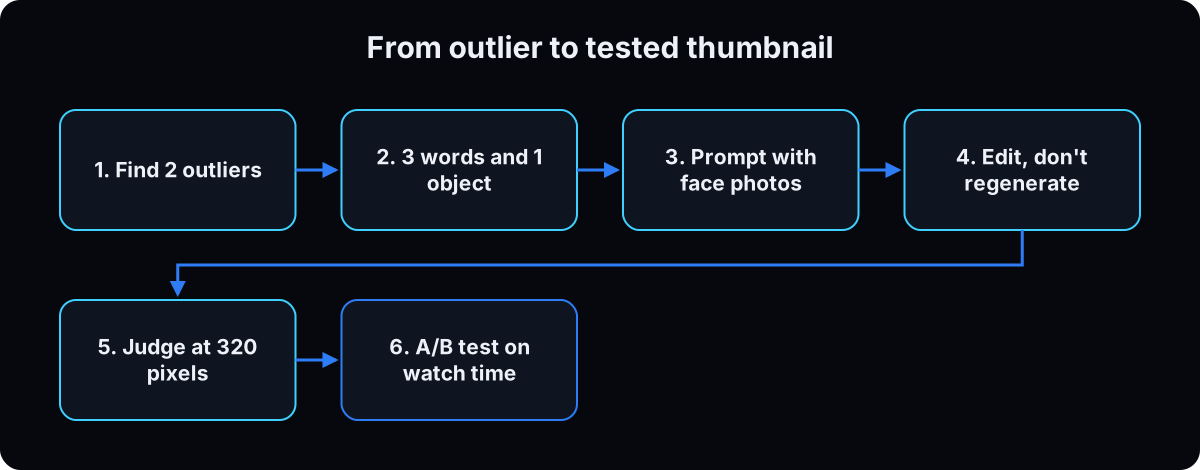 You don't ask an AI for a good thumbnail. You give it an idea that already won, your face, 3 words and one object, and it draws options. Then you do 2 things it can't: judge them at phone size, and let YouTube test them on real viewers.
Today that means ChatGPT or Gemini for the drawing, and YouTube Studio for the test. Uploading and testing in Studio cost nothing.
Who can upload and who can test
Custom thumbnails need a verified account. Phone verification unlocks them, along with longer uploads and live streaming (YouTube verification, checked 15 September 2026).
Test & compare, the A/B test, is an advanced feature. You get advanced features through channel history, or through ID or video verification, which isn't available to every creator (advanced features, checked 15 September 2026). Check this before you plan to test anything.
The catch
AI images still miss. OpenAI's own guide says its model can still struggle with precise text placement and with keeping recurring characters consistent (image generation guide, checked 15 September 2026). That's why your face drifts and the words come back misspelled.
And some viewers dislike thumbnails that look AI-made. The section after this one deals with that.
| YouTube thumbnail spec (YouTube Help, checked 15 September 2026) | Videos | Shorts |
|---|---|---|
| Recommended resolution | 3840 x 2160 pixels | 2160 x 3840 pixels |
| Minimum | 640 pixels wide | 640 pixels high |
| Aspect ratio | 16:9 | 9:16 |
| File types | JPG or PNG | JPG or PNG |
| Max file size | 2 MB from mobile, 50 MB from desktop | 50 MB from desktop |
| Where you can upload | YouTube Studio | YouTube Studio on a computer only |
| Account needed | Verified (phone verification) | Verified (phone verification) |
| Test & compare | Yes, with advanced features on, desktop only | Not available |
| Term | What it means |
|---|---|
| Custom thumbnail | An image you upload instead of the still YouTube picks from your video |
| 16:9 | The wide landscape shape of a normal YouTube video, like 1920 x 1080 |
| Verified account | A channel that confirmed a phone number. Required for custom thumbnails |
| Advanced features | Tools YouTube unlocks with channel history or ID or video verification. Test & compare is one |
| Test & compare | YouTube Studio's free A/B test for up to 3 titles and thumbnails |
| Watch time share | The share of total watch time each version earned in the test. How the winner is picked |
| CTR (click-through rate) | Impressions that turned into views. The test doesn't pick on this |
| Outlier | A video that got far more views than the others on the same search page |
| Reference | A winning thumbnail you borrow the idea from, never the artwork |
| Ask Studio | YouTube Studio's built-in assistant, which can suggest thumbnails from your transcript |
| GPT Image 2.5 | OpenAI's current image models: Sunburst for editing precision, Flare for fast generation |
| Nano Banana | Google's name for its Gemini image models, like Nano Banana 2 and Nano Banana Pro |
| 320 pixel check | Shrinking a thumbnail to 320 pixels wide to see whether it still reads at phone size |
Will an AI thumbnail make people think less of my business?
Some of my audience can spot an AI image instantly and they hate it. If my company's face is on the thumbnail, am I trading a few extra clicks for looking cheap?
Some viewers do. On 9 September 2026 a r/2007scape thread titled "Please stop making AI thumbnails" had 1,425 points and 318 comments when I checked, and JJJacksfilms' August video "STOP USING AI IN YOUR THUMBNAILS!!" had about 315,000 views (checked 15 September 2026). YouTube itself doesn't penalize the tool: its altered or synthetic content page lists using AI to make a thumbnail as something that doesn't need disclosure. What it does ban is a misleading thumbnail, one that makes viewers think they'll see something that isn't in the video.
- People object to the tells, not the tool. Warped hands, a face that's nearly you, a plastic sheen, a background that falls apart, a typeface no human would pick. Each is fixable, and fixing them is most of this page.
- Likeness is the biggest risk. A face that's almost you reads as dishonest in a way a graphic never does. Can't get the resemblance right? Use an object-led layout.
- In a regulated field, the thumbnail is an ad. A dollar figure, a before and after or an outcome is a claim you have to back up, as if you'd written it in a sentence.
The arithmetic: a designer charges per thumbnail, and this workflow takes time before you're fluent, so your first few can cost more than hiring out. You're buying speed: 4 ideas at 11pm, and a new headline after the test teaches you something. 1 video a month? Hire the designer. 4 a month? Learn this. Either way, Test & compare tells you what your own audience prefers.
From zero to a tested YouTube thumbnail, in 12 steps
1. Check your channel can upload and test
In YouTube Studio, check which features your channel has. You want intermediate features on (phone verification) for custom thumbnails, and advanced features on for Test & compare. The steps are on YouTube's verification page and advanced features page (checked 15 September 2026).
Why: if advanced features are off, you can still upload a thumbnail, but you can't run the test in step 12. Better to know on day 1.
2. Decide what the thumbnail says that the title doesn't
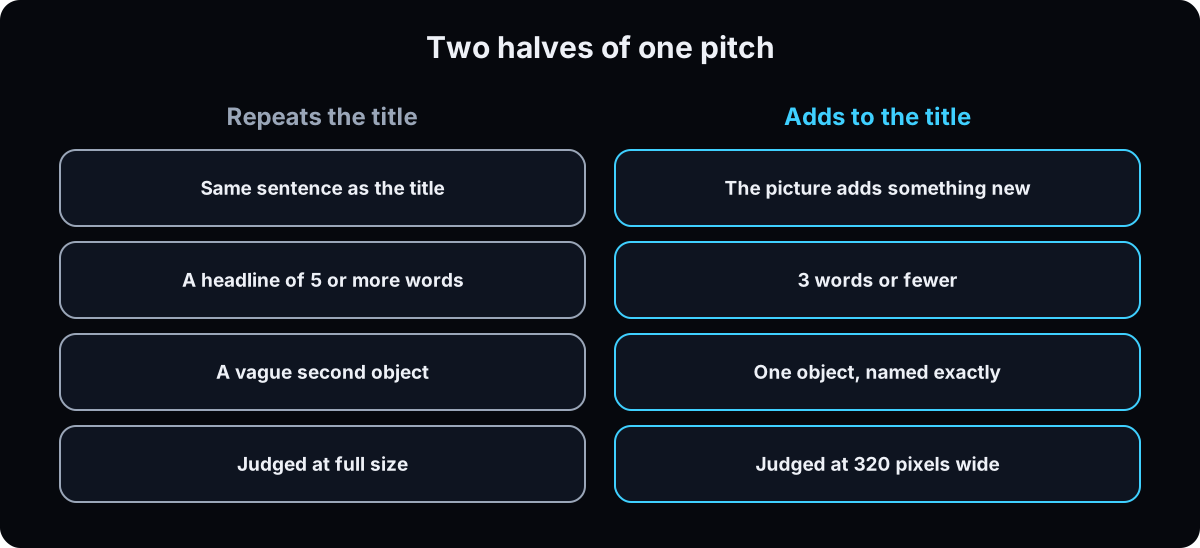 Title and thumbnail are 2 halves of one pitch. Don't put the same sentence in both.
If the title is "How I book 40 consults a month with one reel", the thumbnail shouldn't say "40 consults". Show the calendar, or the reel on a phone. Ask: what does the picture add? If nothing, you have a caption. The same thinking applies to the first line of a video, covered in how to write hooks for reels.
Why: if you can't design a thumbnail before you shoot, the video doesn't have an idea yet.
3. Find 2 outliers from different channels
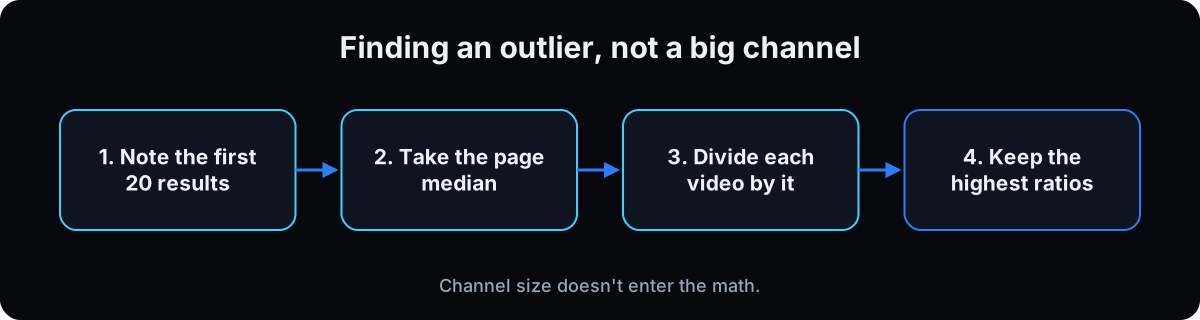 Search YouTube for the phrase someone would type to find your video. The full method is in finding YouTube outlier videos. Note the first 20 results and their views, take the page median, and divide each video by it. You want the video that beat the ones around it, not the biggest channel. A 40,000-subscriber channel pulling 2 million views is a signal. A 10-million one doing 2 million is a quiet Tuesday.
For the top 3, write what idea each thumbnail promises, not what it shows. Screenshot the best 2 from different channels. The research prompt below does the math and drafts headlines.
Why: 1 reference gives 4 outputs that look alike. 2 from different channels give you 2 directions.
Here are the first twenty YouTube results for "[YOUR SEARCH TERM]" with their view counts: [PASTE].
Work out the MEDIAN of the page. Tell me which videos are the biggest outliers against that median and give the ratio for each. Ignore channel size entirely.
For the top three, tell me in one line what IDEA each thumbnail is selling, not what it shows.
Then here is my script or outline: [PASTE].
Propose five headlines of three words or fewer for my thumbnail. My title will be "[YOUR TITLE]", so every headline must add something the title does not already say. Reject any that restate it.
For each headline, name the single object that should sit beside me in the frame, specifically enough that an image model could not get it wrong.
4. Pick one layout: 4 annotated examples
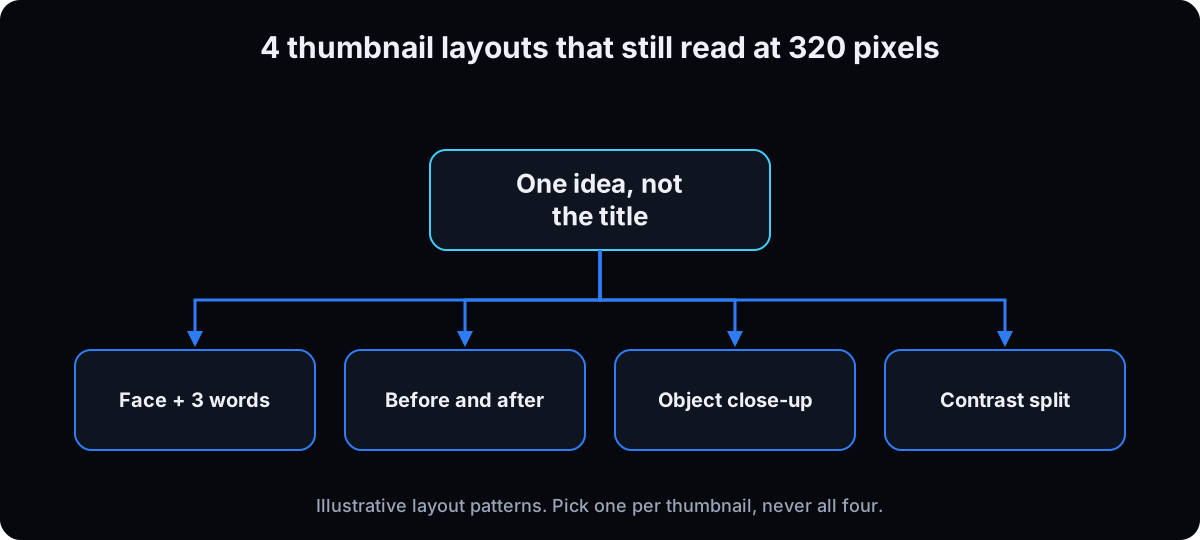 Illustrative examples written for this guide. Not real client thumbnails, and no result is implied.
Example 1: face + 3 words. An agency owner explaining AI video ads. Left third: the owner, cut out, calm expression. Right two thirds: "Ads Without Actors" in a condensed font, "Without" in the accent color. Beside the face: a phone showing a vertical ad. Why it works: the face gives the eye a landing point, 3 words read at phone size, and the phone tells you what kind of ads.
Example 2: before and after. A clinic owner's video on cleaning up lead follow-up. Left half: a cluttered inbox, desaturated. Right half: one calendar with booked slots, full color. Text across the split: "Inbox to Calendar". Why it works: the change is the story, so it needs no face. Watch out: only show a before and after that's true, and never a patient's body without the rules for your field.
Example 3: object close-up. A video on text-message booking. The whole frame is a hand holding a phone with one text bubble, "Booked for Tuesday", and nothing else. Headline: "Booked By Text". Why it works: one object, big, is the easiest thing to read at 320 pixels.
Example 4: contrast split. A comparison video. 2 panels, red and blue, one tool logo each, a large "or" in the middle, text "Which One?". Why it works: 2 colors and 2 objects tell you it's a choice before you read a word. Only use logos the way each company allows.
Why: naming the layout in the prompt stops the model from stacking every idea into one busy frame.
5. Get your face on file, or skip your face
5 photos or more: straight on and slightly turned, good light, plain background, same era. Cut-outs on white work best. With 1 or 2, the model makes a plausible person who isn't you. Generate one and look before you trust anyone's claims about likeness. Why likeness drifts is covered in consistent AI characters.
Ask if your face belongs there. For a clinic, agency or B2B channel, the subject is often the result, the screen or the object, which is layouts 2 to 4.
Why: a stranger's face with your name on the channel does more damage than no face.
6. Write 3 words and name 1 object
Not 5 words. If it needs a 4th, it's a title. Control Your Agents. No Photoshoot Needed. Ads Without Actors. Count the words on your references first. It'll be fewer than you planned. Be wary of click-through stats on this topic: the ones I found in thumbnail blogs didn't link to a primary source.
Then name the second thing in the frame exactly. Not "something related to ads" but "an ads dashboard with one row ringed in red". A vague noun gets a vague object. One object, and at most 3 elements including you. More on writing instructions a model follows: how to write better AI prompts.
Why: the words and the object are the only parts of the prompt the model can't guess for you.
7. Run the free ChatGPT prompt, then fix by conversation
Open ChatGPT, start a new chat, attach 1 reference and your face photos, and paste the prompt below with your layout, 3 words and object filled in. Ask for 2 versions. Repeat in a fresh chat with the other reference. That's 4 candidates. Image limits depend on your ChatGPT plan, and OpenAI changes them, so check what your plan allows.
Edit, don't regenerate. Use the fix prompt and say "keep the rest the same", the same difference-plus-keep-list idea as Nano Banana image editing. Re-rolling throws away what worked.
Composition: cut out onto a graphic looks designed. Your real room looks realistic, as long as it passes the checks in making AI images look real. Expression: ask for calm, because big expressions are where the likeness breaks.
Why: a new chat per reference stops the model mixing ideas from the last thumbnail into this one.
You are designing a YouTube thumbnail. I am attaching a reference thumbnail from a video that beat its topic, and [N] photos of me.
Redesign the CONCEPT of the reference in my own style. Keep what makes it clickable, which is the hook and the composition idea. Change the colors, the typography and the subject treatment so it is original and could never be called a copy of the reference.
Layout: [face + 3 words / before and after / object close-up / contrast split].
The person in the thumbnail is me, from the photos: keep my exact face, do not beautify or restyle it.
The ONLY text is "[YOUR THREE WORDS]", enormous, bold condensed sans, one or two lines, filling about half the frame width, one word in an accent color. No other words anywhere, no logos, no watermark.
The video title is "[YOUR TITLE]". The thumbnail text must ADD to that title, not repeat it. If my three words restate the title, say so before you generate anything.
Include this as a second focal point beside me: [NAME THE OBJECT EXACTLY].
Composition: [cut me out and place me on a built graphic / OR: put me in this room, using the attached photo of my actual space].
Ground: [light off white / deep charcoal].
My expression: [calm and confident / warm smile / mid explanation]. Keep it moderate so the likeness holds.
Render one single full frame image in a wide 16:9 landscape shape, never a grid or collage.
Give me two versions that differ in layout and color.

# the fix prompt, same chat
Here is the thumbnail you made. Change only these things and keep the rest the same:
- the headline is [N] words, cut it to three
- the face is [wrong expression], make it [what you want], and keep it moderate so it still looks like me
- there is nothing to read besides the headline, add [the object]
Do not re-generate the image from scratch. Edit this one.
I will check the legibility at 320 pixels myself; do not tell me whether it is readable.
8. The alternatives: Gemini (Nano Banana) and Ask Studio
Gemini. Google's image models go by Nano Banana: Nano Banana 2 and Nano Banana Pro. Google's image generation docs list 16:9 as a supported ratio and resolutions up to 4K, and say every generated image carries an invisible SynthID watermark (checked 15 September 2026). Use the shorter prompt below in the Gemini app, then edit in the same chat.
Ask Studio. YouTube's thumbnail help page describes Ask Studio suggesting thumbnails based on your video's transcript and themes, and taking follow-ups like making the text larger. If you see it in your Studio, try it first. It's the one option that has read your video.
Why: run the same idea through 2 tools and you get different styles to test, not 4 near-copies.
[Attach 1 reference thumbnail and your face photos, with the face photos last.]
Create a 16:9 YouTube thumbnail. The final images I attached are the real person: keep their face exactly, no restyling.
Use the reference only for its idea and composition. Change colors, type and background so it is original.
Layout: [face + 3 words / before and after / object close-up / contrast split].
Only text: "[YOUR THREE WORDS]", huge bold condensed sans, one accent word. Nothing else written anywhere.
Second focal point: [NAME THE OBJECT EXACTLY].
Expression: [calm and confident]. One single image, not a grid.

# follow-up edit, same chat
Keep everything the same except: [one change].
9. Decide who renders the text
Let the model render text while exploring. You can change wording, font or color by asking, and misspellings are a one-line fix prompt.
Add it yourself in a real font when shipping. You control it, the look repeats across the channel, and you can change the headline at 11pm without losing the picture. Any free editor like Canva or Google Slides works; the three fonts below are the ones my script uses.
For a company channel the real font usually wins. A locked font, accent color and frame are a brand asset. A different AI typeface every week isn't.
Why: the text is the part you'll change after a test, so keep it editable.
# real-font headline pass: 3 fonts ship with my thumbnail script
ls ~/.claude/skills/youtube-thumbnails/assets/fonts/
#   Anton-Regular.ttf  ArchivoBlack-Regular.ttf  BebasNeue-Regular.ttf

python3 ~/.claude/skills/youtube-thumbnails/scripts/generate.py --help
#   --prompt --ref --job --out --slug --fit {pad,cover,preserve}
#   --open --out-size --quality --format {jpeg,png}
10. Judge it at phone size yourself: the 320 pixel check
Shrink every candidate to 320 pixels wide. Can't read the words or tell what the object is? It failed, however good it looks full size. 320 pixels isn't a YouTube spec; it's a quick stand-in for a small thumbnail in a phone feed or the suggested videos column.
Do this yourself. Don't ask the model to shrink its own output and grade it. It'll say yes. The terminal version takes one command; the no-terminal version is below it.
Why: most people see your thumbnail small, on a phone, for a second.
# optional, terminal: shrink a candidate to 320 pixels wide
python3 -c "
from PIL import Image
im = Image.open('thumb.jpg').convert('RGB')
im.resize((320, round(320*im.height/im.width)), Image.LANCZOS).save('thumb-320.jpg','JPEG',quality=92)"

# 1280x720 in gives 320x180 out.
# open thumb-320.jpg at 100% and read it from arm's length.

# no terminal? put the image in a Google Slides or Canva page,
# drag it to about the width of your thumb on a phone screen, and look from arm's length.
11. Export at the right size and upload
Save the winner as a 16:9 JPG. 3840 x 2160 is YouTube's recommendation; 1920 x 1080 is a lighter option that still clears the minimum. Check the file size: under 2 MB if you upload from a phone, under 50 MB from a computer (YouTube Help, checked 15 September 2026).
Upload in YouTube Studio: Content, pick the video, and under Thumbnail choose Upload file, then Save. It can take time for the new thumbnail to appear.
Why: "youtube thumbnail size too big" shows up in YouTube's own search suggestions, and a failed phone upload at 11pm is avoidable.
# optional, terminal: export a YouTube ready JPG
python3 -c "
from PIL import Image
im = Image.open('winner.png').convert('RGB')
im = im.resize((1920, 1080), Image.LANCZOS)   # or (3840, 2160) for the recommended size
im.save('winner-youtube.jpg', 'JPEG', quality=90)
import os; print(os.path.getsize('winner-youtube.jpg')//1024, 'KB')"

# over 2,000 KB and uploading from a phone? lower quality to 80 or upload from a computer (50 MB limit).
12. Let YouTube pick: run Test & compare
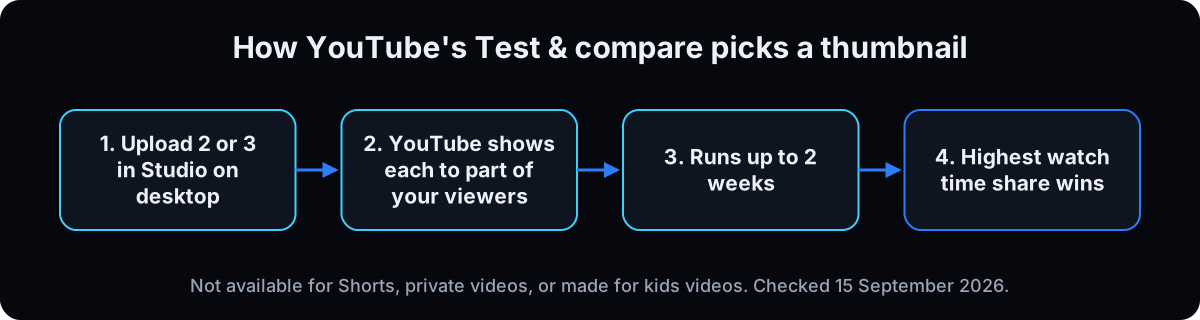 On a computer, open the video in YouTube Studio and start Test & compare. Add up to 3 thumbnails, titles, or both. YouTube's Test & compare page (checked 15 September 2026) says a test can take a few days and should finish within 2 weeks, and ends as a winner, performed same, or inconclusive, where the first option stays.
It picks on watch time share, not click-through rate. A thumbnail that over-promises can win clicks and still lose, which is the right outcome.
What you can't test: Shorts, private videos, videos made for kids or for mature audiences, and scheduled lives and Premieres until they've ended. Regular videos and live archives work.
After it ends, give the result to ChatGPT or Claude with the critique prompt, and feed what you learn into the next video's step 6. Keep the losers in the folder.
Why: your audience decides, not a cheat sheet, and not the model that drew it.
Here is a screenshot of the thumbnails I tested, with the Test & compare result: [winner / performed same / inconclusive], and the watch time share for each.
Tell me what the winner has that the others do not. Be specific about composition, contrast, where the eye lands first, and how many things compete for attention.
Then tell me which single change to my prompt would make the next set more like the winner.
Do not compliment the ones that lost.
Layer 2: the same thing over the API
Once the prompt works, a script can run the loop through an image edits endpoint: send references and face photos, save 4 files, add the headline in a real font. My version is about 550 lines, mostly retries and fit logic. Keep the API key in an environment variable, never in a prompt. This part needs a terminal.
The call
Send the reference and face photos as separate image parts, and ask for an explicit 16:9 size. OpenAI's guide (checked 15 September 2026) says width and height must be multiples of 16, the ratio between 1:3 and 3:1, no edge over 3840 pixels, and total pixels between 655,360 and 8,294,400. 2048 x 1152 and 1536 x 864 both fit. 3840 x 2160 fits too, but OpenAI marks anything above 2560 x 1440 as experimental, so generate smaller and resize. 1536 x 1024 is 3:2 and comes back the wrong shape. Put face photos last and say in the prompt that the final images are the real person, or the model treats them as scenery.
Convert every reference first
YouTube serves thumbnails as webp, in color modes the API rejects with 'invalid image file or mode'. Convert to plain RGB JPEG. In my own script, this failed 34 of my first 36 renders.
Match the fit mode to the reference
cover crops to fill, biased 12% off the top. pad fills the sides with a blurred copy. preserve letterboxes a wide reference to 3:2 so its edges don't get sliced, then trims to 16:9. For a whole thumbnail as reference, use preserve.
Check the model name
My script pins gpt-image-2 and requests 2048 x 1152. OpenAI's models page (checked 15 September 2026) lists the current image models as GPT-Image-2.5 Sunburst (gpt-image-2.5-sunburst, for editing precision) and GPT-Image-2.5 Flare (gpt-image-2.5-flare, for fast everyday generation). Names change every few months, so check that page before blaming a prompt. Want Claude to run the whole loop? Package it as a skill, covered in Claude skills.
If this happens, do this
Every one of these has happened to me or to someone I set this up for.
| Failure | Fix |
|---|---|
| No custom thumbnail option in Studio | Your channel isn't verified. Verify a phone number, then look again |
| No Test & compare option | Advanced features are off, you're on the phone app, or the video is a Short, private, or made for kids |
| Upload fails as too big | Over 2 MB from a phone. Save as JPG at lower quality, or upload from a computer (50 MB) |
| Thumbnail comes back square or 3:2 | Ask for 16:9 by name in the chat, or an explicit size like 2048 x 1152 over the API |
| Vertical video shows a different thumbnail on home | YouTube swaps 16:9 custom thumbnails on vertical videos for an auto 4:5 one there. Expected |
| The thumbnail says the same thing as the title | The picture must add. Restating the title wastes the half that has their attention |
| It looks like the reference | You asked for an edit, not a redesign. Say original, never a copy, and change color, type and subject together |
| The face is a stranger | Not enough angles, or they weren't named as the subject. Use 5 or more and say the final images are the real person |
| All 4 options look the same | One reference gives one direction. Use 2 from different channels, 2 layouts, or 2 tools |
| Great full size, dead in the feed | Shrink to 320 pixels and look yourself. Don't ask the model |
| The API rejects your reference | YouTube serves webp. Convert every reference to RGB JPEG first |
| Won on clicks, lost on watch time | It over-promised. That's why the test scores on watch time share, so run it |
The tools I use for this
| Tool | What it is for here | |
|---|---|---|
| ChatGPT | The no-code path. Draws the candidates from the prompt in step 7 and edits them by conversation. | Open |
| YouTube Studio Test & compare | Free A/B test for up to 3 thumbnails and titles, desktop only, advanced features on. Picks on watch time share. | Docs |
| YouTube search | Free outlier research. The first 20 results and their view counts are all you need for a median. | Open |
| Anton, Archivo Black, Bebas Neue | The 3 condensed fonts my script uses for headlines. Lock one so your thumbnails read as a set. | no link needed |
| Scrape Creators | A search API if you want the outlier math done in a script instead of by eye. | no link needed |
| Claude | The agent I run the scripted version and the post-test critique through. | Open |
From a stranger's face to a tested thumbnail
- Week 1: get your own face back. 5 or more photos on disk, 2 references from different channels above their page median, 1 thumbnail checked for likeness. Done when someone who knows you says it's you without being told.
- Week 2: make it read. 3 words or fewer, one named object, one layout, every candidate judged at 320 pixels. Done when you pick from 4 in under 10 minutes.
- Week 3 on: ship and test. Upload at 16:9 with the headline in a locked font and color, run Test & compare with 3 thumbnails on every eligible upload, keep the rejects. Done when a thumbnail won on watch time and you know which it beat.
Questions people ask
What size is a YouTube thumbnail?
YouTube recommends 3840 x 2160 pixels for video thumbnails, with a minimum width of 640 pixels and a 16:9 ratio, as a JPG or PNG. Files must be under 2 MB when uploaded from a phone or 50 MB from a computer. Shorts thumbnails are 2160 x 3840 at 9:16 (YouTube Help, checked 15 September 2026).
How do I make a YouTube thumbnail for free?
Verify your channel with a phone number, then pick one of 3 free routes: YouTube Studio's own suggestions (including Ask Studio, if you have it), an image from ChatGPT or Gemini within your plan's limits using the prompts in steps 7 and 8, or a free editor like Canva or Google Slides with a real font. Export a 16:9 JPG and check it at 320 pixels wide before uploading.
Can ChatGPT make YouTube thumbnails?
Yes. Attach a reference and photos of your face, name the layout, the 3 words and one object, and ask for a 16:9 image. Expect to fix text and likeness by conversation: OpenAI's own guide says the model can still struggle with precise text placement and recurring characters. Resize to YouTube's spec before you upload.
What makes a good thumbnail?
It adds something the title doesn't say, carries 3 words or fewer, has one clear focal object, and still reads at 320 pixels wide. It must also show what's in the video; YouTube's policy bans thumbnails that mislead viewers about the content. The only real proof is your own Test & compare result.
How do I A/B test thumbnails?
Use Test & compare in YouTube Studio on a computer. Upload up to 3 thumbnails, titles or both; YouTube splits viewers for up to 2 weeks and picks the winner by watch time share. You need advanced features, and it doesn't work on Shorts, private videos, made for kids videos, or scheduled Premieres before they end (YouTube Help, checked 15 September 2026).
Do AI thumbnails hurt a channel?
YouTube doesn't penalize AI thumbnails as such, and its disclosure rules don't require labeling AI used for a thumbnail. Misleading thumbnails do break policy. The risk is your audience: some viewers push back on visible AI tells, as a 1,425-point r/2007scape thread showed in September 2026. Fix the tells, keep your real likeness, and let Test & compare show what your viewers prefer.
The free skill
The thumbnail build I run, written for an agent. It checks your channel can upload and test, finds the outlier videos for a topic, drafts 3-word headlines that add to your title, picks one of 4 layouts, writes the ChatGPT or Gemini prompt, shrinks every candidate to 320 pixels for you to judge, exports to YouTube's size, and sets up Test & compare. Related: YouTube outlier videos.
---
name: youtube-thumbnail-chatgpt
description: Makes a YouTube thumbnail with AI. Checks the channel can upload custom thumbnails and run Test & compare, finds outlier videos for the topic, takes 2 as references, writes a 3 word headline that adds to the title, picks one of 4 layouts, writes the ChatGPT or Gemini prompt, has the user judge every candidate at 320 pixels, exports to YouTube's size, and sets up the A/B test. Trigger on "make my thumbnail".
---

# Make my thumbnail

You're producing one thumbnail. Take the IDEA from what already wins and rebuild it as the user's own. Never a copy. Never publish or upload anything yourself.

## Facts to use (YouTube Help and vendor docs, checked 15 September 2026; recheck if older than 3 months)
- Video thumbnail: 3840 x 2160 recommended, minimum width 640, 16:9, JPG or PNG. Under 2 MB when uploaded from mobile, under 50 MB from desktop. Source: support.google.com/youtube/answer/72431
- Shorts thumbnail: 2160 x 3840, 9:16, minimum height 640, desktop Studio only. Vertical videos with a 16:9 custom thumbnail get an auto 4:5 thumbnail on home, explore and subscriptions.
- Custom thumbnails need a verified (phone verified) account. answer/171664
- Test & compare: up to 3 titles and/or thumbnails, YouTube Studio on desktop, advanced features required, finishes within 2 weeks, winner by watch time share; outcomes winner, performed same, inconclusive. Not for Shorts, private, made for kids or mature audience videos, or scheduled lives and Premieres before they end. answer/16391400, answer/9890437
- Misleading thumbnails break policy (answer/9229980). Using AI to make a thumbnail does not need the altered or synthetic content disclosure (answer/14328491).
- OpenAI image models: gpt-image-2.5-sunburst (editing precision), gpt-image-2.5-flare (fast). Sizes: multiples of 16, ratio 1:3 to 3:1, max edge 3840, 655,360 to 8,294,400 pixels, above 2560x1440 experimental. developers.openai.com/api/docs/guides/image-generation
- Gemini: Nano Banana 2 (gemini-3.1-flash-image), Nano Banana Pro (gemini-3-pro-image), 16:9 supported, up to 4K, SynthID watermark. ai.google.dev/gemini-api/docs/image-generation
If a fact above conflicts with what the user sees in their account, trust the account and tell them.

## Inputs you need before you start
- The topic, the video title, and the exact phrase someone would type into YouTube to find it.
- Whether the video is a regular video, a Short, or a live archive.
- 5 or more photos of the user's face (straight on and slightly turned, good light, plain or cut out background, same era), or a decision to skip the face.
- The user's brand colors and locked headline font, if they have them.
- The script or outline, if it exists.
If any are missing, ask once, then stop and wait.

## Step 0. Check eligibility
Ask whether the channel is phone verified and whether advanced features are on. No verification: they can't upload a custom thumbnail yet. No advanced features, or a Short: skip Step 8 and say why.

## Step 1. Find the outliers
Search YouTube for the phrase. Take the first 20 results with their view counts. Compute the MEDIAN of the page, then each video's ratio against it. Rank by ratio, not raw views.
Report the top 3 as: ratio, views, title, and one line on the idea the thumbnail sells (not what it shows).
Stop and let the user confirm before generating.

## Step 2. Take 2 references
Pick 2 from DIFFERENT channels. Download both. Convert every reference to plain RGB JPEG before it goes near an image API. YouTube serves webp and odd color modes, and the API rejects them with "invalid image file or mode".

## Step 3. Write 3 words and name 1 object
3 words or fewer, and they must add to the title, never repeat it. If a headline restates the title, say so and write another. If the user has a script, pull the headline from a phrase they already said.
Good: Control Your Agents. No Photoshoot Needed. Ads Without Actors.
Name the second focal object precisely: not "something about ads" but "an ads dashboard with one row ringed in red". At most 3 elements including the person.
A number, before and after, or outcome on the thumbnail is a claim the user must be able to back up, and it must be in the video.

## Step 4. Pick one layout
Face + 3 words, before and after, object close-up, or contrast split. For a clinic, agency or B2B channel, ask whether an object-led layout beats the face.

## Step 5. Generate 4
2 from each reference, each in a new chat. For each, state:
- the layout
- the exact text, and that it's the ONLY text
- the color treatment, naming the accent
- the object
- cut out on a built graphic, or the user's real room
- the ground: light off white, or deep charcoal
- the expression, by name, kept moderate so the likeness holds
- one single 16:9 image, never a grid
Put the face photos LAST and say the final images are the real person.
In Gemini, use the same fields in a shorter prompt. If the user has Ask Studio in YouTube Studio, suggest trying it too.
Over the API, request an explicit 16:9 size such as 2048x1152 or 1536x864, then resize. 1536x1024 is 3:2.
To change a candidate, edit it and say "keep the rest the same". Don't regenerate from scratch.

## Step 6. Shrink to 320 pixels
Shrink every candidate to 320 pixels wide and hand the user those files. The user judges legibility, not you. Don't tell them whether it's readable.

## Step 7. Export
Export the chosen ones as 16:9 JPG (3840x2160 or 1920x1080). Report the file size. Warn if over 2 MB and they upload from a phone.

## Step 8. Set up Test & compare
Tell the user to add up to 3 thumbnails in Test & compare in YouTube Studio on a computer, and to come back when it ends with the result and watch time shares. Then compare the winner with the losers: composition, contrast, first focal point, number of competing elements, and one prompt change for next time.

## Report
The eligibility check, the outlier table with ratios, the 2 references and why, the headline, the object, the layout, the 4 files and their 320 pixel versions, the export sizes, and the test plan.
Want the thumbnails made for you every week?
Inside the AI CEO Lab the Content Engine module runs the outlier search, drafts the headline off your script, and hands you four candidates before the video is edited.