 AI CEO Lab
Automated Newsletter: Set It Up Once, Send Every Week
One tag starts it, wait steps pace it, lead magnets feed it, and a 5 minute voice note can write it. Plus the sender setup that keeps it out of spam.
Every doctor I know who tried a newsletter quit inside 2 months. Not for lack of ideas. It was a chore bolted onto a busy week, with nothing feeding it readers and no shape telling them what to write.
In my research, the 7 build-alongs for this term all automate the writing. Across 51,000 words of transcript, not one mentions deliverability, where subscribers come from, or what a reader who joins in March receives. One finishes with 2 subscribers and says so on camera.
So this guide builds the delivery half first, then gives you the easiest way to fill it: talk for 5 minutes and let AI shape the issue, with you approving every send. It's for owners who want a weekly note that runs without them. Feeding it from Instagram: Instagram DM automation.
What you have by the end
Not concepts. Things that exist on your machine when you close the tab.
- An onramp where every subscriber starts at Issue 01
- A sending domain with SPF, DKIM and DMARC set up
- A 5 minute voice note routine for weeks you don't want to write
- A queue that stays one issue ahead
Start here: what an automated newsletter is
If you've only sent emails one at a time, 4 ideas cover it.
It's a workflow, not a Sunday broadcast
A broadcast goes to whoever is on the list that day. An automated newsletter is a sequence: someone joins, gets Issue 01, waits a week, gets Issue 02. Every reader starts at the beginning, whenever they arrive.
A tag starts it
Your email platform or CRM watches for a label, called a tag, on a contact. When a lead magnet or form adds the tag, the sequence starts. In GoHighLevel that's the Contact Tag trigger.
Automated sending isn't automated writing
The platform handles the sending. You still decide what goes in each issue. AI can draft it from your notes or a voice note, and you approve it before it's queued.
The catch
Email from an unauthenticated sender gets filtered. Google's sender guidelines require every sender to Gmail to set up SPF or DKIM, so you need your own domain before your first send.
| Term | What it means |
|---|---|
| Tag | A label on a contact that can start a workflow |
| Wait step | A pause in a workflow, like 7 days, that sets your cadence |
| Onramp | The sequence every new subscriber enters at Issue 01 |
| SPF | A DNS record listing which servers may send email for your domain |
| DKIM | A digital signature that proves the email wasn't altered and came from your domain |
| DMARC | A DNS record telling inboxes what to do with mail that fails SPF or DKIM |
The mental model
A newsletter is a broadcast you write on Sunday night to an exported list. Or an agent pipeline that writes and sends itself.
A newsletter is a workflow one tag starts. Lead magnets add the tag. Wait steps set the cadence and make it evergreen. Your domain is authenticated before the first send. You approve the words, and they're only about things you did.
| Term | What it means |
|---|---|
| The delivery machine | Tag, onramp, wait steps, an authenticated sender. Required, and first. |
| The onramp | The workflow every new subscriber enters at Issue 01, whenever they arrive. |
| The voice note | 5 minutes of talking that AI shapes into a draft you approve. |
| The writing machine | Sources, filter, planner, writers, editor. Optional, and last. |
Should I build the agent pipeline everyone else is building?
There are 7 videos showing a multi-agent system that scrapes, filters, writes and sends a whole newsletter on a schedule. Why am I doing any of this by hand?
Build it eventually. Not first.
- It automates what isn't your bottleneck. At 0 subscribers, writing isn't the problem. One build ends fully automated with 2 subscribers, one of them the builder's girlfriend.
- None has list growth, deliverability, or evergreen order. 6 skip growth and the seventh sold it as a course. They send link-dense digests, the exact Promotions profile, on a schedule that hides your best issue from later joiners.
- Builders with real audiences keep a human gate. 4 of the 7 do, and one un-automated on purpose to keep a few minutes a day of control. A mostly right draft does multiply your hour. That's why the gate exists.
Price the upkeep first: the scraper that breaks, the deprecated model, the week spent debugging instead of writing 400 words. I won't quote anyone's dollar figures; the published ones are stale. And a platform that charges per subscriber changes the maths as your list grows.
Build it once
1. Build the delivery machine first
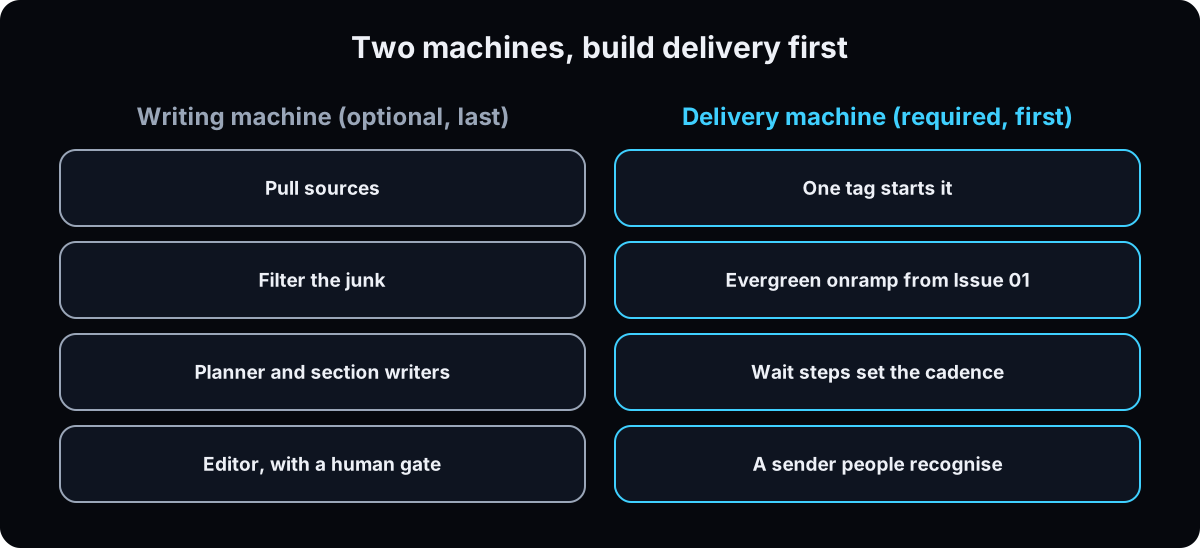 There are 2 machines. The writing machine pulls sources, filters junk, then a planner, section writers and an editor produce the issue. It works.
The delivery machine is a tag, an onramp, wait steps, a sender people recognise, and a reply address you read. That's this guide.
Why first: writing isn't the bottleneck at 0 subscribers, or when the point of the note is that you wrote it.
2. One tag starts everything
Create the tags before the workflow: mine is health-wealth, plus newsletter-subscriber, added on entry so you can count who's in. Missing tags show warning badges and steps silently skip. I lost a build to this.
The trigger is tag added, nothing else. A second trigger is how someone gets Issue 01 twice.
The catch: GoHighLevel's docs say tags trigger workflows only when they're added or removed after the workflow is active. Contacts who already had the tag before you published won't enter. Publish first, then tag, or push existing contacts in with bulk add to workflow.
Every funnel that feeds the newsletter, like each lead magnet, adds the tag as its last step, 1 day after its own resource email.
Why: one door in means one place to debug.
3. Build the onramp, not a broadcast
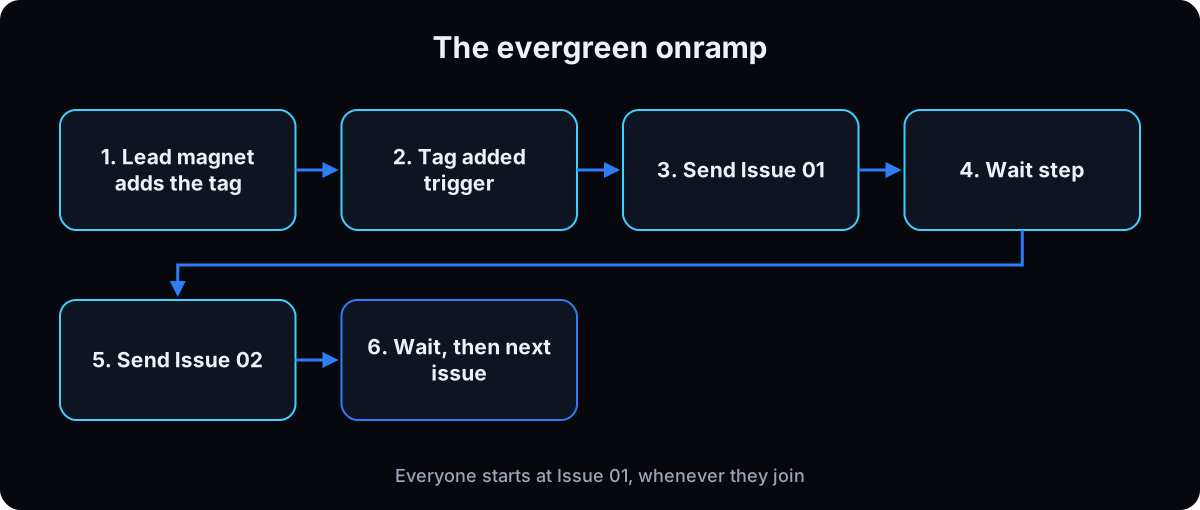 Trigger: tag added. Step 1: add
 newsletter-subscriber. Step 2: send Issue 01. Then wait, Issue 02, wait, and so on.
Why: with a scheduled broadcast, a March subscriber never sees January's best issue. Here, everyone starts at Issue 01. Change cadence by changing one number in the wait step. The wider patterns are in GoHighLevel workflows.
4. Set up SPF, DKIM and DMARC on your domain
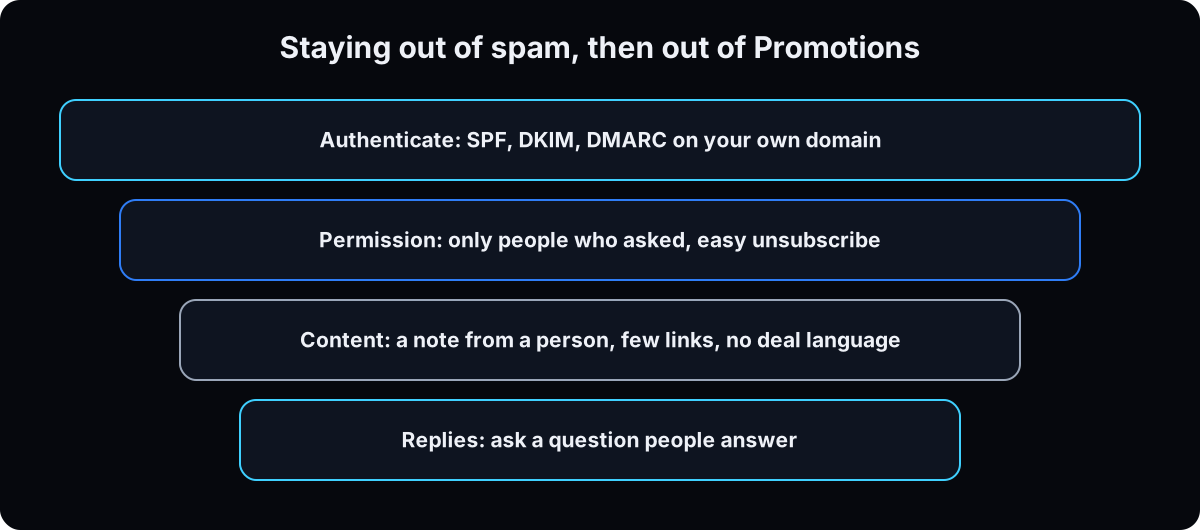 3 records your email platform gives you to paste into your domain's DNS settings. In plain words:
SPF is a guest list: which servers may send email as your domain.
DKIM is a wax seal: a signature inboxes check to confirm the email came from your domain and wasn't changed.
DMARC is the instruction card: what inboxes should do with mail that fails the first 2 checks, and where to send reports. Starting at p=none only collects reports.
Google's sender guidelines require SPF or DKIM from every sender to Gmail, and SPF, DKIM and DMARC from anyone sending more than 5,000 messages a day, plus spam rates below 0.3%.
Why: no amount of good writing fixes an unauthenticated sender.
5. Prove the wiring before you write more
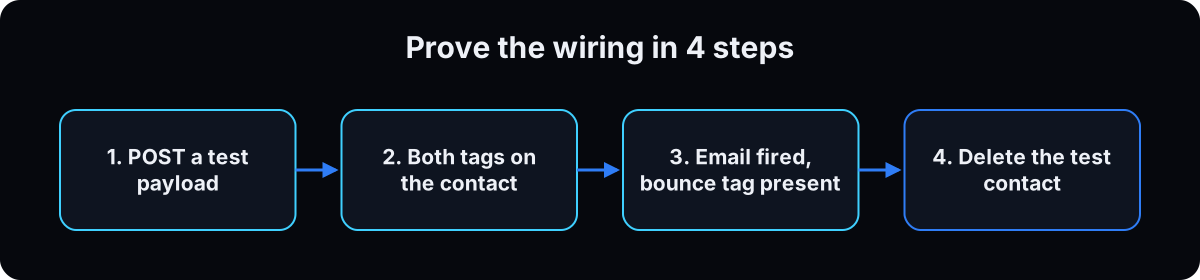 4 steps, 10 minutes. Don't write Issue 02 until this passes.
1. Send a test contact into the funnel with a throwaway address.
2. Check the contact exists with both tags.
3. Check the email fired. An address at a bouncing domain leaves a bounce tag, which is your proof of send.
4. Delete the test contact, or it gets your newsletter forever.
Why: on mine, the bounce tag proved it, not the workflow's green ticks.
# 1. fire the funnel's inbound hook with a throwaway address
curl -s -X POST "$INBOUND_HOOK_URL" \
  -H 'Content-Type: application/json' \
  -d '{"name":"Test Contact","email":"test@example.com",
       "source":"acceptance-test","resource":"guide"}'

# 2-3. in the platform, on that contact: both tags present, email step fired
# 4. delete the test contact
6. Write each issue in one shape
Mine, Health & Wealth, is one thing from medicine and one from business. Under 400 words (my rule), one idea per issue. 3 ideas is 3 issues. The drafting prompt below holds the shape, which comes from Alex Hormozi's weekly emails.
Keep paragraphs to 1 to 3 sentences with spacing set explicitly in the email HTML. My first Issue 01 used default margins and arrived as one grey block on a phone. No header image, one button at most.
Why: only things you did. That's why yours can get a reply and an AI digest can't. Read it aloud on a phone; if it sounds like an agency, rewrite.
7. Don't want to write? Talk for 5 minutes
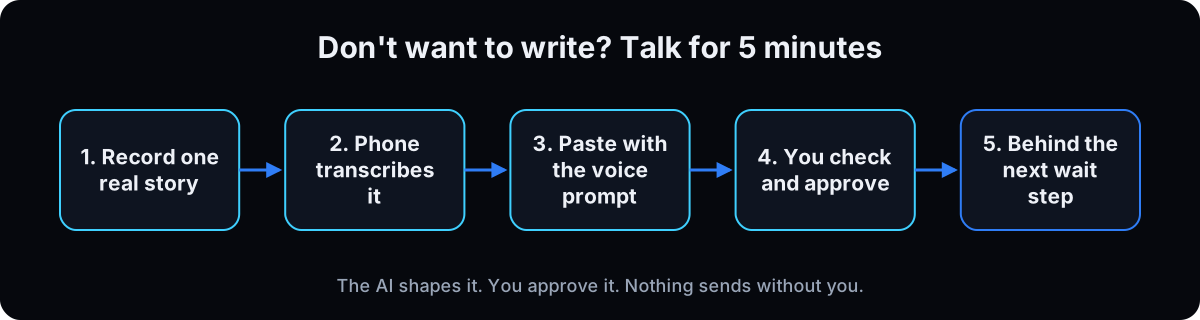 Record one real thing that happened this week and what happened next, the way you'd tell a friend in the car. 5 minutes is plenty.
Transcribe with a tool already on your phone. On iPhone, Voice Memos shows a transcription you can copy (iPhone 12 or later, supported languages, not every region). On a Pixel, the Recorder app makes transcripts.
Paste the transcript into ChatGPT or Claude with the prompt below. It builds the issue from your own phrases and lists questions instead of guessing.
Approve. Check every number against what you said, answer its questions, then place the issue behind the next wait step. No AI gets the send button.
Why: the thinking was never the problem. The blank page was. Say numbers twice, slowly, because transcription mishears figures more than words.
Here is the transcript of my voice note. Turn it into one newsletter issue.

Use only what the note contains. Never add a fact, number, name or result I didn't say.

1. State the one lesson in one sentence. Quote the exact phrases I used that carry it.
2. Draft under 400 words: a preheader under 90 characters, "Hi {{first_name}},", one line on what this newsletter is, the story, the named idea, one question I want a reply to, my name.
   Short paragraphs, plain words, no hype, no em dashes. Build from my phrases, not a summary of them.
3. List your questions: unclear numbers, names that might be wrong, background speech that may not be me.
4. Stop. Don't send or schedule anything.
8. Stay out of Promotions the honest way
Gmail sorts mail into category tabs: Primary for people you know and messages that don't fit elsewhere, Promotions for deals, offers and promotional email. Nobody can promise Primary. What helps:
Write like a person: your name as sender, a reply address you read, few links, no discount language. Ask one question people can answer in a line. Tell new subscribers in Issue 01 that if it lands in Promotions, they can drag it to Primary. Gmail's help says moving an email to the right tab helps Gmail learn their preferences.
Follow CAN-SPAM in every footer: an accurate From and subject, your physical postal address, and a clear way to opt out, honored within 10 business days. The FTC lists penalties of up to $53,088 per violating email.
Why: tricks to dodge filters put the domain at risk. Permission and replies don't.
9. Keep the queue one issue deep
"Never miss a week" is willpower with no mechanism. The mechanism is the wait step: next week's issue already sits behind a wait step before this week's sends. The week you have nothing, the queue sends and nobody notices.
Book 1 hour, or 5 minutes of talking, same day every week, to top it up.
Why: if the hour comes and you have nothing, that tells you about your week, not your newsletter.
Starter prompts
Paste these as written. They are short on purpose, because the long ones drift.
Act as my newsletter editor. The note is called [NAME]. Its promise: one thing from [X], one thing from [Y], every week, and only things I did. Here are my notes from this week: [PASTE]. Write one issue under 400 words in this shape: - a preheader under 90 characters saying what this issue is - first name greeting - one line reminding them what this note is and how often it comes - one idea, with a name they can repeat back to me - a simple example using only numbers from my notes, or none - a short list of what to run this week - one question at the end that I want a reply to - one closing line saying why they received this and how to stop Paragraphs of 1 to 3 sentences with a blank line between them. Plain words, no hype, no em dashes, no header image, at most one button. Then flag every sentence that claims something my notes do not say I did. List them separately. Do not fix them yourself.
Read this issue as a burned out doctor on her phone between patients. Mark every sentence that sounds like an agency, reads as a summary of someone else's idea, or makes a claim without a real number behind it. Rewrite only those sentences. Do not add anything, do not restructure, and do not make it longer.
If this happens, do this
Every one of these has happened to me or to someone I set this up for.
| Failure | Fix |
|---|---|
| You built the agent pipeline and have 2 subscribers | Tag and lead magnet first. Automate writing last |
| Contacts you tagged earlier never got Issue 01 | Tags only trigger after the workflow is active. Bulk add them to the workflow |
| Someone got Issue 01 twice | 2 triggers on one workflow. Tag added only |
| Warning badges, and steps silently skip | Tags referenced before they existed. Create tags first |
| The issue is one grey block on a phone | Set paragraph margins explicitly in the email HTML |
| Issues land in spam | Check SPF, DKIM and DMARC on the sending domain, and stop sending to anyone who didn't ask |
| The voice note draft has a number you never said | Tell it to use only the transcript and list questions. Check every figure before approving |
| Nobody replies | The question was rhetorical. Ask something they can answer in one line |
The tools I use for this
| Tool | What it is for here | |
|---|---|---|
| GoHighLevel † | Tag trigger, email steps, wait steps. Where my newsletter lives. My affiliate link. | Get it |
| Kit / beehiiv | Dedicated newsletter platforms with automations (see beehiiv automations). | Kit docs |
| Google email sender guidelines | What Gmail requires: SPF or DKIM for everyone, DMARC and one-click unsubscribe above 5,000 a day. | Read |
| FTC CAN-SPAM guide | The footer and opt-out rules for commercial email in the US. | Read |
| Claude | Drafts the issue from my notes or a voice note transcript. | Open |
| Wispr Flow † | I talk the week out on my Mac, it types the notes. My affiliate link. | Get it |
What I would tell you over coffee
- Answer every reply yourself for the first 3 months. The replies are the product; the newsletter is the excuse.
- Keep one line per issue: opens, replies, unsubscribes. Change the reply question before the subject line.
- Record before you've decided the lesson. If you already know it, you'll write instead of talk.
Questions people ask
Can AI write my newsletter automatically?
It can draft it. Paste your notes or a voice note transcript into ChatGPT or Claude with a prompt that says to use only what you said, and it returns a draft plus questions. Keep a human approval before anything is queued, because an invented detail is worse than a blank.
What's the best platform for an automated newsletter?
The one that already holds your contacts. If your CRM is GoHighLevel, build it there with a tag trigger and wait steps. If you only need a newsletter, Kit and beehiiv both have automations. The must-haves are a tag or form trigger, wait steps, and your own sending domain.
How do I keep my newsletter out of Promotions?
Nobody can guarantee Primary. Authenticate your domain, send from your name, keep links few and deal language out, ask a question people reply to, and ask new readers to drag your email to Primary. Gmail's help says moving an email to the right tab helps it learn.
Do I need my own domain to send a newsletter?
Yes. Google's sender guidelines require SPF or DKIM authentication for your sending domain, and you can only add those records to a domain you control. Google also warns against impersonating Gmail From: headers, so don't send a newsletter from a gmail.com address.
What are the CAN-SPAM rules for newsletters?
For commercial email, the FTC's guide lists: accurate From and subject lines, identify ads, include your physical postal address, give a clear opt-out, and honor opt-outs within 10 business days. Penalties are up to $53,088 per violating email.
The free skill
It holds the workflow shape, the issue template, the voice rules and the pre-send checks. Give it your week's notes or a voice note transcript and it drafts the issue, flags any claim your notes don't support, and returns subject, preheader and body. It never sends and never builds the workflow.
---
name: newsletter-runs-itself
description: Drafts one issue of a weekly newsletter in a fixed shape from the owner's notes or a voice note transcript, and holds the rules that let it run without them: one tag as the trigger, wait steps as the cadence, every lead magnet feeding the tag, an authenticated sending domain, and a human approval before anything is queued. Never sends. Trigger on "draft this week's issue", "write my newsletter", "turn this voice note into an issue", "build the newsletter onramp", "why is my newsletter in promotions".
---

# The Newsletter That Runs Itself

A newsletter is a workflow, not a broadcast. One tag starts it. Wait steps pace it. Every lead magnet ends by adding the tag. The owner approves the words, and you draft them first.

You draft. You never send, schedule or build. Never invent a number, result or story the owner's notes or transcript don't contain.

## The workflow (build once)
1. Tags first: the newsletter tag (the trigger) and a subscriber tag (added on entry). Tags must exist before a workflow references them, or steps silently skip.
2. Trigger: tag added, the newsletter tag. Nothing else starts the sequence.
3. GoHighLevel caveat: tags trigger workflows only when added or removed after the workflow is active. Contacts tagged before publishing don't enter. Publish first, or bulk add existing contacts to the workflow.
4. Steps: add subscriber tag, send Issue 01, wait N days, send Issue 02, wait, and so on. Every new reader starts at Issue 01.
5. Every lead magnet's workflow adds the newsletter tag 1 day after delivering its own resource.
6. Before writing Issue 02, run the acceptance test: send a throwaway contact in, confirm both tags, confirm the email fired (a bounce tag counts), delete the contact.

## Sender setup (before the first send)
- The owner's own domain. Never a gmail.com From address.
- SPF: which servers may send for the domain. DKIM: a signature proving the mail came from the domain unchanged. DMARC: what inboxes do with mail that fails, starting at p=none to collect reports.
- Google requires SPF or DKIM from all senders to Gmail; SPF, DKIM, DMARC, one-click unsubscribe and spam rate under 0.3% above 5,000 messages a day (support.google.com/a/answer/81126).
- CAN-SPAM footer for commercial email: accurate From and subject, physical postal address, clear opt-out honored within 10 business days (FTC).

## Voice note mode
If the input is a transcript:
1. State the one lesson in one sentence. Quote the exact phrases the owner used that carry it. Build from those phrases, not a summary.
2. If the note holds 2 lessons, pick one and park the other with its phrases.
3. Flag numbers said fast, names that might be wrong, and background speech that may not be the owner.
4. End with questions. Ask, don't fill.

## The shape of one issue
Under 400 words, in this order:
- Preheader under 90 characters that says what this issue is.
- First name greeting.
- One line on what the note is and how often it comes.
- One idea, with a name they can repeat.
- A simple example. Numbers only from the owner's notes, otherwise `[X]`.
- A short list of what to run this week.
- One question the owner wants a reply to.
- One line on why they got this and how to stop.

The format comes from Alex Hormozi's weekly emails.

## Voice rules
- Paragraphs of 1 to 3 sentences with a blank line between. Set paragraph spacing explicitly in the HTML; default margins render as a block.
- Plain words. No hype, no stat dumps, no em dashes, no discount language.
- No header image, no stock photo, at most one button, few links.
- Only things the owner did. Flag, in a separate list, any sentence that claims otherwise. Don't fix it yourself.

## Promotions
Nobody can guarantee Primary. Recommend: owner's name as sender, a reply address they read, few links, a question people answer, and a line in Issue 01 asking readers to drag the email to Primary if it lands in Promotions. Never suggest hidden text or other filter tricks.

## Before it goes into the workflow
- Read aloud on a phone. If it sounds like an agency, rewrite.
- Subject, preheader and body ready to paste into the email step.
- The owner has approved it in writing. No agent gets the send button.
- The queue holds next week's issue behind a wait step before this one sends.

## Weekly line
Subscribers, opens, replies, unsubscribes, per issue. If nobody answers the reply question, change it.
Want your newsletter built and fed by your own keyword funnels?
Inside the AI CEO Lab we build the onramp on your CRM, wire your first lead magnet into it, set up your sending domain, and write the first three issues with you.