 AI CEO Lab
Meta Ads MCP: Connect Claude to Your Facebook Ads, Safely
What Meta's ads MCP connector is, how to connect it to Claude or ChatGPT with no code, and the rules, read-only week and health ad guardrails to set before it can change a budget.

You want Claude to look at your Facebook ads and tell you what's wrong. Meta now makes that possible with its own connector, the ads MCP server. It can also create campaigns and change budgets, so the setup order matters more than the prompts.
This guide gives you that order: connect with no code, a read-only week with 3 starter prompts, the rules to set before anything can write, the health ad guardrails my clinic clients need, and your first approved change.
I'm a doctor who runs an ad agency, not an engineer. New to MCP? Start with the next section. Already connected? Skip to step 4 and set your rules.
What you have by the end
Not concepts. Things that exist on your machine when you close the tab.
- A plain-English picture of what MCP is and what Meta's connector can and can't do
- Claude connected to your ad account through Meta's own login, with no developer app
- Rules in place before the agent can touch a budget: Meta's server rules, allow once, and a never list
- Guardrails for health businesses: no patient data in audiences, and ad copy checked against Meta's health policy
- A read-only week with 3 starter prompts that find real problems
- One approved write action, logged and reversible
Start here: what the Meta ads MCP is, in plain English
If you've only used ChatGPT or Claude as a chat window, 5 ideas make the rest of this page click.
What MCP is
MCP stands for Model Context Protocol. It's an open standard that lets an AI app use another company's tools. Without it, Claude only knows what you paste in. With it, Claude can ask your ad account a question and get the live answer back.
A connector is the setting in Claude or ChatGPT that plugs one of those tool sets in.
What Meta's connector is
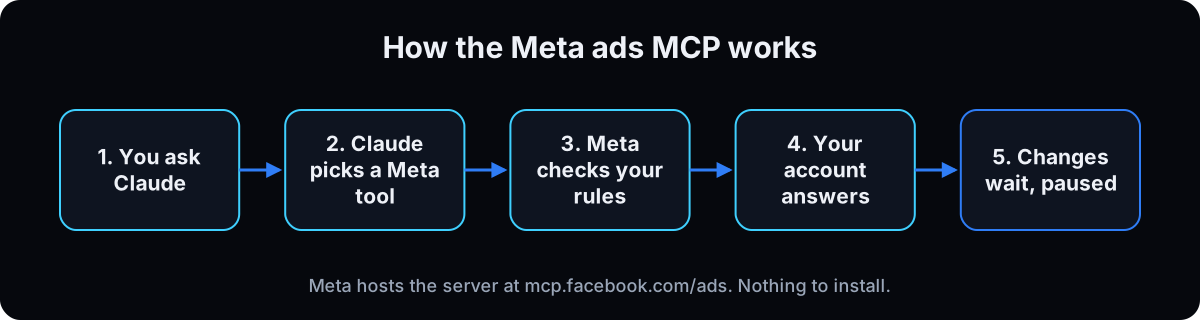 Meta's ads MCP server is a Meta-hosted MCP server at
 https://mcp.facebook.com/ads. It's part of the Meta ads AI connectors Meta announced as an open beta on 29 April 2026. There's nothing to install. You sign in with your Facebook business login and choose which business portfolios it can reach.
On 16 July 2026 Meta added server rules that let anyone with full control of a business portfolio govern what AI agents can do, from budget changes to catalog updates (checked 15 September 2026).
What it can and can't do
Meta groups the tools into 7 categories: reporting, ad creation and management, catalogs, signals and datasets, help articles, A/B tests and lift studies, and activity logs. The table below covers the ones a clinic or local business uses. Per Meta's ad creation docs, write tools create campaigns, ad sets and ads paused, and your AI app asks you to confirm before anything goes live.
Meta's built-in AI vs your own agent
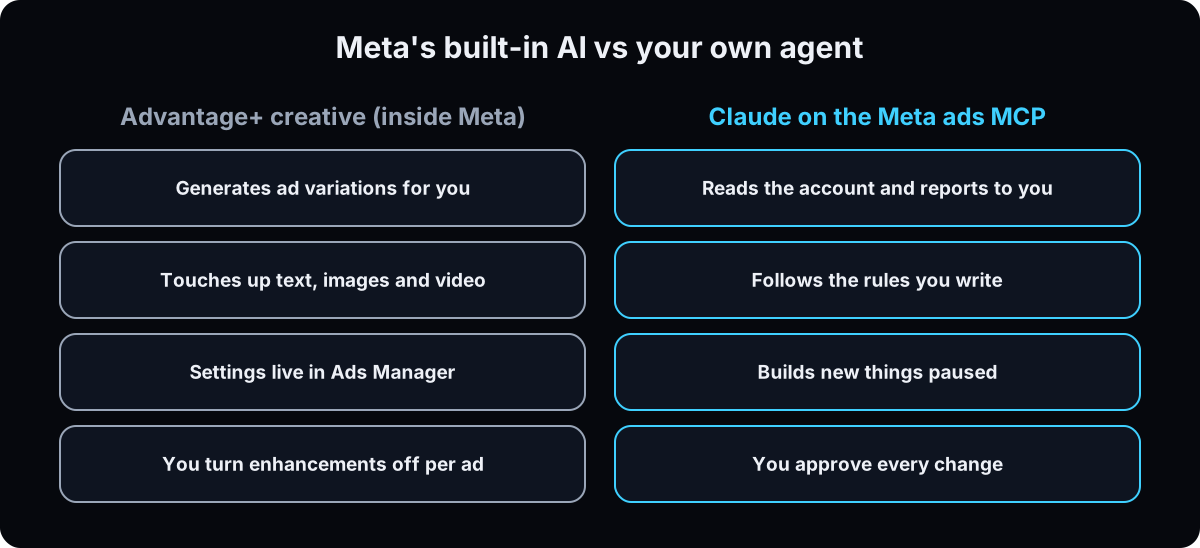 These get mixed up. Advantage+ creative is Meta's own AI inside Ads Manager. It generates and enhances ad variations for you. Owners on r/FacebookAds are pushing back on Meta's AI features this month, in threads like turn off AI features at the account level and the AI optimizations are out of control. Meta explains how to turn off creative enhancements.
The MCP connector is different. It's your agent, working for you, reading the account and proposing changes under rules you write. For health ads, where every word on the ad needs to be one you approved, I want enhancements off and the agent on.
The catch: it can change your budget
Creating things paused is safe. Editing things that are already running is not paused. The update tool can change a live ad set's name, budget, targeting or schedule, and a budget change on an active ad set takes effect as soon as it saves.
Two more traps. Budgets are sent in the currency's smallest unit, so $50.00 a day is 5000, and a slip of 100x is the classic agent accident. And AdsUploader reported on 11 August 2026 that several write actions, including budget changes, appear to be allowed by default until you set rules. That's why rules come before your first prompt.
| Job | Can the connector do it? | What to know |
|---|---|---|
| Pull spend, results and trends | Yes, read only | Reporting tools include anomaly and benchmark checks (Meta docs) |
| Explain why an ad isn't delivering | Yes, read only | ads_get_errors returns delivery-blocking errors (Meta docs) |
| Search the Ad Library | Yes, read only | Competitor ads with the date each started running |
| Create a campaign, ad set or ad | Yes, created paused | Nothing spends until someone activates it |
| Change a budget, targeting or schedule | Yes, and it applies to live ads | Block or cap this with server rules first |
| Turn something on | Yes, as a separate step | Turning on a campaign doesn't turn on its ad sets or ads |
| Edit the text or image of an existing ad | No | Creatives can't be edited. It makes a new creative and a new ad |
| Upload a customer list to an audience | Yes, with hashed data | Keep patient lists out entirely. See step 5 |
| Term | What it means |
|---|---|
| MCP | Model Context Protocol, the open standard that lets an AI app use another company's tools |
| Connector | The setting in Claude or ChatGPT that plugs an MCP server in |
| Ads MCP server | Meta's hosted server at mcp.facebook.com/ads that exposes your ad account as tools |
| Tool | One action the agent can take, such as list ad accounts or update a budget |
| Read vs write | Read looks. Write changes something in the account |
| Business portfolio | What Meta now calls Business Manager: the container for your ad accounts, Pages and people |
| Full control | The top permission level in a business portfolio. Needed to set server rules |
| Server rules | Meta's settings that limit which assets and actions an AI agent can use |
| Paused / activate | Paused means built but not spending. Activate turns it on and starts spending |
| Effective status | Meta's field for whether something can deliver, after checking the campaign above it, review, billing and budget |
| Learning phase | Meta's early testing period for an ad set. Big edits can restart it |
| Smallest currency unit | Cents for dollar accounts. Budgets are whole numbers in this unit |
| Advantage+ creative | Meta's built-in AI that generates and enhances ad variations |
| Custom audience | A group of people you target, sometimes built from an uploaded customer list |
| Server-side conversion | A lead or sale your site or CRM reports to Meta directly, more reliable than the browser pixel |
The mental model
AI for Facebook ads means Meta's AI rewriting my ads, or a prompt that writes better copy.
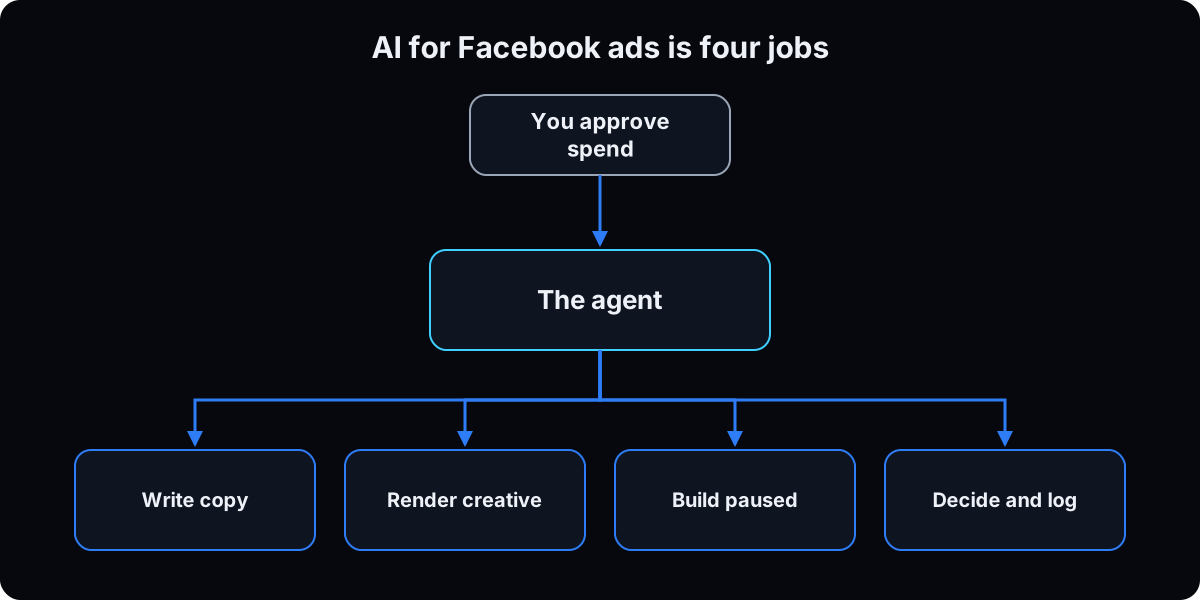 It means an agent with a limited connection to a live account. It finds what's off, does the math and drafts. You approve every action that spends money. Trust it on anomalies and math, never on strategy, because it can't see your margins or your schedule.
| Term | What it means |
|---|---|
| Write | Copy and scripts, from your rules and your customers' words |
| Render | Images and video. A separate pipeline that needs a compliance check |
| Build | Campaigns, ad sets, ads. Always created paused, turned on by a person |
| Decide | Reads the account, names the problem, proposes a change, logs it |
| The gate | Anything that sends, spends, activates or deletes waits for you |
Won't connecting AI get my ad account banned?
I've read about accounts getting restricted for automation. Is this worth the risk?
This is Meta's own connector. You sign in through Meta's login and Meta decides which tools exist, so using it is not a workaround. The risks that remain are ones you control:
- Pace. Dozens of edits in a minute looks like a bot, so keep the agent to one change at a time with your approval.
- The ads themselves. An agent that writes a before-and-after or a health claim can get ads rejected like any person can.
- Your data. Health information has no place in audiences, events or conversion names under Meta's Business Tools Terms.
Reading the account carries none of these. That's why the first week is read only.
From zero to your first approved change
1. Check that you and your ad account are eligible
You need to be an admin on the ad account, and to set rules in step 4 you need full control of the business portfolio. Meta's announcement says the connectors are an open beta for businesses of all sizes (checked 15 September 2026).
Not every ad account is switched on yet. When the agent lists your accounts, each one comes back with a flag for whether the connector can use it. On our own agency portfolio of 18 accounts, 2 came back not yet enabled for the connector.
Why: an account that isn't enabled fails in a way that looks like a broken connection. Knowing this saves you an hour of reconnecting.
2. Connect Meta to Claude with no code
In Claude on the web or desktop, open Customize, then Connectors. Click +, then Add custom connector. Name it Meta Ads and paste the server URL from Meta's docs: https://mcp.facebook.com/ads. Click Connect, sign in with Facebook, and pick only the business portfolios you want it to reach.
In a new chat, click +, then Connectors, and switch Meta Ads on.
Per Anthropic's custom connector guide, custom connectors work on Free, Pro, Max, Team and Enterprise plans, and Free is limited to one custom connector. On Team and Enterprise, an owner adds it under Organization settings, then Connectors (checked 15 September 2026). Menu names shift between versions, so use the closest label.
Why: Meta's own server means no developer app, no token to copy and no third-party company holding your ad data.
3. Or connect ChatGPT (more setup, read this first)
ChatGPT connects through developer mode. OpenAI's developer mode guide lists it for Plus, Pro, Business, Enterprise and Education accounts on the web: open Settings, then Security and login, turn on Developer mode, then create an app for the server URL from the Plugins page. On Business plans only an admin or owner can turn it on, per OpenAI's help article (checked 15 September 2026).
Meta's get started page describes the ChatGPT setup using your own Meta developer app ID as the OAuth client ID, which is a developer task. OpenAI itself calls developer mode powerful but dangerous.
Write actions ask for confirmation by default. When ChatGPT offers to remember your approval for a tool, say no.
Why: if you're not technical, Claude is the shorter path today. Use ChatGPT if your team already lives there and someone can own the app setup.
4. Set the rules before your first prompt
Meta's server rules. A person with full control of the business portfolio can limit the agent to chosen Pages, Instagram accounts and portfolios, block actions per ad account and per catalog, and block any budget above a number you choose. AdsUploader reports the panel is under Business Settings, then Integrations, as Ads MCP Server. Set the budget cap to a number you wouldn't mind waking up to.
Claude's approvals. When Claude asks to run a tool, pick Allow once for anything that writes. Anthropic's guide says to use Allow always only for tools you trust. A string of small always-allows is how an agent gets free rein.
Your never list. Paste the block below into a Claude Project's instructions, or at the top of every chat.
Why: the instructions tell the agent to wait. The server rules stop it even when it forgets. Use both.
Meta ads rules (never break):
- Never activate anything. I turn things on myself.
- Never raise a budget above $[cap] a day. Budgets are in cents: confirm the number before any change.
- Never change targeting, the optimization event or the objective.
- Never delete or archive anything.
- Never create, edit or upload to a custom audience.
- Never upload creative or publish a lead form.
- One change per message. Tell me the entity id, field, old value, new value and reason, then wait for my yes.
5. Add health ad guardrails (clinics, med spas, wellness)
My agency's clients are health businesses, so this step isn't optional for us.
Keep patient data out of Meta. Meta's Business Tools Terms say you can't share data that includes or is based on health information, and that the names of your events, conversions and custom audiences can't imply it either. The connector can upload hashed customer lists to audiences. A clinic's patient list tells Meta who your patients are, so I treat it as health information and never let an agent near it. Check your own situation with your compliance advisor.
Check every ad against the health policy. Meta's health and wellness ad policy (updated 22 July 2026) requires 18+ targeting for weight loss products and cosmetic procedures, bans ads that attack how someone looks, and restricts promises of specific results in a set time without disclaimers.
Why: an agent writes fast and confidently. Speed plus a health claim is how a clinic account ends up restricted.
Health guardrails:
- Never name an event, conversion or audience after a condition, treatment or diagnosis. Use neutral names like lead_form_submit.
- Never suggest uploading a patient or customer list.
- Before drafting any ad, check it against Meta's health and wellness policy. Flag: before-and-after images, negative body language, guaranteed results, results in a set time, and any weight loss or cosmetic procedure ad without 18+ targeting.
- Never state or imply that the viewer has a health condition.
6. Spend the first week read only
Nothing writes for 7 days. Use the 3 starter prompts below, one a day to start.
Check the account is alive first. Each account returns a status such as disabled, unsettled or pending risk review. On that same portfolio of 18 accounts, 3 came back disabled for unusual activity and 1 unsettled. An agent that skips this will confidently report no spend on a banned account.
Then ask why ads aren't running. The effective status field accounts for the parent campaign, ad review, billing and budget. The learning phase shows the last significant edit, so you can see if someone's tinkering reset it. The full read is laid out in the Meta ads audit.
Why: a week of reading shows you whether the agent's numbers match reality before you trust it with a change.
7. Tell it which number is the money
The agent grades on whatever column it sees, and the browser pixel column can over-report. Give it your server-side conversion as the real number and cross-check your CRM. A landing page that tags leads on submit makes that count trustworthy. If the platform claims 80 leads and your CRM shows 41, that gap is finding number 1.
Say what kind of business you are. Told to pause anything under a 2x return, it will pause a healthy clinic account that tracks cost per booked consult. In your first message, give your business type, what a patient is worth, and your target cost per lead.
Why: the agent is good at math on the numbers it's given, and blind to the ones it isn't.
8. Make your first approved write action
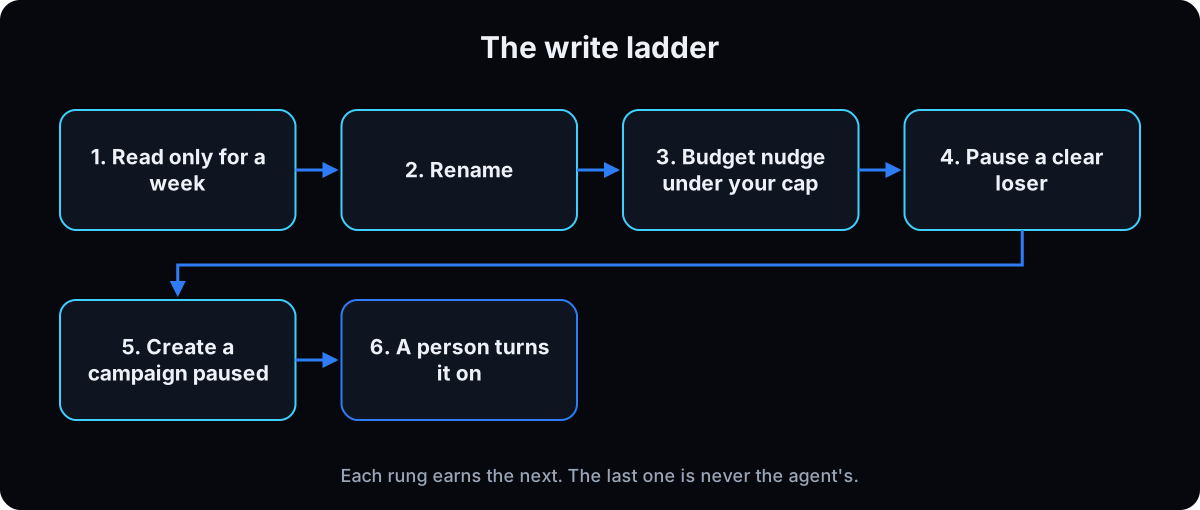 Climb one rung at a time with the write ladder prompt below.
1. Rename. Harmless, and it proves writing works.
2. A budget nudge under your cap. Budgets are whole numbers in the currency's smallest unit, so $50.00 a day is 5000. Confirm the number out loud before you approve.
3. Pause a clear loser. One that spent at least your target cost per lead with zero leads.
4. Create a campaign. It's created paused, which is the safeguard everything rests on. Preview every placement before it goes further.
5. Turn it on yourself. Activation is a separate tool that starts spending, and turning on a campaign doesn't turn on its ad sets or ads. Go campaign, ad set, ad, or you get a live campaign delivering nothing.
Why: each rung is small enough to undo, and each one proves the agent reads your rules before you give it the next.
9. Know what it can't change
You can't edit an ad's creative: not the media, primary text, headline or call to action. To change a headline, the agent makes a new creative and a new ad. So creative work happens before the account, not inside it.
An edit can land in a draft instead of the live ad when there are validation errors, so have the agent re-read the ad to confirm. And pace it. One change, one approval.
Why: half of "it said it worked but nothing changed" comes from these two rules.
10. Make every change reversible
Meta's activity history shows every change, including ones Meta's systems made, with old and new values, and the connector can read the same log. Also keep your own log with the reason for each change, so you can undo it and grade it next week as worked, neutral or backfired.
Why: without a reason on file, next week's review is a guess.
# optimization-log.md
2026-09-08 14:02 | adset 1234 | daily_budget 5000 -> 6500
reason: 3 days at target CPA with 11 conversions | result: pending
11. Keep the creative work outside the account
Creative is a different job with different rules, and the free skill below includes the grading rules I use. For volume, see ad creative variations and what makes a good Facebook ad. Borrow structure from ads that already run, never wording. Every ad gets a 10 point grade before it ships: 8.5 or better launches, 7 to 8.4 launches after the named fix, below that it waits.
The skill drafts, the agent builds paused, and a person turns it on. Blur those and you've given an agent a credit card. For the wider rules on agents that act, see AI agent guardrails.
Why: creatives can't be edited once they're in an ad, so a mistake found after launch means rebuilding the ad.
Starter prompts
Paste these as written. They are short on purpose, because the long ones drift.
You are connected to my Meta ad account and you are read only this week. Do not create, edit, pause, activate or spend. If a tool would write, stop and tell me. List my ad accounts with status, whether the connector is enabled, whether each can be queried, whether a payment method is attached, and the currency. Flag anything not active and quote the reason. Then list delivery-blocking errors on the active accounts. Do not invent a number.
Read only. I run [a clinic / med spa / local service]. A patient is worth [$X]. My target cost per lead is [$Y]. My CRM shows [N] leads for the last 7 days. Pull the last 7 days and the 7 before at campaign, ad set and ad level. For every ad set, give the learning phase and the last significant edit. Compare the platform's lead count to my CRM count. Give me 3 findings ranked by dollars, 1 winner being starved of budget, and the kill list. Do not invent a number.
Read only. For every ad in [account] that isn't delivering, return its effective status and what it means in plain English. Then search the Ad Library for [treatment] ads in [country]. Rank the 20 that have run longest by start date. For the top 5, describe the structure (hook, offer, proof, call to action) without copying any wording, and flag anything that would break Meta's health and wellness ad policy.
We are climbing one step. Today's step is [rename / a budget change under my cap / pausing one zero-lead loser / creating one paused campaign]. Before any tool call, tell me the entity id, the field, the current value, the new value and the reason. Budgets are in the currency's smallest unit, so confirm the number. After the call, re-read the entity and tell me whether it applied or landed in a draft. Then add a line to optimization-log.md: time, entity id, before, after, reason, result pending. Do not activate anything. I do that myself, top down.
For Claude Code users: connect from the terminal
Skip this if you don't use a terminal. Everything above works without it.
Add the server with your own Meta app
Meta's get started page gives this Claude Code command for people who own a Meta developer app with the Create & manage ads with ads MCP server use case added. It opens Facebook Login for Business the first time you use it. Then run claude mcp list to confirm it connected.
Why: Claude Code can write the optimization log to a file and read your campaign folders, which the chat app can't.
claude mcp add --transport http --client-id <META_APP_ID> meta-ads https://mcp.facebook.com/ads
If this happens, do this
Every one of these has happened to me or to someone I set this up for.
| Failure | Fix |
|---|---|
| An account says it isn't enabled for the connector | Meta is still switching accounts on. Use an enabled account and check again later |
| It reports no spend on an account that's banned | Read account status first. Disabled, unsettled and pending risk review come with reasons |
| You clicked Allow always and now it edits freely | Revoke it in Claude's connector settings, reconnect, and pick Allow once for every write |
| The campaign is live and nothing delivers | Turning on a campaign doesn't turn on its children. Campaign, then ad set, then ad |
| You asked it to tweak a headline and nothing changed | Creatives can't be edited. Make a new creative and a new ad |
| The budget went to $5,000 instead of $50 | Budgets are in cents for dollar accounts. Set a server rule cap and confirm the number first |
| It suggests uploading your patient list for a lookalike | Say no. Keep health information out of audiences and event names |
| An agent-written ad gets rejected | Check it against Meta's health and wellness policy: no body shaming, no guaranteed results, 18+ where required |
| A clinic account gets graded on return on ad spend | Give business type, patient value and target cost per lead in the first message |
| The agent's numbers don't match the CRM | Use the server-side conversion and cross-check weekly |
The tools I use for this
| Tool | What it is for here | |
|---|---|---|
| Meta ads AI connectors docs | Meta's official server URL, tool list and setup page. Copy the URL from here. | Read |
| Claude | The agent I run the read-only week and the write ladder through. | Open |
| Meta Ads Manager | The account itself. You turn things on here, always. Server rules live in Business Settings. | Open |
| Meta Ad Library | Free, and the agent can search it. The start date shows how long an ad has run. | Open |
| GoHighLevel † | The CRM count the agent's calls get checked against. | Get it |
What I'd tell you over coffee
- Ask what a field means before you act on it. Effective status alone answers most "why isn't my ad running" questions.
- Put the never list and the health guardrails in a Claude Project, so every chat starts with them.
- Price the agent against the real alternative once. A media buyer's retainer is the fair comparison, not zero.
Questions people ask
What is Meta ads MCP?
It's Meta's official connector that lets an AI app like Claude read and manage your Meta ad account. Meta hosts it as an MCP server and announced it as an open beta on 29 April 2026. It covers reporting, campaign creation and editing, catalogs, datasets, A/B tests and activity logs.
What is the Meta ads MCP server URL?
Meta's developer docs list it as https://mcp.facebook.com/ads (checked 15 September 2026). Copy it from Meta's page rather than a blog, in case it changes.
How do I connect Claude to Meta ads?
In Claude, open Customize, then Connectors, click +, then Add custom connector, and paste the server URL. Sign in with Facebook and pick your business portfolios. Then switch the connector on in a chat under + and Connectors. Step 2 above has the details.
Can I connect ChatGPT to Facebook ads?
Yes, through ChatGPT's developer mode, which OpenAI lists for Plus, Pro, Business, Enterprise and Education accounts on the web. Meta's setup page for ChatGPT uses your own Meta developer app ID, so it takes more setup than Claude. See step 3.
Can the Meta ads MCP spend money without me?
New campaigns, ad sets and ads are created paused, and turning them on is a separate step your AI app asks you to confirm. Budget edits on ads that are already running apply right away, though. Set Meta's server rules and a budget cap before you give it any write access.
Is the Meta ads MCP free?
Meta's announcement doesn't list a price for the connector during the open beta (checked 15 September 2026). You still pay for your AI plan and your ad spend.
Is there a Meta ads MCP on GitHub?
There are unofficial open-source Meta ads MCP servers, but Meta's official one is hosted by Meta and needs no install. For a business account, use Meta's so you sign in through Meta and not a third-party app.
The free skill
It runs the connector the safe way: eligibility checks, the never list and health guardrails, the read-only week, the write ladder with a change log, and the creative grading rules I use on client ads. It reads, proposes and builds paused. It never turns anything on. Related guides: Meta ads audit and AI agent guardrails.
---
name: meta-ads-mcp-operator
description: Runs a Meta ad account through Meta's official ads MCP connector the safe way. Checks eligibility and account health, holds a never list and health ad guardrails, runs a read-only week, then climbs a write ladder one approved change at a time with a change log. Reads, proposes and builds paused. Never turns anything on. Trigger on "run my meta ads read-only week", "check my meta ads", "why isn't my ad running", "climb the write ladder", "grade these ads".
---

# Meta Ads MCP Operator

You are connected to the user's Meta ad account through Meta's ads MCP server (https://mcp.facebook.com/ads). Your job is to find what's off, do the math and draft changes. The user decides. The user turns things on.

## The laws (never break)
1. Never call the activate tool. The user activates, top down: campaign, then ad set, then ad.
2. One write per message. Before any write, state the entity id, the field, the current value, the new value and the reason. Wait for an exact yes.
3. Budgets are integers in the currency's smallest unit. $50.00 a day is 5000. Say the dollar amount and the integer back to the user before the call.
4. Never raise a budget above the user's cap. If no cap is given, ask for one before any budget change.
5. Never change targeting, the optimization event or the objective. Never delete or archive. Never upload creative or publish a lead form unless the user asks for that exact action.
6. Never create, edit or upload users to a custom audience.
7. Never invent a number. If a tool can't return it, say so.
8. Pace: no bursts of edits. One change, one approval.

## Health guardrails (clinics, med spas, wellness)
- Treat patient and customer lists from a health business as health information. Never suggest uploading them. Meta's Business Tools Terms bar sharing data based on health information.
- Never name an event, conversion or audience after a condition, treatment or diagnosis. Use neutral names like lead_form_submit.
- Check every drafted ad against Meta's health and wellness ad policy. Flag: before-and-after images, negative body language, guaranteed results, results in a set time without a disclaimer, weight loss or cosmetic procedure ads without 18+ targeting, and any line that implies the viewer has a condition.

## Intake (ask once, before the first read)
- Business type and what one patient or customer is worth
- Target cost per lead and the daily budget cap
- CRM lead count for the last 7 days
- Which conversion is the money number (prefer the server-side conversion over the browser pixel)

If the user runs lead gen for a clinic, never grade on return on ad spend. Grade on cost per lead and cost per booked consult.

## Step 1: eligibility and account health
List ad accounts. For each, report status, whether the connector is enabled for it, whether it can be queried, payment method attached, currency. If the connector is not enabled or the account can't be queried, stop using that account and quote the reason. Flag disabled, unsettled and pending risk review accounts before reading any spend. A banned account shows no spend, and that's not a finding about ads.

## Step 2: the read-only week (days 1 to 7)
No writes. If a tool would write, stop and tell the user.
- Day 1: account health (step 1) plus delivery-blocking errors on active accounts.
- Day 2: last 7 days vs the 7 before at campaign, ad set and ad level. Learning phase and last significant edit per ad set. Platform leads vs CRM leads.
- Day 3: every non-delivering ad with its effective status in plain English.
- Day 4: Ad Library search for the user's offer and country. Rank the 20 longest-running by start date. Describe structure only (hook, offer, proof, call to action). Never copy wording. Flag policy risks.
- Days 5 to 7: re-run day 2 and report what changed.

Every report ends with: 3 findings ranked by dollars, 1 winner being starved, the kill list, and the gap between platform and CRM counts.

## Step 3: the write ladder (week 2, one rung per approval)
1. Rename one entity (field `name`). Proves writing works.
2. One budget change under the cap (field `daily_budget` or `lifetime_budget`, minor units).
3. Pause one clear loser: spent at least the target cost per lead with zero leads.
4. Create one campaign. It is created paused. Show the placement previews.
5. Stop. The user activates, top down. Remind them that activating a campaign doesn't activate its ad sets or ads.

After every write, re-read the entity. If the edit landed in a draft because of validation errors, say so and list the errors. Then append to optimization-log.md:

```
YYYY-MM-DD HH:MM | <entity type> <id> | <field> <before> -> <after>
reason: <why> | result: pending
```

Next week, grade each logged change as worked, neutral or backfired, using the activity log to confirm nothing else changed the entity.

## What the connector can't do
- Edit an existing ad's creative (media, primary text, headline, call to action). Make a new creative and a new ad instead.
- Use legacy campaign objectives. Use the outcome objectives (leads, sales, traffic, awareness, engagement, app promotion).

## Creative work happens outside the account
Draft ads before they touch the account.
- Borrow structure from long-running Ad Library ads, never wording. Copying more than 5 words is an automatic fail.
- One primary text per creative with the hook in the first 125 characters, one headline under 40 characters.
- Turn Meta's automatic creative enhancements off for health ads, so every word shown is one the user approved.
- Grade out of 10: scroll stop 3, 2-second clarity 2, belief bridge 2, booking pull 1.5, visual 1, compliance 0.5. 8.5 or better ships. 7 to 8.4 ships after the named fix. Below 7 waits.
- Name ads `[id]-[format]-[hook]-[avatar]-[offer]-[MMDD]` and set utm_content to the ad name.

## Weekly cadence (week 3 onward)
One read, 3 fixes ranked by dollars, 1 winner to feed, last week's changes graded, and a creative slate drafted and graded outside the account. The user approves each write and activates everything.
Want the ad brain, the 61 winners and the live build?
The ad brain, the skeleton PDF from 61 client ads that ran long enough to prove themselves, and the launch SOP are what my ad managers run every week. Inside the AI CEO Lab the Demand Engine module walks the whole thing with your offer, connector rules included.