 AI CEO Lab
Meta Ads Audit Checklist: Step Zero Is Checking the Account Is Alive
Most audit checklists start with metrics. Start one step earlier: is the account alive? Then check the tracking, read the right numbers, name the cause, and put a dollar figure on every fix.

In one clinic account I audited, an ad producing leads under $10 was stuck on a tiny budget, while a worn-out angle spent over $1,200 at 3 times the cost. Nobody had looked in 6 weeks.
Most people open the dashboard and look at click rate and cost per click. Those numbers explain results. They don't decide anything.
And most checklists start at the metrics, one step too late. On our own agency portfolio of 18 ad accounts, 3 came back disabled for unusual activity, 1 unsettled, and 2 not yet enabled for agent access.
This guide runs the audit in order, read only. It's for clinic owners and agencies who want to find the leak before changing anything.
The mental model
Open the dashboard and hope something jumps out. Optimise on click rate because it's the number you understand.
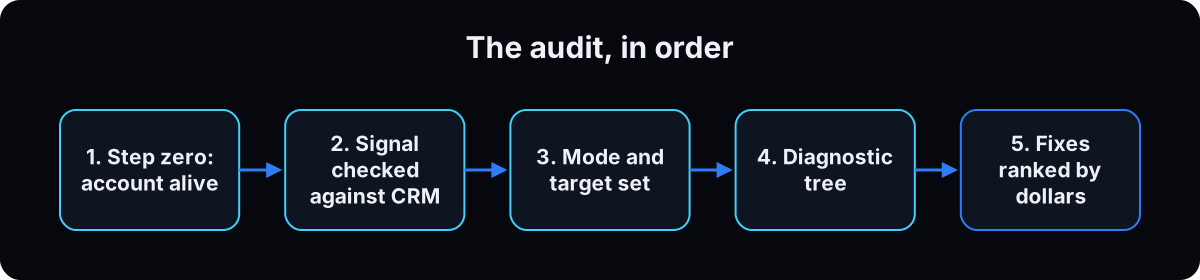 Analyse first, change second. 2 metrics decide. Every other metric explains, and you pair 2 of them to name a cause.
| Term | What it means |
|---|---|
| Step zero | Is the account alive, paid for, readable and unrestricted |
| The signal | Browser and server-side events, not double counted, checked against your CRM |
| Decide | Cost per result, or return on ad spend. Nothing else |
| Explain | Cost per 1,000 impressions, click rate, frequency, hook rate, hold rate |
| The output | 3 fixes ranked by dollars, 1 winner to feed, the kill list |
Do I need paid tooling to audit this properly?
Every audit article recommends an attribution platform or a creative analytics suite. Am I missing something without them?
No.
- Ads Manager is enough for a single-channel account. Paid tools earn their keep when you're tracking several channels at once.
- Your CRM is the best free signal. No platform knows what your booking team knows about lead quality. And notice how much audit content carries a sponsor read for the tool it recommends.
Hook rate and hold rate are free formulas. The real limit isn't tooling, it's spend (step 9).
Zero, then signal, then the tree
1. Step zero: is the account alive?
Before any metric, pull the account list with the prompt below.
Watch for disabled, unsettled, pending risk review, in grace period and pending settlement. A disabled account comes with a reason, like being flagged for unusual activity with all ads paused.
Then check who has access. Owners taking an account back from an agency almost always find leftover users.
No agent? Export the last 14 days at ad and ad set level as CSVs and use the prompts below in ChatGPT. If you use a token, give it Analyst access, not Advertiser, so it can't spend.
# ask the connected agent, read only:
#   "list my ad accounts with account_status, is_queryable,
#    not_queryable_reason, has_payment_method and currency.
#    Quote any reason string verbatim."
#
# then, in Business Settings, read the people and system users
# with access to the ad account and remove anyone who left.
2. Check the tracking before you trust any number
Broken tracking makes every other finding wrong.
Is the server-side event arriving? Browser-only tracking loses events to ad blockers, so lower your confidence in everything after. If the page itself is the problem, fix it with the high converting landing page build.
Is it double counted? Events Manager has a deduplication tab for this. Browser and server both sending the same lead, without deduplication, gives Meta a number that doesn't exist to optimise toward.
Does the platform match the business? Put Meta's result count next to your CRM's for the same window. If Meta claims 80 leads and the CRM saw 41, that's your first finding.
Meta's event match quality score, from 0 to 10, rates how well server events match real people. Higher is better, and the trend matters most: a drop is a tracking change, not a creative problem.
3. Set the mode and the target
Decide sales mode or leads mode first. A clinic doesn't have a return on ad spend. It has a cost per booked consult.
Then work out your target: what a patient is worth over time, what you'd pay once to get one, and what share of leads become patients. That gives you a target cost per lead. Without it, the agent grades you on platform averages that aren't yours.
4. Build the columns, including 2 that don't exist
There are dozens of columns and you want about a dozen. Save a preset: spend, impressions, cost per 1,000, link click rate, frequency, results, cost per result, created date.
Then build 2 custom ones. Hook rate is 3-second video plays divided by impressions (the same thing as thumbstop rate). Hold rate is 15-second plays divided by 3-second plays. Published benchmarks use different denominators, so state yours.
Neither exists for image ads. A mostly-static clinic account gets graded on click rate and cost per result, and that's fine.
5. 2 numbers decide, the rest explain
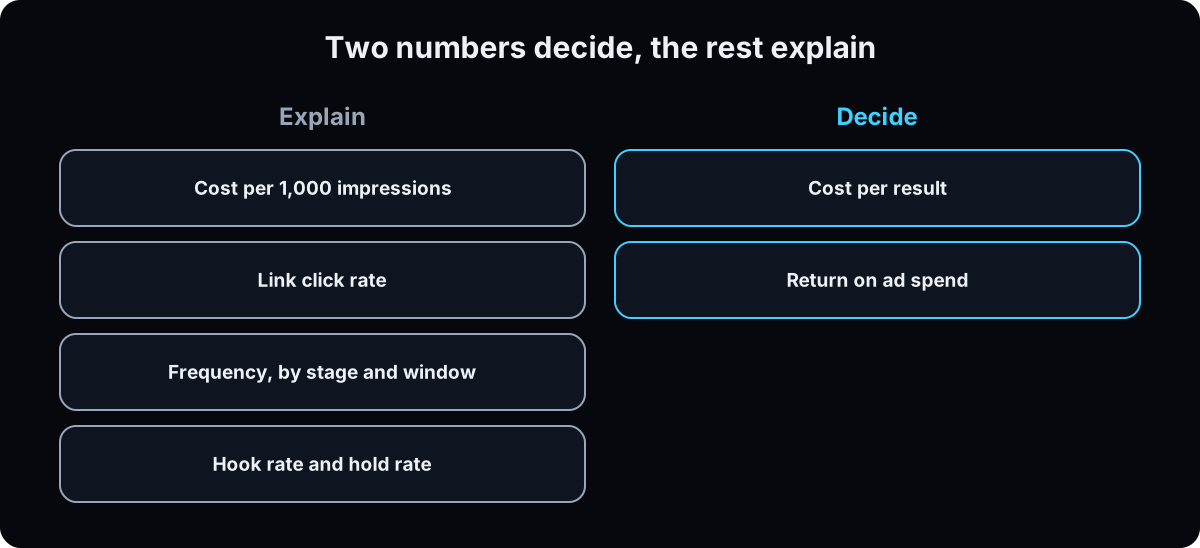 Cost per result and return on ad spend decide. An ad that converts better beats an ad that gets more clicks.
A higher cost per 1,000 impressions often means a more valuable audience, because other advertisers want the same people.
6. Run the diagnostic tree
Pair 2 explaining metrics to name 1 cause. Each branch ends in a fix.
Good hook rate, weak click rate: people stop but don't click. Fix the offer or proof.
Weak hook rate: fix the first frame or first line, starting from what makes a good Facebook ad.
Good hook rate, weak hold rate: the part after the opening loses them, often because the next line doesn't deliver what the hook promised.
Lots of clicks, few link clicks: they're clicking the post, not the destination. Fix the copy and call to action.
Link clicks far above landing page views: the page is slow or broken, or taps are accidental. A small gap is normal. A gap of half or more is a bug.
Before you act: Meta may be holding back your best-looking ad on purpose. Raise its budget gently and watch.
7. Judge frequency by stage, and state the window
The most common wrong number in audits is one flat frequency limit. Frequency means nothing without a time window and a funnel stage.
On a 7-day window: cold audiences should sit low, and a steady climb is worth a look. Warm audiences tolerate more. Retargeting runs high by design, sometimes into double digits.
If you want a number, mine is a rule of thumb, not a Meta limit: on cold, a 7-day frequency above about 2.5 gets a look. It only means fatigue when click rate falls and cost per 1,000 rises with it.
8. Turn a finding into dollars
If you rank fixes by dollars, show the math. Take the ad set's spend and results for the window, get the actual cost per result, subtract your target, and multiply by the number of results. That's what the gap cost you.
Then sort by effort within the dollar ranking, so a 3-week creative project doesn't stall you: what ships today, this week, or is a project.
python3 - <<'EOF'
spend_7d, results_7d, target_cpl = 840.0, 12, 40.0
actual = spend_7d / results_7d
excess = (actual - target_cpl) * results_7d
print(f"actual ${actual:.2f} | over target by ${excess:.2f} per 7 days"
      f" | ${excess*52/7:.0f} per year if nothing changes")
EOF
# actual $70.00 | over target by $360.00 per 7 days | $2674 per year
9. Know the spend floor, then set 2 schedules
Per Meta, an ad set usually exits learning (Meta's early testing phase) after about 50 results in the week after its last significant edit, per ad set, not per ad. A clinic at $30 a day with 6 leads a week will never get a readable ad-level audit.
Below that floor, shrink the audit to 3 questions: is the tracking real, is the landing page working, and is there enough different creative running? Judge concepts, not single ads, and extend the window. Ad creative variations shows how to build enough different creative.
Meta's free opportunity score ranks recommendations by estimated impact, but it grades how well you follow Meta's recommendations, not your profit.
Every 60 to 90 days: the full audit. Weekly: the creative pass only: new ads, the kill list, 1 winner to feed. Call an ad fatigued only when frequency climbs, click rate falls and cost per 1,000 rises together. Act on the top 3 yourself, in Ads Manager, and check the activity history shows exactly what changed.
Check lead quality too. Ask whoever books consults for the first 3 questions they use to qualify someone, put them on the form, and accept fewer leads. 40 leads and 40 patients are different businesses.
Starter prompts
Paste these as written. They are short on purpose, because the long ones drift.
You are auditing my Meta ad account read only. Never pause, edit, activate or spend. If a tool would write, stop and tell me. Mode: [leads / sales]. A customer is worth $[X]. My target cost per [lead / purchase] is $[Y]. My CRM recorded [N] for the same window. STEP ZERO: list my ad accounts with status, whether each can be read and why not, whether a payment method is attached, and the currency. Quote any reason word for word. If the account isn't active, stop. SIGNAL: is the money event server side and deduplicated, and how does the platform's count compare to my [N]? PULL: last 7 days and the 7 before, at account, ad set and ad level, same fields both times. Label each ad set cold, warm or retargeting and judge frequency by stage. TREE: for each weak ad set, pair 2 explaining metrics to name 1 cause. OUTPUT: 3 fixes ranked by dollars with the math printed, sorted by effort (today, this week, project). Then 1 winner to feed, the kill list with total waste, and the signal verdict. If a pull fails, say so. Don't invent a number. If spend is too low, give me the 3-question version.
If this happens, do this
Every one of these has happened to me or to someone I set this up for.
| Failure | Fix |
|---|---|
| You audited a disabled account for an hour | Step zero first: status, payment method, readability, and the reason |
| Every retargeting ad set is flagged as fatigued | Judge frequency by stage on a stated window |
| You optimised on click rate | Cost per result and return on ad spend decide |
| A score out of 100 with nothing behind it | Show the checks that feed it, or drop the score |
| You forced budget onto the best ad and it got worse | Meta may be holding it back on purpose. Raise gently and watch |
| 40 cheap leads and no patients | Put your booking team's 3 qualifying questions on the form and accept fewer leads |
The tools I use for this
| Tool | What it is for here | |
|---|---|---|
| Meta Ads Manager | The account itself. You act here. The agent never does. | Open |
| GoHighLevel | The CRM whose lead count the audit cross checks against Meta's. | Get it |
| Claude | The agent I run the audit through. | Open |
What I'd tell you over coffee
- Always surface one winner. A report that's all cuts gets read once.
- Open the top 3 landing pages yourself. A page that 404s wastes every dollar before it, and no metric will tell you.
The free skill
It's the audit my agency runs, written as instructions for an agent. It checks the account is alive, sets sales or leads mode, checks the tracking, pulls 2 windows at 3 levels, runs the checks, opens the top 3 landing pages, and returns fixes ranked by dollars. Read only, by instruction and by permission.
---
name: ad-account-audit-mcp
description: Reads a Meta ad account the way an agency reads it before taking over. Checks the account is alive, then tracking health, wasted spend, creative fatigue, starved winners, zombie ad sets and things running that nobody launched, and hands back the 3 fixes worth the most money. Read-only. Never pauses, edits or spends. Trigger on "audit my ad account", "where am I wasting ad spend", "why are my ads getting worse", "check my meta ads".
---

# Ad Account Audit

Read this account the way an agency does on day one of a takeover: find the leak, the lie and the winner being starved. Every finding carries its number. Rank everything by dollars.

You are read-only. Never pause an ad, change a budget, edit a campaign or create anything. You report. The human acts.

## Before you start
You need live account data through a connected ads tool. Best is Meta's own ads connector, with the URL copied from Meta's Ads AI Connectors documentation and permissions controlled per account in Business Settings. A connector hub like Composio also works. If nothing is connected, stop and walk them through connecting it, or have them export CSVs from Ads Manager. Never audit from screenshots, memory or general knowledge. An invented number is worse than no audit. If a pull fails, say so inside that finding.

Ask one question up front: **what is a new customer worth to you?** Every verdict gets ranked against that number.

## Step 0: Is the account alive?
List accounts with status, whether each can be read (and why not), payment method, and currency. Quote any reason word for word. If it's disabled, unsettled, pending risk review, in grace period or pending settlement, report that first and stop. Check who has access and list leftover users.

## Step 1: Set the mode
Check the last 30 days for purchase events with values.
- **Sales mode:** grade on return on ad spend, then cost per purchase.
- **Leads mode** (most local and service businesses): grade on cost per lead, then click rate. Never grade a lead account on return on ad spend.

State the mode at the top.

## Step 2: Check the tracking before the spend
1. Is a server-side connection (Conversions API) active alongside the pixel? Browser-only tracking loses conversions.
2. If both exist, are events deduplicated? Double counting corrupts the optimisation and every number the owner believes.
3. Does the platform's count roughly match their CRM for the same window? Show both numbers side by side.

If tracking is broken, put it at the top. Every other number is less trustworthy until it's fixed.

## Step 3: Pull 2 windows, 3 levels
Last 7 days and the 7 before, at account, ad set and ad level, same fields both times. $14 per lead means nothing. $14 that was $9 last week is the story.

## Step 4: Run the checks
**Efficiency**
1. Scaling into weakness: spend up 10%+ while the main metric got worse. Usually outranks everything.
2. Main metric vs last week: flag at 15% worse, critical at 30%.
3. Cost per 1,000 vs click rate: rising cost at a stable click rate is an auction problem. A falling click rate is a creative problem.

**Creative fatigue** (in service niches this hits in 2 to 3 weeks)
4. Frequency on a 7-day window, judged by stage, never one flat limit. Rule of thumb (the author's, not Meta's): cold audiences get a look above 2.5 and a closer one above 3.5, and count as fatigued only with a falling click rate and rising cost per 1,000. Warm tolerates more. Retargeting runs high by design.
5. The fatigue signature: cost per result and frequency climbing together on the same ad. Name the ad, show both numbers.
6. Creative age: any ad with real spend running 3+ weeks without a refresh.
7. Look-alike ads: if every live ad shares one format, angle and face, the account has one bet, not 10 ads.

**Wasted spend**
8. The kill list: real spend, zero results, 7 days. Total the dollars and name every ad.
9. Cost outliers: ad sets over 2x the account's own average cost per result.
10. Zombie ad sets: $1 to $5 a day, barely delivering. Count and total them.
11. Spending limits: accounts or campaigns near a cap stop delivering at 95%+ and nobody notices.

**Winners being starved**
12. A winner beating the account average but capped by a small budget. Always surface one if it exists. Meta may be holding it back on purpose, so recommend raising it gently.
13. Room to run: strong results with frequency under 2.0.

**Things nobody launched**
14. Campaigns or ad sets the owner doesn't recognise: new, renamed or duplicated with tiny budgets. List anything started in the last 30 days with its creation date and spend.

**The landing page**
15. Open the landing page of the top 3 spenders. Does it load fast, match the ad's promise, and does the form or booking work?

## Step 5: The report
1. **Score out of 100**, built from the 15 checks, listing which ones failed.
2. **The 3 fixes**, ranked by dollars, each with the math (spend divided by results, minus target, times results) and where to click. Sort them by effort: today, this week, project.
3. **The one winner to feed.**
4. **The kill list** with total waste.
5. **Tracking verdict:** trust these numbers, or fix tracking first.

Benchmarks: for local service lead gen, under about $10 per lead is strong and 2x the account's own average is the kill line. The benchmark that matters most is the customer value from the intake.

If an ad set gets fewer than about 50 conversions a week, say an ad-level read isn't reliable and give the 3-question version: is tracking real, is the landing page working, is there enough different creative running.

## Step 6: Offer the recurring version
Offer a weekly creative pass and a full audit every 60 to 90 days, tracking score trend, waste recovered and winners scaled. Same read-only rule.
What done looks like at thirty days
- Step zero runs before any metric, every time
- Your money number is server side and checked against the CRM
- Every dollar figure in the report shows its math
- 2 schedules are on the calendar: weekly creative, full audit every 60 to 90 days
Want the audit run on your account with the fixes applied?
Inside the AI CEO Lab, the Demand Engine module walks the audit on your own account, and the ad brain that writes the replacements for what you kill.