 AI CEO Lab
Realistic AI Images: How to Make Them Look Real (Free, in ChatGPT or Gemini)
Plastic skin and light from nowhere give an AI image away in half a second. Here's the routine in the free Gemini app or ChatGPT: a 6 part prompt, cinematic framing, imperfection added back, and a test that tells you if it worked.
Most AI images fail in half a second. Plastic skin, light from nowhere, a background too clean. People clock it, then stop trusting the words next to it.
The fix isn't a better image. It's a less perfect one. Real photos have a stray hair, an uneven wall, someone leaning into a bag for no reason.
This guide works in apps you already have: the Gemini app or ChatGPT. You get a 6 part prompt, the camera and light words that make a frame feel shot rather than rendered, a finishing pass, and a test that gives you evidence instead of a gut call. For batches, an optional last step moves it to the command line. It's for anyone making images for a business feed, ads or a site.
What you have by the end
Not concepts. Things that exist on your machine when you close the tab.
- A 6-part prompt with shot, lens, light and depth
- References that copy the right thing
- Keepers finished with an imperfection pass and scored for realism
- At least 1 image that passed the beside-2-real-photos test
Start here: why AI images look fake
If you've typed a prompt and got something glossy, 4 ideas explain the fix.
The model fills in every decision you skip
Ask for a person in a room and the model picks the light, the lens and the background for you. Its defaults are clean, centered and evenly lit, which is what a render looks like.
Photos are specific and a little messy
A real photo has one light source, a lens, a distance, depth, and small flaws. Naming those in your prompt is what moves an image from render to photograph.
Free apps are enough to learn
The Gemini app makes and edits images with Nano Banana 2 when you're signed in, including from multiple uploaded photos. ChatGPT makes images too. Paid tools add control and batches, not realism.
The catch
Realistic isn't the same as honest. Images from Google and OpenAI carry invisible provenance signals (SynthID, C2PA and SynthID), and presenting a generated person as a real one can break the rules you agreed to.
| Term | What it means |
|---|---|
| Aspect ratio | The shape of the image, like 4:5 for the feed or 9:16 for Reels |
| Reference image | A photo you upload so the model copies a face, product or look |
| Focal length | Lens size in mm; 85mm flatters faces, 24mm feels wide and close |
| f-number | Aperture; f/1.8 blurs the background, f/8 keeps more in focus |
| Kelvin | Light color; about 3200K reads warm, about 5600K reads neutral daylight |
| SynthID | Google's invisible watermark for content made with its AI |
The mental model
Find the perfect prompt and reuse it everywhere. Add masterpiece, cinematic, hyper detailed and 8k until it looks expensive.
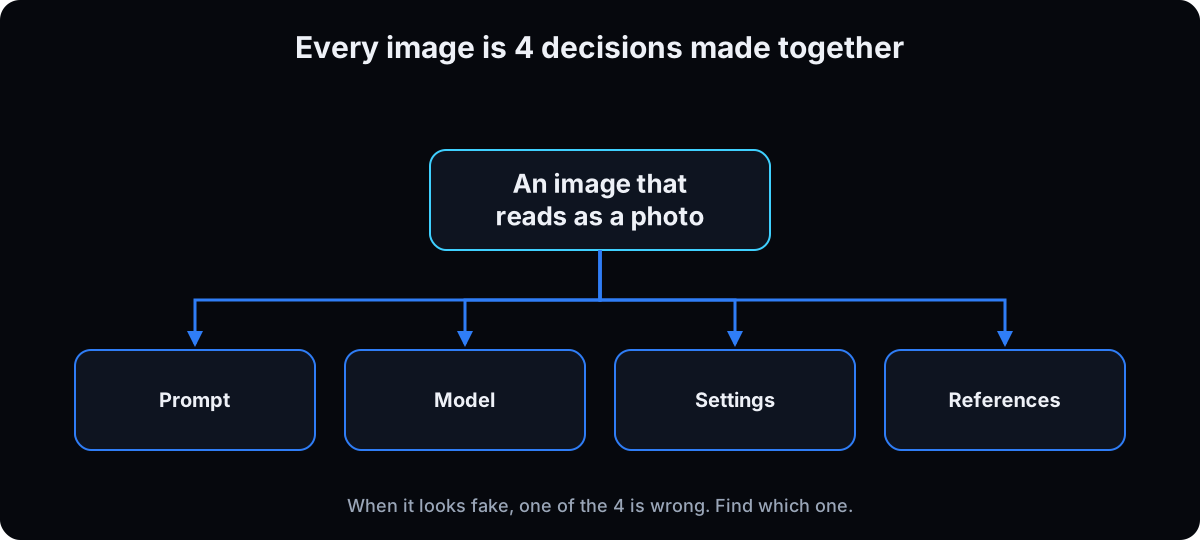 Make 4 decisions together, then add imperfection back on purpose. When an image looks fake, one of the 4 is wrong. Find which one instead of rewriting the whole prompt.
| Term | What it means |
|---|
The routine, step by step
1. Open a free app and pick a shape
Gemini app: sign in at gemini.google.com and ask for an image. Google's help article says it uses Nano Banana 2, can edit uploaded photos and combine several, and downloads at 1K without a Google AI plan (2K with one). You must be 13 or over to generate and 18 or over to edit. There's a daily quota.
ChatGPT: ask for an image in a chat. OpenAI opened image generation to Free users in March 2025. I couldn't find today's free limits on an OpenAI page, so check your own account.
Then pick one shape per project: 9:16 for Reels and Stories, 4:5 for the feed and carousels, 1:1 for profile and static ads, 16:9 for YouTube and slides. Say it in the prompt and check the result.
Why: a crop after the fact moves your subject out of the frame you designed.
2. Write the prompt in 6 parts
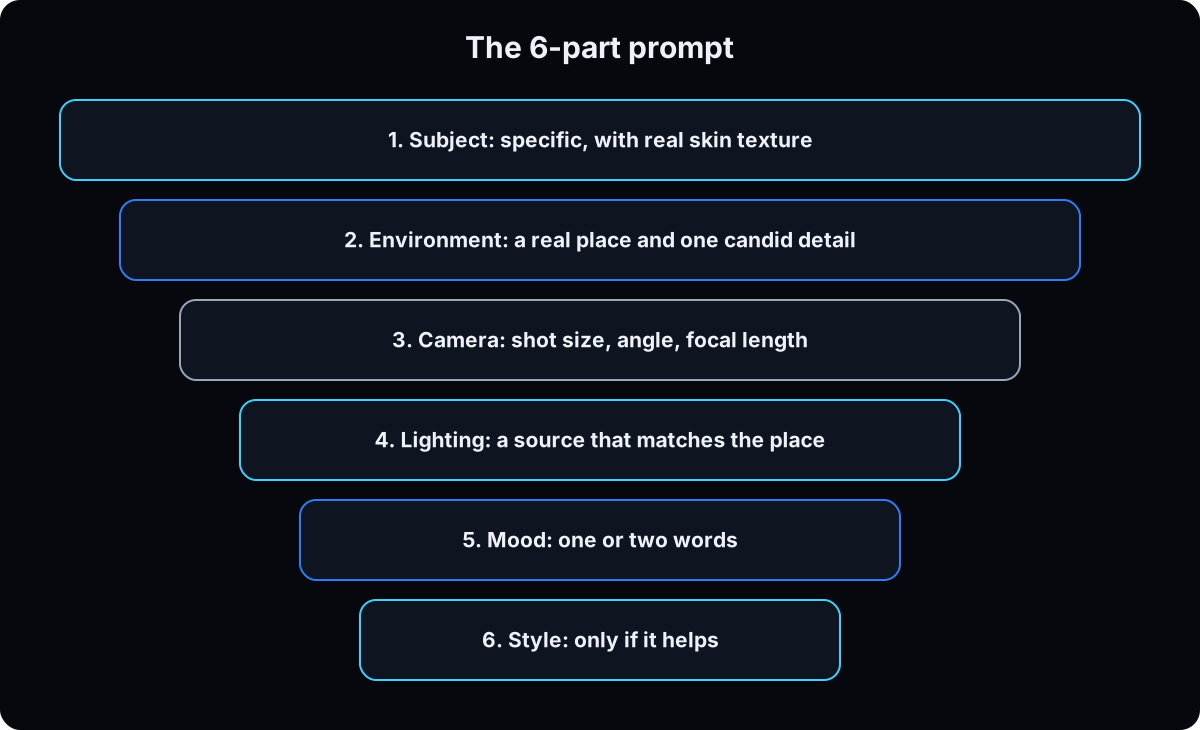 Subject, environment, camera, lighting, mood, style. The build prompt below writes it for you in ChatGPT, Claude or Gemini. New to prompting? Start with how to write better AI prompts.
Cut masterpiece, hyper detailed, perfect lighting and 8k. They push toward a render. Shot on an iPhone, candid, natural framing pulls it back for social content.
Why: better nouns beat more adjectives. "Window light from the left, shadow side falling into the room" does something. "Nice lighting" doesn't.
3. Make it look cinematic: shot, lens, light, depth
 An adjective is a wish. A number is an instruction.
Shot: wide for the place, medium for behavior, close-up for emotion. Camera at eye level is honest, low is power, high is small. Put the subject on a third unless it's a direct stare.
Lens: 24mm feels close and immersive, 50mm calm, 85mm to 135mm flatters faces. Add the aperture: f/1.8 blurs the background, f/8 keeps most of the scene sharp.
Light: name the source (a window, a lamp, a neon sign), hard or soft, which side, and a Kelvin value. About 3200K reads warm, about 5600K reads like daylight. Any accent color needs a source in the scene.
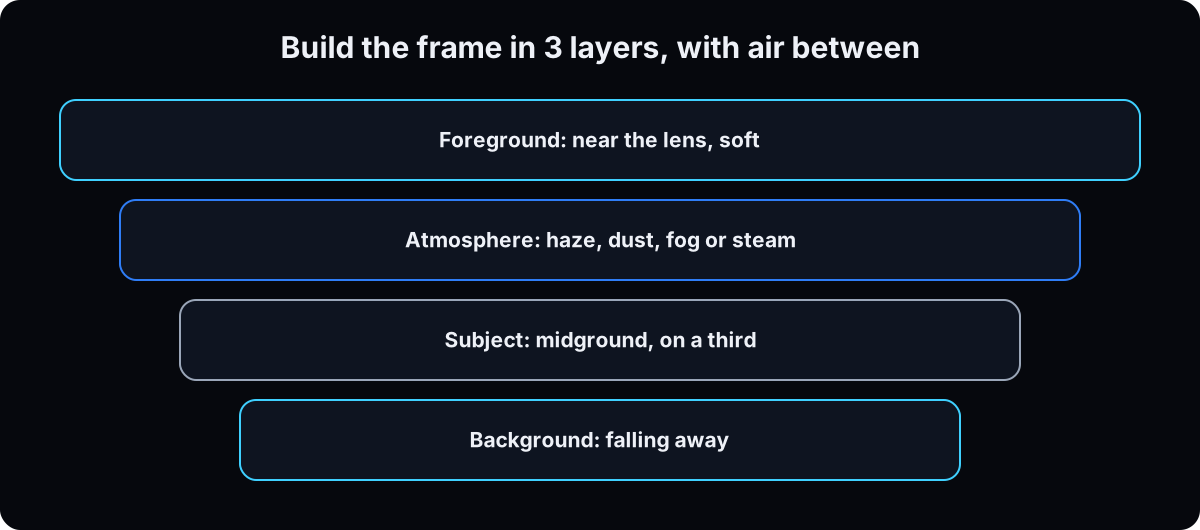
Depth: something soft near the lens, the subject in the middle, a background falling away, and haze, dust or steam between them. It's the fastest fix for a flat image.
Skip motion words like dolly, orbit or rack focus. They describe change over time, and a still has none.
Medium close-up of a clinic owner at her front desk, camera at eye level, 85mm, f/2.
Warm tungsten lamp at about 3200K from the left, cool daylight at about 5600K through the window behind,
shadow side soft. A blurred plant leaf close to the lens, faint dust in the window light,
the waiting room falling out of focus. Shot on a phone, candid, real skin texture.
4. Or re-prompt from a real photo
Drop a photo whose look you want into ChatGPT or Gemini and ask for the prompt that would produce it. Edit that prompt and run it with your subject.
Why: a real photo already holds a consistent set of choices. Attaching it as a bare reference often copies too much, including the content. Re-prompting gives you the recipe. A reference gives you the picture.
5. Tell each reference what it's for
Upload your own photo, product or room, then say what to take: keep the face, hair and skin tone but change the location. Pose only. Keep the packaging, logo and color exactly. Without that, the wrong thing gets copied.
Use natural photos. A filtered selfie teaches filtered output. For the same face across many images, see consistent AI characters; for products, AI product photography.
Why: Google's Gemini help lists character consistency and combining multiple images as Nano Banana 2 features, but it can only keep what you tell it matters.
6. Add the imperfection back
In the prompt: real skin micro-texture, visible pores, natural asymmetry, no retouching sheen. Raw and unedited. One candid detail in the background with no reason to be there.
In a photo editor, on the keeper: light film grain, dust and scratches at a low radius, and about 0.8 pixels of blur painted back with a mask for depth. Small fixes to one area also work as one targeted AI edit.
Why: a few minutes here beats dozens more generations.
7. Run the realism check, then test it
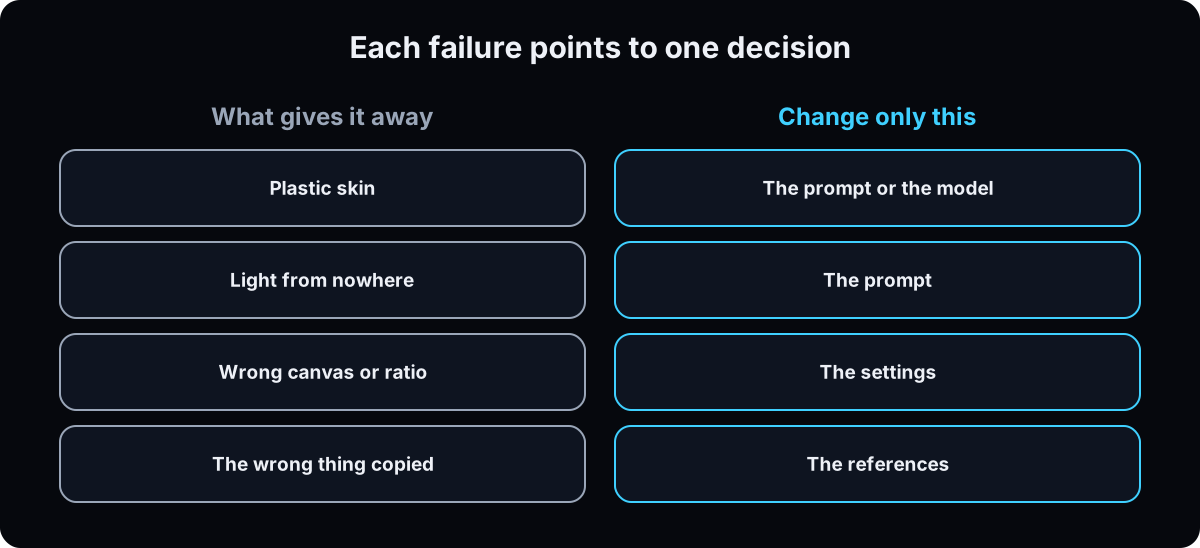 Generate 4 and score them with the realism check prompt. Each failure maps to one decision: plastic skin is the prompt or model, light from nowhere is the prompt, wrong shape is settings, the wrong thing copied is the reference. Change that part only.
Then run the verification test in a fresh chat: your image beside 2 real photos. And show it to someone who wasn't in the room.
Why: a gut call after 40 generations isn't a test. For a clinic: generating a patient or a result is a regulatory decision, not a creative one.
8. Optional: batch it in the Higgsfield CLI
Once the routine works by hand, the Higgsfield command line lets an agent run it in batches with the model, ratio and resolution locked. Install with npm install -g @higgsfield/cli, then higgsfield auth login.
Nano Banana Pro (nano_banana_pro) for people and references, up to 14. GPT Image 2.5 (gpt_image_2_5) for text and layouts; OpenAI's guide describes Sunburst for editing precision and Flare for fast everyday generation, and the CLI takes --variant.
Check ratios with higgsfield model get. On 15 September 2026 both GPT Image 2 and 2.5 listed 4:5. Price before you spend: generate cost takes the same flags and submits nothing. On my account that day, GPT Image 2.5 was 1 credit at low and 1k, 3 at high and 2k; Nano Banana Pro was 2 at 2k.
Why: explore cheap, finish expensive.
higgsfield model get gpt_image_2_5    # ratios, quality, variant flare|sunburst

# price first, spend nothing
higgsfield generate cost gpt_image_2_5 --prompt "$(cat prompt.txt)" --quality low --resolution 1k

# explore 4 at low cost, then rerun the winner at high and 2k
for i in 1 2 3 4; do
  higgsfield generate create nano_banana_pro --prompt "$(cat prompt.txt)" \
    --image ./refs/me-front.jpg --aspect-ratio 4:5 --resolution 1k --wait
done
Starter prompts
Paste these as written. They are short on purpose, because the long ones drift.
I need an image that doesn't look AI generated. Job: [what it's for and where it will be posted]. Aspect ratio: [9:16 / 4:5 / 1:1 / 16:9]. Rough idea: [one sentence]. Write me a prompt in six parts: Subject: who or what, specific. If a person: real skin micro-texture, visible pores, natural asymmetry, no retouching sheen. Environment: a real place, a time of day, and one candid detail that has no reason to be there. Something soft near the lens, the subject in the middle, a background falling away, and haze or dust between. Camera: shot size, camera height, focal length in mm, and an f-number. Lighting: the source, hard or soft, which side, what the shadow side does, and a Kelvin value. It must match the place. Mood: one or two words. Style: only if it helps. No masterpiece, cinematic, hyper detailed, perfect lighting or 8k. No motion words. I will attach these references: [list each one and exactly what to keep from it]. Return only the prompt, as one paragraph.
Here is a real photograph whose look I want. Don't use it as a reference image. Write the prompt that would produce it: subject treatment, environment, camera position, shot size, focal length and f-number, light source, direction and color temperature, and the qualities that make it read as a photograph rather than a render. Then rewrite that prompt with my subject instead: [my subject]. Tell me which parts of the original belong to its content rather than its look, so I don't copy them by accident.
Score these four images and tell me which to keep. Check each for: airbrushed or plastic skin with no pores; studio light in a place that wouldn't have it; a background too clean for the moment; hands, eyes or teeth that are wrong; text that is almost right; a flat frame with no depth; anything that reads as a render. For each failure, tell me which ONE decision to change: the prompt, the model, the settings or the references. Not a whole new prompt. Then tell me what to add in a photo editor to finish the winner.
Here are three images. One of them was generated with AI and two are real photographs. Tell me which one is generated and explain exactly what gave it away. Name the region of the image and the physical property that is wrong. If you can't tell, say so.
If this happens, do this
Every one of these has happened to me or to someone I set this up for.
| Failure | Fix |
|---|---|
| Skin looks like a mannequin | Add pores, a stray hair and asymmetry to the prompt, then grain in an editor |
| Ring light glow on a beach | Name the real light source, its side and a Kelvin value |
| Subject looks pasted onto the background | Add a soft foreground object near the lens and haze between the layers |
| Background looks like a brochure | Add shot on a phone, candid, and one odd detail. Remove studio and perfect |
| Face distorted on a wide lens | Move the camera back and say so, or use 85mm |
| Reference copied the pose, not the face | Say what each reference is for, every time |
| Everything came out filtered | The reference was a filtered selfie. Use a natural photo |
| A Higgsfield command failed on the aspect ratio | Run higgsfield model get <model> and use a listed ratio |
The tools I use for this
| Tool | What it is for here | |
|---|---|---|
| Gemini app | Sign in with Google, no AI plan needed. Nano Banana 2 for generating and editing, including from several uploaded photos. 1K downloads without an AI plan. | Help |
| ChatGPT | Makes and edits images in a chat. Check your plan's current image limits in the app. | Open |
| OpenAI image generation guide | The current API models, GPT Image 2.5 Sunburst and Flare, with sizes and quality options. | Docs |
| Higgsfield | Optional. Nano Banana Pro, GPT Image 2.5 and more from one command line, with a cost check that spends nothing. | Open |
| A photo editor | Where the finishing pass happens: grain, dust, a faked depth of field. | no link needed |
Your first 2 weeks
- Change one thing per retry. If you change the prompt, the model and the reference at once, you learn nothing.
- The fastest fix for a flat image is a foreground object plus haze. Try it before anything else.
- Keep the prompt of every keeper in a note. Your best prompts become your house style.
Questions people ask
Is there a free way to make AI images look real?
Yes. The Gemini app generates and edits images with Nano Banana 2 when you're signed in, with a daily quota and 1K downloads without a paid plan. Use a 6 part prompt with a named light source, lens and depth, add a candid detail, then finish with grain in a photo editor.
What prompt makes AI images realistic?
One that makes the decisions a photographer would: a specific subject with real skin texture, a real place with one candid detail, camera height, focal length and f-number, a named light source with a Kelvin value, and depth in 3 layers. Leave out masterpiece, 8k and hyper detailed.
How can people tell an image is AI?
By eye: plastic skin, light with no source, wrong hands or teeth, almost-right text. By tool: Google says you can ask Gemini whether an image carries its SynthID watermark, and OpenAI's verify tool checks its images for C2PA and SynthID. Editing or sharing a file can strip C2PA metadata, per OpenAI.
Can I use realistic AI images of real people?
Only with care. Google's Generative AI Prohibited Use Policy bans impersonating an individual without explicit disclosure in order to deceive, and using biometrics without legally required consent. Use real photos of people who agreed in writing, label generated images, and never present a generated patient or client as real.
ChatGPT or Gemini for realistic photos?
Try the same prompt in both and keep the winner. Gemini's help lists character consistency and combining several uploaded photos, so I start there for people and products. The prompt matters more than the app: a named light, lens and depth fix more than switching tools.
The free skill
It's the routine as agent instructions: lock the aspect ratio, write the prompt in 6 parts, frame it with shot, lens, light and depth, instruct each reference, score every output against the realism check, and return only what passes. It writes prompts for the Gemini app or ChatGPT, and runs Higgsfield commands when the CLI is available.
---
name: ai-images-that-dont-look-ai
description: Produces AI images that read as photographs, not renders. Writes a 6 part prompt, frames it like a cinematographer (shot, camera height, focal length, f-number, a light source with Kelvin, 3 depth layers with atmosphere), instructs each reference, adds imperfection back, and tests the result. Works by hand in the Gemini app or ChatGPT, or runs the Higgsfield CLI for batches. Trigger on "make me an image that does not look AI", "this looks fake", "make this cinematic", "this looks flat", "make a realistic image of".
---

# AI Images That Don't Look AI

You're making an image the viewer will accept as a photo. A fake looking image has one of 4 decisions wrong: prompt, model, settings or references. Make all 4 on purpose, generate several, and return only what passes.

## Before you start
- Ask where the image will live and set one aspect ratio: 9:16 Reels and Stories, 4:5 feed and carousels, 1:1 profile and static ads, 16:9 YouTube and slides.
- Ask for references and what each one is for: identity, pose, outfit, product, location or style. Ask for natural photos. A filtered selfie gives filtered output.
- Default path: write the prompt for the user to paste into the Gemini app or ChatGPT. If the Higgsfield CLI is available and they want batches, run `higgsfield account status` first.

## Step 1: the 6 part prompt
One paragraph, in this order, nothing decorative.
1. **Subject**: specific. For a person: real skin micro-texture, visible pores, natural asymmetry, no retouching sheen.
2. **Environment**: a real place, time of day, one candid detail with no reason to be there.
3. **Camera**: shot size, camera height, focal length in mm, f-number. For social content, "shot on a phone, candid, natural framing" unless it's a studio brief.
4. **Lighting**: source, hard or soft, which side, what the shadow side does, a Kelvin value. It must be possible in that place.
5. **Mood**: 1 or 2 words.
6. **Style**: only if it helps. Never masterpiece, cinematic, hyper detailed, ultra glossy, perfect lighting or 8k.

For each reference, add 1 sentence on what to keep and what to change. If the user has a photo whose look they want, don't attach it as a bare reference: write the prompt that would produce it, then swap in their subject.

## Step 2: cinematic framing
- **Depth**: foreground close to the lens and soft, subject in the midground, background falling away, haze, dust, fog or steam between. The fastest fix for a flat image.
- **Composition**: subject on a third unless it's a hero shot or a direct stare. Lead room in the direction they look. A line in the location pointing at them.
- **Shot and height**: wide for place, full for posture, medium for behavior, close-up for emotion. Eye level honest, low power, high small.
- **Lens**: 16 to 24mm immersive, 40 to 50mm calm, 85 to 135mm flatters faces. Distortion comes from camera distance, so state the position.
- **Aperture**: f/1.4 to f/2.8 isolates, f/5.6 to f/8 most of the scene sharp, f/11 to f/16 everything.
- **Light**: about 3200K tungsten reads warm, about 5600K daylight reads neutral. Warm subject, cool background for separation. Any accent color needs a source in the scene. Metal, glass, fabric and wet ground react differently.
- **Never** motion words: dolly, orbit, crane, whip pan, push in, rack focus. A still has no time.
- **Sets**: lock source, direction, quality and Kelvin in the widest frame; closer frames change only the camera.

## Step 3: model and settings
- Gemini app (Nano Banana 2): people, edits, several uploaded photos combined. 1K download without a Google AI plan. Nano Banana Pro redo for paid subscribers.
- ChatGPT: try the same prompt and keep the winner.
- Higgsfield CLI (checked 15 September 2026, CLI 1.1.22):
  - `nano_banana_pro` for people and references, up to 14. Ratios 1:1 3:2 2:3 4:3 3:4 4:5 5:4 9:16 16:9 21:9.
  - `gpt_image_2_5` for text and layouts. `--variant flare` (fast everyday, the default) or `sunburst` (editing precision). Quality low to max. `--background transparent` for cutouts.
  - Always run `higgsfield model get <model>` before assuming a ratio.
  - Price first: `higgsfield generate cost` takes the same flags as `generate create` and spends nothing. Explore at low and 1k, finish at high and 2k.
- 2 failed tries on one engine: switch engines before rewriting the prompt.

```bash
higgsfield generate create nano_banana_pro \
  --prompt "<six part prompt>" \
  --image ./refs/a.jpg --image ./refs/b.jpg \
  --aspect-ratio 4:5 --resolution 1k --wait
```

## Step 4: the realism check
Generate 4. Fail any output with:
- Airbrushed or plastic skin, no texture, no asymmetry.
- Studio light in a place that wouldn't have it.
- A background too clean or staged, or a flat frame with no depth.
- Wrong hands, eyes or teeth.
- Text that's almost right.
- A render feel: every surface reacting to light the same way.

For each failure, name the one decision to change. Don't rewrite the whole prompt.

## Step 5: deliver
Return only outputs that pass, with 1 line each on why and the exact prompt and settings. Suggest a finishing pass: light grain, a little dust, a masked blur for depth. Suggest testing the keeper beside 2 real photos in a fresh chat and asking which is AI.

## House rules
- Real photos of the real person, with their written permission, when an identifiable person is needed.
- Never a fake patient or fake clinician presented as real. Never impersonate someone to deceive (Google Generative AI Prohibited Use Policy).
- Generated images from Google and OpenAI carry provenance signals (SynthID, C2PA). Don't try to remove them.
- Never invent a logo. Composite the real file afterwards.
What done looks like at thirty days
- Five images for your business that passed the beside-two-real-photos test
- A saved prompt that includes shot, lens, light and depth
- A written rule for when an image needs a real photo instead
Want the whole image system built around your brand?
Inside the AI CEO Lab, the Content Engine module sets up your reference library, your locked prompts and the agent that runs them, so every image you post looks like you shot it.