 AI CEO Lab
11 Steps to Editing My Reels With AI
Everyone is editing videos with AI now. The point isn't to become a video editor. It's to put out quality content at scale, test new ideas fast, and build a look that's yours. Here is the 11-step pipeline behind one of my reels, with the real numbers and the prompt to run it.
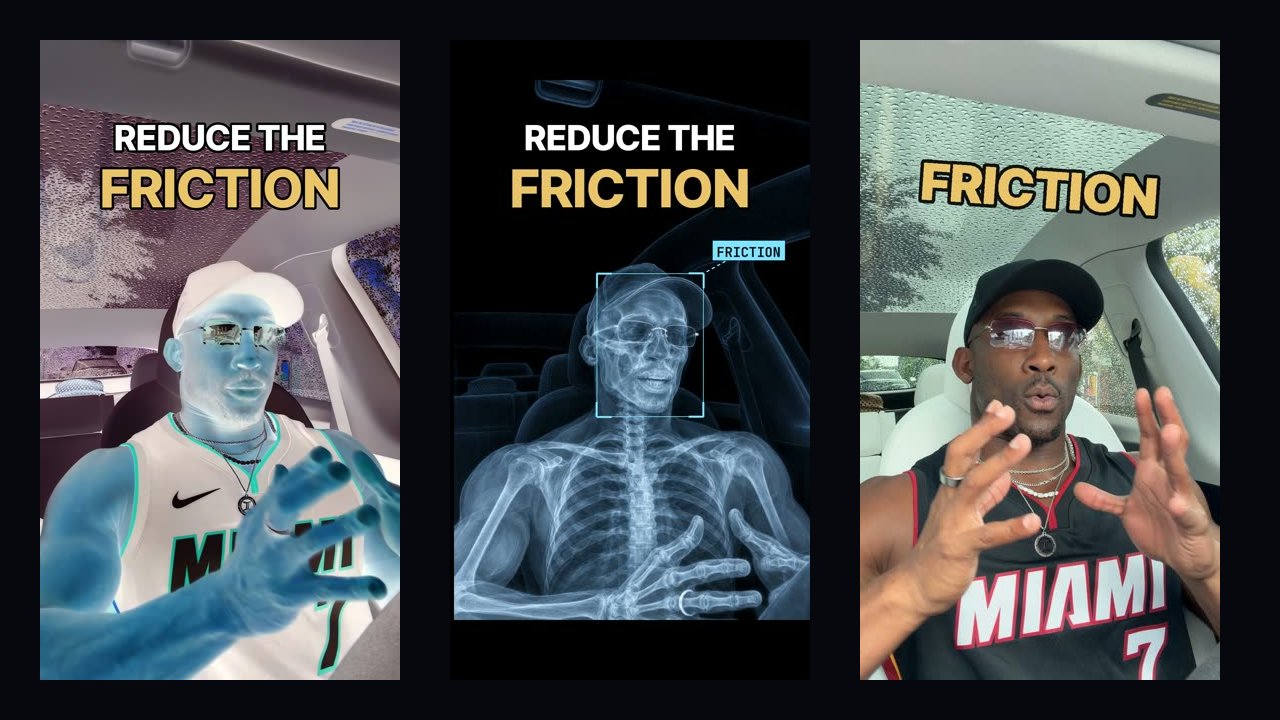
That's the finished reel. I filmed one take in my car and dropped the file in a folder. Everything after that was my pipeline: it found the hook, cleaned my voice, studied a reference reel I liked frame by frame, made the pictures, put the intro on the beat and brought me in only to approve.
I used to pay $2,000 for an editor and wait 24 to 48 hours for a cut. Now I can put out a video like this every day without an editor, with the tools running in the background. But saving money isn't the point. The point is quality content at scale: testing new ideas, and building a custom look and style that's unique to me so I stand out.
I'm a doctor, not an editor, and I don't want to become one. I touched this reel three times: I filmed it, I left notes on frames, and I approved it to post. This guide walks through the 11 steps in order, with the real numbers from this reel.
Want the shortcut? Scroll to the free skill, paste it into Claude Code with your own take, and it runs these steps and stops at your two approvals.
What you have by the end
Not concepts. Things that exist on your machine when you close the tab.
- A hook pulled from the strongest line in your take, not the first one
- A clean voice measured before and after
- A reference reel broken into reusable techniques, frame by frame
- 2 or 3 storyboard options to pick from instead of one guess
- An x-ray of your own frame, lined up on your face
- An intro cut on the beat of your song
- Captions per channel written from your own words
The mental model
Learn to be a video editor, or keep paying one and waiting a day or two for every cut.
Run a pipeline that edits in your style while you do your real job. The AI does the cutting, measuring and fixing; you approve twice. Every note you give becomes a rule, so each reel gets closer to your look and the next one starts further ahead.
| Term | What it means |
|---|---|
| Pipeline | The steps that run on their own: backup, hook, voice, pictures, render, captions |
| Gate | The two places you step in: pick the version, approve it to post |
| Menu | Your own intro, body and ending options, built from your reels |
| Rule | A note you gave twice. Every reel after follows it |
Won't it look like every other AI edit?
If anyone can do this, why would mine stand out?
Anyone can do this, and that's exactly why the tools aren't the edge. What makes you unique is still you: your voice, your tonality, your style. The pipeline is how you get that out more often.
- The inputs are yours: your take, your hook, the references you picked, the effects you kept.
- The rules come from your own best and worst reels. On my account, 22 of my top 23 reels open on my face; only 12 of my bottom 25 do.
- Every note you give becomes a rule, so each reel gets closer to your look.
A generic prompt doesn't know any of that. Your pipeline does.
The 11 steps
1. Film one take and drop it in a folder
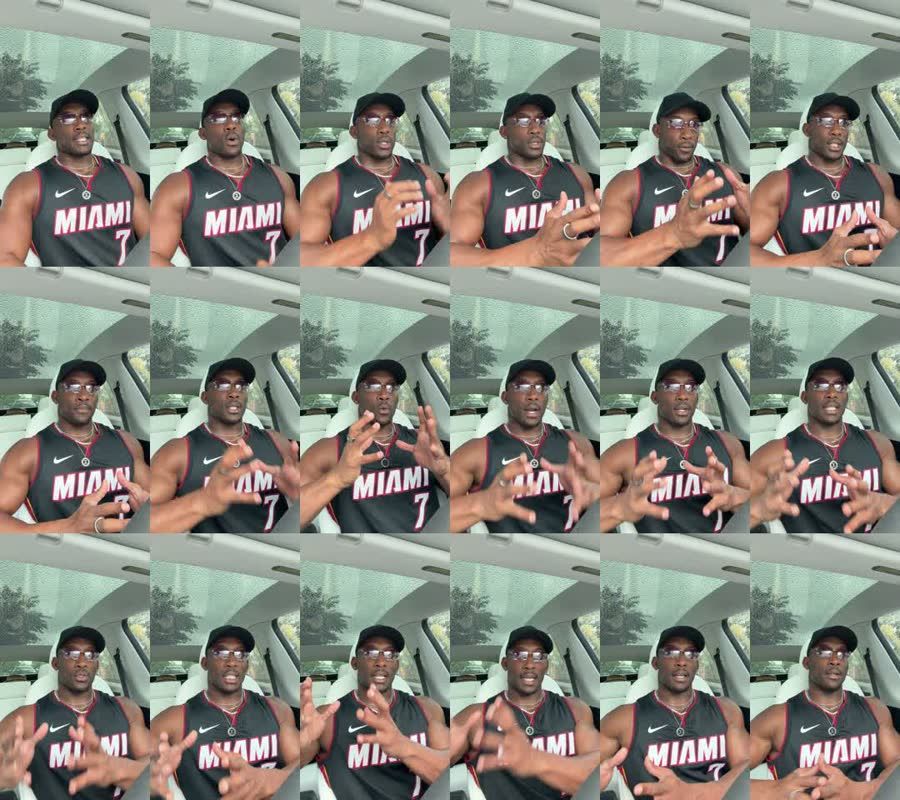 Phone on the dash, one sit-down take, 2 minutes 16 seconds, 4K vertical. I didn't restart for flubs. The transcript catches those later. I dropped the file in my Google Drive folder and walked away.
2. It gets backed up and logged
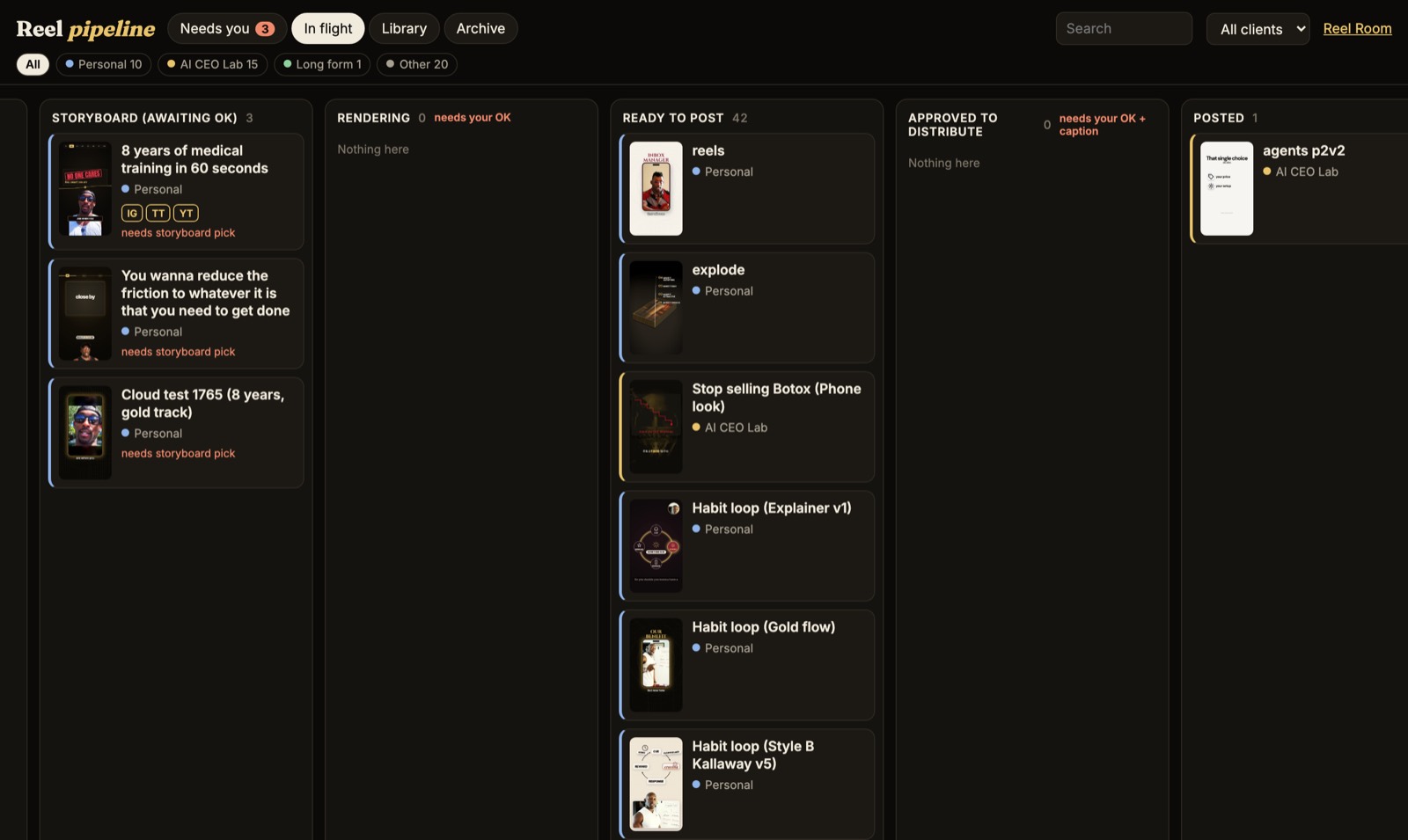 A watcher checks my folders every five minutes. It copied the file to Drive, checked the copy matched byte for byte, and added a card to my board. One card per video, from raw take to posted, so nothing gets lost.
One rule: never move a file out of iCloud or another synced folder. Moving it deletes the cloud copy.
3. Find the hook
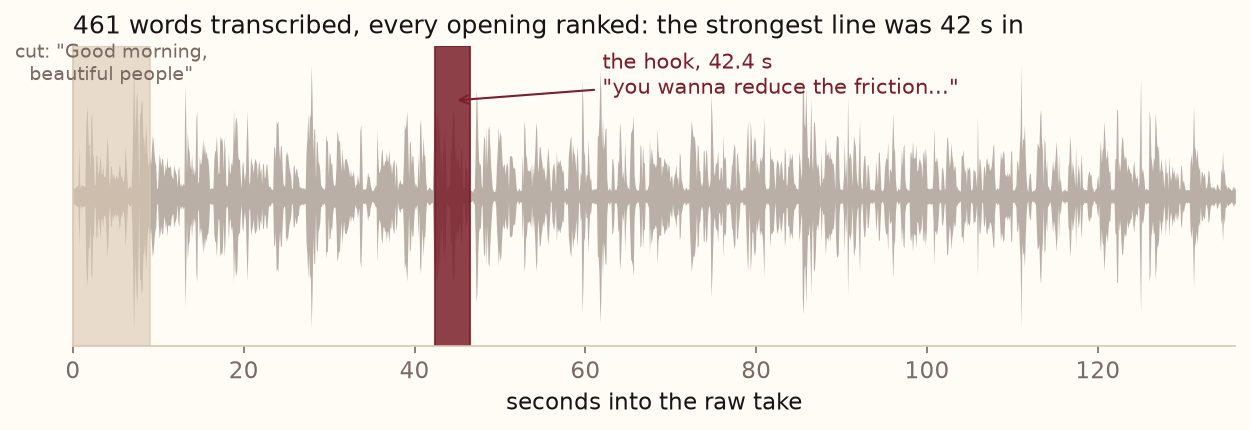 The whole take was transcribed (461 words), then every possible opening was ranked. The strongest line was 42 seconds in: "you wanna reduce the friction to whatever it is that you need to get done." My "Good morning, beautiful people" opener was cut.
4. Clean the voice with Auphonic
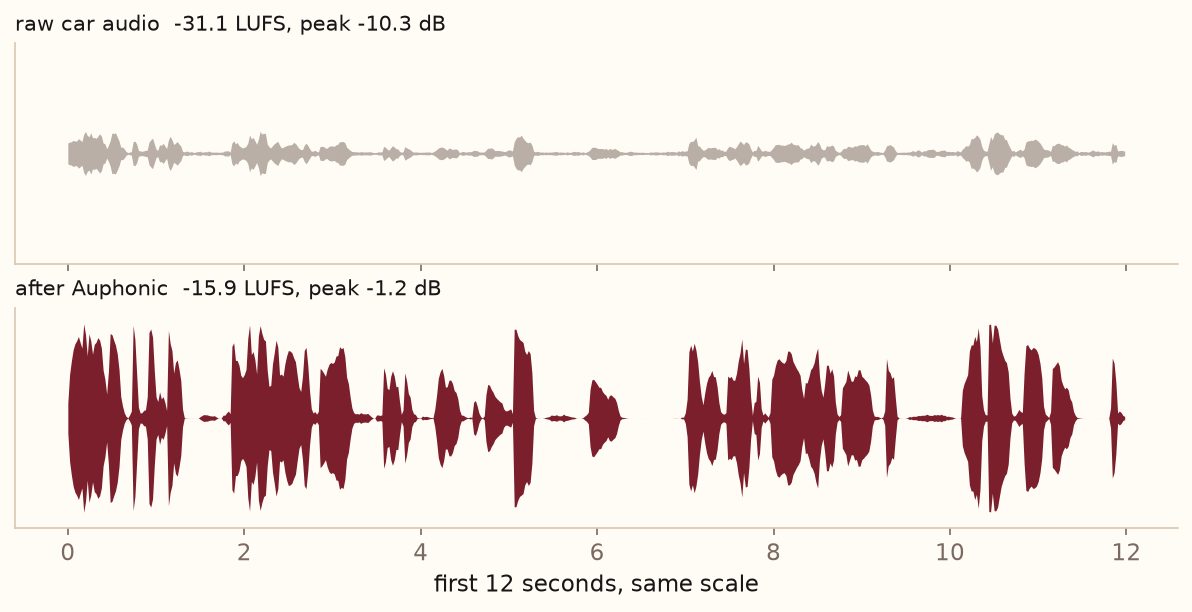 Car audio is quiet and uneven. Auphonic levels it and removes noise on the voice only, before music or sound effects, so every version starts from the same clean voice. This take went from -31.1 to -15.9 LUFS, and the peak from -10.3 to -1.2 dB.
5. Study the reference, every single frame
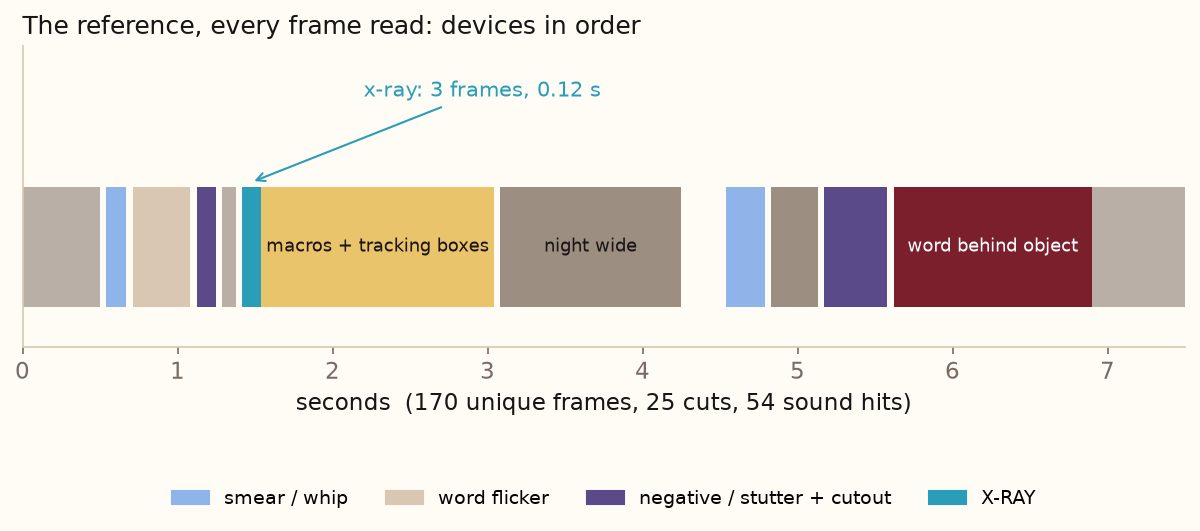 I liked a brand reel with an x-ray hit. The first pass sampled a frame every half second and missed it: the x-ray is on screen for 3 frames, 0.12 seconds. So the rule became: look at every frame where the picture changes, and save every shot that lasts 4 frames or fewer. The reference had 170 different frames and 25 cuts in 7.5 seconds.
Borrow the technique, never the footage, music or logos.
6. Pick from a menu, graded on my own data
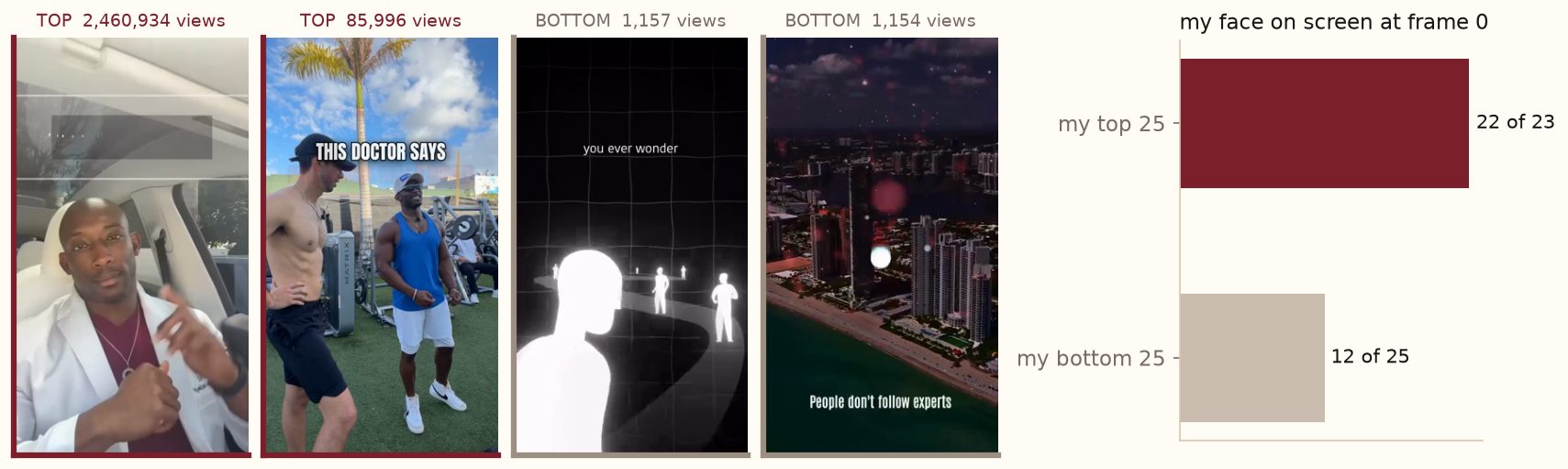 Every reel is three parts: intro, body, ending. Each part has a short menu built from my own reels, and every storyboard offers 2 or 3 combinations. The intros get graded on rules from my best and worst reels: a title on screen from the first frame, the point clear by 5 seconds, and never text on my face.
7. Make the pictures with the Codex CLI
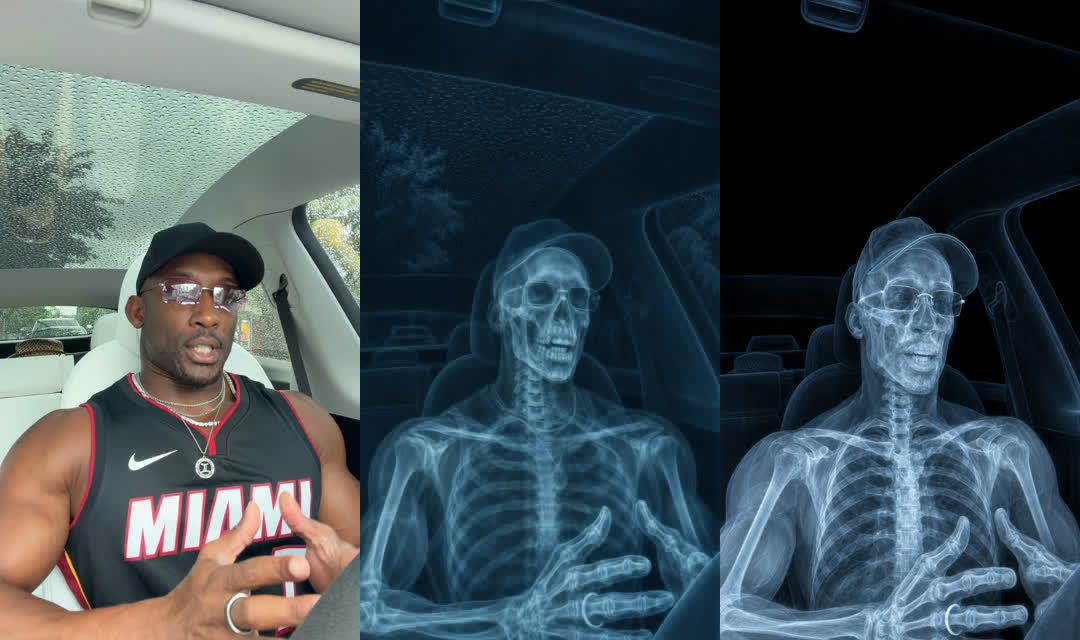 The x-ray is my exact frame turned into a radiograph with the Codex CLI, using the frame as the reference image. Image models reframe, so it was overlaid on my frame and moved until the skull sat on my face. The first try was 160 pixels too high and read as a jump.
 For the fast intro, one literal still per phrase: a dial turned down and a weight lifted on "reduce", sparking gears on "friction", a gym and a desk on "whatever", a green button on "done". No text in any image.
8. Pull from the effects library
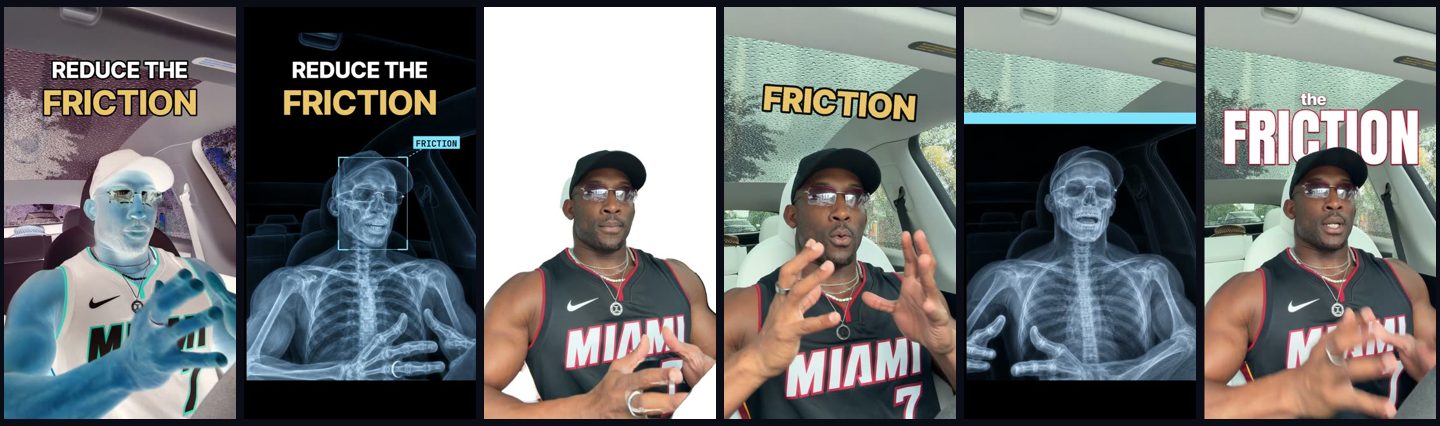 Each effect is reusable on any take: a negative flash, the x-ray hit with a tracking box, one frame of me cut out on white, a stamp that slams in, a scan line that wipes the x-ray back into live footage, and 3D captions with the word behind my head.
9. Make my own music in Suno and put it on the beat
 I make my own music in Suno now. A popular song can play on an organic Instagram post, but YouTube, TikTok, LinkedIn and ads need music I have the rights to, and a paid Suno plan gives me commercial use. Repitching someone else's song doesn't make it mine.
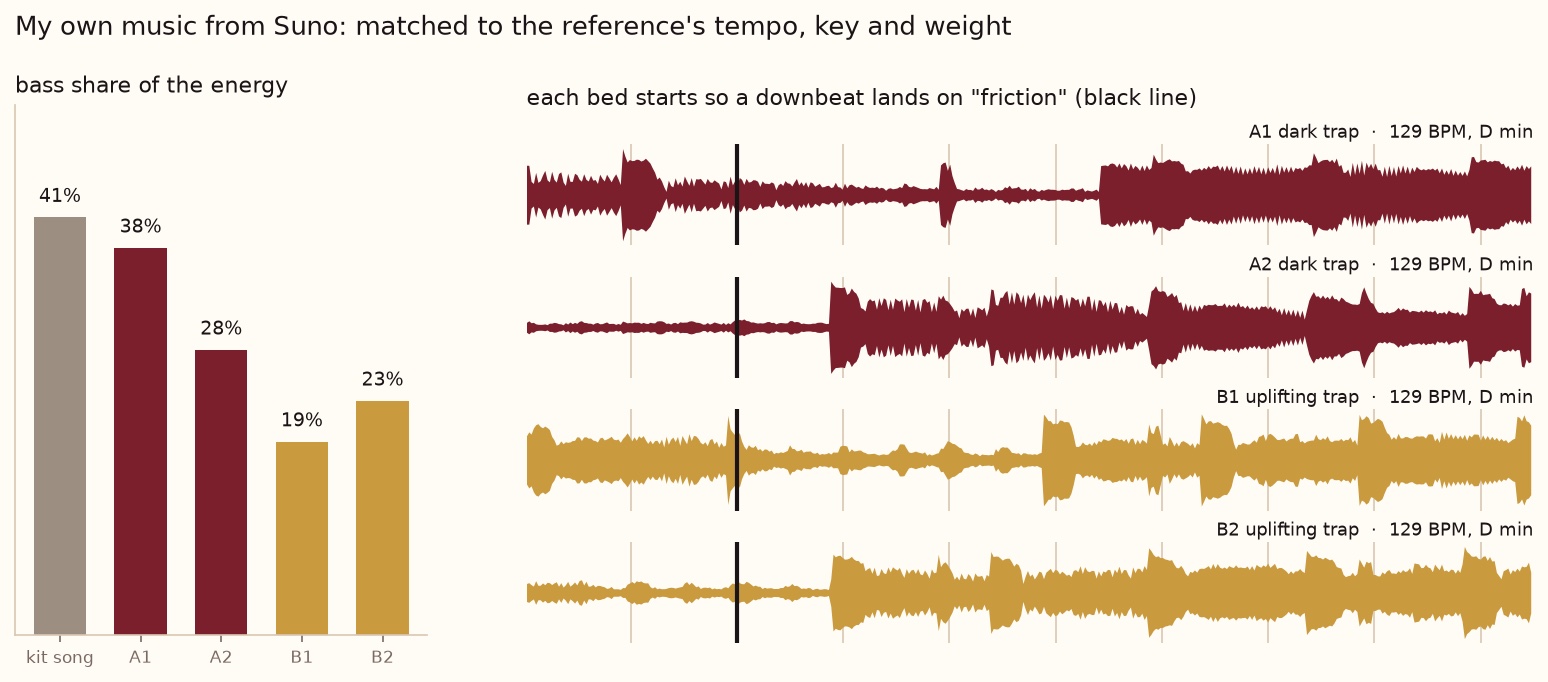 First I measured the song I liked: 129 BPM, D minor, about 41% of its energy in the bass. That went straight into the Suno style prompt: "dark motivational trap, 129 bpm, D minor, deep 808 sub bass, punchy kick, crisp hi-hats, airy dark synth pads, steady energy from the first bar, no long intro, instrumental". Two prompts gave me four tracks. All four came back at 129 BPM in D minor, and A1 was closest on bass. Claude filled in Suno's form in my browser and downloaded the files. It cost 20 credits.
Same reel, on my own Suno track. Turn the sound on.
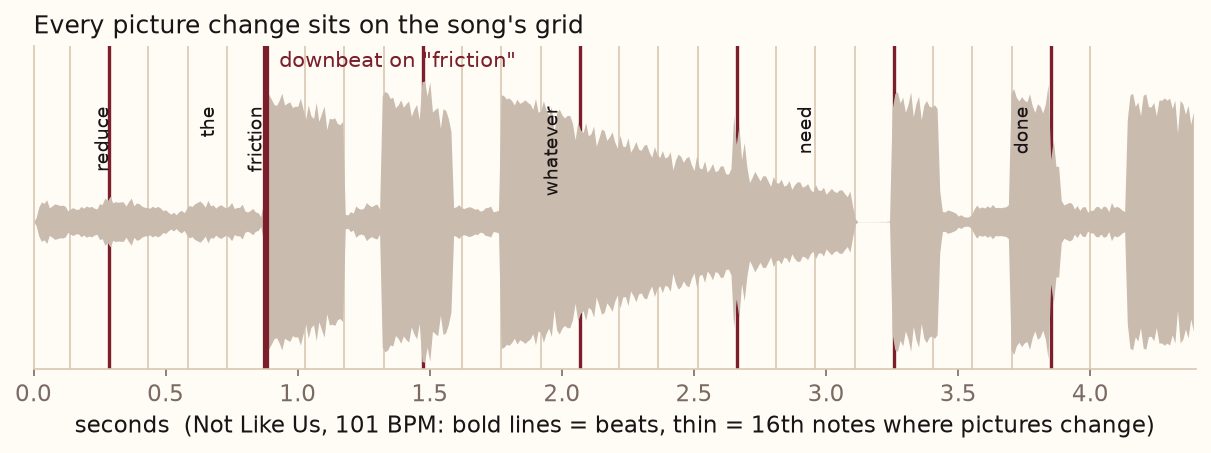 Whatever the track, its beat gets measured and it starts so a downbeat lands exactly on "friction". Every picture change sits on the 16th-note grid. The sound effects are their own layer: ticks speeding up into the hit, impacts on each x-ray, a whoosh into the wipe.
10. Measure, then take notes
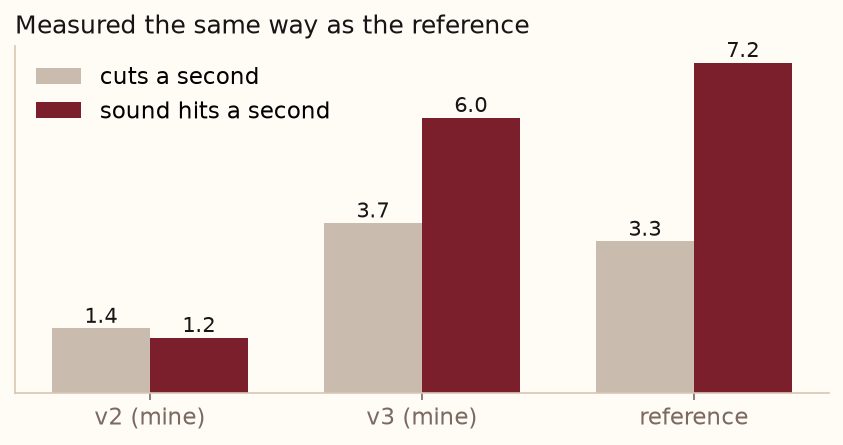 My first version had 1.4 cuts and 1.2 sound hits a second. The reference had 3.3 and 7.2. Measuring the same way closed the gap: v3 hit 3.7 and 6.0. Then I watched it and left notes on exact frames.
 One version put FRICTION across my eyes. I flagged it, it moved above my cap, and "no text on my face" became a rule for every reel after.
11. Test versions, write captions, post
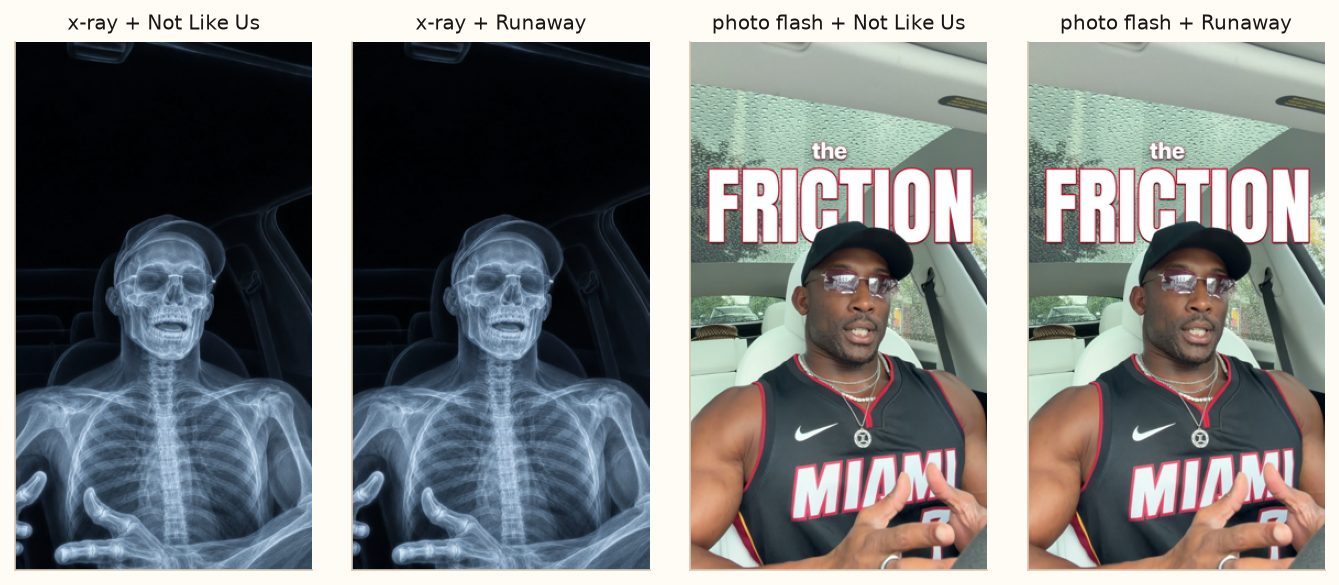 The final reel went out in four versions as Instagram trial reels: two intros, two songs, everything else identical, so the numbers tell me which opening works.
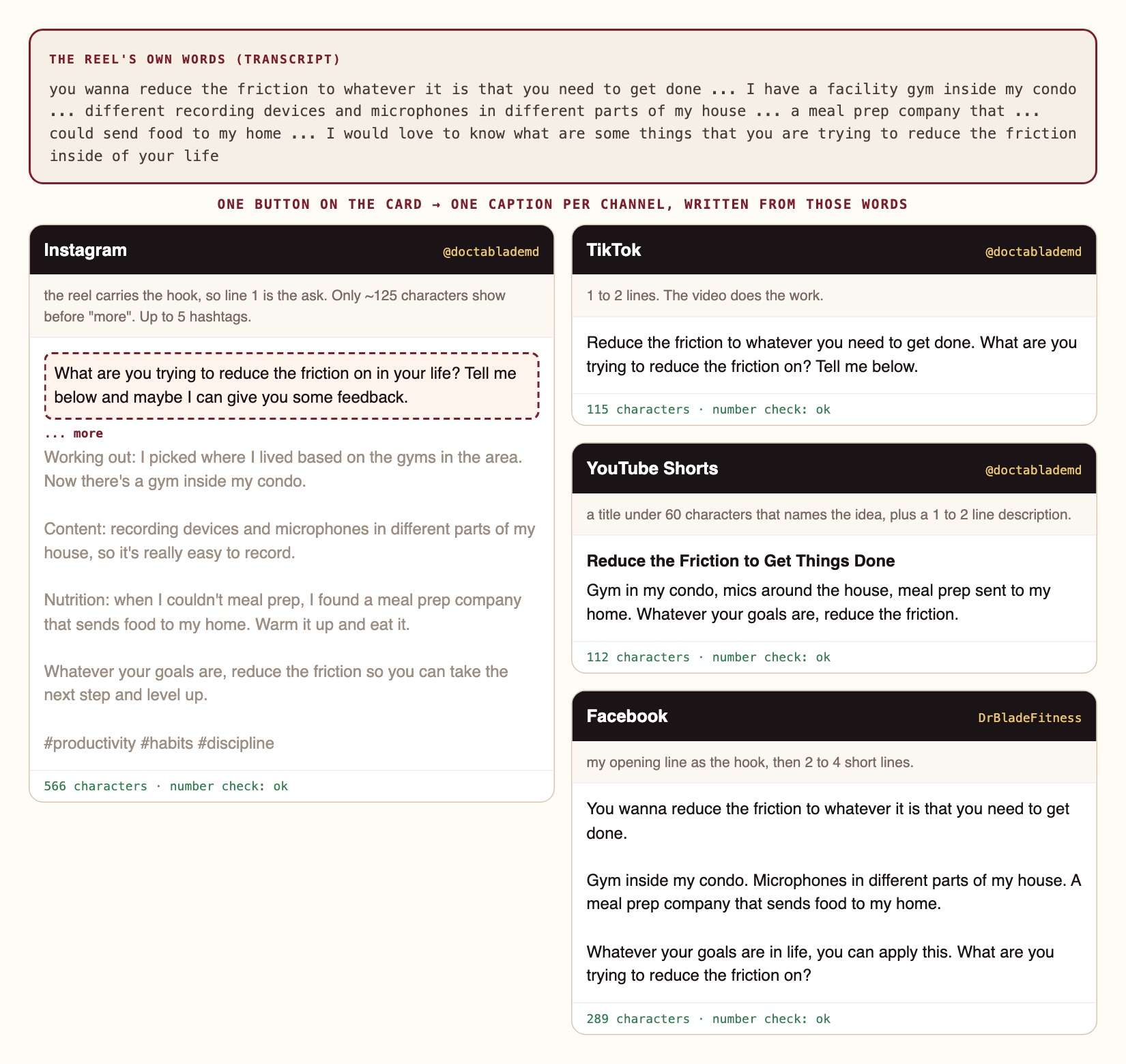 Then one button writes a caption per channel from my own words, each in that channel's shape. Instagram: the reel already hooks people, so the first line is the ask, inside the 125 characters that show before "more". TikTok: one or two lines. YouTube: a real title under 60 characters. Facebook: my opening line, then a few short lines. A checker flags any number I never said, and nothing posts until I approve it.
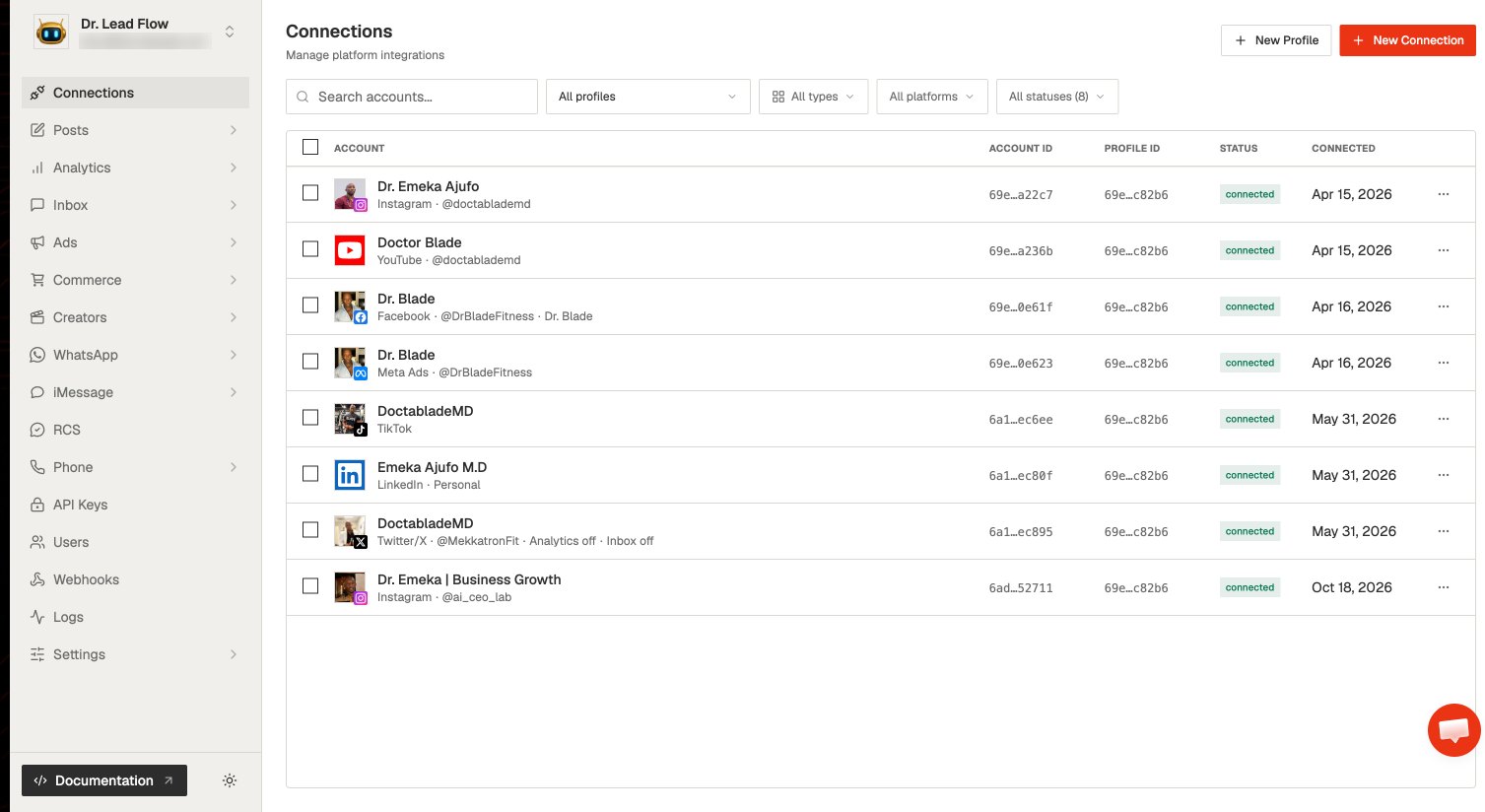 Approved posts go out through Zernio. One profile holds every account I post to: Instagram, YouTube, Facebook, TikTok, LinkedIn and X. Each caption goes to its own account, so one approval posts everywhere.
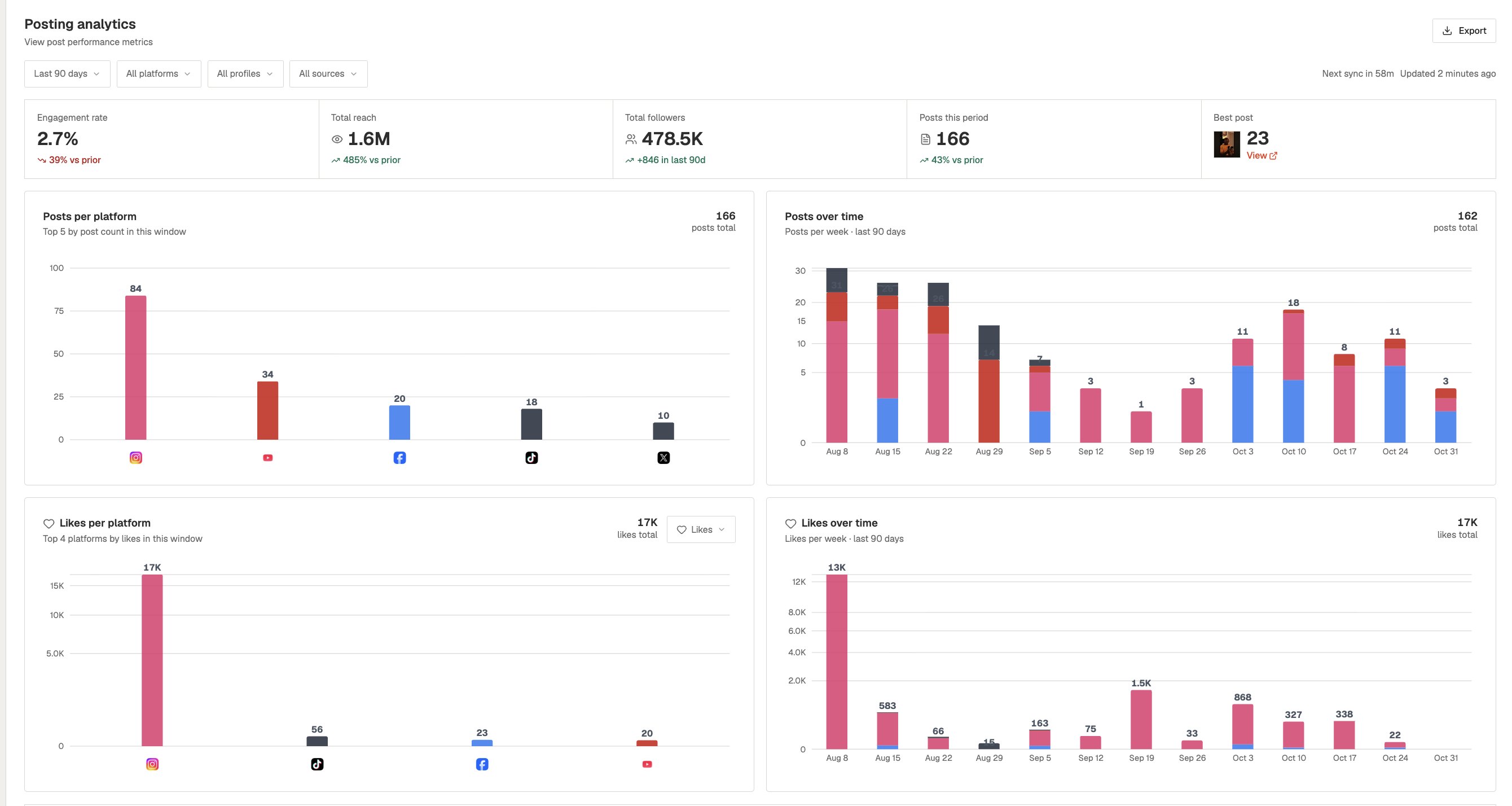 Zernio pulls the numbers back per platform, so the next reel starts from what actually worked.
Starter prompts
Paste these as written. They are short on purpose, because the long ones drift.
Here is my raw take [path]. Run my 11-step reel pipeline: back it up and log it, find the strongest hook, clean the voice with Auphonic, study my reference [link] frame by frame, give me 2 or 3 options, make the pictures, put the intro on the beat of [song], measure it against the reference, then stop for my notes. Only my words on screen, never text on my face.
Study this reel frame by frame, never sampled. Save every shot that lasts 4 frames or fewer at full size. Give me a timeline of every technique, when it happens and how to rebuild it on my footage. Do not reuse its footage, music or logos.
Take the frame at [time] from my take. Turn it into a clinical x-ray with the Codex CLI using that frame as the reference image: same pose, same framing, no text. Then overlay it on my frame and move it until the skull, glasses and hands line up.
Measure [song I like]: tempo, key, and how much of its energy is bass. Turn that into a Suno style prompt (genre, BPM, key, the drums and synths you hear, "steady energy from the first bar, no long intro, instrumental"). Make two prompts, so I get 4 tracks. Measure all 4 and drop any that don't match the tempo and key. Then start the one I pick so a downbeat lands on the word [word].
Find the beat of [song]. Start it so a downbeat lands on the word [word]. Put every picture change in the first 4 seconds on the 16th-note grid, and build the sound effects as their own layer, about 6 hits a second.
If this happens, do this
Every one of these has happened to me or to someone I set this up for.
| Failure | Fix |
|---|---|
| The AI picked my first sentence as the hook | Ask it to rank every possible opening across the whole transcript and show the top three with timestamps |
| The reference breakdown missed the effect I liked | It sampled frames. Ask for every frame where the picture changes and every shot of 4 frames or fewer |
| The x-ray or edited frame jumps when it appears | Image models reframe. Overlay it on your frame at 50 percent and move or scale it until it lines up |
| The intro feels empty even with fast cuts | One sound per effect is too sparse. Build the sound effects as their own layer, around 6 hits a second |
| Text covers my face on a zoom-in | Check every text layer against your face on every frame, including punch-ins that move your face up |
The tools I use for this
| Tool | What it is for here | |
|---|---|---|
| Claude Code | Runs every step, writes the renderer and checks the frames. | Site |
| Auphonic | Levels and cleans the voice before anything else. | Site |
| Codex CLI | Makes the x-ray of my exact frame and the literal stills. | GitHub |
| Suno | Makes my own instrumental tracks, matched to the tempo and key of a song I like. | Site |
| ElevenLabs Speech to Text | Transcribes the whole take with word timings. | Site |
| Zernio | Schedules and posts the approved reel. | Site |
Before your second reel
- Don't try to become an editor. Your job is the idea, the take and the notes. Let the pipeline do the cutting.
- Make two intros, change nothing else. Trial reels then tell you which opening holds people.
- Save every effect you like. A reference you study once should become a menu item you use forever. That library is your style.
- Give notes on frames, one at a time. A timestamp and one problem gets fixed; five in a paragraph get half-fixed.
Questions people ask
Do I have to become a video editor?
No, and you shouldn't try. Editing tools can eat your whole day. The goal is quality content at scale in your own style; the pipeline does the editing and you give the notes.
Do I need to know how to code?
No. You paste prompts into Claude Code and review frames. It writes and runs the code.
Is this just about saving money on an editor?
You can save money; I used to pay $2,000 for an editor and wait 24 to 48 hours. The bigger win is speed and range: a finished reel the same day, and room to test new ideas and build a look that's yours.
How long does one reel take?
This one took about an hour of my time across a day: filming, two rounds of notes and approving. The rest ran on its own.
Can I use popular songs?
On organic Instagram posts, songs from the app's music library are usually fine. Everywhere else (YouTube, TikTok, LinkedIn, ads) use music you own. I make mine in Suno on a paid plan, matched to the tempo and key of the song I like.
What if I don't have reference reels?
Start with the reels of creators you watch the most. Study two or three, keep the techniques you like, and build your own menu from there.
The free skill
The full 11-step reel pipeline as one prompt: back up and log the take, find the hook, clean the voice, study references frame by frame, offer options, make pictures, use your effects, put it on the beat, measure, take notes, then captions and posting.
# Edit my reel with AI (the 11-step pipeline)

You are my reel editor: director, editor and engineer. Work step by step and stop at my two approval points.

## What I give you
- A raw talking-head take (a .MOV or a Drive link).
- Who it is for and what kind of reel it is (personal or business).
- One to three reference reels I like, and what I like about them.

## The 11 steps
1. **Back it up and log it.** Copy the raw take to my cloud folder and check the copy matches the original. Add the video to my tracking board (a list, a sheet or a Kanban, one row or card per video).
2. **Find the hook.** Transcribe the whole take. Rank the possible opening lines. Use the strongest one, not the first one I said. Show me the top three with timestamps.
3. **Clean the voice.** Run the voice through Auphonic (or a similar leveler and noise remover) before anything with sound. Tell me the loudness before and after.
4. **Study the references, every frame.** Never sample. Look at every frame where the picture changes, and save every shot that lasts 4 frames or fewer. Write down each technique, when it happens, and how to rebuild it on my footage. Never reuse their footage, music or logos.
5. **Offer options.** Give me 2 or 3 options, each one intro, one body and one ending. Grade every intro: title on screen from the first frame, the point clear by 5 seconds, numbers with their noun, only my words, never text on my face.
6. **Make the pictures.** For an x-ray or any edited version of my frame, use my exact frame as the reference image, then overlay it on my frame and move it until it lines up. For quick stills, one literal picture per phrase I say. No text in any generated image.
7. **Use my effects.** Reuse effects I already have: negative flash, x-ray hit with a tracking box, one frame of me cut out on white, a stamp, a scan line that wipes back to live footage, words behind my head.
8. **Put it on the beat.** Use music I own: measure the song I like (tempo, key, how much is bass) and make matching instrumental tracks in Suno on a paid plan. Commercial songs only on organic Instagram, never on YouTube, TikTok, LinkedIn or ads. Find the track's beat, and start it so a downbeat lands on the key word. Put every picture change on the 16th-note grid. Treat sound effects as their own layer: about 6 hits a second through a fast intro.
9. **Measure before I see it.** Count cuts per second and sound hits per second on your render and on the reference. Close the gap, then show me.
10. **Take my notes.** Show me each version. I leave notes on exact frames. Fix each note and show the next version; never overwrite an old one. A note I give twice becomes a rule.
11. **Captions and posting.** When I approve a version, write a caption per channel from my own words and check every number against what I said. Post nothing until I approve it.

## Rules
- Only my words on screen. Never invent a number, a result or a story.
- No text on my face, on any frame.
- Never claim it is done because a command finished. Show me the frames.
- Stop and ask when an asset is missing. Never fake one.
Build your own look, not just faster edits
AI CEO Lab is where we build the pipeline around your voice and your style: the boards, rules and effect libraries that let you put out quality content every day and test new ideas without an editor.