 AI CEO Lab
AI Headshots and Consistent AI Photos of Yourself (Free and Paid)
Make an AI headshot from your own selfies for free in ChatGPT or Gemini, keep the same face across scenes with a character sheet, or train a Higgsfield Soul ID when you need hundreds. Plus the rules for using any of it in a business.
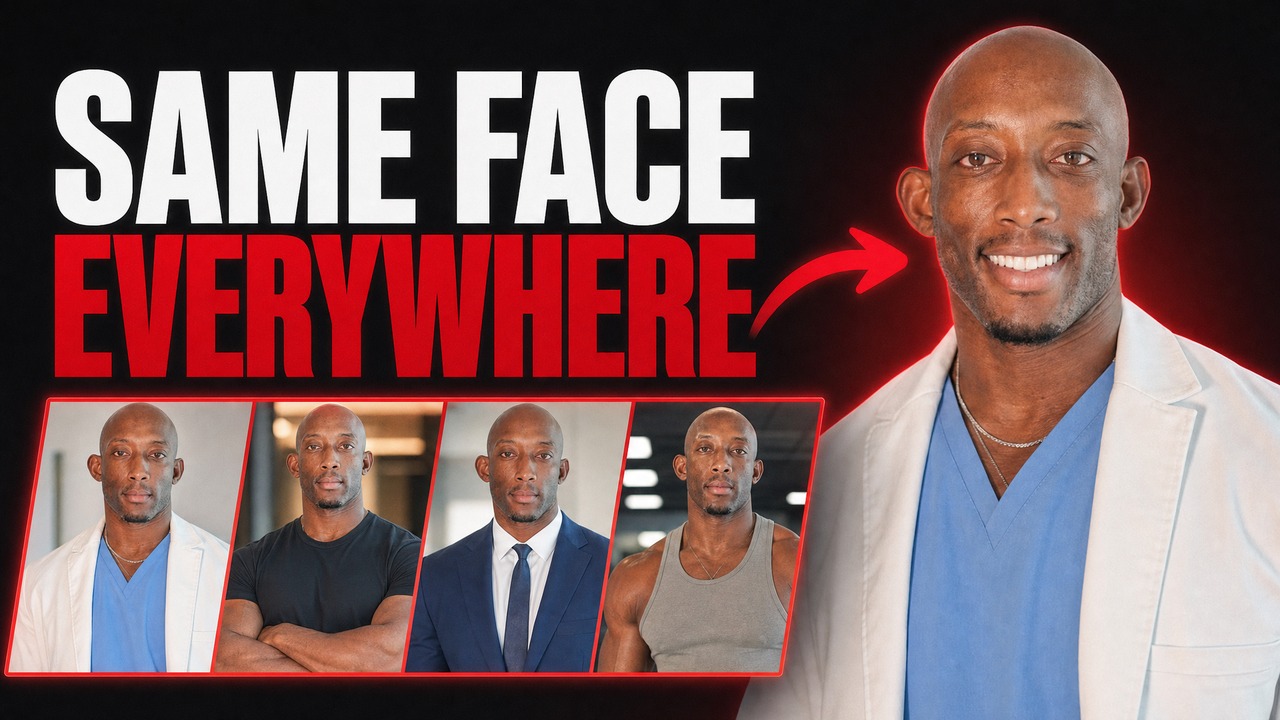
You need a headshot for the website, LinkedIn and the team page, and a photographer isn't on this week's calendar. The first AI photo of you is easy. The fiftieth is the problem: the jaw has drifted, the beard changed twice, and your audience is looking at a stranger with your name.
This guide gives you 3 paths in the order you should try them. Free: a headshot from your own selfies in ChatGPT or Gemini. Consistent: a character sheet that keeps your face the same across scenes. Paid and trained: a Higgsfield Soul ID for when you need hundreds of images. Every step comes with the prompt, and the limits are from each company's own help pages, checked 15 September 2026.
It's written for agency and small business owners, not for people building an entertainment influencer. So it covers what a business has to get right: consent for every face, no fake credentials or results, and labels where Meta and TikTok require them.
New to AI photos? Start with the next section. Already made a headshot and want the same face everywhere? Skip to step 6.
What you have by the end
Not concepts. Things that exist on your machine when you close the tab.
- A professional headshot made from your own photos, free, in ChatGPT or Gemini
- A matching set of team headshots with the same background and framing, each with written consent
- One character sheet and one descriptor that keep your face the same across scenes
- A clear rule for when a paid trained identity is worth it, and how to train one
- A check you run on every image before it goes out, in the order faces drift
- The consent, claims, disclosure and real-photo rules written down for your team
Start here: how AI photos of yourself work
If you've only typed prompts into a chat app, 4 ideas make the rest of this guide click.
What an AI headshot is
An AI headshot is a new photo an image model makes from real photos of you. You upload selfies, describe the shot (a navy blazer, a plain gray studio background, soft light), and the model generates a picture that is meant to look like you in that setting. Nobody took that photo. That's the whole appeal and the whole risk.
How it differs from a photographer
A photographer records what you look like on one day. An AI model predicts what you might look like, and each new image is a fresh prediction. So one good headshot is easy, and the same face across 50 images needs a method. That method is most of this guide.
How it works
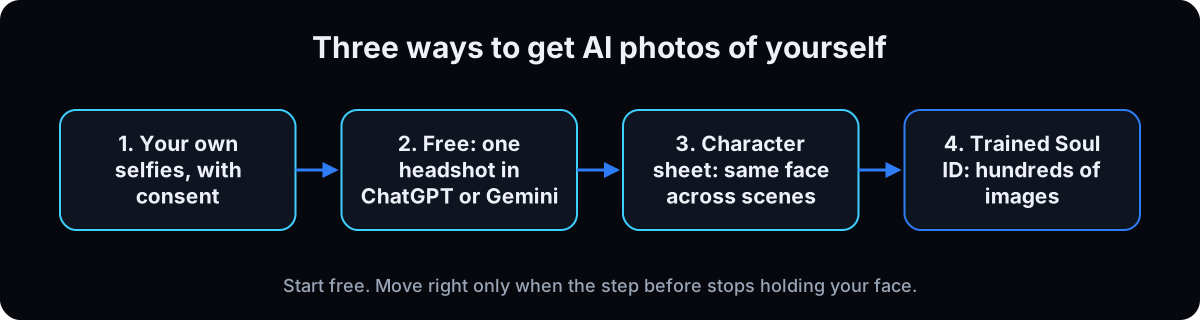 The free path edits from your uploaded photos each time. A character sheet is one image of the face from several angles that you attach to every prompt. A trained identity is a model that has learned your face from a set of photos, so you call it by an id instead of uploading references. Each step up costs more setup and holds the face better.
The catch
Faces drift, and a drifted face with your name on it is worse than no photo. The bigger catch is the rules. A real, identifiable person means real photos of them with their consent, and some places expect a real photo, full stop. The rules get their own section below the steps table.
| Path | Cost | Photos you need | Best for |
|---|---|---|---|
| ChatGPT or Gemini with your selfies | Free tier, with usage limits | 1 to a few clear selfies | One headshot for LinkedIn or the website |
| Character sheet plus descriptor | Free in a chat app, or credits in an image tool | One good base image or selfie | Tens of images of the same face, in one tool |
| Trained Higgsfield Soul ID | Paid plan, Basic or above | 20 to 80 on the web, 5 to 20 in the command line tool | Hundreds of images, a recurring founder face in content |
| Term | What it means |
|---|---|
| Reference image | A photo you attach so the model copies a face, outfit or room from it |
| Character sheet | One image showing the same person from several angles, attached to every prompt |
| Descriptor | One paragraph naming every feature a model gets wrong, pasted word for word |
| Lock phrase | The line at the end of a prompt telling the model what not to change |
| Soul ID | Higgsfield's trained identity: a model of one face you call by its id |
| Drift | Small changes to a face that pile up across images until it's someone else |
| Ground truth | The folder of real photos every output gets checked against |
Is it legal to use AI headshots? The rules for a business
It's my face, or my team's. Why would a headshot need rules?
Using an AI headshot of yourself is generally fine. The trouble starts with other people's faces, with what the photo implies, and with places that expect a real photo. I'm a doctor, not a lawyer, so treat these as the floor and check with your own counsel for anything regulated. 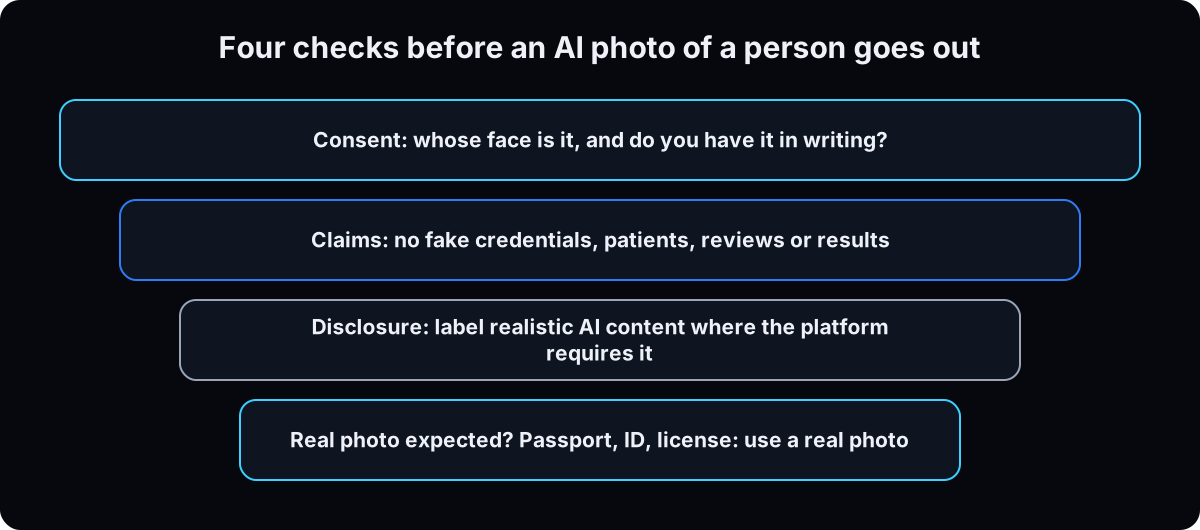
- Consent for every face. Your own face is the easy case. A staff member gets asked in writing before you upload a single photo, and a trained identity outlives the job, so the permission should say what happens when they leave. A patient, a client or a public figure is a no. TikTok's AI-generated content support page prohibits the likeness of adult private figures used without their permission (checked 15 September 2026).
- Don't misrepresent credentials or results. No AI photo of a clinician who doesn't work for you, no fake patient, no before and after of an outcome that didn't happen. The FTC's final rule on fake reviews and testimonials (August 2024) covers testimonials that claim to be by someone who does not exist, including AI-generated ones. LinkedIn's Professional Community Policies say not to post misleading information about your qualifications. AI generated ads covers the compliant way to show results.
- Label it where the platform requires it. Meta's misinformation policy requires you to use its AI disclosure tool when you post organic content with photorealistic video or realistic-sounding audio that was digitally created or altered, and says it may apply penalties if you don't. Meta also adds an "AI info" label when it detects industry standard AI indicators. TikTok requires a label on AI-generated content that contains realistic images, audio and video: turn on the AI-generated content setting in Post settings. Both checked 15 September 2026.
- Use a real photo where a real photo is expected. Passports, IDs, professional licenses, badges and credential applications want a photo of you, not a prediction of you. The State Department's passport photo page tells applicants not to change the photo with filters or artificial intelligence (checked 15 September 2026). LinkedIn's policies say not to use an image that is not your likeness as your profile photo, so an AI headshot there has to look like you today.
One more for the paid path: a hosted Soul ID lives on a platform. If the plan lapses or the platform changes, the identity goes with it. A character sheet is a file you keep.
From selfies to the same face everywhere: free first, then paid
1. Pick your path before you make anything
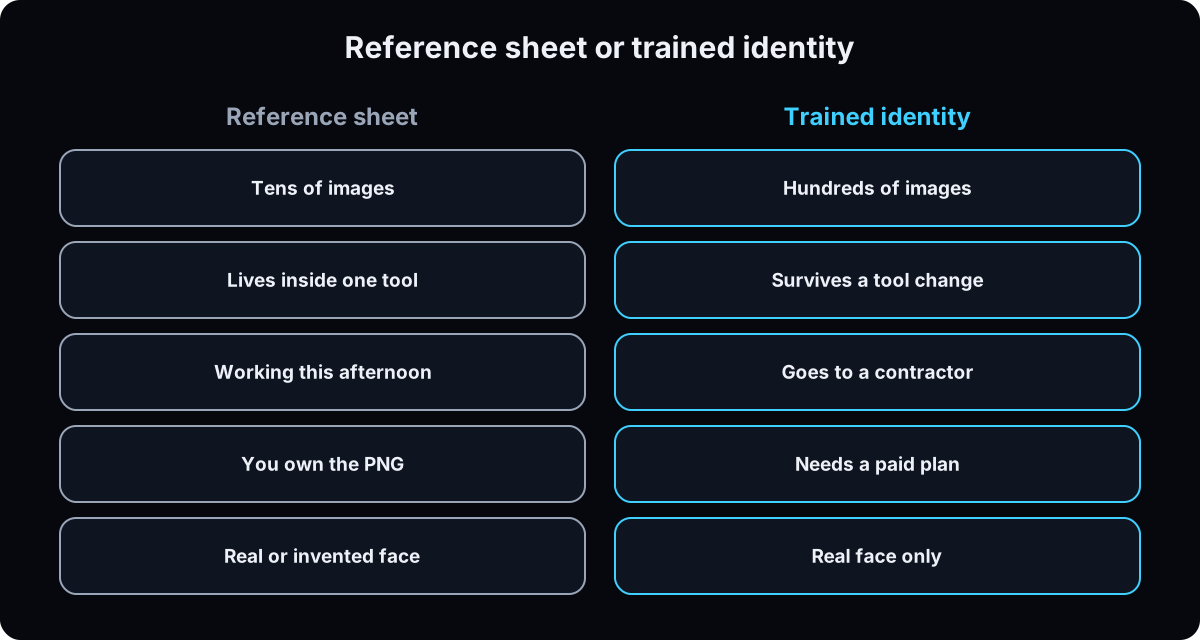 One headshot for LinkedIn or the website: the free path, steps 3 to 5.
The same face in tens of images, in one tool: add a character sheet and descriptor, steps 6 and 7.
Hundreds of images, a recurring founder face, or work you hand to a contractor: train a Soul ID, steps 8 and 9.
Hard rule: a real face trains well because real photos show real angles. An invented face doesn't. Training on a picture locks the picture, and it drifts. Real face: any path. Invented character: sheet only.
Why: switching methods halfway gives you 2 slightly different faces. Write the choice down.
2. Take the source photos (this folder is your ground truth)
Take them on your phone in daylight, in one sitting. Front, three quarter left and right, slightly above and below. Neutral, smiling and talking. A headshot, a head and shoulders and one full body. Sharp, one person, eyes visible, no sunglasses, hats or filters. Higgsfield's Soul ID help article lists the same traps: sunglasses, hats or scarves covering the face, group shots, heavy shadows and the same pose in every photo.
For a team, every person signs consent first, then sits for the same setup.
Why: every tool in this guide copies what you give it. A dim, filtered selfie makes the model invent the parts it can't see, and that's where the uncanny look comes from. Keep this folder. Every output gets checked against it.
3. Free: make a headshot in ChatGPT
Per OpenAI's Images in ChatGPT help article (checked 15 September 2026): ChatGPT Images is available on all tiers, on web, iOS and Android. In a chat, select More, then Images, or ask for an image in the conversation. Upload your best front-facing selfie and paste the prompt below. Use the aspect ratio picker, or put the ratio in the prompt. To change one area, open the editor, use Select on that part, and describe the change.
Limits: OpenAI's Free tier FAQ says image creation and uploads have usage limits separate from chat, stricter than paid plans, and ChatGPT tells you when you reach one. It doesn't publish a fixed number, so don't plan around one.
Why this prompt: it tells the model what to keep before it says what to change. Leave that out and it redraws your face.
Make a professional headshot from the attached photo of me.
Keep my exact face, facial structure, skin tone, hairline, facial hair, eye shape and age. Do not slim, smooth or beautify my face. Keep real skin texture.
Change only: clothing to a [navy blazer over a white open-collar shirt], background to a [plain light gray studio backdrop], lighting to soft studio light from the front left.
Framing: chest up, looking at the camera, relaxed natural smile.
Aspect ratio: [1:1 for LinkedIn / 4:5 for the website].
If anything about my face would have to change to do this, keep my face and change the scene instead.
4. Free: make a headshot in Gemini (Nano Banana)
Per Google's Gemini Apps help page on images (checked 15 September 2026): go to gemini.google.com, open the sidebar and choose Images, then upload your photo and ask for the edit. The same prompt from step 3 works here. You can also upload several photos and ask for a new image based on them, which helps when one selfie hides an angle.
Limits and requirements: you must be 18 or over to edit images. The models are Nano Banana 2 Lite, Nano Banana 2 and Nano Banana Pro, and Nano Banana Pro is for paid subscribers. Free users download at 1K resolution and Google AI plan subscribers at 2K. Google's image generation page says Gemini images carry an invisible SynthID watermark and a visible watermark.
Why try both: free tools differ on the same face. Run the same prompt and selfie in each and keep whichever looks more like you. For deeper edits, see Nano Banana image editing.
5. Check the likeness before you publish anything
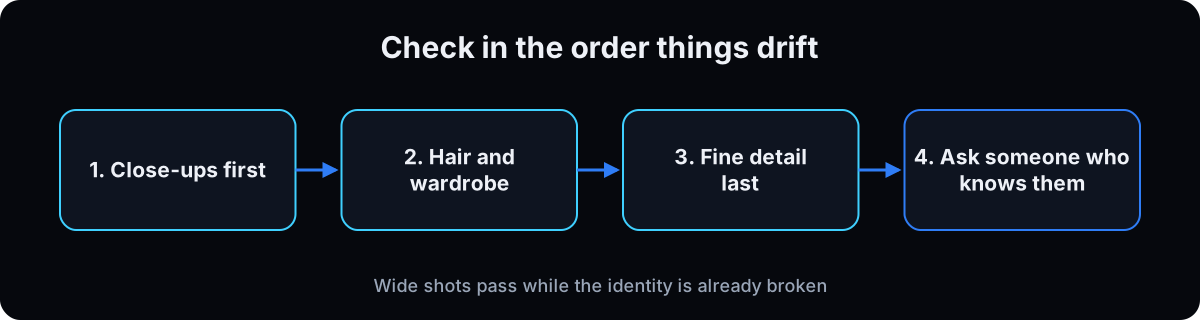 Put the result beside 3 photos from your ground truth folder and check in the order faces drift. Close-ups first: jaw, nose, eye spacing, hairline. Hair and wardrobe next: they drift before the face. Fine detail last: scars, moles, glasses and jewelry fade quietly. Then ask someone who knows you. If they hesitate, don't use it.
For team headshots, reuse one prompt word for word and change only the clothing line, so the page looks like one shoot.
Why: a headshot that doesn't look like you breaks trust the first time a client meets you. Making AI images look real covers the skin and light cues that give it away.
6. Build a character sheet for the same face across scenes
A headshot is one photo. Content needs you at a desk, on stage, with a client. A character sheet is one image showing your face and body from several angles, attached to every prompt. Make it in Gemini or ChatGPT from your best result or a clear selfie, with the prompt below. Generate it in the aspect ratio you publish in, because the closer the reference matches the output, the better it carries over.
Why close-up and full body in one image: a close-up alone can't be zoomed out later without the body breaking. A full body alone renders the face small, and that slightly wrong face becomes the reference for every close-up after. Feet cropped? Repair it with an edit instead of starting again.
If you use the API, Google's image generation docs list Nano Banana Pro as holding up to 5 images of characters for consistency, and Nano Banana 2 up to 4 (checked 15 September 2026). On my Higgsfield account a Nano Banana Pro sheet cost 2 credits at 2k and 4 at 4k when I ran it on 8 September 2026.
Generate a character reference sheet from the attached photo of me.
Top row, full body: front view, side profile, three quarter view, back view.
Bottom row, face: front close-up, profile close-up.
Same face, same hair, same build, same clothing in every panel. Neutral expression. Arms relaxed at my sides. Plain neutral background. Even, soft lighting with no dramatic shadows.
All figures in the top row fully visible from head to toe, including feet, with no cropping at the ankles, knees or head.
Render the close-up and the full body at the same level of detail. Do not let the face be small or soft in the full body panels.
Aspect ratio: [the ratio I will publish in].
7. Write the descriptor and the lock phrase
The descriptor is one paragraph pasted at the start of every prompt, naming each feature the model would otherwise invent. The prompt below writes it. Mine says completely bald shaved head, because the moment I left it out the model gave me hair.
The lock phrase goes on the end. The descriptor tells the model what to build. The lock phrase tells it not to move what's already there. To change one thing, delete one word: new clothes, drop "outfit". New location, drop "background".
Then every scene is: descriptor, the scene, the sheet attached, the lock phrase.
Why: retyping your look from memory is how the beard changes twice. Keep the sheet, descriptor and ground truth in one folder named after the person. For prompt structure in general, see how to write better AI prompts.
Write my identity descriptor from the attached photos.
One paragraph, under 60 words, written so it can be pasted verbatim at the start of every prompt.
Name every feature a model would otherwise invent: skin tone, head and hair (say bald explicitly if bald), facial hair, build, age range, glasses, signature clothing.
Do not write anything poetic. Every word must be a thing the model could get wrong.
Then give me the lock phrase to append to every prompt, in the form: maintain the exact face, expression, hair, outfit and background.
Then tell me which single word I delete from that phrase for each of these: change the clothes, change the location, change the expression.
8. Paid: train a Higgsfield Soul ID on the web
A Soul ID is Higgsfield's trained identity. You train it once on real photos, then pick it when you generate, so the face comes from the model instead of a reference you attach.
Plan: Soul training needs a paid plan, Basic or above, per Higgsfield's own Soul ID agent skill (checked 15 September 2026). On a free account you get a plan error, not a training error.
On the web, per the Soul ID help article (updated 2 September 2026, checked 15 September 2026): open higgsfield.ai, go to Soul, then Train new character. Upload 20 or more photos of the same person, up to 80, with varied angles and expressions, a clear well-lit face and at least one full-height shot. Name the character, start training, then select it when you generate.
Why a trained identity: once you need a recurring founder face in weekly content, attaching a sheet to every prompt stops scaling, and close-ups drift. A trained Soul holds the face without the reference.
9. Optional, terminal: train and use the Soul from the command line
Terminal step. Skip it if step 8 works for you. The command line tool is how I run it, and it's what an AI agent uses to make images for you in batches.
The CLI takes 5 to 20 photos, per higgsfield soul-id create --help on version 1.1.22 (checked 15 September 2026), while the web flow asks for 20 to 80. Follow the tool you're using.
For a trained identity the generate parameter is custom_reference_id, with --soul-id as an alias. Soul models take at most 1 image reference, so use that slot for the outfit, pose or room. Soul 2.0 has a seed: same prompt plus same seed gets the same shot back. The setting is quality (1.5k or 2k), not resolution, and there's no 4:5, so run 3:4 and crop for feed posts. Soul generations cost 0.12 credits on my account when I ran them on 8 September 2026.
npm install -g @higgsfield/cli
higgsfield auth login
higgsfield account status        # Soul training needs a paid plan

higgsfield soul-id create --name "emeka" --soul-2 \
  --image ./refs/me-01.jpg --image ./refs/me-02.jpg --image ./refs/me-03.jpg \
  --image ./refs/me-04.jpg --image ./refs/me-05.jpg      # 5 to 20 photos
higgsfield soul-id wait <soul_id>

DESC="$(cat descriptor.txt)"
higgsfield generate create text2image_soul_v2 \
  --custom_reference_id "<soul_id>" \
  --prompt "$DESC On stage at a small business workshop, candid photo, soft window light from the left, realistic skin texture. Maintain the exact face, hair and build." \
  --image ./wardrobe/navy-blazer.jpg \
  --aspect-ratio 3:4 --quality 2k --seed 42 --wait
10. Use it in the business, and label what needs a label
 Team headshots: one prompt, one background, one crop for everyone, and a signed consent for each face.
Website and LinkedIn: a free headshot is usually enough. Make sure it looks like you today.
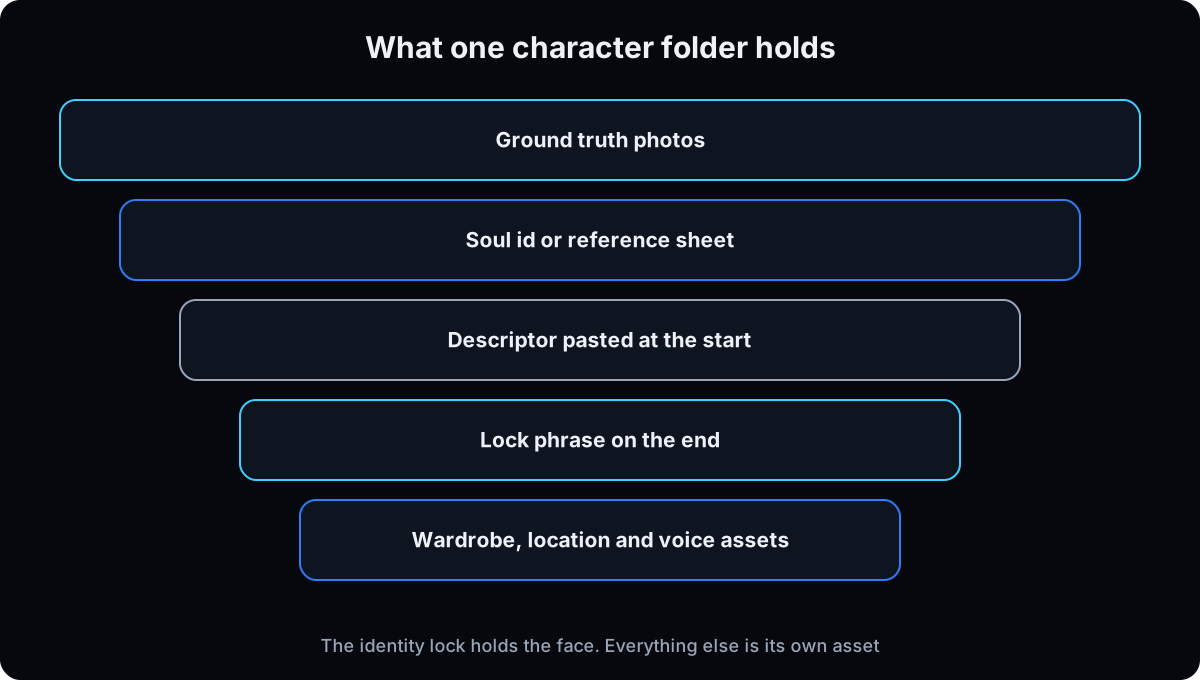
A recurring founder face in content: sheet or Soul, plus one wardrobe image and one location image you attach every time, because the identity lock holds the face and nothing else.
Before you post: run the 4 checks from the rules section. On TikTok, turn on the AI-generated content setting for realistic AI images. On Meta, use the AI disclosure tool whenever the rules above require it.
Why: the face gets people to recognize you. The rules keep that recognition from turning into a complaint.
If this happens, do this
Every one of these has happened to me or to someone I set this up for.
| Failure | Fix |
|---|---|
| The headshot is a cousin of you | Use a sharper, front-facing selfie in daylight, put "keep my exact face" before the changes, and try the other free tool |
| ChatGPT or Gemini made you slimmer, younger or smoother | Add "do not slim, smooth or beautify my face, keep real skin texture" and reject any image that fails the likeness check |
| You hit a free usage limit | Wait for the reset ChatGPT or Gemini shows you, or switch tools. Neither publishes a fixed free number, so don't batch 20 in one sitting |
| Hair appeared on a bald head, or the beard changes every time | The descriptor is missing or being retyped. Name the feature and paste it word for word |
| Close-ups slightly off from the first image | The base was a full body, so the face rendered small. Regenerate the sheet with close-up and full body in one image |
| Soul ID training refused or failed | Refused is the plan gate: check your plan. Failed usually means too few usable faces, or sunglasses, group photos or filters. Swap photos and stay inside the count for the tool you use |
| A staff member's AI photo is still on the site after they left | Take it down, and add what happens at departure to the consent form |
| A fake patient or clinician in a testimonial-style image | Don't. Real people, real consent, or no person |
The tools I use for this
| Tool | What it is for here | |
|---|---|---|
| Higgsfield | Soul ID training and the image models for the paid path, on the web and the command line. Soul training needs a paid plan. | Open |
| Nano Banana Pro | The character sheet path inside Higgsfield. Holds several references, so the sheet, wardrobe and location go in together. | no link needed |
| Higgsfield Soul 2.0 | The trained path for a real face. One free reference slot, a seed, and 0.12 credits a generation on my account. | no link needed |
| Claude | Writes the descriptor and scene prompts, and runs the likeness check in drift order. | Open |
What I'd tell you over coffee
- Start free, and stop when it's enough. Most business owners need 1 good headshot and a matching team page, not a trained identity. Pay for training when a recurring face in content is the job.
- Dedicated headshot apps are an alternative I haven't used. They take your selfies and return a batch of headshots. On their own pricing pages, checked 15 September 2026, HeadshotPro lists individual packages at $29, $39 and $59, and Aragon lists $35, $45 and $75. Check what each package includes before you buy.
- Two people in one frame need 3 things. Say where each stands, give each their own descriptor in the same prompt, and say which attached reference belongs to whom. Otherwise the model blends 2 faces into a hybrid.
- Match the reference ratio to the output ratio. It costs nothing, and the face carries over better.
- Keep the folder, not the chat. Ground truth, sheet or Soul id, descriptor, wardrobe and location in one folder per person. A chat history is not a filing system.
- An AI influencer is the same method with an invented face. Build it with a sheet, never a trained Soul, disclose it as AI wherever it talks to people, and never let it pose as a real clinician or customer. For ads built this way, see AI UGC ads.
Questions people ask
What is the best AI headshot generator?
It depends on the job. For one headshot, start free with ChatGPT or Gemini and your own selfies, and keep whichever looks more like you. Dedicated headshot apps like HeadshotPro and Aragon sell packages from $29 and $35 on their pricing pages (checked 15 September 2026); I haven't used them. For the same face across hundreds of images, a trained identity such as a Higgsfield Soul ID holds up better.
Can ChatGPT make a headshot from my photo?
Yes. Per OpenAI's Images in ChatGPT help article, you can upload an existing image and describe the changes, and ChatGPT Images is on all tiers including Free. Free image creation has usage limits that ChatGPT shows you when you hit them. Tell it to keep your exact face before you describe the new clothes and background.
Are AI headshots worth it?
For a website, LinkedIn or a team page, often yes, as long as the result looks like you today and passes the likeness check in step 5. They're not worth it where a real photo is expected, like a passport, ID or professional license, or when the result makes you look younger or different from the person clients will meet.
How do I make consistent AI photos of myself?
Use the same identity every time instead of describing yourself from scratch. Build one character sheet with close-ups and full body in one image, write a descriptor you paste word for word, and end each prompt with a lock phrase. When you need hundreds of images, train a Soul ID on 20 to 80 real photos on Higgsfield's web flow.
How do I create an AI influencer?
Generate one realistic invented face, build a character sheet from it, write a descriptor, then generate scenes with the sheet attached. Don't train an identity on an invented face, because it locks the picture and drifts. Label realistic AI content where platforms require it: TikTok requires a label on realistic AI-generated images, audio and video.
Is it legal to use AI headshots?
Using an AI headshot of yourself is generally allowed, but the rules around it matter. Get written consent for anyone else's face, don't use AI photos to misrepresent credentials, patients or results (the FTC's 2024 rule covers fake AI-generated testimonials), label realistic AI content where Meta and TikTok require it, and use a real photo for passports, IDs and licenses. For regulated work, check with your own counsel.
The free skill
It's the whole path as agent instructions: pick free, sheet or trained, write the headshot prompt that keeps your face, build the sheet and descriptor, train and call a Soul ID when it's worth it, check every output against your real photos in drift order, and run the 4 rule checks before anything goes out.
---
name: reusable-ai-avatar
description: Makes AI headshots and consistent AI photos of a real person from their own selfies, free first (ChatGPT or Gemini), then a character sheet plus verbatim descriptor, then a paid Higgsfield Soul ID when volume demands it. Checks every output against real photos and runs consent, claims, disclosure and real-photo checks before anything is returned. Trigger on "build my avatar", "make me a headshot", "AI headshot", "train my face", "make my character consistent", "put me in a scene", "why does my avatar keep changing".
---

# Reusable AI Avatar

You make AI photos of one person that look like them, every time. Never describe the identity from scratch: it's an uploaded selfie, a sheet plus a descriptor, or a trained Soul, and every output gets checked against ground truth.

## House rules (check before any generation)
- **Consent:** a real, identifiable person means their own photos and their written consent. Never a patient, a client, a public figure, or a blend of real faces.
- **Claims:** never a fake clinician presented as real, a fake testimonial, a before-and-after, or any implied result or credential.
- **Disclosure:** realistic AI images for TikTok get the AI-generated content setting. Meta requires its AI disclosure tool for photorealistic video or realistic-sounding audio that was created or altered. Tell the user which applies.
- **Real photo expected:** refuse to make photos for passports, IDs, professional licenses, badges or credential applications. Say a real photo is required.
- The descriptor is pasted verbatim. Never paraphrase it.

## Step 1: Choose the path
Ask: whose face, where it will appear (LinkedIn, website, team page, recurring content), roughly how many images this year, and whether it must move between tools or go to a contractor.
- **Free headshot** (ChatGPT or Gemini with a selfie) for one headshot or a team page.
- **Sheet + descriptor** for tens of images of one face in one tool.
- **Trained Soul ID** for hundreds of images, a recurring founder face, or portability. Needs a paid Higgsfield plan (Basic or above).
- An invented face (AI influencer) always goes to the sheet, never training, and is always disclosed.
Write the choice down and flag any consent problem.

## Step 2: Ground truth
Check the photo folder and report gaps: front, three quarter left and right, slightly above and below; neutral, smiling, talking; headshot, head and shoulders, full body; daylight, sharp, one person, eyes visible, no sunglasses, hats, filters or group shots.
Counts: Higgsfield web Soul training 20 to 80 photos; CLI `soul-id create` 5 to 20.

## Step 3: Free headshot
Give the user this prompt for ChatGPT (More, then Images, upload selfie) or Gemini (gemini.google.com, sidebar, Images, upload; editing needs 18+):

```
Make a professional headshot from the attached photo of me.
Keep my exact face, facial structure, skin tone, hairline, facial hair, eye shape and age. Do not slim, smooth or beautify my face. Keep real skin texture.
Change only: clothing to [..], background to [..], lighting to soft studio light from the front left.
Framing: chest up, looking at the camera, relaxed natural smile.
Aspect ratio: [1:1 LinkedIn / 4:5 website].
If anything about my face would have to change to do this, keep my face and change the scene instead.
```
Free tiers have usage limits with no published fixed number. For a team, reuse the prompt verbatim and change only the clothing line.

## Step 4: Build the sheet
One image. Top row full body: front, side profile, three quarter, back. Bottom row: front close-up, profile close-up. Same face, hair, build and clothes in every panel, neutral expression, plain background, soft even light. Close-up and full body at the same detail. Aspect ratio = the ratio they publish in. If feet are cropped, repair with an edit instead of rerolling.

## Step 5: Descriptor and lock phrase
- **Descriptor:** one paragraph under 60 words naming every feature a model drifts on: skin tone, head and hair (say "completely bald" if so), facial hair, build, age range, glasses, signature clothing. Nothing poetic. Store it as a file.
- **Lock phrase** on the end of every prompt: "Maintain the exact face, expression, hair, outfit and background." To change one thing, delete that word.

## Step 6: Train the Soul (paid)
Check `higgsfield account status` first; a refusal is the plan gate, not the photos.

```bash
higgsfield soul-id create --name "<oneword>" --soul-2 --image ./refs/a.jpg ... # 5 to 20
higgsfield soul-id wait <reference_id>
```
Web alternative: higgsfield.ai, Soul, Train new character, 20 to 80 photos with at least one full-height shot. Store the id with the descriptor.

## Step 7: Generate a scene
Prompt shape: descriptor verbatim, location, outfit, shot size and angle, light source, expression, realism details, lock phrase. Close-up first.

```bash
# trained real face
higgsfield generate create text2image_soul_v2 --custom_reference_id <id> --prompt "<descriptor> ..." --image ./wardrobe.jpg --aspect-ratio 3:4 --quality 2k --seed 42 --wait
# sheet path
higgsfield generate create nano_banana_pro --prompt "<descriptor> Use the attached sheet as identity reference; keep face, hair, skin tone, build exactly. Scene: ..." --image ./char/sheet.png --image ./char/wardrobe.png --aspect-ratio 4:5 --resolution 2k --wait
```
Soul models take at most one extra image reference (use it for outfit, pose or room), use `quality` not `resolution`, and have no 4:5: use 3:4 and crop. Record the seed when a shot works.

Two people: say where each stands, give each a full descriptor in the same prompt, and say which reference file is whose. Avoid common or famous names.

## Step 8: Likeness and rules check
Check in drift order: close-ups before wide shots, hair and wardrobe before the face, fine detail (scars, moles, glasses, jewelry) last. Fail on a different jaw or nose, changed facial hair, invented hair, wrong skin tone or build, beautified or younger face, plastic skin, or light that doesn't match the scene. Then run the four house-rule checks. Return only what passes, with prompt, settings and which disclosure applies. If a feature keeps drifting, fix the descriptor, not the scene prompt.
Want your face locked in and wired into your content engine?
Inside the AI CEO Lab, the Content Engine module builds your headshot set and character, writes your descriptor, and sets up the agent that turns one face into a month of carousels and covers, with the consent and labeling checks built in.