 AI CEO Lab
AI UGC Ads: How to Make Them Without Faking a Testimonial
What AI UGC ads are, how the tools turn a face and a script into a talking video, and how a small business or agency makes one with no code, without an AI customer the FTC's fake testimonial rule would cover.
You've seen the ads: someone holds a product up to a phone camera and says it changed their routine. More of them are generated now, and YouTube tutorials on making them pass 100,000 views. Most of those tutorials build the same thing, an AI person who never bought the product saying it worked for them. That's the one version of this you can't run.
This guide builds the version you can. A presenter who speaks for your brand (a stock avatar, or real staff with a signed release), a script written in parts, a no-code tool path with prices checked on each vendor's own site, a realism check, the labels each platform asks for, and 3 ads live with a way to read the results.
It's for small business owners and agency owners. I'm a doctor who runs an ad agency, not an engineer. New to AI UGC? Start with the next section. Already making them? Skip to step 1 and check your presenter.
What you have by the end
Not concepts. Things that exist on your machine when you close the tab.
- A clear picture of the 3 kinds of AI UGC and which one you can legally run
- A signed likeness release checklist for anyone real
- A script set in parts: 5 hooks, 1 body, 3 calls to action
- A no-code tool picked on verified pricing, not a rival's comparison video
- Clips that passed an audio, face, frame and claims check
- 3 ads live, labelled where required, with a rule for which one wins
Start here: what AI UGC ads are, in plain English
If you've never made one, these 5 ideas make the rest of the page easy.
What UGC means
UGC stands for user-generated content: videos that look like a normal person filmed them on a phone, not a studio. In ads, it usually means a creator talking to camera about a product. Brands pay UGC creators to film these, and r/UGCSideHustle has creators posting what they earn and how they land deals.
An AI UGC ad keeps the look (phone framing, one person, talking to camera) and swaps the filming for AI tools. Nobody books a creator, and a new version is a new generation, not a new shoot.
The 3 kinds of AI UGC, and why the difference matters
Everything sold as AI UGC falls into one of 3 kinds. The table below sorts them. The first two are a presenter speaking for your brand, which is ordinary advertising. The third, an AI person posing as a customer who used your product, is the one the FTC's rule on fake testimonials is written for.
How it works
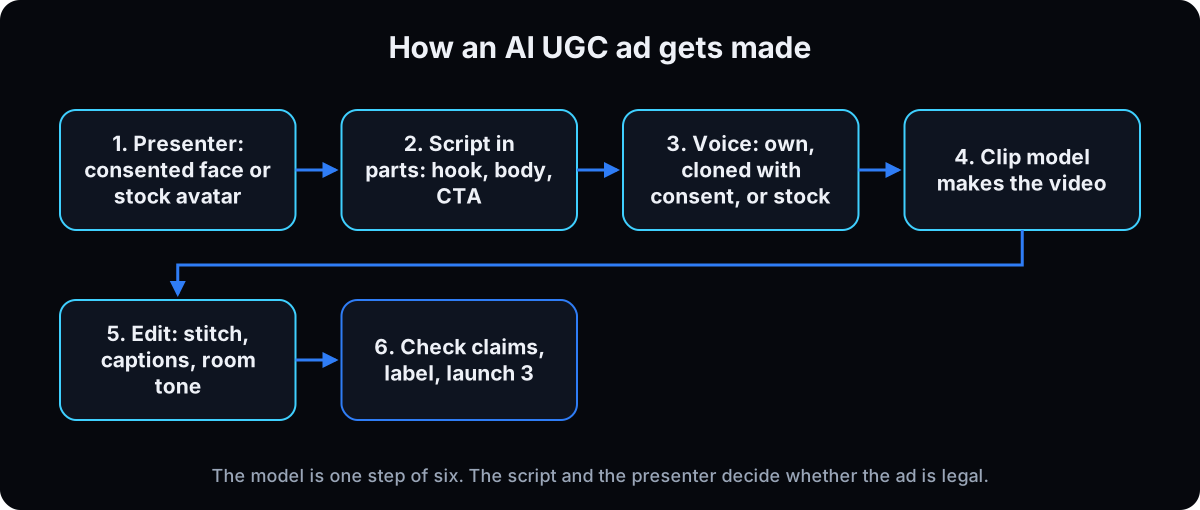 Every tool runs the same pipeline, whether it shows you the steps or hides them behind one button. You bring a presenter (a photo of a real person who agreed, or a stock avatar from the tool's library) and a script. A voice reads the script. A clip model (tutorials name Seedance, Kling, Veo and Sora 2) turns the still image and the audio into a few seconds of talking video. Then you edit: stitch the clips, add captions and a little background sound.
All-in-one tools like HeyGen and Arcads do most of that inside one screen. Platforms like Higgsfield let you pick the model for each step, which costs more attention and gives more control.
Why businesses use it
It's faster and cheaper to test ideas. A new opening line is a clip, not a reshoot, so you can try 5 hooks against the same body and keep the one that holds attention. That's the same logic as filming ad creative variations in parts.
Whether viewers can tell is an open argument. On r/AI_UGC_Marketing this month, one creator posted u can never say AI until i disclose and a separate thread was titled AI UGC ads can look pretty real now, but side-by-side is a different story. I haven't found a solid public study either way, so plan as if some viewers will notice.
The catch
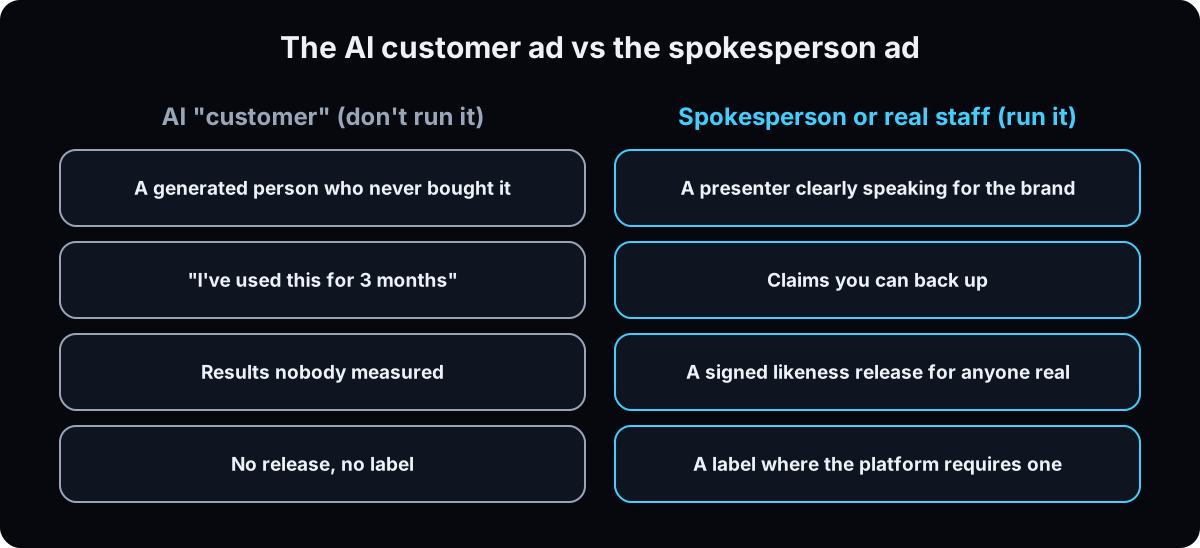 The tool doesn't care what the presenter says, so the legal risk sits entirely in your script. An AI person saying "I've used this for 3 months and my skin cleared up" claims an experience nobody had. A presenter saying "here's what's in the box and what it does" doesn't.
The second risk is a real person's face or voice used without clear permission. Both are covered in the next section and in steps 1 and 2.
| Kind | What it is | Can you run it? |
|---|---|---|
| AI avatar or presenter | A stock AI person from the tool's library (Arcads says it has 1,000+ AI actors) speaking for the brand | Yes, if the script doesn't pretend they're a customer and the claims are true |
| Real staff with AI edits | You, an employee or a hired creator, turned into an avatar or voice clone with consent | Yes, with a signed release that names the uses. It's the strongest option for trust |
| AI "customer" | A generated person describing their own results with a product they never used | No. It misrepresents that the testimonialist used the product, which 16 CFR 465.2 prohibits |
| Term | What it means |
|---|---|
| UGC | User-generated content: casual, phone-style video of a person talking about a product |
| AI avatar | A generated person, from a tool's stock library or built from someone's photos or video |
| Digital twin or custom avatar | An avatar built from a real person's footage, with their consent |
| Voice clone | A synthetic copy of a real person's voice, made from their recordings |
| Clip model | The AI model that turns an image, words and audio into a short video (Seedance, Kling, Veo, Sora 2) |
| Hook | The first 3 to 5 seconds that decide whether someone keeps watching |
| Body | The middle of the ad: what it is, how it works, one honest limit |
| CTA | Call to action: what you want the viewer to do next |
| Testimonial | An ad message people are likely to believe reflects a customer's own opinion or experience |
| Likeness release | A signed document letting you use someone's face and voice for named uses |
| AIGC label | TikTok's tag for AI-generated content in an ad |
| AI info label | The tag Meta adds to ads it detects or knows were made or edited with AI |
| Hook rate | 3-second video plays divided by impressions: how well the opening stops the scroll |
| Room tone | The quiet background sound of a real room, laid under a voice so it doesn't sound sealed |
Are AI UGC ads legal?
Every tutorial makes these and nobody mentions a law. Can I run AI UGC ads, or am I about to get fined or lose my ad account?
The activity is legal. Three versions of it aren't safe: an AI person posing as a customer, a real person's likeness without clear consent, and missing AI labels where a platform requires them. This is general information, not legal advice; take specifics to your lawyer.
- No fake customers. The FTC's rule on consumer reviews and testimonials (16 CFR Part 465) took effect on 21 October 2024. Section 465.2 bars a business from creating a testimonial that misrepresents that the person exists, that they used the product, or what their experience was. The FTC's announcement names AI-generated fake reviews as an example.
- Avatars aren't banned. The FTC's questions and answers on the rule say it "has no blanket prohibition" on AI avatars. An avatar ad breaks the rule only if the testimonial in it is fake or false, and it can still be deceptive under the FTC Act.
- The fine is real. A knowing violation can cost up to $53,088 per violation, the 2025 inflation-adjusted amount still listed in the FTC's civil penalty table (checked 15 September 2026; federal agencies skipped the 2026 inflation adjustment). The advertiser answers for an ad an agency or freelancer made.
- Health and results claims need proof. Per the FTC's health products guidance, a claim made through a testimonial needs the same evidence as a claim you make directly, and "results not typical" doesn't fix a deceptive one.
- Real people need a specific release. California's AB 2602, signed 17 September 2024, makes a contract clause allowing a digital replica of a worker unenforceable if it lacks a reasonably specific description of the intended uses, unless the worker had a lawyer or union negotiate it. HeyGen, for one, requires the person to record their own consent video before it builds their digital twin.
- TikTok requires its AIGC label or a clear disclaimer, caption, watermark or sticker on ads with fully AI-generated or significantly AI-edited media, including cloned voices, and rejects or restricts undisclosed ones. Lighting and colour tweaks are exempt.
- Meta requires advertisers to disclose AI only on ads about social issues, elections or politics. For other ads it may detect third-party AI and add an AI info label itself (checked 15 September 2026).
The label isn't the big risk. The words in the presenter's mouth are. Keep the presenter speaking for the brand, never as a customer, and every claim one you could prove.
From zero to your first 3 AI UGC ads
1. Pick a spokesperson, not a fake customer
Choose one of the first two kinds from the table: a stock avatar who speaks for your brand, or a real person (you, staff, a hired creator) who agrees in writing. Then write down the rule for every script: the presenter talks about the product; the presenter never says they bought it, used it or got a result.
Real stories belong to real customers. If you have a genuine review, film or quote the actual customer with their permission, and don't have an avatar retell it.
Why: this one decision removes the fake testimonial problem before you spend a credit, and it stops the most common tutorial script from ever reaching your ad account.
2. Get a signed likeness release before you generate anyone real
Skip this for a stock avatar, but read the tool's terms for commercial use. For any real person, get a separate signed release, not a line in a job contract. Fill in this checklist and take it to your lawyer:
Name: [person]. Uses allowed: [paid social / organic / email / website]. Platforms: [list]. Territory and term: [where, how long]. Script approval: [each script needs their written OK, yes/no]. When they leave: [ads paused within N days]. Deletion: [avatar and voice clone deleted on exit]. No sublicensing to third parties.
For an agency, get it signed by the client's person and keep a copy on your side too.
Why: under laws like California's AB 2602 a vague clause may not hold, and a staff member leaving with 20 live ads on their face is a problem you settle on day one or pay for later.
3. Write the script in parts
Write parts, not one video: 5 hooks of 3 to 5 seconds, 1 body under 160 words, and 3 CTAs. That's the set my agency writes for client accounts, and it's the same hook, body, CTA structure as filming ad creative variations. For hook shapes, see how to write hooks.
Fill in: Hook: [a problem your buyer has, said in their words]. Body: [what the product is], [how it works in one sentence], [one honest limit], [what it costs or how to start]. CTA: [one action], [where].
Keep 2 to 3 spoken words per second of clip, so a 5-second hook is about 12 words. Too many and the presenter rushes; too few and it fills the gap with odd sounds.
Why: separate parts let you swap a hook without regenerating the whole ad, and a script in the brand's voice keeps your ads when a presenter or tool changes.
4. Pick one no-code tool and start on a small plan
Prices below are from each vendor's own pricing page, checked 15 September 2026. They change often, so reopen the page before you pay.
HeyGen (pricing): free plan with 3 videos a month and a watermark; Creator $29 a month ($24 billed annually); Pro from $49; Business $149 a month plus $20 a seat.
Higgsfield (pricing): Starter $19 a month; Plus $59 a month or $47 a month billed annually. It picks the model per step, including Seedance and Kling.
Arcads (site): an AI actor library built for ads. I couldn't find a public price on its site, so check after sign-up.
ElevenLabs (pricing) for voices: the paid Starter plan at $6 a month is the first tier listing a commercial licence and instant voice cloning.
Test on a free tier, but don't run watermarked clips as paid ads.
Why: one tool learned well beats three half-learned, and when I last checked, none of the prices I found in rival comparison videos matched the vendor's own page.
5. Make your first clip: one hook, one body, one CTA
Start with a single ad before a batch. Pick the presenter, paste hook 1, the body and CTA 1 as separate scenes, and generate. If the tool asks for an image prompt, open it with phone front camera, selfie framing, natural window light, natural skin texture, and ask for no captions or music (you add those in the edit).
For a real person, upload one sharp, well-lit portrait and reuse that same image every time. Editing from your last edit drifts the face a little more each round. For more, see consistent AI characters and making AI images look real.
Why: one finished ad shows you where your tool fails before you've paid to generate 15 clips of the same fault.
6. Run the realism check on every clip
Check in this order and mark each clip ship, regenerate once, or rewrite the line.
Audio: dead silence behind the voice is the loudest tell, so lay room tone under it. Same voice across every clip? Any natural pauses?
Face: skin too smooth, eyes too even, the mouth on hard sounds like b, p and m, eye contact that never breaks.
Frame: hands, product shape and label, clothes changing between clips, light that doesn't match the room.
Claims: is every sentence on your landing page? Any "I tried", "my results", guarantee or cure words? Cut them.
Tutorials suggest speeding up a bad moment or hiding it under B-roll. Cutting away to real footage of the product is normal editing. Speeding up to hide a glitch on a real person's face is concealment, and I won't do it.
Why: viewers argue about whether they can spot AI in these ads, and a clip that fails one of these checks gives them the answer.
7. Label it where the platform asks
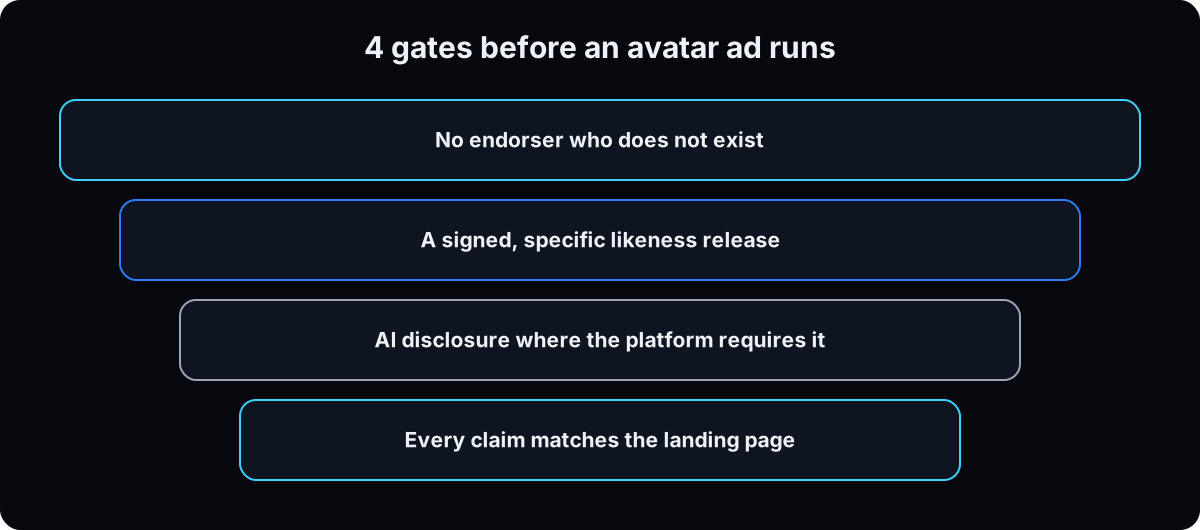 TikTok: turn on the AIGC label when you create the ad, or add a clear on-screen line such as AI presenter. Meta: the disclosure checkbox is required for social issue, election and political ads; for other ads Meta may add its own AI info label. If you use Meta's own generative AI ad tools, its Ad Creative Generative AI Terms also say not to pass that output off as human-made or strip its watermark.
An on-screen line costs you little on any platform and removes the argument.
Why: an undisclosed AI ad on TikTok gets rejected or restricted, and labels are cheap next to a rejected account.
8. Launch 3 ads and read the results
Stitch 3 ads: hooks 1, 2 and 3, each with the same body and the same CTA, so the hook is the only difference. Name each file by its parts (for example hook2-body1-cta1-avatarA-0915) and use the file name as the ad name.
Leave them alone for 72 hours. Then read hook rate (3-second plays divided by impressions) to pick the hook, and cost per lead to judge the ad. After 2 weeks, turn off the losers, keep the winning hook, and test the other CTAs against it. For what to look for, see what makes a good Facebook ad.
Why: changing one part at a time is the only way to know which part worked, and it's the whole reason you wrote the script in parts.
Starter prompts
Paste these as written. They are short on purpose, because the long ones drift.
You are writing an AI UGC video ad for my business, in parts. My offer: [product or service, price shape, who it's for, the landing page, a free resource if one exists]. The presenter is [a stock AI avatar speaking for the brand / a real person, name and role, signed release on file]. Clip lengths my tool generates: [5, 10, 15] seconds. Write: 1) Five hooks of 3 to 5 seconds, each a different shape (buried truth, before you do this, contrarian, identity call out, first timer), with a word count that fits the clip at about 2.5 words per second. 2) One body under 160 words, to one person, with one concrete mechanism and one honest limit, that pairs with every hook and repeats none, split into clips with a word count on each. 3) Three calls to action: a direct one, the free resource if it exists, and a one-word comment trigger only if I confirm the automation is live. Rules: the presenter speaks for the brand. The presenter never says they bought, used or got results from the product, and never tells a story that did not happen. Nothing that is not on my landing page. No cure or guarantee language. Zero em dashes. Return an assembly sheet: the first 3 ads to make (hooks 1 to 3, same body, same CTA) with a file name for each in the form hook-body-cta-presenter-date.
Here are [N] frames and the transcript from my AI UGC clips: [attach]. Check each clip in this order and mark it ship, regenerate once, or rewrite the line. Audio: room tone under the voice or dead silence? Natural pauses? Same voice as the other clips? Face: skin texture, eye symmetry, the mouth on b, p and m, whether the presenter ever looks away. Frame: hands, product shape and label, clothing against the reference, lighting against the room. Claims: flag any line where the presenter implies they used the product or got a result, and any line not on this landing page: [paste page text]. For a regenerate, give me the one prompt change. For a rewrite, say why the line is the problem. Never suggest speeding a clip up to hide a fault.
Draft the checklist a written likeness and voice release for [person, role] must satisfy before I generate an AI avatar or voice clone of them. Name specifically: - which uses are allowed (paid social, organic, email, website) - which platforms - territory and term - whether each script needs their written approval before it runs - what happens to live ads when they leave - deletion of the avatar and voice clone on exit - no sublicensing to third parties - no use in an ad they have not read Flag anything a general clause in an employment or creator contract would fail to cover. Say at the top that this is a checklist to take to a lawyer, not legal advice.
For terminal users: price and generate with the Higgsfield CLI
Skip this if you don't use a terminal. Everything above works without it. Higgsfield's pricing page notes that the unlimited models and free generations on its plans aren't available through its MCP or CLI, so this path spends credits.
Price the batch before you generate
higgsfield generate cost estimates credits without creating a job or spending. On my own account on 8 September 2026 it returned: kling3_0 5 seconds standard, 8.75 credits; seedance_2_0 5 seconds at 720p, 22.5; marketing_studio_video 15 seconds at 1080p, 150. An 11-clip set came to about 96 credits on Kling, 248 on Seedance and 1,650 through Marketing Studio. veo3_1 at 8 seconds was 22 credits at basic and at high, and 48 at ultra, so don't pay for ultra by reflex.
Why: the same script can cost 17 times more depending on the model.
higgsfield generate cost kling3_0 --duration 5 --mode std
higgsfield generate cost seedance_2_0 --duration 5 --resolution 720p
higgsfield generate cost veo3_1 --duration 8 --quality basic
Lock the face and the voice
Upload the portrait once with higgsfield upload create and reuse the id. Put this line in every prompt: Preserve exact facial likeness, hairstyle, skin tone, build and clothing as photographed. Do not alter the face. Re-light and re-compose only. Run higgsfield voices list, pick one voice ID, and write it next to the presenter's name.
Real staff stay on this identity-lock path. Marketing Studio's avatar endpoints are built around stock avatars, and I haven't got a real staff face through them cleanly.
Why: one face and one voice across every clip is what makes a batch look like one person.
Generate one part per clip
One generation per hook, body section and CTA, with the reference image attached and the duration matched to the word count.
higgsfield generate create kling3_0 \
  --prompt "Single continuous shot, no cuts. Presenter speaks to camera, eye level, phone front camera, natural window light. She says: 'Before you buy another serum, give me ten seconds.' No captions, no music." \
  --start-image <upload_id> \
  --duration 5 --mode std --aspect_ratio 9:16 --wait
If this happens, do this
Every one of these has happened to me or to someone I set this up for.
| Failure | Fix |
|---|---|
| The script has the avatar say "I tried it and it worked" | Rewrite it before generating. That's a testimonial from someone who didn't use the product, which 16 CFR 465.2 prohibits |
| TikTok rejected or restricted the ad | Undisclosed AI content. Turn on the AIGC label or add a clear on-screen line, then resubmit |
| A staff member left and their face is on every live ad | Pause those ads, swap the presenter, keep the scripts. Next time the release says what happens on exit |
| The presenter rushes the last words or trails off | The word count didn't fit the clip. Rewrite the line to about 2.5 words a second |
| The face drifts or gets smoother each round | You're editing the last edit. Always go back to the same original portrait |
| It sounds fake even though it looks fine | Dead silent background. Lay room tone under the voice and keep the natural pauses |
| Comment keyword CTA with nothing behind it | Build the comment-to-DM automation first, or use the direct CTA |
The tools I use for this
| Tool | What it is for here | |
|---|---|---|
| HeyGen | All-in-one avatar video: stock avatars, consented digital twins, voices. Free plan with watermark; Creator $29 a month (checked 15 September 2026). | Open |
| Higgsfield | Pick the clip model per step (Seedance, Kling and others); also has a CLI. Starter $19 a month (checked 15 September 2026). What I run. | Open |
| Arcads | AI actor library built for ad creative. No public price found on its site (checked 15 September 2026). | Open |
| ElevenLabs | Voices, consented voice clones and a voice changer to keep one voice across a cut. Commercial licence from Starter, $6 a month (checked 15 September 2026). | Open |
| Submagic † | Captions on every finished ad. | Get it |
| CapCut or DaVinci Resolve | Stitch the parts, cut away to real product footage, add room tone, export. | no link needed |
| Claude | Runs the skill below: writes the script set, checks claims, builds the assembly sheet. | Open |
| GoHighLevel † | Where the comment keyword and free resource live, so the CTA leads somewhere real. | Get it |
| FTC rule, 16 CFR Part 465 | The fake reviews and testimonials rule. Read section 465.2 and the FTC's Q&A on AI avatars. | Read |
| TikTok ads AIGC policy | The label rule that gets undisclosed AI ads rejected. | Read |
What I'd tell you over coffee
- Real staff beat a stock avatar for trust when you can get the release. People can meet that person when they call or walk in.
- Write the claims check once as a Claude Project instruction, so every script gets checked the same way.
- Keep the original portrait and the voice ID in the same folder as the signed release. When someone asks who agreed to this, it's one click.
- Nobody has measured how long one AI face can carry an account before people tune it out, including me. Watch frequency and have a second presenter ready.
Questions people ask
What are AI UGC ads?
They're ads made to look like user-generated content (a person talking to a phone camera about a product), but made with AI tools instead of a filmed creator. A tool combines a presenter image, a script and a voice into a short talking video. The presenter can be a stock AI avatar or a real person who consented.
Are AI UGC ads legal?
Yes, when the presenter speaks for the brand. The FTC's Q&A on its testimonials rule says there's no blanket ban on AI avatars. What 16 CFR 465.2 prohibits is a testimonial that misrepresents that the person exists or used the product, so an AI "customer" describing their results is the version to avoid. You also need consent for any real person's likeness.
Can people tell an ad is AI UGC?
Some can, some can't, and I haven't found a solid public study. Creators on r/AI_UGC_Marketing argue both ways, with one thread saying the ads look pretty real now, but side-by-side is a different story. The usual giveaways are silent audio, hands, and mouths on hard consonants, which is why step 6 checks those first.
Can I make AI UGC ads for free?
You can test for free. HeyGen's free plan allows 3 videos a month with a watermark (checked 15 September 2026). For paid ads you'll want a paid plan without the watermark, and ElevenLabs lists its commercial licence from the $6 Starter plan, not the free one.
What's the best AI UGC video generator?
The one that fits your presenter. For a stock or consented avatar in one screen, HeyGen or Arcads. For picking the clip model yourself (Seedance, Kling and others), Higgsfield. Start with one, make the 3 ads in this guide, and judge it on hook rate, not on a demo reel.
Do I have to disclose AI UGC ads on Facebook and Instagram?
Meta requires the disclosure for social issue, election and political ads. For other ads it doesn't require it, but it may detect AI and add its own AI info label (checked 15 September 2026). TikTok is stricter and requires a label on AI-generated ads.
Can I make money making AI UGC ads for brands?
People are trying. r/UGCSideHustle has posts like I made 8700$+ from AI ugc and r/AI_UGC_Marketing has has anyone of you made decent money, with mixed answers. Those are self-reported, so treat them as anecdotes. If you sell it, the brand is still the advertiser on the hook for fake testimonials, so the rules above protect your clients and you.
The free skill
It writes an AI UGC ad as parts: 5 hooks, 1 body under 160 words, 3 CTAs, each sized to its clip. It refuses AI customer testimonials, checks every line against your landing page, reminds you of the release and the platform labels, and returns an assembly sheet with file names. Related guides: ad creative variations and AI static ads.
---
name: ai-ugc-ads
description: Writes an AI UGC video ad for a small business or agency client as parts (5 hooks, 1 body under 160 words, 3 CTAs) sized to each clip length, writes the presenter description or the identity lock line for a consented real person, refuses AI customer testimonials, checks every spoken line against the landing page, reminds the human about the likeness release and platform AI labels, and returns an assembly sheet with file names. Trigger on "make me an AI UGC ad", "AI UGC script", "avatar ad", "talking head ad without filming", "AI presenter ad".
---

# AI UGC Ads

You're producing a UGC-style talking head ad (one person, phone framing, talking to camera) where nobody films. The presenter is generated or cloned with consent. The script isn't generated from nothing: it comes from the business's own offer and page. Write the script first, in parts. Everything after that is assembly.

Never invent a fact, price, review, customer or result. Missing facts stay in [brackets].

## Step 1: Intake (ask only what's missing)
- Offer: product or service, price shape, who it's for, the landing page (paste its text), a free resource if one exists.
- Presenter: a stock AI avatar speaking for the brand, or a real person (name, role, signed release on file, one sharp portrait).
- Clip lengths the tool generates (for example 5, 10, 15 seconds).
- Limits: claims the business won't make. For health, finance or results-driven offers, ask what evidence exists for each claim.

## Step 2: The presenter rule (hard stop)
The presenter speaks for the brand. The presenter never says they bought, used, tried or got results from the product, and never tells a story that didn't happen.

Why: the FTC's rule on consumer reviews and testimonials (16 CFR Part 465, effective 21 October 2024) prohibits a testimonial that misrepresents that the person exists, that they used the product, or what their experience was. The FTC's Q&A says there's no blanket ban on AI avatars; the problem is a fake or false testimonial. If the human asks for an AI customer testimonial, refuse that line, say why in one sentence, and offer the spokesperson version. Real customer stories come from real customers, with permission.

## Step 3: The script set, with word counts
Write parts, not a video:
- **5 hooks**, 3 to 5 seconds each, 5 different shapes: buried truth, before you do this, contrarian, identity call out, first timer.
- **1 body under 160 words**, to one person: what it is, one concrete mechanism, one honest limit, how to start. Pairs with every hook and repeats none. Split into clips with a word count on each.
- **3 CTAs**: direct (one action, where), the free resource (only if it exists), a one-word comment trigger (only if the human confirms the automation is live).

Size every line at about 2.5 spoken words per second. Too many words and the presenter rushes; too few and it fills the gap with odd sounds. Rewrite the line to fit the clip, never the reverse.

## Step 4: The presenter description
Stock or generic presenter: stated age, average realistic build, real skin texture, natural asymmetry, no retouching sheen, phone front camera, selfie framing, natural window light. Ask the tool for no captions and no music.

Real person: don't describe a face. Write the identity lock line for every prompt: "Preserve exact facial likeness, hairstyle, skin tone, build and clothing as photographed. Do not alter the face. Re-light and re-compose only." Always use the same original portrait, never the last edit.

Consent before anything real is generated: a signed likeness and voice release, separate from any job or creator contract, naming uses, platforms, territory, term, per-script approval, what happens to live ads when they leave, and deletion of the avatar and voice clone on exit. Tell the human to take it to a lawyer. You don't give legal advice.

## Step 5: The checks (every spoken line and on-screen word)
Claims: every sentence must be on the landing page or backed by evidence the human confirmed. Flag "I tried", "my results", "it worked for me", cure, guarantee and prevent language. A claim made through a testimonial needs the same evidence as a direct claim, and "results not typical" doesn't fix it.

Writing: zero em dashes. No brochure words (game-changer, unlock, elevate, seamless, holistic, journey, empower, transformative, cutting-edge, revolutionary). No phrase over 5 words borrowed from any source. It must fail the "could be anybody's ad" test.

Labels: remind the human that TikTok requires its AIGC label or a clear disclaimer on AI-generated ads, and that Meta requires disclosure on social issue, election and political ads and may add its own AI info label to others. Suggest an on-screen "AI presenter" line as the simple default.

## Step 6: Generation and realism notes for the human
- Price the batch before generating if the tool shows credit costs.
- One generation per part. Batch, then review together.
- Check audio first (room tone under the voice, natural pauses, same voice in every clip), then face (skin, eyes, mouth on b, p, m), then frame (hands, product label, clothing, light).
- One regeneration per clip, then rewrite the line or replace the reference.
- Cut away to real product footage rather than speeding a clip up to hide a fault.

## Step 7: The assembly sheet
Return a table of the first 3 ads: hooks 1, 2 and 3, each with the same body and the same CTA, total length, and a file name in the form `hook-body-cta-presenter-MMDD`. Ad name equals file name.

## Weekly mode
Given hook rates (3-second plays over impressions) and cost per lead: keep the body, write 3 new hooks in the winning shape without repeating its words, then test the other CTAs against the winning hook. Remind the human to recheck that every real presenter's release is still current.
Want the script set, the presenter and your first ads made with you?
Inside the AI CEO Lab the Demand Engine module walks the script, the presenter lock and the batch on your own offer, with the claims check built into the prompts.