 AI CEO Lab
AI Ad Generator: Make Static Image Ads Free, Without Faking Proof
Make a static image ad with ChatGPT or Gemini for free: copyable prompts, the direct or indirect decision, a check before you publish, Meta's AI label and health rules, and the Higgsfield batch as a later step.
You need ad images this week and you don't have a designer. ChatGPT and the Gemini app can both draw a finished ad, words included, from one prompt on a free account. The trouble is what else they draw: star ratings you never earned, prices you don't charge, results nobody got.
Your customers have also learned to spot AI ads, and many don't like them. So this guide treats that distrust as a design rule. You get a free browser path, copyable prompts, a layout, a check before you publish, Meta's current rules on AI labels and health claims, and a terminal batch for agencies as a later, optional step.
I'm a doctor who runs an ad agency, not an engineer. New to AI ads? Start with the next section. Already making them? Skip to step 8 and run the check before your next one goes live.
What you have by the end
Not concepts. Things that exist on your machine when you close the tab.
- A plain-English picture of what an AI ad generator is, and what it gets wrong
- An offer sheet that holds every fact your ad is allowed to show
- A direct or indirect decision made before you write a word
- Copyable prompts for a first ad, a full layout, and edits from your own photo
- A check before publish that catches misspelled text, invented claims and a wrong offer
- Two sizes ready for Meta, with the AI label and health ad rules understood
Start here: what an AI ad generator is, in plain English
If you've only used ChatGPT to write emails, 5 ideas make the rest of this page click.
What it is
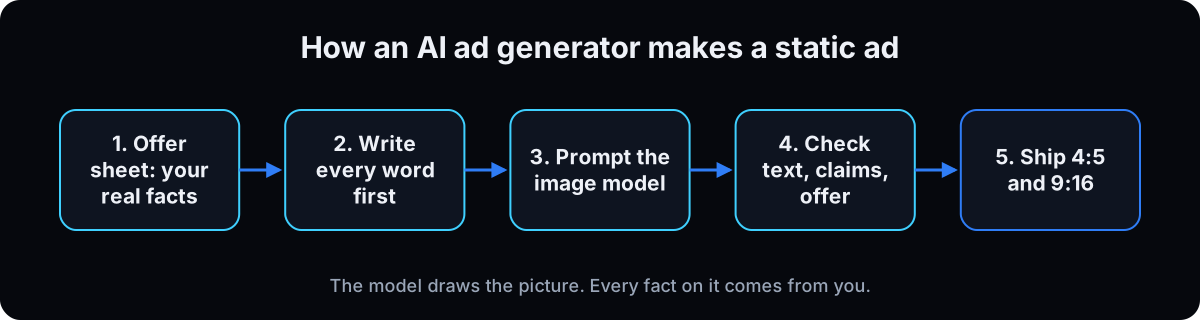 An AI ad generator is an image model that turns a written description, called a prompt, into a finished ad image, headline and button included. Paid ad tools wrap this kind of model in templates. You don't need one to start.
OpenAI released ChatGPT Images 2.5 on 8 September 2026 for ChatGPT users on all tiers, free included. Google's Gemini app plans page lists image generation with Nano Banana 2 on every plan, including no plan (checked 15 September 2026). Nano Banana is Google's name for its Gemini image models.
Static vs video ads
A static ad is one still image with your ad text above it. It's the cheapest thing to test: one prompt, one image, and you can read every word before it runs. Video ads add a script, voice and motion, and far more places for the model to go wrong.
This guide is statics only. For AI video, see AI UGC ads.
Direct vs indirect ads
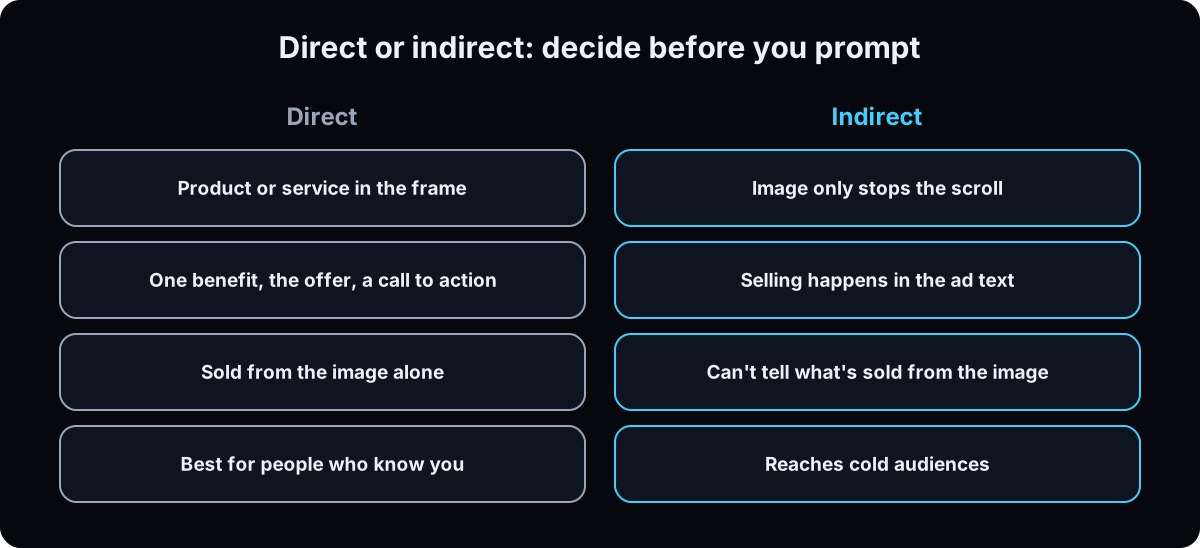 A direct ad sells from the image alone: the product, one benefit, the offer, the button. It works best on people who already know you. An indirect ad only stops the scroll, and the ad text does the selling. That's what reaches people who don't know you yet.
Most owners only make direct ads, then wonder why cold audiences won't respond. Step 3 makes you choose.
Why people distrust obvious AI ads
In IAB research published 15 January 2026, 82% of ad executives believed Gen Z and Millennial consumers felt positive about AI-generated ads. Only 45% of those consumers did. NielsenIQ testing with more than 2,000 people (December 2024) found viewers called AI ads annoying, boring and confusing, and remembered them less, even the good-looking ones.
Search "AI generated ads" on YouTube and the biggest results are creators unboxing products from AI dropship ads that didn't match the picture. By my count they had roughly 20 times the views of the how-to videos on the term. The failure is the same every time: the thing shown doesn't exist as shown.
So use it as a design rule: the ad should look like a photo of your real business, and nothing on it can promise what the customer won't receive.
The catch: models invent proof
Ask for an ad and the model fills empty space with things that look convincing: "4.9 stars", "500+ happy clients", a price, a badge. None of it comes from you. OpenAI's own image generation guide still lists text rendering and precise layout as limits (checked 15 September 2026).
That matters legally too. The FTC rule on fake reviews, announced 14 August 2024, covers reviews and testimonials by someone who doesn't exist, and names AI-generated fake reviews. And Meta can tell: its help page on AI in ads says ad images made with third-party AI tools get an AI info label. OpenAI says its images carry C2PA metadata and an invisible watermark, and Google says every Gemini image carries a SynthID watermark.
| Option | Cost to start | Worth knowing | Watch out for |
|---|---|---|---|
| ChatGPT (Images 2.5) | Free tier included | Templates for formats like posters and flyers; comment on one spot to edit it | Daily limits shown in the app; OpenAI announcement |
| Gemini app (Nano Banana 2) | Free, no plan needed | Upload your own photo and describe the change | Visible watermark on new images unless turned off (Google); Nano Banana Pro redo starts at AI Plus |
| Template ad tools | Usually paid plans | Brand templates instead of prompts | Same invented-proof risk; check pricing on their site |
| Higgsfield CLI | Paid credits | Brand kit from a URL, batches up to 20 | Defaults to low quality, 1k, 1:1; set all three (see the terminal section) |
| Term | What it means |
|---|---|
| AI ad generator | An image model, or a tool built on one, that makes an ad image from a prompt |
| Prompt | The written instructions you give the model |
| Static ad | A single still image ad, as opposed to video |
| Direct ad | An ad that sells from the image alone: product, benefit, offer, call to action |
| Indirect ad | An ad whose image only stops the scroll; the ad text does the selling |
| Cold / warm audience | People who don't know you yet / people who've visited or engaged |
| Retargeting | Showing ads to people who already visited your page or engaged |
| Offer sheet | Your list of every fact the ad may show, each with a source |
| Nano Banana | Google's nickname for its Gemini image models, such as Nano Banana 2 and Nano Banana Pro |
| ChatGPT Images 2.5 | OpenAI's image model in ChatGPT, released 8 September 2026 |
| Reference image | A real photo you upload so the model keeps your product or person accurate |
| Identity lock | A prompt line telling the model not to change a real person's face |
| Contact sheet | All your renders laid side by side so you judge them together |
| AI info label | Meta's label on ads made or significantly edited with AI |
| C2PA / SynthID | Hidden markers inside AI images that platforms can detect |
| Aspect ratio | Width to height. 4:5 is tall feed, 9:16 is full-screen Stories and Reels |
| Safe zone | The part of a 9:16 image that app buttons and captions don't cover |
| Standard enhancements | Meta settings that can change your creative automatically |
| CLI | Command line tool, run by typing in a terminal |
The mental model
An AI ad generator makes my ad for me, and I pick the prettiest one.
It draws. You supply every fact, and you check every word before it runs. The prettiest render with an invented review count is the worst one on the sheet.
| Term | What it means |
|---|---|
| You | The offer, the words, the proof, the real photos |
| The model | Layout, lighting, type, composition |
| The check | Every word and number traced to a source you can show |
| Meta | Labels AI images and reviews ads against its policies |
| The gate | Nothing publishes until you've read the finished image |
Will Meta block my ad for using AI?
If Meta can detect AI images, will it reject or bury my ads?
Meta's help page describes a label, not a ban: ad images created or edited with third-party AI tools get AI info, usually behind the three-dot menu under About this ad, and sometimes next to Sponsored. Meta's announcement (updated 1 June 2026) says ads with AI-generated photorealistic people are the ones that show it next to Sponsored (checked 15 September 2026). What gets ads rejected is the same as always:
- Claims. Invented reviews, results or prices break Meta's rules and the FTC's whether a person or a model wrote them.
- Health and personal attributes. Meta's health and wellness policy and personal attributes policy apply to every image. Step 9 covers both.
- Political and social issue ads. Meta requires advertisers to disclose AI-made or edited images, video or audio in those ads.
A clean, honest static with an AI info label is still a clean, honest static.
From a blank page to a checked static ad
1. Pick your free generator
ChatGPT. Sign in at chatgpt.com, start a chat and describe the image you want. Images 2.5 added templates for common formats and comments you place on an image to edit one spot. OpenAI doesn't publish a fixed free image count; ChatGPT shows you when you hit the limit.
Gemini. Sign in at gemini.google.com and ask for an image. Google's plans page says limits may change without notice. New images can carry a small visible watermark; Google's watermark page explains the setting (checked 15 September 2026).
Pick the one you already have an account for and learn it. Switch only if it keeps failing the step 4 test.
Why: both are free to test, and the prompts below work in either.
2. Write your offer sheet before anything gets made
This is the rule that keeps you out of trouble: nothing goes on the image unless it's on this sheet, and nothing goes on the sheet unless you can show where it came from. Your page, your price list, a review screen you can screenshot, a photo with consent.
Mark each price live or not approved. Only live ones go on an ad. If a monthly payment appears, US credit ads have disclosure rules under Regulation Z.
Why: the model will fill every gap with something plausible. A sheet with no gaps leaves it nothing to invent.
OFFER SHEET: [business name]
What I sell in this ad: [one product or service]
Who it's for: [customer, in one line]
The customer's words: [a sentence a real customer said or wrote to me]
One benefit, in my page's wording: [paste]
Price or offer (live only): [paste] | Source: [page URL]
Proof I can show: [review count, rating, award, credential] | Source: [link or screenshot]
Call to action: [Book / Shop / Get a quote]
Where: [city or full address]
Real photos I own, with consent: [list]
Not allowed on this ad: anything not listed above
3. Decide direct or indirect
Swipe structure from ads that already work before you pick. In the Meta Ad Library, the filter I use is simple: still running, and live at least 7 days. Borrow the structure, never the wording. What makes a good Facebook ad goes deeper.
Then paste this with your offer sheet. It picks the type, writes the ad text that carries it, and names the audience.
Why: a direct ad shown to strangers and an indirect ad shown to past visitors both waste money, and the image prompt is different for each.
Here is my offer sheet: [paste].
Audience: [cold, or people who visited my page or engaged with my content].
Decide whether this ad should be direct or indirect and say why in two sentences.
If direct: the image shows the product or service, one benefit, the offer and a call to action.
If indirect: the image only stops the scroll, you can't tell what's sold from it, and the ad text does the selling.
Write the ad text for the version you chose and tell me which audience to run it to.
Use only facts from my offer sheet. No em dashes.
4. Make one small test ad
Before the full layout, run one simple direct ad: a headline, your product, one line and a button. You're testing two things, whether the model spells your words right and whether the picture looks like your business.
Put every word you want on the image in quotes, and tell it there are no other words. If you have a real product photo, attach it and the model will keep it closer to the real thing.
Why: one cheap image shows you the model's habits before you spend an afternoon on a layout.
Make a 4:5 vertical static ad image for [business] in [city].
If a photo is attached, it is my real product. Keep its shape, color, label and branding exactly.
Show [product or service] in a real [setting], natural light, looks like a real photo, not a render.
The only words on the image are, exactly:
Headline: "[SHORT HEADLINE, NO APOSTROPHES]"
Line: "[ONE BENEFIT FROM MY PAGE]"
Button: "[CALL TO ACTION]"
Do not add any other text, logos, star ratings, review counts, prices, badges or statistics.
All text crisp, correctly spelled and fully visible.
5. Build the full layout
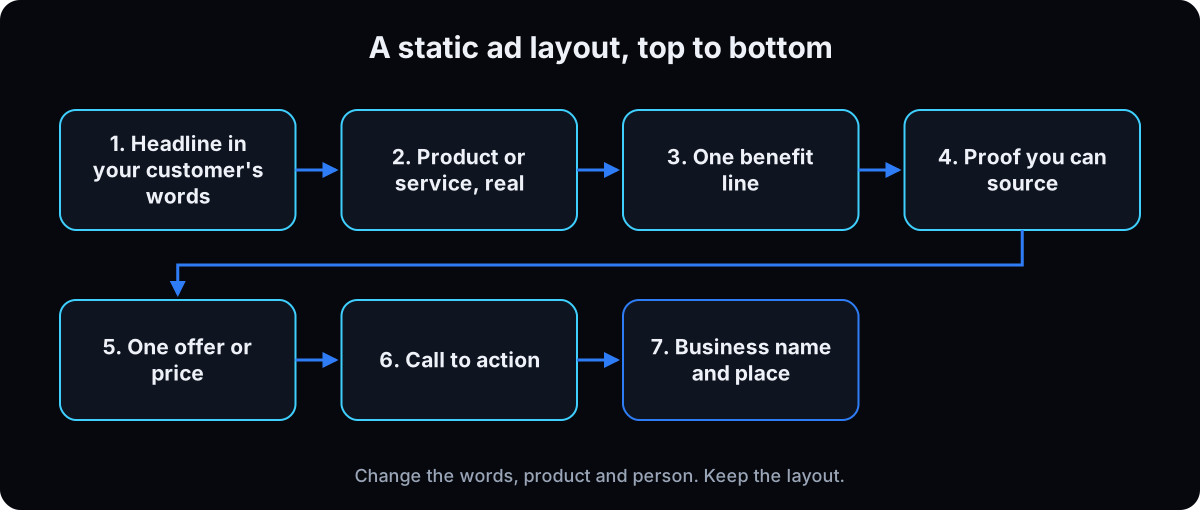 Once the test passes, use the layout below. It follows the skeleton of the statics that produced leads across my agency's clinic accounts, generalised for any local business: customer-words headline, the real thing, one benefit, sourced proof, one offer, button, and where you are.
No apostrophes in big headline type. On our render runs, condensed capitals turned ISN'T into IN'T often enough that we write IS NOT, DO NOT, CANNOT.
Change the words, product and person. Keep the layout, so when an ad wins you know why.
Why: a fixed layout turns ad testing into testing one idea at a time.
Premium static ad for [business], 4:5 vertical.
STYLE: [2 brand colors], one accent color only, bold condensed sans headline, clean small sans body, editorial photography, real textures, natural light.
LAYOUT top to bottom:
Headline in capitals, no apostrophes: "[THE CUSTOMER'S SENTENCE FROM MY OFFER SHEET]"
Main image: [real product or service in use, setting, person if any], filling half the frame, looks like a real photo.
One benefit line: "[BENEFIT FROM MY PAGE]"
Proof line, only if on my offer sheet: "[SOURCED PROOF]" (otherwise leave this line out)
Offer: "[ONE LIVE PRICE OR OFFER]"
Button: "[CALL TO ACTION]"
Footer: "[BUSINESS NAME, CITY OR ADDRESS]"
Small print, only if needed: "[TERMS OR DISCLAIMER]"
QUALITY: every quoted string present once, spelled correctly, fully legible, nothing cut off, no extra words.
AVOID: plastic skin, AI sheen, warped hands, extra fingers, stock poses, invented logos, star ratings, review counts, statistics or badges not quoted above, clutter.
6. Use your own photo and real people safely
The most honest ad starts from a real photo: your product, your shop, your team. Upload it and tell the model what to keep and what to change. Autocomplete shows people search for making an ad "from image", and this is how.
A real staff member on an ad needs their consent and this identity lock line. Then compare the render to the photo yourself. If faces come out waxy, make AI images look real has the fixes. For small edits on a render you like, see Nano Banana image editing.
Why: a generated stranger reads as stock, and a changed face on a real person is a misrepresentation.
Use the attached photo of [person or product].
Preserve the exact facial likeness, hairstyle, skin tone, build and clothing as photographed. Do not alter the face.
For a product: keep its shape, color, label and branding exactly.
Re-light and re-compose only: place it [where] at [size] in the layout I gave you.
Change nothing else.
7. Read the batch together, and fix once
Make 4 to 6 versions, then look at all of them side by side before you judge any single one. That's the contact sheet.
Allow one fix per image: keep everything identical, change only the defect. If a text mistake survives one fix, reword the line so it's easier to render. That beats a fifth reroll. A face that looks AI reads dishonest, whatever the copy says, so discard it.
Why: endless rerolls burn your daily limit and drift the image further from what you asked for.
Here are [N] versions of my ad: [attach].
For each: is every quoted string present once and spelled correctly, is anything cut off or duplicated, do hands, faces and the product look real, does it look like my business.
Mark each: ship, fix once (give me the exact one-line fix), or discard.
If the same text mistake appears twice, don't tell me to try again. Rewrite the line so it is easier to render.
No em dashes.
8. Run the check before you publish
This is the step most AI ad tutorials skip. Zoom to 100% and read the image yourself, then paste it back into a chat with the prompt below. It lists every claim and asks where each came from. An invented number gets removed, not swapped for a different number.
In the most-quoted video in this genre, a creator says he thinks the model made up a statistic, then ships the ad anyway. Don't.
Why: once an ad runs, every word on it is yours, legally and with your customers.
CHECK BEFORE PUBLISH
Text on the image
[ ] Every word spelled right at 100% zoom, nothing cut off or repeated
[ ] No words I didn't write (fake badges, stray letters, made-up slogans)
[ ] Phone, address, URL and business name exactly right
Claims
[ ] Every number, rating, review count, award and credential is on my offer sheet with a source
[ ] No result, before and after, or testimonial the model made up
[ ] Nothing says or implies the viewer has a health condition or other personal attribute
Offer accuracy
[ ] Price and offer are live today and match my landing page
[ ] The product or service shown is what the customer receives
[ ] Terms, deposit or financing line present if the offer needs one
People and platform
[ ] Real people have given consent, and their faces weren't changed
[ ] Fits Meta's policies for my category (step 9)

Paste into the chat:
Here is my ad image: [attach] and my offer sheet: [paste].
List every word, number, rating, review count, award, credential and claim on the image, one per line.
For each, point to the line of my offer sheet it came from. If you can't, mark it INVENTED.
Tell me whether anything on the image shows a product, result or service that doesn't exist exactly as shown.
9. Health, beauty and personal attribute rules
If you sell anything health, wellness or beauty related, Meta's health and wellness policy (updated 22 July 2026) applies. It bans statements that attack how someone looks, restricts promises of specific results in a set time without qualifiers, and limits cosmetic procedure ads, including before and afters, to people 18 and over.
Every business is covered by the personal attributes policy: ads can't assert or imply things like a person's health, age, finances or religion. Meta's own disallowed example is "Are you Christian?" A headline built on "you have this problem" gets rejected the same way (checked 15 September 2026).
Never generate a before and after, not even as a placeholder. It's a made-up result, and the FTC's health products compliance guidance expects health claims to have real evidence behind them. Use a real, consented, unretouched photo pair or a different angle entirely.
Why: an image model will happily draw a transformation. The rejection, or worse, lands on you.
10. Make two sizes and launch
Meta's Facebook feed image spec is 4:5 at 1440 by 1800 pixels, JPG or PNG (checked 15 September 2026). Make that your master. Build the 9:16 Stories and Reels version from it with the important parts inside the safe zone, instead of letting it crop automatically, because the headline and the address are what get cut.
In Ads Manager, map each size to its placement, turn standard enhancements off so Meta doesn't rewrite what you checked, and use one primary text and one headline per ad. Judge results on your CRM's lead count, not the platform's. For more angles from a winner, see ad creative variations, and to connect Claude to the account itself, Meta ads MCP.
Why: speed isn't quality. If the offer doesn't work, 50 renders of it won't either.
Later, for agencies: batch statics with the Higgsfield CLI
Skip this unless you make ads for several clients or offers every week and you're comfortable typing commands in a terminal. Everything above works without it. The commands below were read from the CLI's own help output on 15 September 2026; no generation was run for this guide.
Build a brand kit and product from a URL
The Higgsfield command line tool has a DTC Ads Engine that builds a brand kit from your website, imports your offer page as a product, and lists ad format presets with an id each. Log in once, then run these in order.
Why: you stop retyping brand colors and product details into every prompt.
higgsfield auth login
higgsfield marketing-studio brand-kits fetch --url https://yourbusiness.com --wait
higgsfield marketing-studio products fetch --url https://yourbusiness.com/offer --wait
higgsfield marketing-studio ad-formats list
Preview the cost, then raise the three defaults
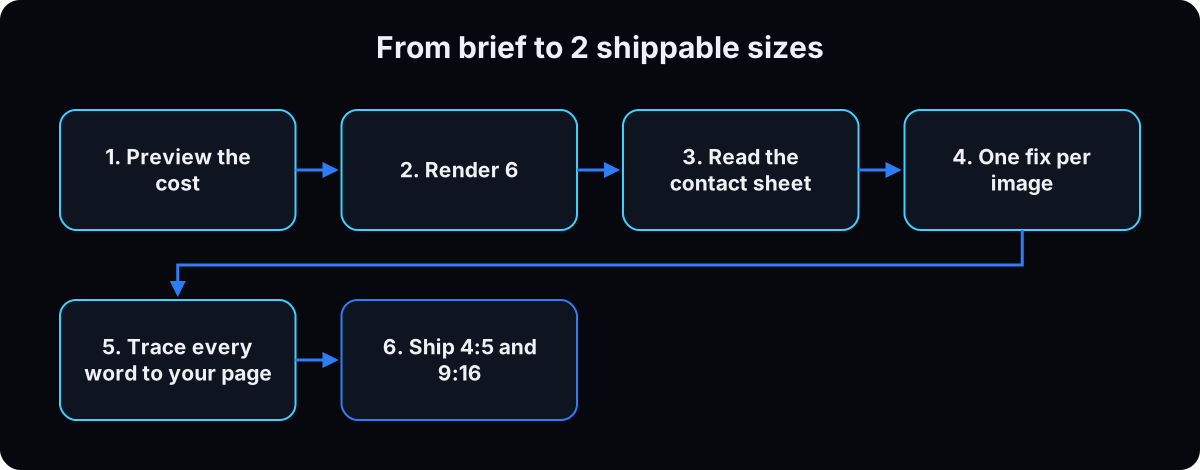 Per the help output, generate defaults to low quality, 1k resolution and a 1:1 square. None of those is a feed ad. Set all three every time, and use
 --cost-only to see the price without creating a job. Batches run 1 to 20; 6 per angle is enough to judge an idea.
Then read the contact sheet and run the step 8 check on every image, same as the browser path.
Why: the defaults quietly make square, low-quality images you'll have to render again.
higgsfield marketing-studio dtc-ads generate --prompt "$(cat brief.txt)" --format-id <format_id> --cost-only

higgsfield marketing-studio dtc-ads generate \
  --prompt "$(cat brief.txt)" --format-id <format_id> \
  --brand-kit-id <brand_kit_id> --product <product_id> \
  --aspect-ratio 4:5 --quality high --resolution 2k \
  --batch-size 6 --wait
If this happens, do this
Every one of these has happened to me or to someone I set this up for.
| Failure | Fix |
|---|---|
| The ad shows a star rating or review count you never gave it | Remove it, don't replace it. Add "no ratings, reviews, badges or statistics not quoted above" to the prompt |
| Headline renders ISN'T as IN'T | No apostrophes in big type: IS NOT, DO NOT, CANNOT |
| The same text mistake survives a fix | Reword the line shorter instead of rerolling |
| Your product came out a different shape or color | Attach the real photo and say keep its shape, color, label and branding exactly |
| A team member's face doesn't look like them | Use the identity lock line, compare to the photo, or don't use the render |
| Direct ad to cold audiences isn't working | Direct suits people who know you. Test an indirect ad that sells in the text |
| Gemini image has a watermark in the corner | Check Google's watermark setting, or crop or cover it in the layout |
| Ad rejected for a health or personal attribute claim | Remove any line that says or implies the viewer has a condition, and check Meta's health policy |
| Stories placement cut off the headline or address | Build 9:16 from the 4:5 master inside the safe zone |
| Higgsfield batch came out square and soft | Set --aspect-ratio 4:5 --quality high --resolution 2k; the defaults are 1:1, low and 1k |
The tools I use for this
| Tool | What it is for here | |
|---|---|---|
| ChatGPT | Free image generation with Images 2.5, on all tiers, with templates and on-image comments. | Open |
| Gemini app | Free image generation with Nano Banana 2, on every plan. Upload a photo and describe the edit. | Open |
| Meta Ad Library | Free swipe file. Filter to ads still running and live at least a week. | Open |
| Meta Ads Manager | Where both sizes get mapped to placements with enhancements off. | Open |
| Claude | Runs the direct or indirect decision, reads the contact sheet and the claims check. | Open |
| Higgsfield CLI | Optional, for agencies: brand kits and products from a URL, ad format presets, batched renders. | Read |
| GoHighLevel † | The lead count the statics are judged on, never the platform's. | Get it |
What I'd tell you over coffee
- Keep your offer sheet in a doc you paste every time. Most bad ads start with a model guessing a fact you didn't give it.
- Make both a direct and an indirect ad for the same offer. Most owners only ever make the direct one.
- Save the prompt with every ad that wins, named by product, hook and date. A winner you can't recreate is luck.
Questions people ask
What is the best free AI ad generator?
For static image ads, start with the free tiers of ChatGPT and the Gemini app. ChatGPT runs Images 2.5 on all tiers, and Google lists Nano Banana 2 on every Gemini plan, including no plan (checked 15 September 2026). Both have daily limits. Try the step 4 prompt in each and keep whichever spells your words right more often.
Can ChatGPT make ads?
Yes. Describe the ad, put every word you want on it in quotes, and attach a real product photo if you have one. It will also add text you didn't ask for, so tell it there are no other words and run the check in step 8 before you publish.
How do I make ads with Nano Banana?
Open the Gemini app, attach your product or team photo, and use the layout prompt in step 5. Say what to keep from the photo and what to change. New images may carry a small visible watermark depending on your settings, which Google explains on its watermark page.
Can I make an AI ad from a product image?
Yes, and it's the most accurate way. Upload the photo and tell the model to keep its shape, color, label and branding exactly, then place it in your layout. Compare the result to the real product before you publish.
Are AI-generated ads allowed on Facebook?
Meta's help page describes labeling, not a ban: ad images made or edited with third-party AI tools get an AI info label under About this ad. The ad still has to pass Meta's normal policies, and ads about social issues, elections or politics must disclose AI-made or edited media (checked 15 September 2026).
Do I have to disclose AI in my ads?
For ordinary product and service ads, Meta applies the AI info label itself when it detects AI. For social issue, election and political ads, Meta requires the advertiser to disclose it. Other platforms and places have their own rules, so check yours if you advertise beyond Meta.
Why do people hate AI generated ads?
Many AI ads look fake or promise things that don't exist. NielsenIQ's testing found viewers called AI ads annoying, boring and confusing, and IAB research found only 45% of Gen Z and Millennial consumers felt positive about them. An ad built from real photos and facts you can back up avoids most of that.
The free skill
It builds a static image ad for any business from your offer sheet: the direct or indirect decision, a prompt in the locked layout with every word quoted, the identity lock for real people, and the check before publish. It refuses any number, review or claim that isn't on your sheet and never generates a before and after. Works in ChatGPT, Gemini or Claude, with an optional Higgsfield batch for agencies. Related: ad creative variations.
---
name: static-ads-ai-generator
description: Builds a static image ad for any small business or agency client from an offer sheet, using a free image model (ChatGPT Images or Nano Banana in the Gemini app) or the Higgsfield CLI. Makes the direct or indirect decision, writes every on-image word first, fills a locked 7 part layout with every string quoted, adds the identity lock for real people, then runs the check before publish (text on image, claims, offer accuracy, Meta health and personal attribute rules). Refuses any number, review, price or result not on the offer sheet and never generates a before and after. Trigger on "make a static ad", "AI ad generator", "image ad for my business", "Nano Banana ad", "ChatGPT ad image".
---

# Static Image Ads With an AI Image Model

You make static image ads (one still image, not video) for a small business or an agency's client. The model draws. Every fact on the image comes from the user.

Hard rules:
- Never invent a price, review count, star rating, statistic, award, credential, testimonial or result. Missing facts stay in brackets.
- Never generate a before and after, not as a mock-up or placeholder.
- Never write a line that says or implies the viewer has a health condition or other personal attribute (health, age, finances, religion and similar).
- Nothing publishes until the user has read the finished image at 100% zoom.
- No em dashes in anything you write.

## Step 1: The offer sheet (ask only for what's missing)
- Business name, city or full address.
- The one product or service in this ad.
- A sentence a real customer said or wrote (the headline source).
- One benefit, in the exact wording of the user's page. If you get a paraphrase, ask for the page text.
- Price or offer, marked live or not approved, with its source. Only live ones go on an image.
- Proof the user can show right now (review count, rating, award, credential), each with a source. No source, no proof line.
- Call to action and destination page.
- Terms: deposit, disclaimer, or for a monthly price in the US, the financing disclosure (amount, term, APR).
- Real photos the user owns, and consent for any person in them.
- Category: flag health, wellness, beauty, finance, housing, employment or politics, because stricter platform rules apply.

## Step 2: Direct or indirect
- Direct: the image sells alone. Product or service, one benefit, the offer, a call to action. Best for people who already know the business.
- Indirect: the image only stops the scroll; you can't tell what's sold from it. The primary text does the selling. Reaches cold audiences.
Say which you chose and why in two sentences, write the primary text that carries it, and name the audience.

## Step 3: Write every word before the prompt
- Headline: the customer's sentence, short, in capitals, no apostrophes (IS NOT, DO NOT, CANNOT). Big condensed type mangles apostrophes.
- One benefit line, page language only.
- Proof line only if sourced on the sheet.
- One offer or price shape, live only. Never "$X OFF" without a confirmed promotion.
- Button text, business name and place, small print if needed.

## Step 4: The layout, top to bottom (locked)
1. Headline in the customer's words.
2. The real product or service, filling about half the frame, looks like a real photo.
3. One benefit line.
4. Proof you can source (omit if none).
5. One offer or price.
6. Call to action button.
7. Business name and city or address, plus small print.

Change the words, product and person. Never the layout, so a winning ad tells you which idea won.

## Step 5: Real products and people
For an attached product: "Keep its shape, color, label and branding exactly. Place it [where] at [size]." Several objects go on one labeled composite, referred to by label.

For a real person, with consent, add the identity lock: "Preserve the exact facial likeness, hairstyle, skin tone, build and clothing as photographed. Do not alter the face. Re-light and re-compose only." Tell the user to compare the render to the photo. Prefer the real business's people and photos over generated strangers.

## Step 6: The prompt structure
```
[FORMAT] static ad, 4:5 vertical
[STYLE] brand colors, one accent, type, photographic, natural light
[IDENTITY LOCK] only when a real person appears
[LAYOUT top to bottom] every on-image string in quotes, in layout order
[REFERENCE] what to preserve from the attached photo, where to place it
[QUALITY] every quoted string present once, spelled correctly, fully legible,
          nothing cut off, no extra words
[AVOID] plastic skin, AI sheen, warped hands, extra fingers, stock poses,
        invented logos, star ratings, review counts, statistics or badges
        not quoted above, any before and after, clutter
```

## Step 7: The batch loop
1. 4 to 6 versions from one prompt.
2. Lay them side by side (contact sheet) before judging any one.
3. Read each: every quoted string present once and spelled right, nothing cut off, hands, faces and product look real, looks like the actual business. A face that reads AI is a discard.
4. At most one fix per image: "Keep everything identical, only fix [defect]." If a text defect survives, rewrite the line shorter. Don't reroll.

## Step 8: Check before publish (run on every image)
Text on the image
- Every word spelled right at 100% zoom, nothing cut off or repeated.
- No words the user didn't write.
- Phone, address, URL and business name exact.
Claims
- List every number, rating, review count, award, credential and claim on the image, one per line, each with the offer sheet line it came from. Mark anything without a source INVENTED and remove it. Don't swap in a different number.
- No generated result, before and after, or testimonial.
- No line asserting or implying a personal attribute of the viewer.
Offer accuracy
- Price and offer live today and matching the landing page.
- What's shown is what the customer receives.
- Terms, deposit or financing line present when needed.
People and platform
- Consent for every real person; faces unaltered.
- Meta health and wellness policy for health, wellness and beauty: no statements attacking appearance, no specific results in a set time without qualifiers, cosmetic procedure ads (including real before and afters) to 18+ only.
- Meta labels AI images with "AI info" automatically. Ads about social issues, elections or politics must disclose AI-made or edited media.

## Step 9: Sizes and launch
- Master: 4:5 at 1440 x 1800, JPG or PNG.
- Stories and Reels: 9:16 built from the master with the headline, offer and address inside the safe zone. Never auto-crop.
- Map each size to its placement, standard enhancements off, one primary text and one headline per ad.
- Name files id-format-hook-person-offer-MMDD. Save the prompt with the file.
- Judge on the CRM's lead count, not the platform's.

## Optional: Higgsfield CLI batch (agencies, terminal)
Only if the user has the CLI and is comfortable in a terminal.
```
higgsfield auth login
higgsfield marketing-studio brand-kits fetch --url https://yourbusiness.com --wait
higgsfield marketing-studio products fetch --url https://yourbusiness.com/offer --wait
higgsfield marketing-studio ad-formats list
higgsfield marketing-studio dtc-ads generate --prompt "$(cat brief.txt)" --format-id <format_id> --cost-only
higgsfield marketing-studio dtc-ads generate --prompt "$(cat brief.txt)" --format-id <format_id> \
  --brand-kit-id <brand_kit_id> --product <product_id> \
  --aspect-ratio 4:5 --quality high --resolution 2k --batch-size 6 --wait
```
The generate defaults are 1:1, low quality and 1k. Always set all three. Preview cost first. Run Step 8 on every render.

## Clinic module (health businesses)
For clinics, med spas and aesthetics practices, the layout that produced leads across Dr. Lead Flow client accounts adds: a thin "NOW AVAILABLE IN [CITY]" strip on top, a gold procedure line under the headline, the patient on one side with thin white dashed treatment zone lines and 2 small arrows on the area, 4 page-language bullets in a bordered panel, and a gold address bar at the bottom. The provider appears as a gloved hand with the device, or one credential ad per set from a real consented portrait with the identity lock. No FDA wording beyond the exact clearance, no cure or guarantee language, no drug brand names. Only real patient before and afters: written consent, unretouched, same lighting and angle, "individual results vary" on the image, 18+ targeting. If none exist, offer the marked treatment zone, a mechanism cross section, a real visit photo, or the physician answering the patient's question.

## Multiply mode
Given a winner: keep the layout and style identical and write 4 prompts that each change exactly one thing (product or area, offer shape from the approved list, person, or headline). A new concept only when the variations run out.
Want the sixty one winning statics and the prompts that render them?
Inside the AI CEO Lab the Demand Engine module hands you the skeleton PDF, the prompt recipe, and the ad brain that renders and grades a slate for your own offer.